
git-branch-status
v1.0.0
Published
print pretty git branch sync status reports


Readme
git-branch-status - print pretty git branch sync status reports
By default, the git-branch-status command shows the divergence relationship between branches for which the upstream differs from it's local counterpart.
A number of command-line switches exist, selecting various reports that compare any or all local or remote branches.
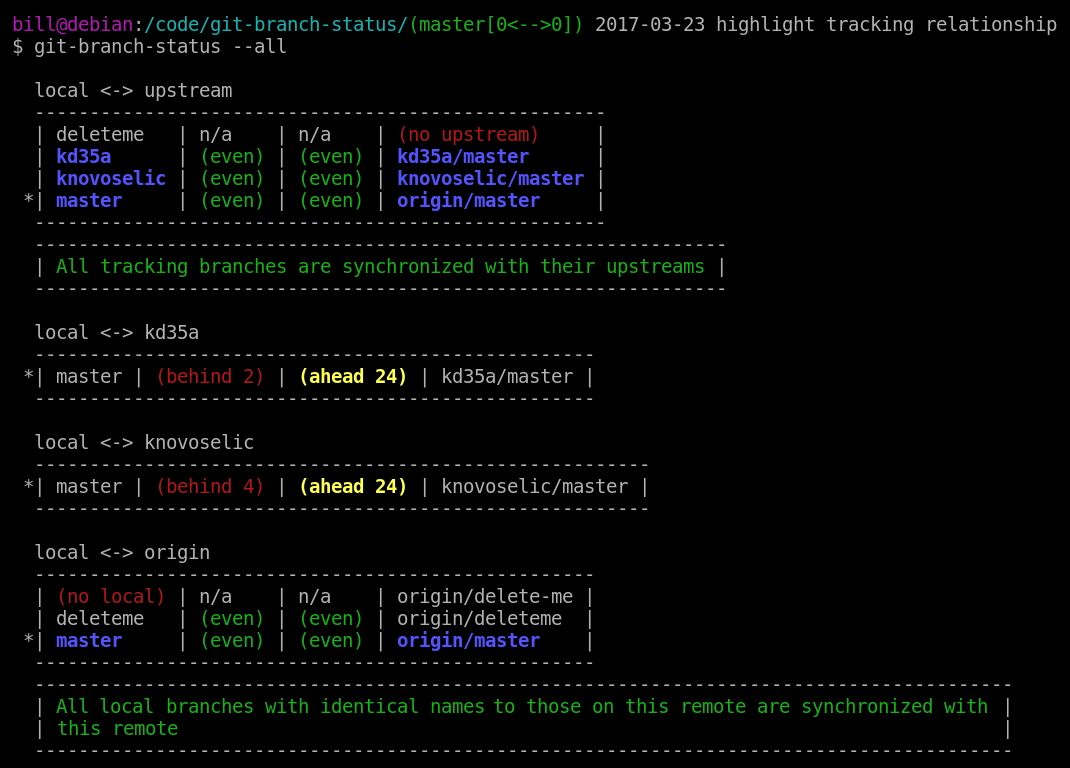
Notes regarding the screen-shot above:
- This is showing the exhaustive '--all' report. Other reports are constrained (see 'USAGE' below).
- The "local <-> upstream" section is itemizing all local branches. In this instance:
- The local branch 'deleteme' is not tracking any remote branch.
- The local branch 'kd35a' is tracking remote branch 'kd35a/master'.
- The local branch 'knovoselic' is tracking remote branch 'knovoselic/master'.
- The local branch 'master' is tracking remote branch 'origin/master'.
- The "local <-> kd35a" section is itemizing all branches on the 'kd35a' remote. In this instance:
- The local branch 'master' is 2 commits behind and 24 commits ahead of the remote branch 'kd35a/master'.
- The remote 'kd35a' has no other branches.
- The "local <-> knovoselic" section is itemizing all branches on the 'knovoselic' remote. In this instance:
- The local branch 'master' is 4 commits behind and 24 commits ahead of the remote branch 'knovoselic/master'.
- The remote 'knovoselic' has no other branches.
- The "local <-> origin" section is itemizing all branches on the 'origin' remote. In this instance:
- The remote branch 'origin/delete-me' may or may not be checked-out locally; but no local branch exists with the name: 'delete-me'.
- The local branch 'deleteme' is at the same commit as the remote branch 'origin/deleteme' but this is not a tracking relationship.
- The local branch 'master' is tracking the remote branch 'origin/master'.
- The asterisks to the left of the local 'master' branch names indicate the current working branch.
- The blue branch names indicate an explicit tracking relationship between a local branch and it's upstream counterpart.
- The "local <-> upstream" section relates tracking relationships between local branches and their upstream counterparts; while the remote-specific sections relate identically named branches. Tracking relationships may or may not be indicated in the remote-specific sections, depending on whether or not both counterparts also coincidentally have the same branch name.
- In addition to the local amd remote reports, there are two other reports that are not shown in the screen-shot: a single branch report and an arbitrary branch comparison report. The report context determines the semantics of the green "... synchronized ..." messages which may appear under the respectively appropriate circumstances, as such:
- In the "local <-> upstream" section, the green message indicates that all local branches which are tracking an upstream are synchronized with their respective upstream counterparts.
- In remote-specific sections, the green message indicates that all local branches which have the same name as some branch on this remote are synchronized with that remote branch. These are not necessarily tracking relationships.
- In single branch reports, the green message indicates that the local branch is tracking an upstream branch and is synchronized with it's upstream counterpart.
- In arbitrary branch comparison reports, the green message indicates that the two compared branches are synchronized with each other.
INSTALL:
  npm install -g git-branch-status

USAGE:

  git-branch-status
  git-branch-status [ base-branch-name compare-branch-name ]
  git-branch-status [ -a | --all ]
  git-branch-status [ -b | --branch ] [ filter-branch-name ]
  git-branch-status [ -d | --dates ]
  git-branch-status [ -h | --help ]
  git-branch-status [ -l | --local ]
  git-branch-status [ -r | --remotes ]
  git-branch-status [ -v | --verbose ]


EXAMPLES:

  # show only branches for which upstream differs from local
  $ git-branch-status
    | collab-branch  | (behind 1) | (ahead 2) | origin/collab-branch  |
    | feature-branch | (even)     | (ahead 2) | origin/feature-branch |
    | master         | (behind 1) | (even)    | origin/master         |

  # compare two arbitrary branches (either local and either remote)
  $ git-branch-status local-arbitrary-branch fork/arbitrary-branch
    | local-arbitrary-branch | (even)     | (ahead 1) | fork/arbitrary-branch  |
  $ git-branch-status fork/arbitrary-branch local-arbitrary-branch
    | fork/arbitrary-branch  | (behind 1) | (even)    | local-arbitrary-branch |

  # show all branches - including those synchronized, non-tracking, or not checked-out
  $ git-branch-status -a
  $ git-branch-status --all
    | master         | (even)     | (ahead 1) | origin/master             |
    | tracked-branch | (even)     | (even)    | origin/tracked-branch     |
    | (no local)     | n/a        | n/a       | origin/untracked-branch   |
    | local-branch   | n/a        | n/a       | (no upstream)             |
    | master         | (behind 1) | (ahead 1) | a-remote/master           |
    | (no local)     | n/a        | n/a       | a-remote/untracked-branch |

  # show the current branch
  $ git-branch-status -b
  $ git-branch-status --branch
    | current-branch | (even) | (ahead 2) | origin/current-branch |

  # show a specific branch
  $ git-branch-status          specific-branch
  $ git-branch-status -b       specific-branch
  $ git-branch-status --branch specific-branch
    | specific-branch | (even) | (ahead 2) | origin/specific-branch |

  # show the timestamp of each HEAD
  $ git-branch-status -d
  $ git-branch-status --dates
    | 1999-12-31 master | (behind 2) | (even) | 2000-01-01 origin/master |

  # print this usage message
  $ git-branch-status -h
  $ git-branch-status --help
      "prints this usage message"

  # show all local branches - including those synchronized or non-tracking
  $ git-branch-status -l
  $ git-branch-status --local
    | master         | (even)     | (ahead 1) | origin/master         |
    | tracked-branch | (even)     | (even)    | origin/tracked-branch |
    | local-branch   | n/a        | n/a       | (no upstream)         |

  # show all remote branches - including those not checked-out
  $ git-branch-status -r
  $ git-branch-status --remotes
    | master     | (behind 1) | (even) | a-remote/master           |
    | (no local) | n/a        | n/a    | a-remote/untracked-branch |

  # show all branches with timestamps (like -a -d)
  $ git-branch-status -v
  $ git-branch-status --verbose
    | 1999-12-31 local   | n/a        | n/a    | (no upstream)             |
    | 1999-12-31 master  | (behind 1) | (even) | 2000-01-01 origin/master  |
    | 1999-12-31 tracked | (even)     | (even) | 2000-01-01 origin/tracked |
NOTE: please direct bug reports, feature requests, or PRs to one of the upstream repos: