
git-coco
v0.91.0
Published
git-coco — AI git commits, changelogs, code review, and PR/MR creation, plus a terminal workstation. Works on GitHub, GitHub Enterprise, and GitLab; supports OpenAI, Anthropic, Gemini, Mistral, Azure, Bedrock, and local Ollama.

Maintainers
 gfargo
Readme
coco




AI commits, changelogs, code review, PR creation, a structured agent/MCP API, and a full keyboard-driven git workstation — all from one CLI. coco commit turns your staged diff into a Conventional-Commits-ready message. coco commit --split breaks a large staging area into logical multi-commit groups. coco changelog writes your release notes. coco review catches issues before they ship. coco pr create generates a title and body and opens it on your forge. coco agent and coco mcp expose the same generation engine to coding agents through versioned JSON and four local read-only MCP tools. And coco ui ties it all together in a terminal workstation with 16 views, chord navigation, and one-keystroke workflows. Seven AI providers — including fully local Ollama — on GitHub, GitHub Enterprise, GitLab, and Bitbucket.
The package is git-coco; the command is
coco.
git add .
coco commit          # AI writes the message from your staged changes
That's the core. Everything else — changelogs, code review, PRs, and the workstation — is the same engine pointed at more of your git workflow.

Why coco
- 🤖 Smart commits — contextual AI messages from your staged diff, with Conventional Commits and commitlint validation built in
- 🔌 Agent-native — versioned JSON/stdin operations plus four discoverable local MCP tools for commit drafts, reviews, changelogs, and recaps
- 🏠 Local-first — run fully offline with Ollama (no API costs, nothing leaves your machine)
- 🖥️ Terminal workstation — 16 views (history, status, diff, branches, PRs, issues, and more) via
g-chord navigation + command palette - 🌐 Multi-forge — GitHub, GitHub Enterprise, GitLab, and Bitbucket from the same tool
- 🎨 120+ themes — Catppuccin, Gruvbox, Dracula, Tokyo Night, and many more, with a live picker (
gC) - 🩺 Self-diagnosing —
coco doctoraudits your config, providers, and model routing in one command
Install
# Homebrew (macOS/Linux)
brew install gfargo/tap/coco

# curl
curl -fsSL https://coco.griffen.codes/install.sh | sh

# npm (needs Node 22+)
npm install -g git-coco

# try without installing
npx git-coco@latest init

# Docker (no Node install required)
docker run --rm -v "$PWD:/repo" -w /repo ghcr.io/gfargo/coco:latest commit
Quick Start
coco init            # pick a provider, set preferences
git add .
coco commit -i       # generate your first commit (interactive)
Commands
| Command | What it does |
|---------|-------------|
| coco commit | Generate commit messages from staged changes |
| coco commit --split | Break a large diff into logical multi-commit groups |
| coco amend | Regenerate and rewrite the last commit message |
| coco changelog | Create changelogs from commit history (by branch, tag, or range) |
| coco pr create | Generate PR title + body and open via gh / glab / Bitbucket API |
| coco recap | Summarize recent changes for standups or handoffs |
| coco review | AI code review with severity gating for CI (--severity) |
| coco watch | Continuously re-run review / commit-draft as changes settle, --json for editors |
| coco agent | Run commit-draft, review, changelog, or recap through versioned JSON/stdin |
| coco mcp | Start a local stdio MCP server with four read-only generation tools |
| coco ui | Full-screen git workstation — 16 views, keyboard-driven |
| coco workspace | Multi-repo overview; drill into any repo as a coco ui session |
| coco log | Commit history with graph, filters, and JSON output |
| coco prs / coco issues | List PRs or issues across GitHub, GitLab, or Bitbucket |
| coco doctor | Diagnose config, providers, model routing, and usage stats |
| coco init | Interactive setup wizard |
Global flags: --repo <dir> targets any repo without cd, --json for machine output, --quiet suppresses chrome.
Use coco in CI
The repo ships a composite GitHub Action (action.yml) that installs a pinned git-coco and runs a coco command, so you don't have to hand-roll the Node setup / npm install -g / severity-flag plumbing yourself:
# .github/workflows/review.yml
name: coco review

on: pull_request

jobs:
  review:
    runs-on: ubuntu-latest
    steps:
      - uses: actions/checkout@v4
        with:
          fetch-depth: 0 # coco diffs against the base branch

      - id: coco
        uses: gfargo/coco@v1
        with:
          command: review --staged
          severity: 7 # fail the job if any finding is severity >= 7
        env:
          ANTHROPIC_API_KEY: ${{ secrets.ANTHROPIC_API_KEY }}

      - name: Show findings
        if: always()
        run: echo '${{ steps.coco.outputs.findings }}' | jq '.'
The action's severity gate exits non-zero (failing the job) when a finding meets the threshold — it isn't swallowed. outputs.findings carries whatever the coco command wrote to stdout; with the default json: true on coco review, that's the --json findings array (fromJSON(steps.coco.outputs.findings) parses it downstream).
| Input | Default | Description |
|---|---|---|
| command | (required) | The coco subcommand and its args, e.g. review --staged, lint, review --pr 42 |
| version | latest | git-coco npm version/dist-tag to install |
| severity | (none) | Forwarded as --severity. Numeric 1-10 for review, error|warning for lint |
| json | true | Adds --json --quiet so outputs.findings is clean, machine-readable JSON |
| args | (none) | Extra raw args appended after severity/json, e.g. --pr 42 |
| repo | (checkout root) | Forwarded as --repo <dir> to target a different directory |
coco reads provider credentials from the environment, same as local usage — supply ANTHROPIC_API_KEY / OPENAI_API_KEY / etc. via the workflow's env or repo secrets; the action does not manage keys itself.
Agent and MCP integration
Use coco directly from coding agents and IDEs without scraping interactive terminal output:
# Inspect the strict protocol-v1 schemas
coco agent schema --task review

# Run a one-shot structured operation
coco agent commit-draft --input request.json --repo /work/project

# Expose four local stdio MCP tools, bound to one repository
coco mcp --repo /work/project
Both transports share typed commit-draft, review, changelog, and recap operations. They accept safe repository scopes or caller-supplied patches/summaries and return explicit success/failure envelopes. By default MCP tools never create commits, write repository files, post comments, or mutate a forge. Starting the server with coco mcp --allow-write additionally registers coco_commit_apply, an opt-in tool that commits the currently staged index (it never stages files itself and never pushes). When local usage stats are already enabled, calls add metadata-only agent-cli/mcp records to the user-cache ledger; prompts, diffs, and code are never recorded.
See Agent CLI and MCP for client setup, every parameter and schema, safety boundaries, examples, analytics, and troubleshooting.
Git hooks
Get an AI-drafted message on every plain git commit, without typing coco commit.
Native git hook — coco hooks install writes a prepare-commit-msg hook that fills the message only when it's still empty (chaining to any existing hook first):
coco hooks install     # add the hook (--force to replace an existing one)
coco hooks status      # check what's installed
coco hooks uninstall   # remove it
pre-commit framework — repos already using pre-commit can pull in the same behavior via .pre-commit-hooks.yaml:
repos:
  - repo: https://github.com/gfargo/coco
    rev: v0.89.0
    hooks:
      - id: coco-commit-msg
Pin rev to the latest coco release tag (v0.89.0 or newer — run pre-commit autoupdate to resolve it automatically); tags before v0.89.0 predate .pre-commit-hooks.yaml and won't resolve.
Both paths run coco commit --print-message's draft-generation logic and fail open — a missing API key, a generation error, or coco being unavailable simply leaves the message file untouched rather than blocking the commit. Set COCO_SKIP=1 to bypass either hook for a single commit.
Configuration
coco init                    # interactive setup
coco init --scope project    # project-specific config
Seven providers out of the box — OpenAI, Anthropic, Google Gemini, Mistral, Azure OpenAI, AWS Bedrock, Ollama — plus any OpenAI-compatible endpoint. Keys read from config or environment (OPENAI_API_KEY, ANTHROPIC_API_KEY, GEMINI_API_KEY, etc.).
{
  "service": { "provider": "openai", "model": "gpt-4o" },
  "conventionalCommits": true
}
See the Configuration Overview for every option — themes, per-task model routing, output modes, and more.
Documentation
📚 Wiki — Getting Started, Command Reference, Configuration, Coco UI, Using Ollama, Team Collaboration, Troubleshooting
🤖 Agent CLI and MCP — structured operations, MCP client setup, schemas, safety, analytics, and troubleshooting
💬 Discord — real-time help and discussion
🐛 Issues — bug reports and feature requests
Contributing
We welcome contributions — see CONTRIBUTING.md to get started.
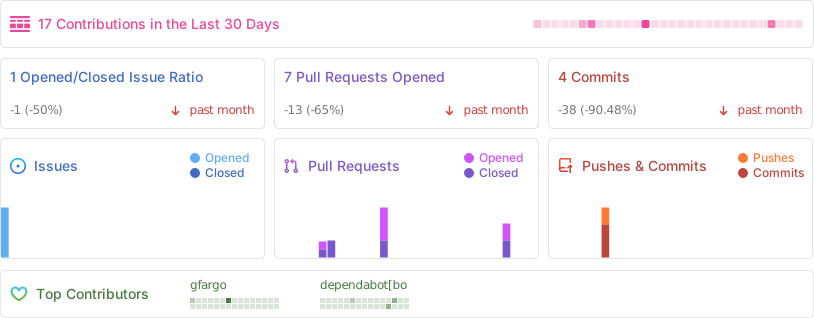
Project Stats
License
MIT © gfargo