
git-merge-forge
v1.1.6
Published
Modern browser-based Git merge conflict resolution tool with a multi-repo dashboard, three-pane Monaco editor, pre-merge conflict prediction, character-level diff, BASE pane, auto-resolve, and an AI assistant supporting Claude, OpenAI, Gemini, xAI, and Ol

Maintainers
 mohanchinnappan
Readme
MergeForge 🔀
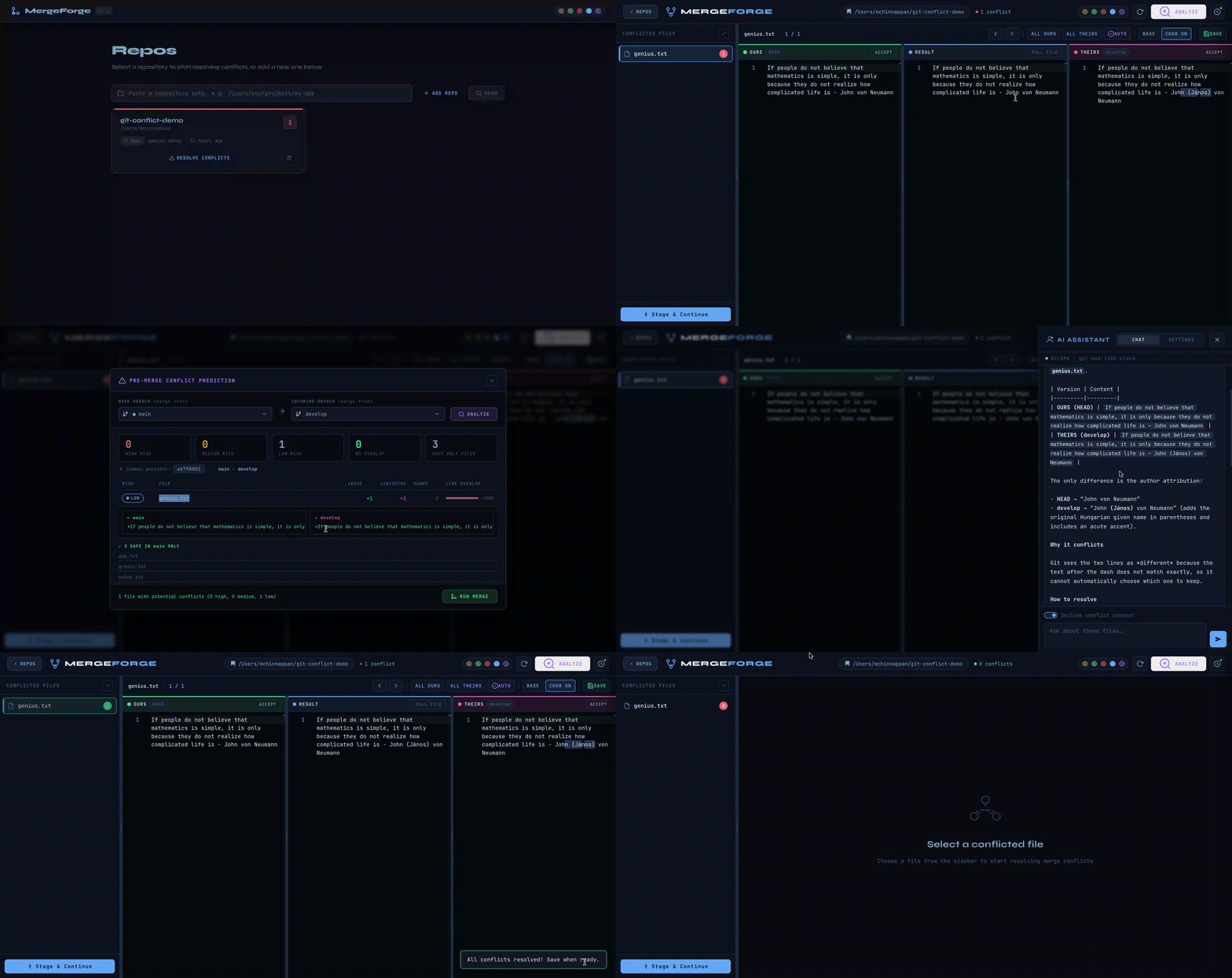
A modern, browser-based Git merge conflict resolution tool with a multi-repo dashboard, three-pane Monaco editor, pre-merge conflict prediction, five visual themes, drag-to-resize splitters, and an optional AI assistant that understands your conflicts in context.
Table of Contents
- Features
- Quick Start
- CLI Reference
- Multi-Repo Dashboard
- Workflow
- Pre-merge Conflict Prediction
- AI Assistant
- Themes
- Architecture
- Tech Stack
Features
| Feature | Details |
|---|---|
| Multi-Repo Dashboard | Live cards for every registered repo — shows conflict count, branch, last commit. Auto-refreshes every 15 s |
| Repo Scanner | SCAN button discovers git repos under ~/projects, ~/code, ~/dev, and similar directories automatically |
| Repo Registry | Repos persisted in ~/.mergeforge/repos.json — survive server restarts |
| 3-Pane Monaco Editor | OURS · RESULT · THEIRS side-by-side with full VS Code–grade syntax highlighting |
| Conflict Navigator | Jump between conflicts with ← → arrows; per-conflict resolution tracking |
| One-Click Accept | Accept OURS, THEIRS, BOTH, or free-edit the RESULT pane directly |
| Accept All | Apply a single choice to every conflict in the file in one click |
| AUTO Resolve | Auto-resolves identical or whitespace-only conflicts across the entire file silently |
| BASE Pane | Toggle a 4th Monaco pane showing the common ancestor for any conflict |
| Character-Level Diff | LCS-based highlighting of exact changed characters within each line |
| Full File View | Toggle out of conflict mode to see and edit the whole file |
| Pre-merge Analysis | ANALYZE button scores every overlapping file HIGH / MEDIUM / LOW / NONE before you merge |
| Animated Splitters | Drag any divider to resize panes; accent-glow on hover |
| 5 Themes | Obsidian · Aurora · Crimson · Glacier · Light — persisted via localStorage |
| AI Assistant | Slide-in panel with Chat + Settings tabs; context-aware conflict advice |
| AI Chat History | Conversation persisted to localStorage per file path; restored on reopen |
| Live Ollama Discovery | Queries localhost:11434 to list your actual installed models, with sizes |
| git mergetool Integration | Ready-to-copy git config snippet in Settings panel |
| Stage & Commit | Stage resolved files directly from the UI; guided commit flow |
| WebSocket | Server pushes repo path on connection for live-reload hooks |
| --no-ai flag | Completely disables AI routes and hides the UI button for locked-down environments |
Demo
-
Install
npm install -g git-merge-forge
CLI Reference
Usage: git-merge-resolve [options]

Options:
  -p, --port <port>   HTTP port to listen on              (default: 3847)
  -r, --repo <path>   Open directly into a specific repo  (skips dashboard)
  --no-open           Do not auto-open the browser
  --no-ai             Disable the AI assistant entirely
  -V, --version       Print version and exit
  -h, --help          Show this help message
Examples
# Dashboard mode — manage all your repos from one place
mergeforge

# Jump straight into a repo (legacy / single-repo mode)
mergeforge  --repo ~/projects/my-app

# Custom port
mergeforge  --port 8080

# CI / headless — no browser, no AI
mergeforge  --no-open --no-ai
Multi-Repo Dashboard
When you start MergeForge without --repo, it opens the dashboard at /dashboard.
mergeforge
→ http://localhost:3847/dashboard
Repo cards
Each registered repo is displayed as a card showing:
- Name — the directory name (bold)
- Path — the parent directory path
- Conflict badge — red number if conflicts exist, green ✓ if clean
- Branch — current checked-out branch
- Last commit — message and relative time (e.g. "Fix null check · 3 hours ago")
- RESOLVE CONFLICTS / OPEN button — jumps straight into the editor for that repo
- Remove button (trash icon) — removes from the registry (does not delete files)
Cards with active conflicts get a red accent stripe at the top and are sorted to draw your attention. The dashboard auto-refreshes every 15 seconds to keep conflict counts current as you work.
Adding repos
Manually: Paste a full path into the input bar at the top and press ADD REPO or Enter.
/Users/you/projects/my-appThe server validates the path is an existing git repository before registering it.
Auto-scan: Click SCAN to search for git repositories in common locations:
~/              ~/projects      ~/code
~/dev           ~/src           ~/workspace
<current dir>
Up to 30 unregistered repos are returned in a checklist. Select the ones you want and click ADD ALL.
Repo registry
Registered repos are stored in ~/.mergeforge/repos.json and survive server restarts. You can inspect or edit this file directly:
[
  { "path": "/Users/you/projects/my-app", "addedAt": "2026-03-12T10:00:00.000Z" },
  { "path": "/Users/you/projects/api",    "addedAt": "2026-03-12T10:01:00.000Z" }
]
Security
All API routes that operate on a repo (/api/files, /api/resolve, /api/stage, etc.) check that the requested path is in the registry before serving it. Arbitrary filesystem paths cannot be accessed by passing a ?repo= parameter unless the path has been explicitly registered. This prevents path traversal attacks when running MergeForge on a shared or networked machine.
Workflow
Dashboard → editor flow
mergeforge
        │
        ▼  /dashboard opens
┌─────────────────────────────────┐
│  Repo cards with conflict counts│
│  Click a red card to open it    │
└─────────────────────────────────┘
        │
        ▼  /resolve?repo=... opens
┌─────────────────────────────────────────────┐
│  1. Select a conflicted file in the sidebar │
│  2. Read OURS (left) and THEIRS (right)     │
│  3. Edit / accept into RESULT (centre)      │
│  4. Ask AI for advice if unsure             │
│  5. Click SAVE                              │
│  6. Repeat for each conflict in each file   │
│  7. Click "Stage & Continue"                │
└─────────────────────────────────────────────┘
        │
        ▼
git commit   ←  finalize the merge
        │
        ▼
← REPOS button  →  back to the dashboard
Resolution choices per conflict
| Button | Behaviour |
|---|---|
| ACCEPT (ours pane) | Keep your branch's version |
| ACCEPT (theirs pane) | Keep the incoming branch's version |
| ALL OURS | Accept your side for every unresolved conflict in the file |
| ALL THEIRS | Accept their side for every unresolved conflict in the file |
| AUTO | Auto-resolve identical / whitespace-only conflicts across the whole file |
| BASE | Toggle the common ancestor pane for additional context |
| CHAR DIFF | Highlight exact character-level changes within each line |
| (edit result pane) | Freeform merge — type anything you like |
| SAVE | Write the resolved content to disk |
| Stage & Continue | Run git add on all resolved files |
Pre-merge Conflict Prediction
Click ANALYZE in the top bar to open the prediction modal before running git merge.
How it works
- Select a base branch and an incoming branch from the dropdowns (auto-populated from your repo)
- Click ANALYZE — MergeForge runs:
git merge-base <base> <incoming>→ finds the common ancestor commitgit diff --name-only <ancestor> <base>and...<incoming>→ lists changed files per branch- For every file touched by both branches:
git diff -U0hunk analysis comparing which line ranges were modified - An overlap algorithm scores each file: HIGH (large overlapping edits), MEDIUM (small overlap), LOW (ranges nearly touch), NONE (disjoint sections — safe)
- Results show a summary row (High / Medium / Low / None counts + safe-only file counts) and a file table with per-file risk badges, line-change counts, hunk counts, and an overlap bar
- Click any file row to expand a coloured diff snippet showing what each branch actually changed
- Click RUN MERGE to execute
git merge <incoming>— if conflicts result, the modal closes and the editor loads them immediately
Risk levels
| Badge | Meaning | |---|---| | 🔴 HIGH | 20+ overlapping lines, or both sides changed 30+ lines — very likely to conflict | | 🟡 MEDIUM | 5–19 overlapping lines — may conflict, review recommended | | 🟢 LOW | Ranges nearly touch but don't overlap — usually safe | | ⚪ NONE | No line overlap — the branches edited completely different sections |
Files only touched by one branch appear in the Safe (base only) or Safe (incoming only) lists — these will merge cleanly regardless.
AI Assistant
The AI panel slides in from the right. It has two tabs: CHAT and SETTINGS.
Enabling a Provider
Open Settings, choose a provider card, enter your API key, select a model, and click SAVE SETTINGS. Settings are persisted in localStorage so you only configure this once per browser profile.
| Provider | Key format | Where to get it |
|---|---|---|
| Claude by Anthropic | sk-ant-… | console.anthropic.com |
| OpenAI | sk-… | platform.openai.com |
| xAI (Grok) | xai-… | console.x.ai |
| Google Gemini | AIza… | aistudio.google.com |
| Ollama | (none) | Run locally — see below |
Default models used when "Default" is selected:
| Provider | Default model |
|---|---|
| Anthropic | claude-opus-4-5 |
| OpenAI | gpt-4o |
| xAI | grok-2 |
| Gemini | gemini-1.5-pro |
| Ollama | First model returned by ollama list |
Using the Chat
- Select a conflicted file in the sidebar
- Navigate to the specific conflict you want help with (← → arrows)
- Switch to the CHAT tab in the AI panel
- The "Include conflict context" toggle (on by default) automatically appends the current conflict's OURS/THEIRS blocks to every message sent to the AI
- Type your question and press Enter (Shift+Enter for a new line)
Chat history is persisted to localStorage keyed by file path and restored automatically each time you open that file — you can close MergeForge and pick up where you left off.
Effective prompts:
Which side should I accept and why?
Explain what each branch was trying to do here.
Write a merged version that preserves both changes.
Is there a logical conflict here, or just a formatting difference?
What does this function do?
Ollama (Local Models)
When you select the Ollama provider card, MergeForge immediately queries your local Ollama instance at http://localhost:11434/api/tags and populates the model dropdown with your actual installed models including their on-disk sizes:
deepseek-v3.1:671b-cloud
qwen3-coder:480b-cloud
llama3.2:latest   (2.0 GB)
nomic-embed-text:latest   (274 MB)
Custom host — If Ollama is running on a different address (remote machine or non-standard port), edit the OLLAMA HOST field and press Enter or click ↺. The model list updates live without a page reload.
Troubleshooting:
# Make sure Ollama is running
ollama serve

# Check what models you have installed
ollama ls

# Pull a model if you have none
ollama pull llama3.2
If the model dropdown shows an error, click ↺ after Ollama is running. The server enforces a 4-second timeout if Ollama is unreachable.
Disabling AI (--no-ai)
mergeforge --no-aiWhen --no-ai is passed:
- The AI toggle button is completely hidden from the top bar
POST /api/ai/chatreturns403 ForbiddenGET /api/ollama/modelsreturns403 Forbidden- The startup log prints
AI: disabled (--no-ai) - No outbound HTTP is attempted by the server
Useful for:
| Scenario | Reason | |---|---| | CI pipelines | No accidental API calls or key requirements | | Team review environments | Enforce human-only resolution decisions | | Air-gapped machines | Guarantee no external network calls | | Security audits | Clearly documented, verifiable behaviour |
The flag does not affect any git operations, file reading/writing, staging, the editor, or the dashboard.
Themes
Switch themes with the coloured dots in the top-right toolbar. Your choice is saved to localStorage across sessions and applies to both the dashboard and the resolver.
| Name | Accent colour | Character |
|---|---|---|
| Obsidian | Gold #c5a028 | Dark charcoal — the default |
| Aurora | Green #4ade80 | Deep forest, cool and focused |
| Crimson | Red #f87171 | High-contrast warm dark |
| Glacier | Blue #60a5fa | Midnight navy, cool and calm |
| Light | Purple #7c3aed | Parchment off-white for bright rooms |
Each theme defines its own full Monaco editor colour scheme (background, foreground, line numbers, cursor, selection highlight) — so the editor always matches the surrounding UI shell.
Server
Responsibilities:
- CLI parsing — Commander handles
--port,--repo,--no-open,--no-ai - Repo registry —
loadRepos()/saveRepos()/addRepo()/removeRepo()maintain~/.mergeforge/repos.json - Security —
isAllowedRepo()validates every incoming repo path against the registry;requireRepomiddleware rejects unregistered paths with400 - Routing — explicit
GET /,/dashboard,/resolveroutes registered beforeexpress.staticso the root redirect fires correctly - Static serving —
public/mounted after explicit routes - Git operations — all git calls go through
simple-gitbound toreq.repoPath(set byrequireRepo) - Conflict parsing — a pure-JS line scanner reads conflict markers (
<<<<<<</=======/>>>>>>>) and returns structured objects - Resolution writing —
resolveConflictsInContent()replays the line array, substituting each conflict block with the chosen resolution, then writes to disk - AI proxying — requests are forwarded server-side so API keys travel only over
localhostand are never exposed to the browser's network tab - WebSocket — announces
{ type: 'connected', repoPath }to new connections
REST API
All endpoints are under /api/. All bodies are JSON.
Repos (no auth required)
| Method | Path | Description |
|---|---|---|
| GET | /api/repos | All registered repos with live conflict counts, branch, last commit |
| POST | /api/repos/add | Register a new repo path (validates it exists and is a git repo) |
| POST | /api/repos/remove | Remove a repo from the registry |
| GET | /api/repos/scan | Scan common directories for unregistered git repos |
Repo-scoped (require ?repo= or --repo)
| Method | Path | Description |
|---|---|---|
| GET | /api/status | Repo path, branch, conflicted files, aiEnabled flag |
| GET | /api/files | All conflicted files with parsed conflict arrays |
| GET | /api/file?path= | Single file content + parsed conflicts |
| POST | /api/resolve | Apply resolution choices and write file to disk |
| POST | /api/save | Write raw content to a file (full-file edit mode) |
| POST | /api/stage | Run git add <filePath> |
| GET | /api/diff?path= | Raw git diff output for a file |
| GET | /api/branches | All local + remote branches for the ANALYZE selector |
| GET | /api/predict?base=&incoming= | Pre-merge hunk-collision analysis |
| POST | /api/merge | Execute git merge <incoming> |
AI (no repo scope)
| Method | Path | Description |
|---|---|---|
| GET | /api/ollama/models?host= | Live model list from Ollama — 403 if --no-ai |
| POST | /api/ai/chat | Proxy chat to configured provider — 403 if --no-ai |
GET /api/repos response:
{
  "repos": [
    {
      "path": "/Users/you/projects/my-app",
      "addedAt": "2026-03-12T10:00:00.000Z",
      "valid": true,
      "conflictCount": 3,
      "branch": "main",
      "lastCommit": { "message": "Fix null check in auth handler", "ago": "2 hours ago" }
    }
  ]
}
POST /api/resolve request body:
{
  "repo": "/Users/you/projects/my-app",
  "filePath": "src/app.js",
  "resolutions": [
    { "choice": "ours",   "custom": "" },
    { "choice": "custom", "custom": "// merged manually\nconst x = 42;" }
  ]
}
GET /api/predict?base=main&incoming=feature&repo=... response:
{
  "base": "main",
  "incoming": "feature",
  "mergeBase": "a3f9c1d2",
  "summary": { "high": 1, "medium": 2, "low": 0, "none": 3, "safeBase": 5, "safeIncoming": 2 },
  "files": [
    {
      "file": "src/auth.js",
      "risk": "high",
      "baseLinesChanged": 34,
      "incomingLinesChanged": 28,
      "hasLineOverlap": true,
      "baseSnippet": "-const TOKEN = 'abc'\n+const TOKEN = process.env.TOKEN",
      "incomingSnippet": "-const TOKEN = 'abc'\n+const TOKEN = req.headers.auth"
    }
  ],
  "safeBaseOnly": ["docs/api.md"],
  "safeIncomingOnly": ["src/utils/format.js"]
}
Frontend
REPO_PARAM       reads ?repo= from URL; repoUrl() appends it to every API call
State            single flat object — files, conflicts, resolutions, ai config
API helpers      fetch() wrappers; POST bodies automatically include repo param
File list        sidebar render, file open, conflict badge update
Conflict logic   loadConflict(), acceptConflict(), acceptAll(), saveResolved()
BASE pane        toggle 4th Monaco editor (edBase), visibility:hidden pattern
Char diff        getCharDiffRanges() LCS algorithm, Monaco inline decorations
Auto-resolve     scanAutoResolvable(), applyAutoResolutions(), AUTO badge
Splitters        mouse-drag resize for sidebar and all editor panes
Monaco init      custom theme definitions per app-theme, editor creation
Theme switcher   data-theme swap + localStorage persistence
AI panel         open/close animation, tab switching, provider card selection
Ollama fetch     live /api/ollama/models call with spinner
AI settings      selectProvider(), saveAISettings(), loadAISettings()
AI chat          history per file (localStorage), send(), appendMessage()
Predict (ANALYZE) initPredict(), branch selectors, risk table, RUN MERGE
Event wiring     all addEventListener calls
Init             DOMContentLoaded bootstrap
Dashboard
Theme switcher   reads/writes mf-theme in localStorage
loadRepos()      GET /api/repos → renders repo card grid; auto-refreshes 15 s
repoCard()       renders one card with conflict badge, branch, commit, actions
addRepo()        POST /api/repos/add → reload grid
scan flow        GET /api/repos/scan → checklist modal → POST /api/repos/add
remove           POST /api/repos/remove → reload grid
Monaco Editor Integration
Three (or four, with BASE) monaco.editor.create() instances share the same options object and custom per-theme colour schemes. A well-known Monaco pitfall — editors silently render at 0×0 when their container has display: none at creation time — is addressed with three layers of defence:
visibility: hiddennotdisplay: none— Theeditor-panescontainer stays in the browser's layout engine (has real pixel dimensions) but is visually invisible until a file is selectedautomaticLayout: true— Monaco installs aResizeObserverinternally and re-measures on every container size change, handling all subsequent splitter drags automatically- Double
requestAnimationFrameon show — when a file is selected andvisibilityflips tovisible, two animation frames are awaited before callingeditor.layout()to ensure the browser has fully painted before Monaco measures
Conflict Resolution Pipeline
Raw file on disk  (contains <<<<<<< / ======= / >>>>>>> markers)
        │
        ▼  parseConflicts(content)
[
  {
    id:         "conflict_14",
    startLine:  14,
    endLine:    22,
    ours:       "const x = 1;",
    theirs:     "const x = 2;",
    base:       "",               // populated if diff3 style
    label:      "HEAD",
    theirLabel: "feature-branch"
  },
  …
]
        │
        ▼  User interacts with Monaco panes
state.resolutions["src/app.js"] = [
  { choice: "ours",   custom: "" },
  { choice: "custom", custom: "const x = 42;" }
]
        │
        ▼  POST /api/resolve  →  resolveConflictsInContent()
        │  Walks the raw lines; on each <<<<<<< block, substitutes
        │  with the chosen resolution text; skips all marker lines
        ▼
Clean file written to disk  (no conflict markers remain)
        │
        ▼  POST /api/stage  →  git add src/app.js
        │
        ▼  User runs:  git commit
        │
        ▼  ← REPOS button  →  back to /dashboard
Tech Stack
| Layer | Technology | Version | Role |
|---|---|---|---|
| Runtime | Node.js | 18+ | Server process |
| CLI | Commander | 11 | Argument parsing |
| HTTP | Express | 4 | REST API + static serving |
| Git | simple-git | 3 | All git operations |
| Realtime | ws | 8 | WebSocket server |
| Editor | Monaco Editor | 0.44 (CDN) | Three/four-pane code editor |
| Fonts | JetBrains Mono + Syne | — | Monospace + UI display |
| Styling | Vanilla CSS + variables | — | Theming, layout, animations |
| Frontend | Vanilla JS | ES2022 | All UI logic, no framework |
| Storage | ~/.mergeforge/repos.json | — | Persistent repo registry |
| AI — Claude | Anthropic Messages API | 2023-06-01 | /v1/messages |
| AI — OpenAI | OpenAI Chat API | v1 | /v1/chat/completions |
| AI — Gemini | Google Generative Language | v1beta | generateContent |
| AI — Grok | xAI Chat API | v1 | /v1/chat/completions |
| AI — local | Ollama REST API | — | /api/chat + /api/tags |
License
- MIT (c) Mohan Chinnappan