
git-rake
v0.2.0
Published
Interactive CLI tool to safely prune, delete, and restore Git branches

Maintainers
 kallehauge
Readme
Git Rake 🍂
Git Rake is an interactive Terminal UI that allows you to easily do bulk operations on Git branches.
Practical example: assuming you work full time on a project, and you do manual testing of your colleague's pull requests, you'll quickly end up with loads of branches and jumping between your own active branches can become more annoying if you're not actively pruning branches.
So! git rake provides users with an easier way to prune branches that would otherwise require a combination of e.g. git branch --merged | fzf --multi and xargs git branch -d to do it in an efficient manner (you can read more about these in the Git Flows Made Easy section).
Trash system: although you can completely skip the feature, then Git Rake also introduces a new "trash system" that will move your branches from refs/heads/* to a new refs/rake-trash/ namespace so they do not appear in your normal git branch commands anymore, but they can be restored again later.
This allows you to, safely, be more aggresive with cleaning up branches you're unsure if you want to keep around.
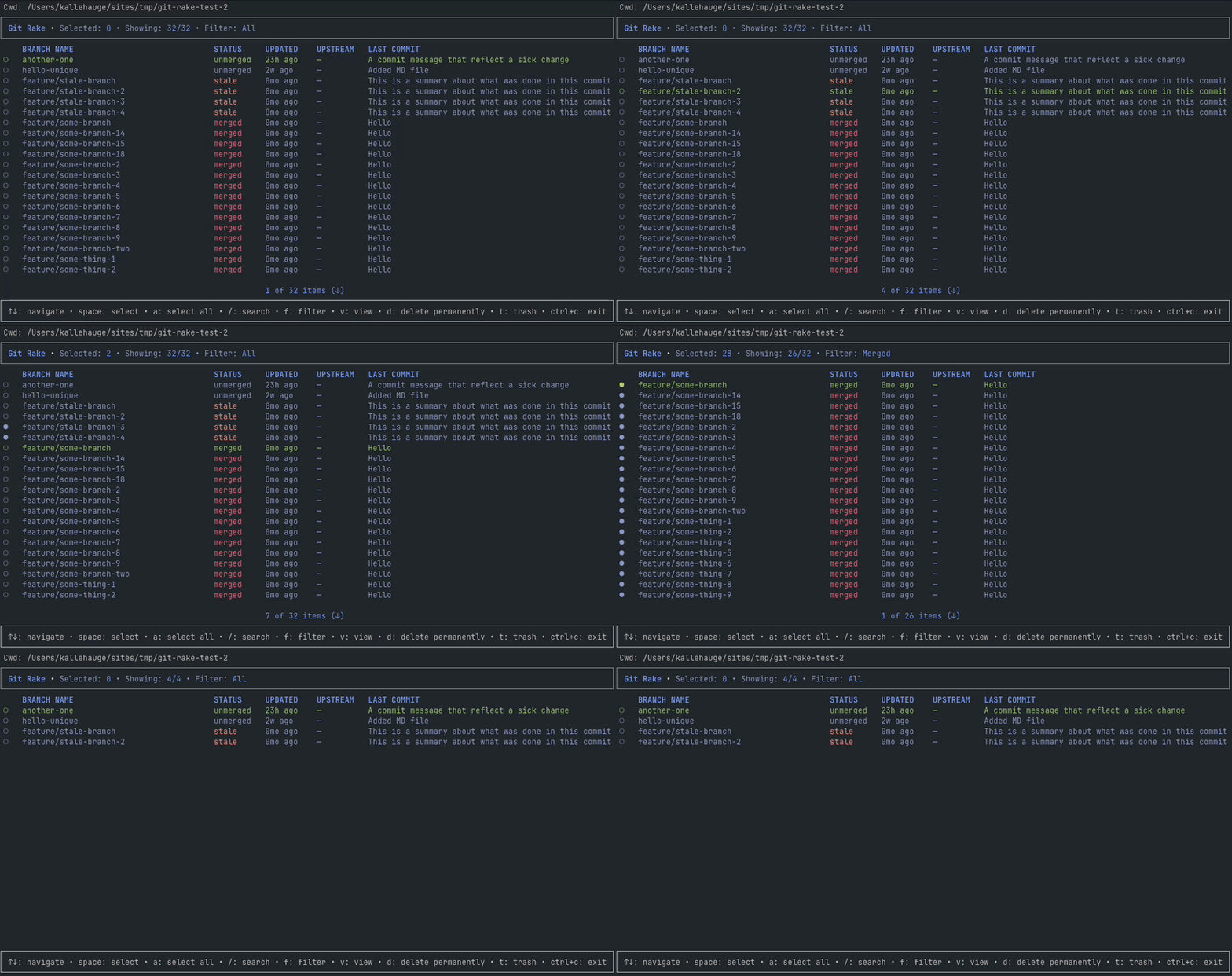
Features
- 🎯 Interactive Branch Browser - Navigate branches with visual indicators
- ⚡ Batch Operations - Select multiple branches for bulk operations (delete, trash, restore)
- 🔍 Search - Quick branch finding with
/key - 🗂️ Filter - Select filters to easily do bulk operations on a full category (e.g. delete all merged branches)
All: Show all branchesMerged: Show merged branchesUnmerged: Show unmerged branchesStale: Show stale branches (based on staleDaysThreshold)Selected: Show branches selected for batch operation
- 📅 Stale Detection - Automatically identify old branches
- 🗑️ Safe Deletion - (Optional) Branches moved to trash namespace for easy restoration
- 🎨 Themes - Select between different "light" or "dark" themes inspired by existing color-schemes (VS Code, GitHub, and general themes like Tokyo Night, Catppuccin, and Gruvbox)
- 📊 Detailed view - See expanded commit history and branch details
Installation
npm install -g git-rakeOr run directly with npx:
npx git-rakeTip - I'd personally recommend looking at the Git Alias Setup section for a more seamless command-flow.
Requirements
- Node.js ≥14
- Git
Usage
Available Commands
git-rake                    # Show command help
git-rake trash              # Interactive branch management (trash/delete)
git-rake branch             # Alias for trash command
git-rake trash --list       # List trashed branches
git-rake trash --prune      # Prune trashed branches that are past TTL
git-rake trash <branch>     # Move specific branch to trash
git-rake restore            # Interactive restore mode
git-rake restore <branch>   # Restore specific branch
Tip - I'd personally recommend looking at the Git Alias Setup section for a more seamless command-flow.
Keyboard Controls
Branches list
↑/↓(orj/k) - Navigate branchesspace/s- Select/deselect branch for batch operations (Swill move the next selection upwards)a- Select all branches that are being displayedA- Deselect all branches that are being displayed/- Enter search modef- Cycle filters (all/merged/stale/unmerged)t- Trash selected branches (soft delete)d- Delete selected branches (permanent)r- Restore selected branches (in restore mode)v- View more details about a specific branchEsc- Cancel current operation (e.g. clear search query)Ctrl+c- Exit
Confirmation prompt
↑/↓- Navigate branchesspace/s- Last chance to review and deselect/remove branches you do not want to <delete|trash|restore>y/Enter- Approve operation (<delete|trash|restore>)n/Esc- Cancel operation (<delete|trash|restore>)Ctrl+c- Exit
Configuration
Make Git Rake fit your own workflow!
Git Rake looks for configuration files in two locations (the actual file format can be any of .gitrakerc, .gitrake.config.js, .gitrakerc.yml, or any other format supported to cosmiconfig):
- Home:
~/.gitrakerc - Project:
/my/project/root/.gitrakerc
Any configuration that is defined in a project will override user configuration (think: you define your prefered theme in the user configuration and then define mergeCompareBranch and excludedBranches in projects that needs some modification to work).
Tip - add .gitrakerc to global Git ignore:
I consider Git Rake a personal tool that projects shouldn't know about, so I have added all .gitrakerc files to my global ignore file.
If you don't have global ignore file already, then you can register one like this:
git config --global core.excludesfile ~/.gitignoreExample .gitrakerc file
# Theme: use the default `auto` theme that tries to give as wide support as possible based on your terminal's own colors.
# Alternatively, you can also choose from these:
# - Light themes: "github-light", "catppuccin-latte", "gruvbox-light", "tokyo-night-day", "vscode-light"
# - Dark themes: "catppuccin-mocha", "gruvbox-dark", "tokyo-night", "ayu", "dracula", "vscode-dark"
theme: "tokyo-night"

# Number of days before a branch is considered stale.
staleDaysThreshold: 30

# Disable automatic cleanup of trashed branches that are past their TTL.
autoCleanupTrash: false

# Number of days to keep deleted branches in trash before they get cleaned up
# via `autoCleanupTrash` or manually with the `git rake trash --prune` command.
trashTtlDays: 90

# The branch the tool will use to compare if other branches are already merged.
# Based on my own experience, this is typically a "develop" branch since, when
# we work, we do so against that branch - but it's up to you and your flow!
mergeCompareBranch: "develop"

# Branches to exclude from git rake operations (they'll never be shown or selectable).
excludedBranches: ["main", "master", "develop", "staging"]
Git Alias Setup
There are generally two ways you can setup Git Rake as a Git alias (or combine them):
Add rake as an alias:
git config --global alias.rake '!git-rake'This will allow you to run subcommands using git rake <command>:
git rake trash              # Interactive branch management
git rake restore            # Interactive restore mode
git rake trash --prune      # Prune trashed branches that are past TTL
A more direct way would be to add the subcommands directly:
git config --global alias.trash '!git-rake trash'
git config --global alias.untrash '!git-rake restore'
This will allow you to ignore the rake top-level command and feel even more integrated into Git itself:
git trash                   # Interactive branch management
git untrash                 # Interactive restore mode
Contributing
See more in the development docs (WIP)
Git Flows Made Easy
These are a couple of examples of what Git Rake lets you do, without remembering all the terminal commands:
1. Cleanup merged branches
Terminal: Git doesn't have a simple built-in "prune all merged branches" command - especially if you want to do some manual selection/deselection, but you can use something like fzf together with a few more piped commands:
git branch --merged main | grep -vE 'main' | fzf --multi | xargs -r git branch -dand if you forget the grep -vE part, you'll end up removing the main branch as well.
Git Rake: In git-rake you can use the merged filter (f key to cycle filters) to displayed all merged branches. On that list, you can either pick individual branches or select all (a key) and delete them in one bulk operation _ (d key)_.
2. Prune stale branches
Terminal: The concept of "stale branches" doesn't really exist in Git, but you can pipe pipe the following commands together to get a similar experience (notice the cutoff date):
git for-each-ref \
  --format="%(committerdate:short) %(refname:short)" refs/heads \
| awk -v cutoff="$(date -d '30 days ago' +%Y-%m-%d)" \
      '$1 < cutoff { print $2 }' \
| xargs -r git branch -d
Git Rake: In git-rake you can use the stale filter (f key to cycle filters) to list all stale branches. On that list, you can either pick individual branches or select all (a key) and delete them in one bulk operation (d key).
Appreciation
This project is built using:
- Ink - used to create a TUI with React and TypeScript for type safety
- Ink Fullscreen - used to trigger a fullscreen alternate buffer screen
- Commander.js - used to register CLI Commands
- cosmiconfig - used to easily load and support different config formats