
git-wtree
v0.8.5
Published
Git worktree manager with .env syncing and IDE integration


Readme
git-wtree
Worktrees that are ready to work in.
git worktree add gives you an empty directory. gwt add gives you a working
one — your .env files copied, your dependencies installed, and its own colour in
VS Code so you can tell your windows apart.
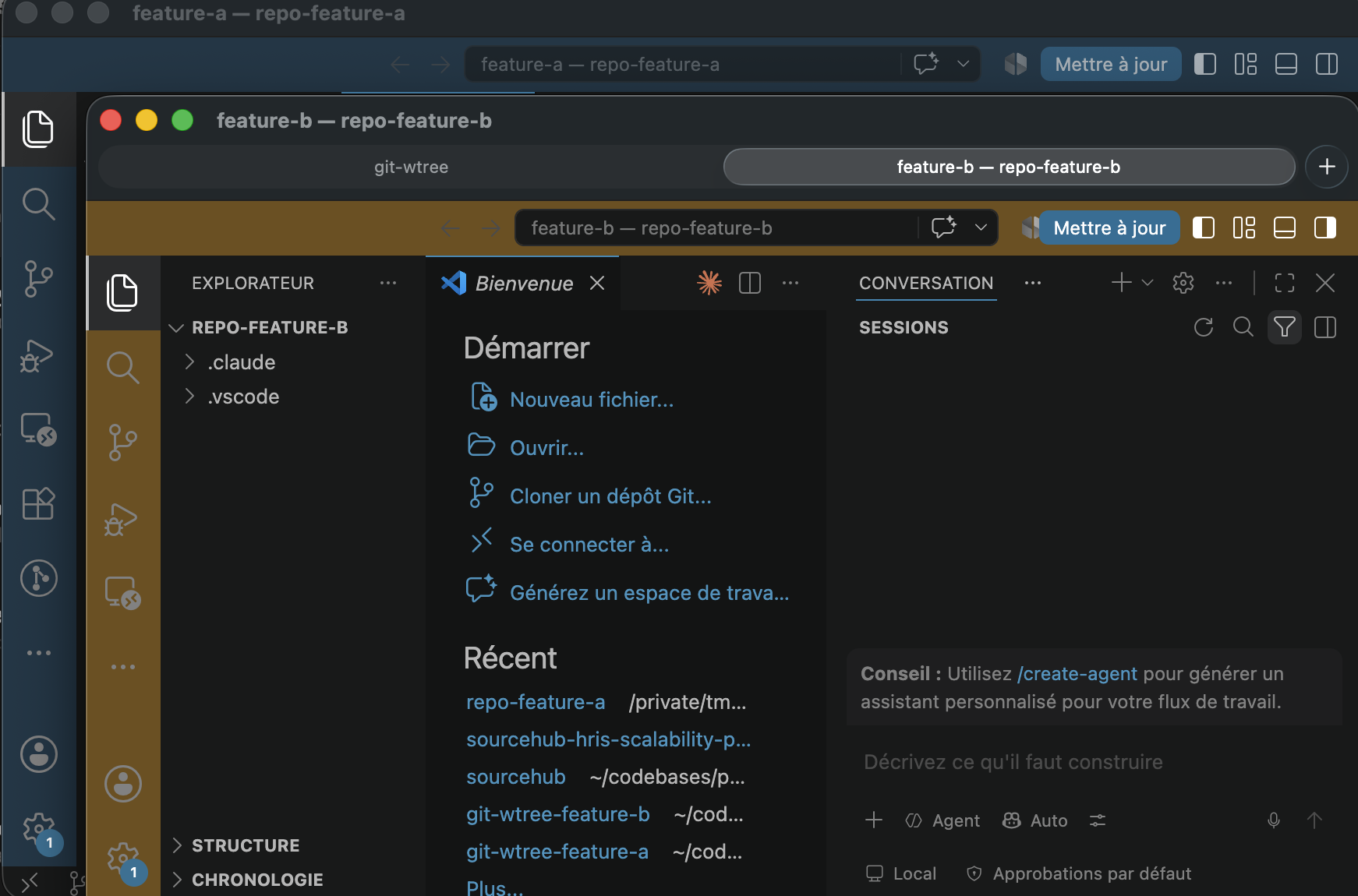
The colour comes from the branch name, so the same branch always looks the same. Nothing to configure, and nothing to pick.
Install
npm install -g git-wtreeUsage
gitwtree add my-feature     # always works
gwt add my-feature          # the same, shorter
gitwtree is the name nothing else claims. gwt is the same command plus
gwt switch, and needs the one-time
shell integration — which also frees the name
from oh-my-zsh's git plugin, where gwt is an alias for git worktree.
Commands
| Command | Description |
| ----------------------------------- | ------------------------------------------------------------- |
| gwt add <branch> [--from <base>] | Create a worktree, sync .env files, and run the setup hook |
| gwt add <branch> --force | …resetting to remote even if the branch has unpushed commits |
| gwt add <branch> --open | …and open it in your IDE straight away |
| gwt pr <number> [--open] | Create a worktree from a GitHub pull request |
| gwt rm [branch] [--force] | Remove a worktree (picker if omitted; guards unsaved changes) |
| gwt ls | List worktrees with their state, tracking and age |
| gwt prune [--apply] | Remove worktrees whose branch has been merged |
| gwt open [branch] | Open a worktree in your IDE (picker if omitted) |
| gwt switch [query] | cd to another worktree (needs the shell integration) |
| gwt shell-init [--install] | Install (or print) the shell integration; --uninstall too |
| gwt doctor | Diagnose the install (integration present + version, git) |
| gwt trust | Approve this repo's .gitwtree.json to run its commands |
| gwt sync-env [query] [--apply] | Re-copy .env from main into a worktree (--all for every) |
| gwt config | Show current configuration |
| gwt config ide | Configure your IDE |
| gwt config scan-dirs [dirs] | Set directories to scan for .env files (per project) |
| gwt config setup [commands...] | Post-create commands, per project (auto / none / custom) |
| gwt config teardown [commands...] | Pre-remove commands, per project (none to clear) |
| gwt config theme [on\|off] | Toggle per-worktree VS Code color + window title |
| gwt config statusline [on\|off] | Toggle the Claude Code branch statusline |
| gwt help | Show help |
gwt add <branch>
Creates a git worktree for the given branch, copies .env files from the main repo, and runs the setup hook.
- If the branch doesn't exist, it's created from
HEADby default — use--fromto specify a different base. - If the branch already exists locally, it fetches the latest remote changes and resets to them (handles force-pushes cleanly) — unless that reset would throw away work, see below.
gwt add my-feature                     # create from HEAD
gwt add my-feature --from production   # create from production
gwt add my-feature --open              # …and open it in your IDE
gwt add codex/fix-bug                  # checkout existing branch, reset to remote
--open is opt-in: creating a worktree does not pop a window unless you ask.
gwt pr takes it too.
When the branch has unpushed commits
Resetting to the remote is what makes an upstream force-push land cleanly, but the
same reset silently discards commits your branch has and origin does not. gwt add
stops and shows them instead:
▲  2 commits on 'my-feature' are not on origin:
       60fec9a fix the parser
       4b4637a add a failing test

◆  Reset 'my-feature' to origin/my-feature?
   ❯ Keep them — skip the reset          the worktree stays on your local commits
     Discard them and reset              recoverable with git reflog
Outside a terminal it keeps them and says so, rather than guessing. --force resets
without asking, and points at git reflog <branch> afterwards so the commits can be
recovered.
This mirrors gwt rm, which already refuses to remove a worktree that is ahead of its
upstream — the two commands used to contradict each other.
gwt pr <number>
Creates a worktree from a GitHub pull request (then runs the same .env sync, setup hook, and theming as gwt add). The worktree lives at <repo>-pr-<number>.
gwt pr 1234   # specific PR
gwt pr # no number → pick from open PRs (arrow-key picker, requires gh)- If
ghis installed, it runsgh pr checkoutinside the worktree — you get the PR's real branch with push tracking (works for forks too), so you can push fixes back. - Otherwise it falls back to
git fetch origin pull/<number>/headinto a localpr-<number>branch (review only).
gwt ls
The dashboard. Beyond the branch and the path, it answers the three questions you actually have when several worktrees are open at once: which ones hold work you haven't committed, which are out of step with their remote, and which have gone stale.
$ gwt ls

  main (main)  clean · 3 hours ago
  ~/projects/myrepo

  feat/login  2 changes · ↑1 ↓3 · 5 minutes ago
  ~/projects/myrepo-feat-login

  spike/idea  clean · no upstream · 3 weeks ago
  ~/projects/myrepo-spike-idea
no upstream is worth noticing: that is the branch gwt rm will refuse to
remove, because nothing has a copy of it.
gwt open [branch]
Opens a worktree in your configured IDE. On first use, a wizard will prompt you to choose your IDE.
gwt open my-feature   # substring match on branch or path
gwt open              # no argument → arrow-key picker
Worktrees are resolved from git worktree list (the same source as gwt ls): the argument is matched as a substring of the branch or path, and you get a picker when it's ambiguous or omitted. The same resolution powers gwt switch and gwt rm, so a PR worktree (dir repo-pr-<n>, different branch) is found whether you pass its branch, pr-<n>, or pick it.
To reconfigure your IDE at any time:
gwt config idegwt switch — jump between worktrees
gwt switch [query] changes your shell's directory to another worktree. Because a binary can't change its parent shell's working directory, this needs the shell function installed by Shell integration (gitwtree shell-init --install). Once that's in place:
gwt switch my-feature   # cd to the worktree whose branch matches "my-feature"
gwt switch              # no query → arrow-key picker
gwt sw my-feature       # alias
Removing the worktree you are standing in returns you to the main worktree rather than leaving your shell in a directory that no longer exists — gwt rm and gwt prune both do this.
query is a substring match on the branch name. If it matches exactly one worktree you go straight there; if it's ambiguous or omitted, you get an arrow-key picker (same style as the rest of the prompts). (gwt path [query] is the underlying primitive the wrapper calls — it resolves the worktree and writes the path back to the wrapper.)
gwt prune — clean up finished work
The problem the tool creates by working well: after a few months you have a dozen
worktrees and most of them are merged pull requests. prune finds them.
gwt prune                    # dry run: what would go, and why
gwt prune --apply            # actually remove them
gwt prune --force --apply    # include ones with uncommitted work
gwt prune --base release     # compare against another ref
$ gwt prune
● Base: main
◇ remove feat/login merged into main
◇ remove fix/typo PR #12 merged
◇ skip spike/idea merged into main — has uncommitted or unpushed work
◇ keep feat/wip not merged
Dry run — 2 worktree(s) would be removed. Re-run with --apply.A branch that was created and never committed to is kept, not pruned: no commits
are at risk, but the worktree's .env files and installed dependencies are, and
prune is for finished work rather than unstarted work.
◇ keep spike/idea never committed to — nothing to clean upTwo ways a branch counts as finished, because one is not enough:
- it is an ancestor of the base — covers merge commits and rebases
- its pull request is merged — covers squash merges, where GitHub rebuilds the change as a new commit and the branch appears nowhere in the base's history
The second needs gh. Without it, prune says so
rather than quietly finding less.
It borrows its conventions rather than inventing any: dry run with --apply like
gwt sync-env, and the same dirty guard with --force as gwt rm. Teardown hooks
run before each removal, subject to the same gwt trust approval.
Branches are never deleted. Removing a worktree frees a directory; deleting a
branch discards history. gwt rm asks you about the second one at a time — a bulk
command is the wrong place to decide it for you.
How the colours work
To make parallel windows easy to tell apart, gwt add gives each worktree its own visual identity, and gwt open re-applies it — so a worktree created with a bare git worktree add gets colored too:
- A deterministic color, derived from the branch name, is applied to the VS Code / Cursor title bar and activity bar, plus a worktree-aware
window.title. Written to the worktree's.vscode/settings.jsonand merged into any existing settings without dropping your keys or comments. - A branch statusline is written to
.claude/settings.local.jsonso each Claude Code session shows its branch. "workbench.experimental.modernUI": falseis pinned in the same file. VS Code's Modern UI experiment paints workbench.partbackgroundstransparent !important, which silently nullifies the colors above (microsoft/vscode#326126). It ships as a staged rollout, so it can switch on without you changing a setting. Pinning it per worktree keeps the colors working without touching your global settings.
Colours come from the branch name alone, so the same branch always looks the same and no two machines disagree. Hue, lightness and saturation all vary, which keeps four open worktrees visually distinct about thirteen times in fourteen. The flip side of deriving from the name is that colours cannot be coordinated: if two ever do land close, renaming one branch separates them.
Both files are kept out of git status automatically — skip-worktree when the file is tracked, the worktree's local info/exclude otherwise. Your shared .gitignore is never touched.
Toggle either feature (both on by default):
gwt config theme off        # disable color + window title
gwt config statusline off   # disable the Claude statusline
.env syncing
By default, gwt add recursively scans the repo for .env* files (excluding node_modules, .git, dist, etc.) and copies them into the new worktree.
To restrict scanning to specific directories (written to the project's .gitwtree.json):
gwt config scan-dirs apps/api,apps/webTo reset back to auto scan:
gwt config scan-dirs --resetRe-syncing after the fact
gwt add only copies .env files at creation time. When you refresh them on your main checkout (e.g. after pulling a new database), gwt sync-env re-copies them into existing worktrees. The main worktree is always the source (detected automatically, so it works from any worktree); it's never a target.
It is a dry run by default — it lists, per worktree, which files would be copied and which would overwrite an existing one — and only writes with --apply:
gwt sync-env                  # pick a worktree, preview the changes
gwt sync-env my-feature       # preview for the worktree matching "my-feature"
gwt sync-env my-feature --apply   # actually copy into that worktree
gwt sync-env --all            # preview across every secondary worktree
gwt sync-env --all --apply    # copy into all of them
Project configuration — .gitwtree.json
Three settings describe the project, not you: which directories hold .env files, what to run
after a worktree is created, and what to release before one is removed. They live in a
.gitwtree.json at the repo root, meant to be committed, so a teammate who clones gets the right
behaviour without configuring anything:
{
  "scanDirs": ["apps/api", "apps/web"],
  "setup": ["pnpm install"],
  "teardown": ["docker compose down"]
}
Your own preferences — IDE, theming, statusline — stay in the global
~/.config/git-wtree/config.json. gwt config shows both, and tags every value with where it
came from:
$ gwt config

Global  ~/.config/git-wtree/config.json
  ide:         vscode
  theme:       on
  statusline:  on

Project  /path/to/repo/.gitwtree.json  trusted
  scan-dirs:   apps/api, apps/web [.gitwtree.json]
  setup:       pnpm install [.gitwtree.json]
  teardown:    none [default]
The file is always read from the main worktree, never from the worktree being created — so a branch (or a fork's PR) can't change what runs on your machine, and your config doesn't shift under you when you switch branches.
Trust
setup and teardown are shell commands git-wtree executes. A committed file that runs commands
is a supply-chain risk, so they only run once you've approved the file:
gwt trust            # prints what it wants to run, asks, records a hash of the file
gwt trust --revoke   # withdraw approval
Any later edit changes the hash and silently revokes trust, so a git pull that rewrites the
commands asks again. Until then gwt add warns, skips the commands, and carries on with the rest.
Writing through gwt config re-trusts the file automatically — you authored the change.
scanDirs never needs approval. It is inert data, so a .gitwtree.json carrying only
scanDirs applies with no prompt.
Setup & teardown hooks
gwt add runs the setup hook after creating the worktree, and gwt rm runs the teardown
hook before removing it. Both run inside the worktree.
Setup defaults to auto: if a package.json is present it runs <package-manager> install
(plus <pm> run prepare when that script exists); otherwise it does nothing — so non-Node repos
stay untouched. Override it for any stack:
gwt config setup                              # show current value and where it comes from
gwt config setup "bundle install"             # Ruby
gwt config setup "go mod download" "make dev" # multiple commands, in order
gwt config setup none                         # do nothing
gwt config setup auto                         # back to auto-detection
Teardown is empty by default. Use it to release resources tied to a worktree (databases,
containers, ports) before it's deleted. If a teardown command fails, removal is aborted unless you
pass --force:
gwt config teardown "docker compose down"
gwt config teardown none                      # clear
Both write to .gitwtree.json, so they must be run inside a repo.
Removing worktrees
gwt rm <branch> refuses to remove a worktree that has uncommitted changes, untracked files, or unpushed commits — to avoid losing work. Re-run with --force to remove anyway:
gwt rm my-feature
gwt rm my-feature --force
Worktree location
Worktrees are created as siblings of your repo directory:
~/projects/
  myrepo/           ← main repo
  myrepo-my-feature ← worktree created by gwt
Shell integration (recommended)
Run this once — it enables gwt switch (jumping between worktrees) and, on zsh + oh-my-zsh, frees the gwt name from the git plugin's alias:
gitwtree shell-init --installIt detects your shell, writes three lines to your rc (~/.zshrc, ~/.bashrc, or
~/.config/fish/config.fish) and the wrapper itself to
~/.config/git-wtree/init.<shell>. Then open a new terminal.
You should only ever need to run this once. The rc line is a loader — the same shape nvm and
bun use — so upgrading git-wtree never touches it. When a new version changes the wrapper, the
next gwt command rewrites it and the next terminal picks it up.
Why
gitwtreeand notgwt? oh-my-zsh's git plugin aliasesgwt(andgwta,gwtls, …) togit worktree, which shadows this CLI.gitwtreeis never aliased, so it always works; the block it installs clears those aliases and defines agwtfunction that wins. Ifgwtrunsgit worktree, you haven't run the integration yet — rungitwtree shell-init --install, or usegitwtreedirectly.
Manual alternative. If you'd rather not let a command edit your rc, append the block yourself (put it after any PATH setup, e.g. nvm/fnm, so gitwtree resolves) and open a new terminal:
gitwtree shell-init zsh >> ~/.zshrc # or: bash | fishThat prints the loader and writes the wrapper file, so it is --install minus the rc edit. Neither form calls gitwtree at shell startup, so both are robust regardless of where your PATH is configured. To remove everything later: gitwtree shell-init --uninstall.
Troubleshooting
gwt doctor
Checks the install: git availability, the gitwtree version, and whether the shell-integration block is present in your rc (and whether its version matches — if not, it tells you to re-run gitwtree shell-init --install).
gwt doctorIt answers two separate questions, and the second is the one that usually matters:
- Is the block written to your rc? — read from the file.
- Is it active in this shell? — the block exports
GWT_SHELL_INTEGRATION, which every command it launches inherits.
A block that is installed but never sourced, or shadowed by oh-my-zsh's gwt alias, looks exactly like a missing one from the outside. doctor tells them apart:
◆  Shell integration installed in ~/.zshrc (v1.2.3)
▲  Installed, but not active in this shell — GWT_SHELL_INTEGRATION is unset.
     Either you haven't opened a new terminal since installing, or something
     (oh-my-zsh's git plugin aliases gwt) is shadowing it.
Supported IDEs
VS Code, Cursor, Zed, WebStorm, IntelliJ IDEA, PyCharm, GoLand, Vim, Neovim, Sublime Text — or any custom IDE via the "Other" option in the wizard.
Requirements
- Node.js >= 22.12
- Git >= 2.5
gitwtreeon yourPATH.npm install -ghandles this normally. If you use a lazy-loaded nvm (or similar), make sure your global npm bin directory is exported on shell startup — otherwisegitwtree/gwtwon't resolve in a new shell. git-wtree assumes it's runnable; it deliberately doesn't touch yourPATH.
License
MIT
For maintainers
Development
npm test          # builds, type-checks the tests, runs them
npm run build     # tsc
Tests are plain node:test, written in TypeScript and run by Node directly —
no test runner dependency and no separate compile step. They exercise the
built binary rather than the source, so what is tested is what ships.
The security-critical behaviours are tests, not documentation: a branch name
cannot execute a shell command, an unapproved .gitwtree.json cannot run its
commands, gwt add cannot discard unpushed commits, and shellQuote round-trips
every metacharacter a git refname allows.
Releasing
Ask Claude Code for /release patch (or minor, major). It checks the tree,
bumps the version, reads the pull requests merged since the last tag, writes the
CHANGELOG entry from them, opens the release PR, and shows you the entry. Say yes
and it merges, tags, and pushes; CI stages the package.
/release minor
→ …changelog…
? Cette release te va ?  Oui — merger et taguer
→ staged. Approve it on npmjs.com.
You approve the staged package with 2FA. That step is never automated: it is the
only thing between this repository and the registry, and automating it would undo
the reason staged publishing was chosen. See .claude/skills/release/.
The PR bodies are the material, not the commit subjects: they were written to
explain why a change matters, which is what a changelog needs and what git log
does not carry.
git tag v1.2.3 && git push --tagsThe Publish workflow runs the tests, refuses a tag that disagrees with
package.json, and submits the build to npm through OIDC — no token anywhere.
It stages rather than publishes: a maintainer approves it with 2FA before it
goes live, so a compromised repository can propose a version and no more.
npm stage list git-wtree
npm stage approve <id>       # asks for 2FA
Provenance is attached automatically, so npmjs.com shows which commit and which workflow produced the tarball.