
gitbook-plugin-forkmegit
v1.0.4
Published
Display a 'Fork me on Gitcode' ribbon in your GitBook with customizable colors and responsive design

Maintainers
 xu_jianguo
Readme
GitBook Fork Me Plugin
在您的 GitBook 中显示一个连接到 GitCode 存储库的「Fork me」丝带,支持自定义颜色和响应式设计。



功能特色
- 🎨 多种颜色选择:支持 5 种不同颜色的丝带
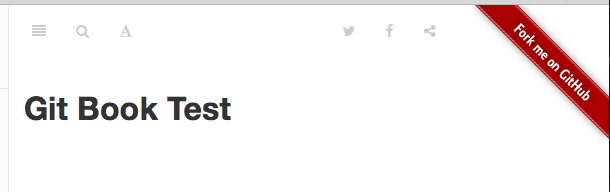
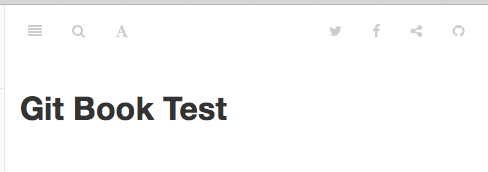
- 📱 响应式设计:桌面版显示丝带,移动版显示工具栏按钮
- ⚙️ 简单配置:只需在
book.json中配置 URL 和颜色 - 🔗 安全链接:使用
target="_blank"和rel="noopener noreferrer"确保安全性 - 🛡️ 错误处理:包含完整的配置验证和错误提示
预览效果
桌面版(长页面宽度)
移动版(短页面宽度)
安装
npm install gitbook-plugin-forkmegit使用方法
在您的 book.json 文件中添加以下配置:
{
  "plugins": ["forkmegit"],
  "pluginsConfig": {
    "forkmegit": {
      "url": "https://gitcode.com/your-username/your-repo",
      "color": "gray"
    }
  }
}
配置选项
| 选项 | 类型 | 必需 | 默认值 | 描述 |
|------|------|------|--------|------|
| url | string | ✅ | - | 您的 GitCode 存储库 URL |
| color | string | ❌ | gray | 丝带颜色 |
支持的颜色
gray- 灰色(默认)darkblue- 深蓝色red- 红色orange- 橙色green- 绿色
使用案例
案例 1:开源项目文档
{
  "plugins": ["forkmegit"],
  "pluginsConfig": {
    "forkmegit": {
      "url": "https://gitcode.com/nutpi/awesome-project",
      "color": "green"
    }
  }
}适用场景:开源项目的技术文档,鼓励社区参与和贡献。
案例 2:企业内部项目
{
  "plugins": ["forkmegit"],
  "pluginsConfig": {
    "forkmegit": {
      "url": "https://gitcode.com/company/internal-tool",
      "color": "darkblue"
    }
  }
}适用场景:企业内部工具的文档,方便团队成员访问源代码。
案例 3:教学项目
{
  "plugins": ["forkmegit"],
  "pluginsConfig": {
    "forkmegit": {
      "url": "https://gitcode.com/teacher/course-examples",
      "color": "orange"
    }
  }
}适用场景:编程课程的示例代码文档,学生可以轻松获取完整代码。
案例 4:API 文档
{
  "plugins": ["forkmegit"],
  "pluginsConfig": {
    "forkmegit": {
      "url": "https://gitcode.com/developer/api-sdk",
      "color": "red"
    }
  }
}适用场景:API SDK 的文档,开发者可以快速访问和下载 SDK 源代码。
案例 5:多语言项目
{
  "plugins": ["forkmegit"],
  "pluginsConfig": {
    "forkmegit": {
      "url": "https://gitcode.com/org/multilang-project",
      "color": "gray"
    }
  }
}适用场景:支持多种编程语言的项目文档,使用默认的灰色丝带保持简洁。
响应式行为
- 桌面版(屏幕宽度 > 800px):在页面右上角显示彩色丝带
- 移动版(屏幕宽度 ≤ 800px):隐藏丝带,在工具栏右侧显示 GitHub 图标按钮
故障排除
常见问题
丝带不显示
- 检查
url配置是否正确 - 确认 GitCode 存储库是否公开
- 检查
颜色不生效
- 检查
color值是否在支持的选项中 - 确认配置语法是否正确
- 检查
移动版按钮不显示
- 检查工具栏是否正常加载
- 确认 CSS 文件是否正确加载
调试模式
在浏览器控制台中查看警告信息:
// 检查配置
console.log('Plugin config:', window.gitbook && window.gitbook.plugins);
贡献
欢迎您的贡献!