
github-badge
v0.5.5
Published
A jQuery widget to show-off your GitHub Repositories.


Readme
GitHub Badge




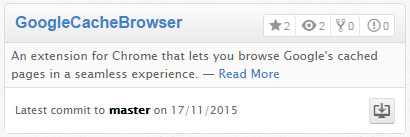
A widget to show-off your Github Repositories.
Takes the best of ricardobeat/github-repos and zenorocha/jquery-github and adds:
- Option to display the number of watchers
- Official GitHub font for icons
- Configurable date format
NOW, no longer requires jQuery or Zepto!
Browser Support
We do care about it.
 |
|  |
|  |
|  |
|  --- | --- | --- | --- | --- |
IE 8+ ✔ | Latest ✔ | Latest ✔ | Latest ✔ | Latest ✔ |
--- | --- | --- | --- | --- |
IE 8+ ✔ | Latest ✔ | Latest ✔ | Latest ✔ | Latest ✔ |
Getting started
Three quick start options are available:
- Download latest release
- Clone the repo:
[email protected]:joelself/github-badge.git - Install with Bower:
bower install github-badge
Setup
Use Bower to fetch all dependencies:
$ bower installNow you're ready to go!
Usage
Create an attribute called data-repo:
<div data-repo="jquery-boilerplate/jquery-boilerplate"></div>Include widget's CSS and JS:
<link rel="stylesheet" href="assets/base.css">
<script src="github-badge.min.js"></script>
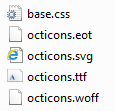
Make sure the font is in the same directory as the base.css (or change base.css to reference the correct directory):
Call the plugin:
GHBadges.create("[data-repo]");Or call it with options
GHBadges.create("[data-repo]", {iconStars: true,
								iconWatchers: true,
								iconForks: true,
								iconIssues: true,
								dateFormat: "M/D/Y"});
And that's it.
Check full example's source code.
Options
Here's a list of available settings.
GHBadges.create("[data-repo]", {
	iconStars:  false,
	iconWatchers: true,
	iconForks:  true,
	iconIssues: false,
	dateFormat: "D/M/Y"
});
Attribute | Type | Default | Description
--- | --- | --- | ---
iconStars | Boolean | false | Displays the number of stars in a repository.
iconWatchers| Boolean | true | Displays the number of watchers in a repository.
iconForks | Boolean | true | Displays the number of forks in a repository.
iconIssues | Boolean | false | Displays the number of issues in a repository.
dateFormat | String | "D/M/Y" | Specifies what format the date should be display as.
Structure
The basic structure of the project is given in the following way:
.
|-- assets/
|-- demo/
|   |-- index.html
|   |-- index-zepto.html
|-- dist/
|   |-- github-badge.js
|   |-- github-badge.min.js
|-- src/
|   |-- github-badge.js
|   |-- github-badge.template.js
|   |-- template.html
|-- .editorconfig
|-- .gitignore
|-- .jshintrc
|-- .travis.yml
|-- bower.json
|-- github-badge.json
|-- Gruntfile.js
`-- package.json
assets/
Contains CSS and Font files to create that lovely Github box.
demo/
Contains a simple HTML file to demonstrate the plugin.
dist/
This is where the generated files are stored once Grunt runs JSHint and other stuff.
src/
Contains the files responsible for the plugin.
.editorconfig
This file is for unifying the coding style for different editors and IDEs.
Check editorconfig.org if you haven't heard about this project yet.
.gitignore
List of files that we don't want Git to track.
Check this Git Ignoring Files Guide for more details.
.jshintrc
List of rules used by JSHint to detect errors and potential problems in JavaScript.
Check jshint.com if you haven't heard about this project yet.
.travis.yml
Definitions for continous integration using Travis.
Check travis-ci.org if you haven't heard about this project yet.
gihub-badge.json
Package manifest file used to publish plugins in jQuery Plugin Registry.
Check this Package Manifest Guide for more details.
Gruntfile.js
Contains all automated tasks using Grunt.
Check gruntjs.com if you haven't heard about this project yet.
package.json
Specify all dependencies loaded via Node.JS.
Check NPM for more details.
Showcase
Have you used this plugin in your project?
Let me know! Send a tweet or pull request and I'll add it here :)
Alternatives
Prefer AngularJS?
No problem, @lucasconstantino already did that. Check his fork!
Contributing
Check CONTRIBUTING.md.
History
Check Releases for detailed changelog.
Credits
Based on zenorocha/jquery-github and ricardobeat/github-repos
License
MIT License © Joel Self