
github-projects-md-sync
v0.1.11
Published
A tool to sync GitHub Project V2 items with local markdown files


Readme
GitHub Projects Markdown Sync



Sync GitHub Projects V2 with Markdown stories. Licensed under the MIT License.
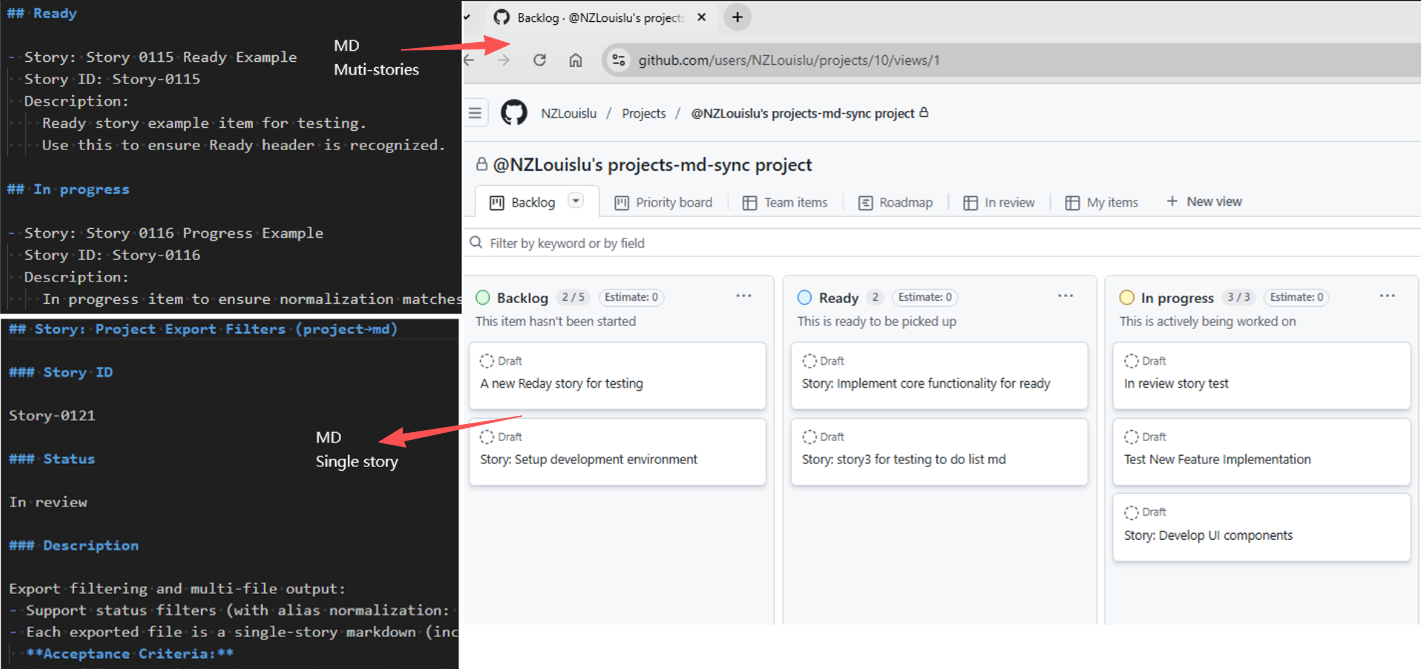
Overview
The latest release introduces a safer, clearer sync model:
- Single entry for md→project with create-only enforcement
- Separated formats: Multi-Story for import, Single-Story for export
- Dry-run diagnostics for CI and previewing plans
This tool synchronises Markdown documents and GitHub Projects (V2) so teams can manage work in text while keeping the project board current.
Requirements
- Node.js 18 or newer
Features
- Create-only import: Multi-Story Markdown → GitHub Project items by Story ID
- Read-only export: GitHub Project → Single-Story Markdown files
- Status mapping: Backlog, Ready, In progress, In review, Done (with aliases)
- Deterministic, idempotent behaviour keyed by Story ID
- Dry-run with structured logs for CI gates
- TypeScript API and runnable examples
Quick start
- Install the package in a Node.js workspace:
npm install github-projects-md-sync- Create a
.envfile in the project root with credentials that can access GitHub Projects V2:
GITHUB_TOKEN=your_github_token
PROJECT_ID=your_project_id- Run the CLI commands or consume the TypeScript API as described below.
Usage
CLI
| Command | Purpose | Key options |
| --- | --- | --- |
| npm run md -- <path> | Import Multi-Story Markdown into a project (create-only) | --dry-run to print the plan without calling the API |
| npm run project [-- <Story-ID>] [<outputDir>] | Export all stories or a single story into Markdown files | Positional Story-ID selects a single story, positional outputDir overrides the destination |
| npm run project:story -- [Story-ID] [outputDir] | Convenience wrapper for single-story export | Accepts Story-ID and outputDir as positional args or via --story, --output |
| npx ts-node src/project-to-stories.ts [Story-ID] [outputDir] | Low-level script that powers the exports | Requires PROJECT_ID and GITHUB_TOKEN env vars; positional arguments follow the same rules |
- Import Multi-Story Markdown to a GitHub Project (create-only):
npm run md -- stories/test-multi-stories-0.1.11.md- Optional dry-run plan: simulates the sync and prints the intended GitHub mutations without executing API writes:
npm run md -- stories/test-multi-stories-0.1.11.md --dry-run- Export GitHub Project items to Single-Story Markdown files:
npm run project
npm run project -- <Story-ID>
As a Library
import {
  mdToProject,
  projectToMdWithOptions,
  projectToMdSingleStory
} from "github-projects-md-sync";

const projectId = process.env.PROJECT_ID!;
const githubToken = process.env.GITHUB_TOKEN!;

const mdResult = await mdToProject(projectId, githubToken, "./markdown-files");
const exportAllResult = await projectToMdWithOptions({
  projectId,
  githubToken,
  outputPath: "./output-dir",
  logLevel: "info"
});
const exportSingleResult = await projectToMdSingleStory(
  projectId,
  githubToken,
  "Story-1234",
  "./single-story"
);

mdResult.logs.forEach((entry) => {
  console.log(`[${entry.level.toUpperCase()}] ${entry.message}`, ...entry.args);
});

if (!mdResult.result.success) {
  console.error("Import run failed", mdResult.result.errors);
}

if (exportAllResult.result.success) {
  console.log(`Exported ${exportAllResult.result.files.length} files to ${exportAllResult.result.outputDir}`);
} else {
  console.error("Bulk export failed", exportAllResult.result.errors);
}

if (!exportSingleResult.result.success) {
  console.error("Single story export failed", exportSingleResult.result.errors);
}
Examples
The examples/ workspace demonstrates end-to-end usage with ready-made scripts:
examples/md-to-project.ts— imports markdown fromexamples/md/into a project.examples/project-to-md.ts— exports project items intoexamples/items/.examples/tests/— Mocha scenarios that validate the flows.
Sample package.json scripts (from examples/package.json):
{
  "scripts": {
    "md": "ts-node ./md-to-project.ts",
    "project": "ts-node ./project-to-md.ts",
    "project:story": "ts-node ./project-to-md.ts --story"
  }
}
Run them from the examples/ directory once .env is configured:
npm run md            # imports multi-story markdown from examples/md/
npm run project       # exports all stories to examples/items/
npm run project:story # exports a single story, prompting when IDs are missing
Using project:story
npm run project:story -- Story-1234- Prompts for GitHub token and project ID if env vars
GITHUB_TOKENandPROJECT_IDare not set - Generates markdown for the specified story ID under
stories/by default - Accepts
Story-XXXXvia positional arg or--story Story-XXXX - Overrides the output directory via positional path or
--output ./custom-dir
Parameter rules:
Story-IDpositional detection checks for values that match/^Story-/i. If omitted, all stories are exported.- The first remaining positional argument is treated as the output directory. Without it, files are written to
./stories. - Flags
--story=value/--output=valueare equivalent to their spaced counterparts.
Examples:
npm run project -- Story-0456
npm run project ./stories/out-story -- Story-0112
npm run project:story -- Story-0112 ./stories/single
npm run project:story -- --story Story-0112 --output ./stories/single
How to get PROJECT_ID (personal GitHub user)
- Create a new issue in your repository first
- Then go to Projects settings -> Manage access, your GitHub username should appear with Admin role
PowerShell to query PROJECT_ID:
$owner = "your_github_username"
$repo = "your_repo_name"
$token = "your_github_token_with_repo_and_projects_access"
$headers = @{
    Authorization = "Bearer $token"
    "User-Agent"  = "PowerShell"
    Accept        = "application/json"
}

$query = @"
{
  repository(owner: "$owner", name: "$repo") {
    projectsV2(first: 10) {
      nodes {
        __typename
        id
        title
      }
    }
  }
}
"@

$body = @{ query = $query } | ConvertTo-Json -Depth 5 -Compress

$response = Invoke-RestMethod `
    -Uri "https://api.github.com/graphql" `
    -Method POST `
    -Headers $headers `
    -Body $body `
    -ContentType "application/json"

$response.errors
$response.data.repository.projectsV2.nodes | Select-Object id, title
API Reference
mdToProject(projectId: string, githubToken: string, sourcePath: string)
Import Multi-Story markdown files from a directory into a GitHub Project. Create-only and idempotent by Story ID.
- projectId: GitHub Project V2 ID
- githubToken: GitHub personal access token
- sourcePath: Path to directory containing markdown files
projectToMd(projectId: string, githubToken: string, outputPath?: string)
Export GitHub Project items to Single-Story markdown files. Defaults to writing into ./stories when no output path is provided.
- projectId: GitHub Project V2 ID
- githubToken: GitHub personal access token
- outputPath (optional): Output directory path. Defaults to './stories'
Story File Formats
Two complementary formats are supported:
- Multi-Story files (for
mdToProject()import) - Single-Story files (for
projectToMd()export)
Multi-Story format (md→project)
Sections represent status. Each story must include - Story:, story id:, and description:.
## Backlog

- Story: Setup development environment
  Story ID: Story-001
  Description:
    - Install required tools
    - Configure IDE
    - Setup version control

## Ready

- Story: Implement authentication
  Story ID: Story-002
  Description:
    - Design flows
    - Implement backend
    - Integrate frontend

## In review

- Story: Improve accessibility
  Story ID: Story-003
  Description:
    - Audit key screens
    - Fix critical issues
Rules:
- Allowed headings: Backlog, Ready, In progress, In review, Done
- Aliases:
To do → Ready,In Progress/in progress → In progress - Unrecognised headings map to Backlog
story idmust be unique; existing IDs in Project are skipped (no update, no delete)- Within a file, duplicate IDs: only the first entry is honoured; later duplicates are skipped
description:content is free-form Markdown and preserved verbatim
Single-Story format (project→md, read-only)
Each file contains exactly one story and includes a Story ID section.
## Story: Setup development environment

### Story ID

Story-001

### Status

In progress

### Description

- Install required tools
- Configure IDE
- Setup version control
This format is generated by export and must not be used for import.
Status mapping
mdToProject() normalises headings/status strings using the logic in src/markdown-to-project.ts:
| Input heading / status | Stored status |
| --- | --- |
| Backlog | Backlog |
| Ready, To do, Todo | Ready |
| In progress, In Progress | In Progress |
| In review | In review |
| Done | Done |
| Any other heading | Treated as Backlog |
Import and Export Behaviour
- md→project (import)
- Input: Multi-Story files only
- Action: Create new items when
story iddoes not exist in Project; skip otherwise - No updates or deletes from Markdown
- project→md (export)
- Output: Multiple Single-Story files, each with
### Story ID - Read-only: do not feed these files back into import
- Output: Multiple Single-Story files, each with
Limitations and caveats
- The importer is create-only. Updating or deleting existing project items must be done in GitHub Projects.
- Exporters overwrite files with the same name inside the target directory.
- All commands expect
PROJECT_IDandGITHUB_TOKENto be available; the GitHub token must allow Projects and repo read access. - Large exports/imports may trigger GitHub API rate limits. Use
--dry-runto validate before executing. story idmatching is case-insensitive, but duplicates in the same markdown file keep only the first occurrence.
Story ID
- Matching uses Story ID only; titles never overwrite existing items
- If an item with the same ID exists in Project: skip
- Missing
story id: strictly skipped and logged with file name, start line, and title - Missing ID plus exact title match triggers an additional "Possible title duplicate" warning
Dry-run and Diagnostics
Use dry-run to preview planned operations, with logs covering create plans, skip reasons, missing IDs, duplicates, and unknown keys. Ideal for CI gates and author feedback.
Migration (≤0.1.10 → 0.1.11)
- Move from per-story import files to a Multi-Story import file
- Ensure each story has a unique
story id - Keep edits and deletions within GitHub Project; do not attempt to overwrite via Markdown
- Update scripts or automation to use the new CLI entry points
Deprecated
src/story-to-project-item.tsis deprecated as an import entry. Usesrc/markdown-to-project.tsvia the CLI or library.
GitHub Actions
MD Sync
name: MD Sync
on:
  push:
    paths:
      - examples/md/**/*.md
  workflow_dispatch:
jobs:
  sync:
    runs-on: ubuntu-latest
    steps:
      - uses: actions/checkout@v4
      - uses: actions/setup-node@v4
        with:
          node-version: 20
          cache: npm
      - run: npm ci
      - env:
          PROJECT_ID: ${{ secrets.PROJECT_ID }}
          GITHUB_TOKEN: ${{ secrets.GH_TOKEN }}
        run: npx ts-node examples/md-to-project.ts
Daily Project to MD
name: Daily Project to MD
on:
  schedule:
    - cron: "0 16 * * *"
  workflow_dispatch:
jobs:
  export:
    runs-on: ubuntu-latest
    steps:
      - uses: actions/checkout@v4
      - uses: actions/setup-node@v4
        with:
          node-version: 20
          cache: npm
      - run: npm ci
      - env:
          PROJECT_ID: ${{ secrets.PROJECT_ID }}
          GITHUB_TOKEN: ${{ secrets.GH_TOKEN }}
        run: npx ts-node examples/project-to-md.ts examples/items
Notes
- Requires Node.js 18+
- Runs in Node.js/server environments, not in the browser
Feedback
If you encounter any problems during use, or have suggestions for improvement, feel free to contact me:
- 🌐 Personal Website: https://nzlouis.com
- 📝 Blog: https://blog.nzlouis.com
- 💼 LinkedIn: https://www.linkedin.com/in/ailouis
- 📧 Email: [email protected]
You are also welcome to submit feedback directly in GitHub Issues 🙌
If you find this tool helpful, please consider giving it a ⭐️ Star on GitHub to support the project, or connect with me on LinkedIn.