
github-puller
v1.0.7
Published
Respond to GitHub changes and get the latest version of an application.


Readme
github-puller
Listen for GitHub changes (Web Hooks) and update local copies of applications. This allows test servers to always remain up to date. It is designed for small projects but there is no particular reason why it wouldn't work for dozens of big projects. Originally written to allow lightweight development on a mobile device which then sends to the server running Node.js for testing.
github-puller runs on the edge of your network (DMZ) so that GitHub is able to contact it, on port 7777 by default. When it receives notification of a change it connects to GitHub and downloads the latest version from the master branch. The downloaded file can be placed on the local machine or placed on a server on the network using sftp.
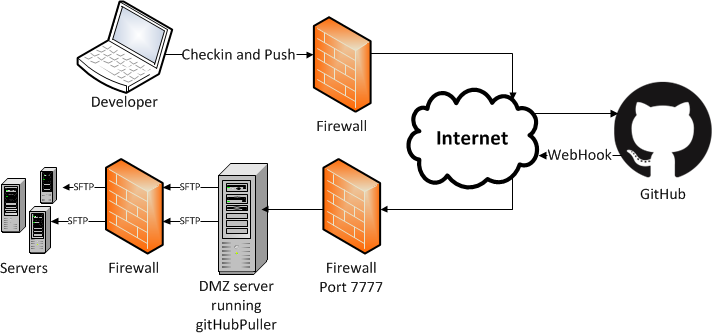
Getting started
npm install github-puller
Create .settings.js (note the leading . making the file hidden). An example is supplied in settings.js.
Update .settings.js with an array each sorresponding to a GitHub hook path and your local server details. If localPath is not specified then it us ignored and if sftpPath is not specified then the sftp server isn't used. If neither are specified then an error is thrown.
{name: the path specified in GitHub with leading slash,
    localPath: path on local file system to copy to,
    secret: set in GitHub,
    sftpPath: path on Lan server,
    sftp: {
        username: Lan server username,
        password: Lan server password,
        host: SSH Lan server hostname or IP address,
        port: 22
        }
    };
Make sure the username specified has write access to the SSH server's file system.
github-puller doesn't initialise the source so make sure the destination already has any existing code. If you want this feature then get in touch.
Follow GitHub's instructions for setting up Webhooks Set the Payload URL as http://[your server]:7777/[hook path].
Set the Content type to application/json.
Set a Secret.
Set your firewall to forward requests on port 7777 to the github-puller server.
If your internal SSH server is running code which requires a service restart before it is displayed then you will need some sort of file watcher. If it is Node.js code then nodemon or forever are the two alternatives. Forever needs the server to run as root if it is watching for file changes so nodemon seems to work better.
More
Errors are written to a local database. To view go to http://[server]:8080/public/toolbox.html Only local computers can access this.
Only GitHub's IP range can access the server and also the Secret is checked.
Any feedback to [email protected] would be tremendously useful.