github-widget-js
v1.0.5
Published
Display repos and gists on your website


Readme
github-widget
Display repos and gists on your website
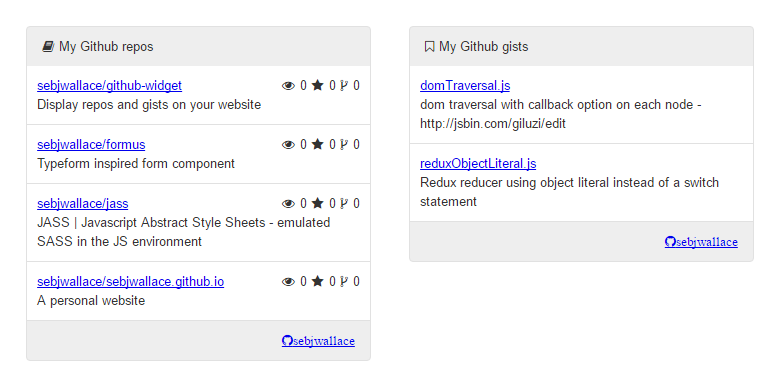
Forgive the example screenshot showing 0 stars, watches and forks. Hopefully you'll have more attractive stats for your wigit.
The project was built in JSBin, so here's a link if you want to see how it all works.
The only dependency is font-awesome, if fonts are desired for your theming. npm github-widget-js
To instantiate a wigit object, call a new GithubWigit. For a profile wigit just supply the Github profile username. For a repo or gist wigit you'll need to supply username, repos/gists, and the limit of repos/gists to display. Then mount the wigit to an empty element.
var profile = new GithubWidget('sebjwallace');
var profileEl = document.getElementById('profile');
profile.mount(profileEl);

var repos = new GithubWidget('sebjwallace','repos',4);
var reposEl = document.getElementById('repos');
repos.mount(reposEl);

var gists = new GithubWidget('sebjwallace','gists',4);
var gistsEl = document.getElementById('gists');
gists.mount(gistsEl);
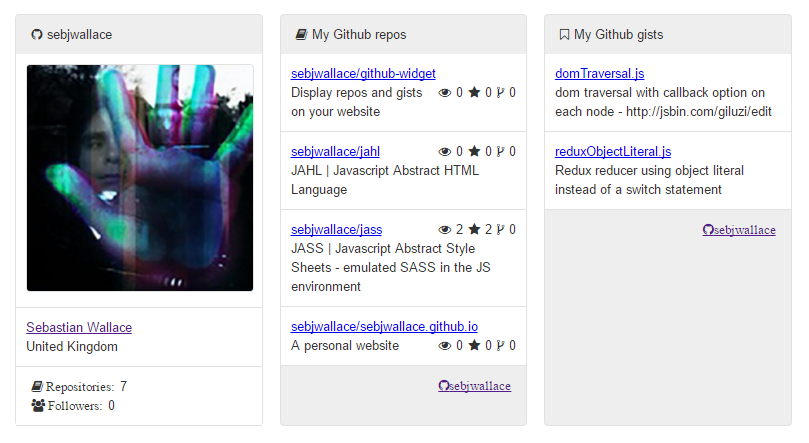
Will produce:
Its important to declare styles on the elements you'll mount to.
#repos, #gists, #profile{
  height: 400px;
  width: 30%;
  float: left;
  margin: 1%;
}
Custom styles can be injected into the wigit. The values in the styles object literal are the class names that'll be hooked up to wigit.
var styles = {
  feed: 'feed', stats: 'stats',
  description: 'description',
  header: 'header', footer: 'footer',
  wigit: 'wigit'
};

var repos = new GithubWidget('sebjwallace','repos',4);
var reposEl = document.getElementById('repos');
repos.setStyles(styles);
repos.mount(reposEl);

var gists = new GithubWidget('sebjwallace','gists',4);
var gistsEl = document.getElementById('gists');
gists.setStyles(styles);
gists.mount(gistsEl);
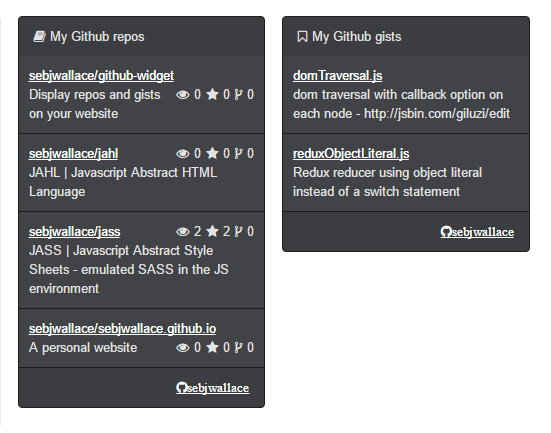
Will result: