
gitink
v1.0.8
Published
Auto-generate GitHub PR titles and descriptions using Gemini AI

Maintainers
 talha_khurram
Readme
GitInk




Automatically generate pull request titles and descriptions using AI.
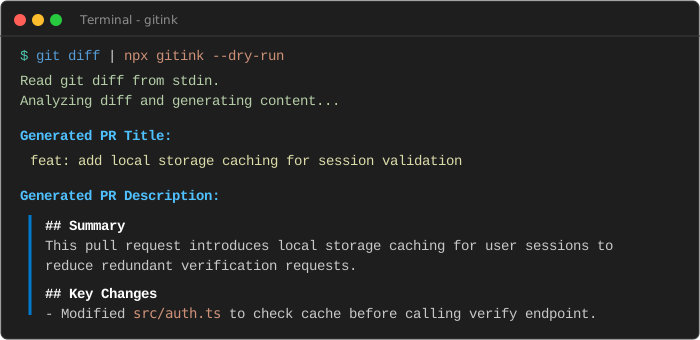
Table of Contents
Features
- Hybrid Workflow: Use it as a terminal CLI tool during local development or drop it directly into your GitHub Action workflows.
- Diff Optimization: Automatically ignores noisy file changes (such as package lockfiles, assets, and compiled directories) to keep analysis clean.
- Smart Truncation: Handles large pull requests safely by truncating excessive diff chunks and listing omitted files in the final analysis.
- Configurable Prompting: Allows you to customize the AI's generation instructions and output formatting via a simple configuration file.
- Structured Output: Enforces valid JSON schema responses from the API to guarantee error-free formatting.
Getting Started
Prerequisites
- Node.js >= 20.0.0
- An API key for Google Gemini (obtainable from Google AI Studio)
Installation
You can run GitInk on demand without permanent installation:
npx gitink --helpAlternatively, install it globally on your system:
npm install -g gitinkUsage
CLI Mode
To test or run GitInk's AI analysis locally, you can execute it in CLI mode using one of the following methods:
Method 1: Zero-Setup Quick Run (No installation required)
You can run GitInk instantly on demand without installing it or setting environment variables by passing your credentials directly via the --key (-k) and --token (-t) flags.
Dry-Run Unstaged Changes
Analyze local file modifications that have not been staged yet:
git diff | npx gitink --dry-run --key "your_gemini_api_key"Dry-Run Staged Changes
Analyze changes that have been added to the staging area with git add:
git diff --staged | npx gitink --dry-run --key "your_gemini_api_key"Dry-Run All Uncommitted Changes
Analyze both staged and unstaged local changes:
git diff HEAD | npx gitink --dry-run --key "your_gemini_api_key"Dry-Run Committed Changes
Analyze commits made on your current branch since it split from main:
git diff main...HEAD | npx gitink --dry-run --key "your_gemini_api_key"Update Active GitHub Pull Request
Directly submit the generated title and description to an open pull request on GitHub:
npx gitink --repo "owner/repo" --pr 42 --key "your_gemini_api_key" --token "your_github_personal_access_token"Method 2: Session Environment Variables
Alternatively, to avoid typing credentials for every command, set them in your terminal session first.
Windows (PowerShell)
$env:GEMINI_API_KEY="your_api_key_here"macOS / Linux (Bash)
export GEMINI_API_KEY="your_api_key_here"Once the environment variable is configured, run the matching command for your repository state:
Dry-Run Unstaged Changes
git diff | npx gitink --dry-runDry-Run Staged Changes
git diff --staged | npx gitink --dry-runDry-Run All Uncommitted Changes
git diff HEAD | npx gitink --dry-runDry-Run Committed Changes
git diff main...HEAD | npx gitink --dry-runUpdate Active GitHub Pull Request (Requires GITHUB_TOKEN)
Windows (PowerShell):
$env:GEMINI_API_KEY="your_api_key_here"
$env:GITHUB_TOKEN="your_github_personal_access_token"

npx gitink --repo "owner/repo" --pr 42
macOS / Linux (Bash):
export GEMINI_API_KEY="your_api_key_here"
export GITHUB_TOKEN="your_github_personal_access_token"

npx gitink --repo "owner/repo" --pr 42
CLI Options
You can customize the execution of the CLI using the following options:
Usage: gitink [options]

Auto-generate GitHub PR titles and descriptions using Gemini AI

Options:
  -V, --version        output the version number
  -k, --key <key>      Gemini API Key
  -t, --token <token>  GitHub Token
  -r, --repo <repo>    GitHub Repository (owner/repo)
  -p, --pr <number>    PR Number
  -c, --config <path>  Path to config JSON file
  -d, --dry-run        Generate and print description without updating GitHub
  -m, --model <model>  Gemini model to use (default: gemini-2.5-flash)
  -h, --help           display help for command
GitHub Action Mode
To automate PR descriptions on every commit, add this workflow file to your repository at .github/workflows/gitink.yml:
name: GitInk PR Auto-Describer

on:
  pull_request:
    types: [opened, reopened, synchronize]

jobs:
  describe-pr:
    runs-on: ubuntu-latest
    permissions:
      pull-requests: write

    steps:
      - name: Checkout repository
        uses: actions/checkout@v4

      - name: Run GitInk Generator
        uses: Talha12Shiekh/gitink@main
        with:
          gemini-api-key: ${{ secrets.GEMINI_API_KEY }}
          github-token: ${{ secrets.GITHUB_TOKEN }}
GitHub Environment Setup
To run GitInk in your repository's actions, you need to configure access credentials:
Set up GEMINI_API_KEY:
- Go to your repository on GitHub.
- Navigate to Settings -> Secrets and variables -> Actions.
- Click on New repository secret.
- Set the name to
GEMINI_API_KEYand paste your Gemini API key from Google AI Studio as the value.
Set up GITHUB_TOKEN:
- The
GITHUB_TOKENis a built-in token automatically created by GitHub for every workflow run. You do not need to manually define it in your secrets. - Ensure the workflow has the
permissions: pull-requests: writeproperty configured (this is already included in the YAML template above) to grant the token access to update your pull request.
- The
Configuration
You can customize GitInk's files validation and prompt settings by creating a .gitink.json file in the root of your project:
{
  "exclude": [
    "package-lock.json",
    "yarn.lock",
    "pnpm-lock.yaml",
    "dist/**",
    "*.png",
    "*.jpg"
  ],
  "maxDiffLength": 60000,
  "prompt": "Analyze the changes and write a pull request description in a concise, bulleted format. Keep the tone technical and direct."
}
Contributing
We welcome community contributions. To set up the project locally:
- Clone the repository:
git clone https://github.com/Talha12Shiekh/gitink.git cd gitink - Install development dependencies:
npm install - Compile TypeScript files:
npm run build
For detailed coding standards and pull request workflows, please read our CONTRIBUTING.md.
License
This project is licensed under the MIT License - see the LICENSE file for details.