
gitrain
v1.3.2
Published
A CLI tool for emoji-powered commits and automated GitHub PR creation with story tracking.
Downloads
74

Maintainers
 iampavan
Readme
gitrain
A CLI tool for emoji-powered commits and automated GitHub pull request creation, with built-in support for including AB#123 (Azure Boards) or JIRA-123 references in PR titles.
This helps teams who follow merge policies that require story identifiers in pull requests, ensuring proper linkage to work items in systems like Azure DevOps or Jira, which is often required for completing merges.
Features
- Select files to stage
- Create commits like
✨ feat: add validation - Auto-push to current branch
- Generate PRs with titles like
AB#123456 add validationorJIRA-123 add validation - Custom configuration support via
.gitrainrc, allowing you to define your own emoji map, default tracker, and default base branch for PR creation.
Installation
Install globally via npm to use gitrain from anywhere:
npm install -g gitrainUsage
Commit
gitrain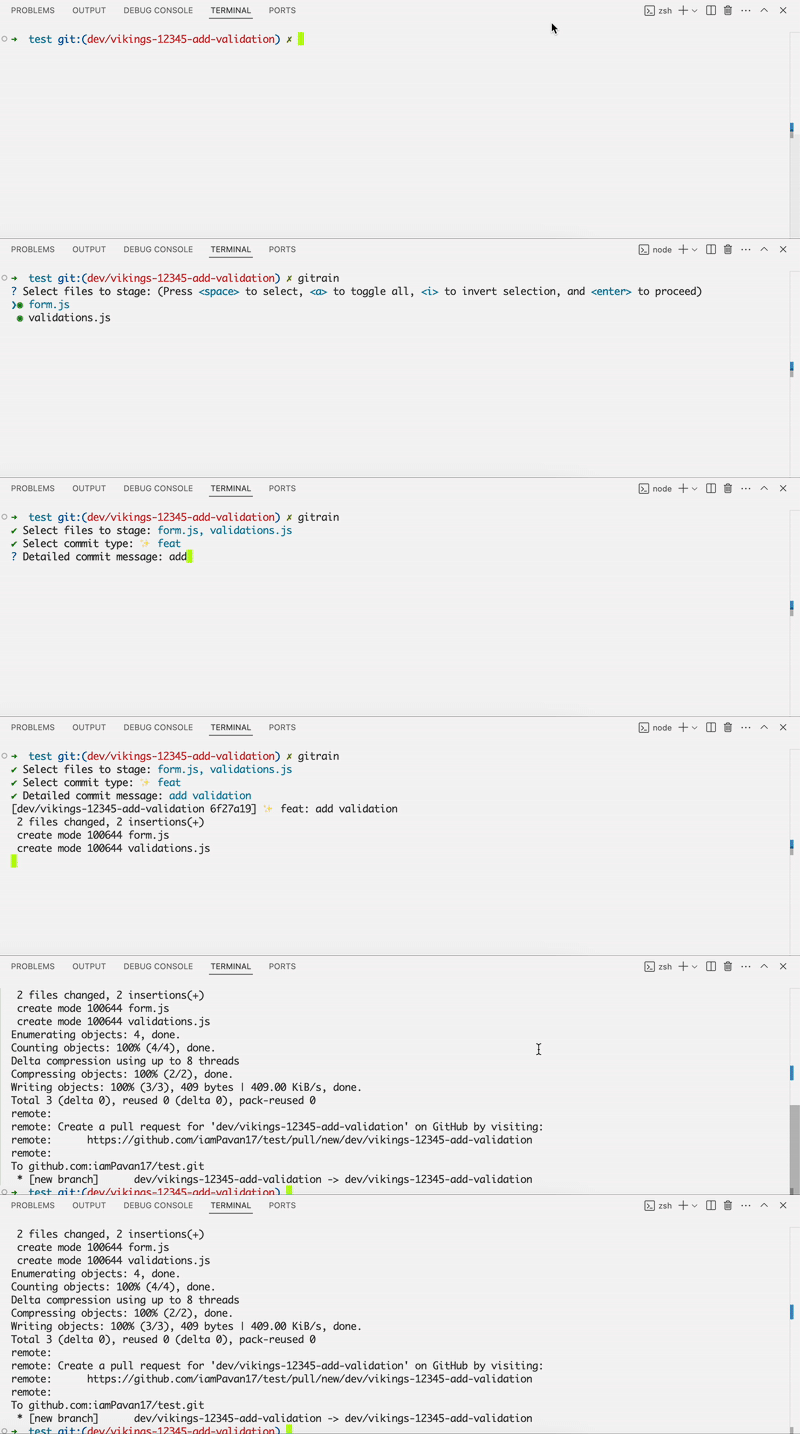
Create PR
gitrain pr                     # Creates a PR to 'develop' (default) with title like: AB#123456 add login
gitrain pr --base main         # Creates PR to 'main' branch
gitrain pr --tracker jira      # PR title format: JIRA-123 add login
gitrain pr --base release --tracker jira  # Customize both base branch and title format
This command auto-generates a pull request title from your branch name using the embedded story number. It’s built to cut down on manual effort when using tools like Azure DevOps and Jira, ensuring PR titles include:
- AB#123456 → for Azure Boards
- JIRA-123 → for Jira integrations
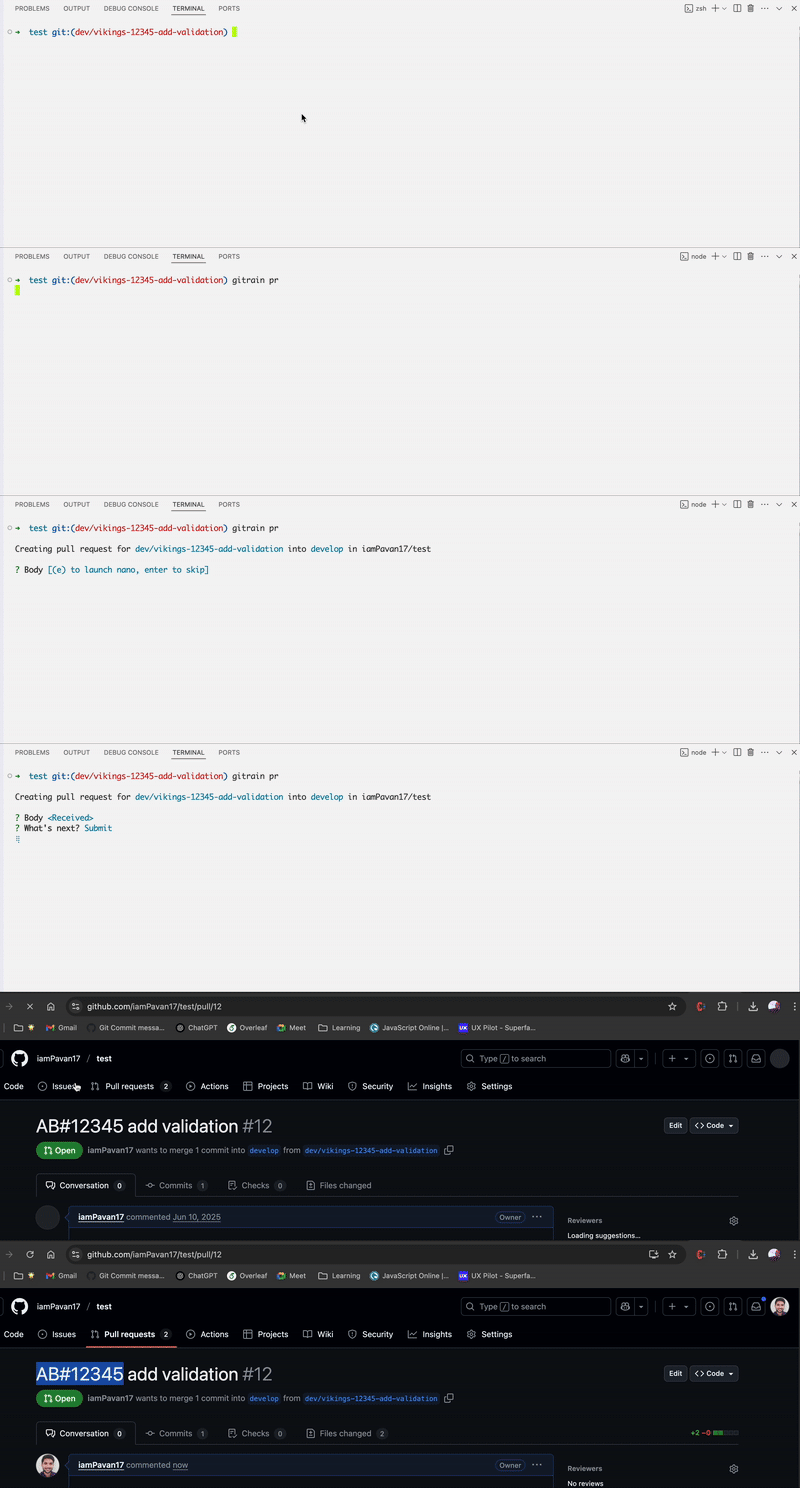
⚠️ Requires GitHub CLI (gh) and gh auth login to use gitrain pr.
PR creation is currently supported only for GitHub repositories.
Options
gitrain pr [--base <branch>] [--tracker <type>]| Flag | Description | | --------- | ---------------------------------------------------------------------------------- | | --base | Target branch for the PR (default: develop) | | --tracker | Story tracker type: azure, jira, or custom (default: azure i.e, AB#) |
Examples:
gitrain pr                         # PR to 'develop', title like: AB#123 add login
gitrain pr --base main             # PR to 'main'
gitrain pr --tracker jira          # PR title: JIRA-123 add login
gitrain pr --base release --tracker custom  # Use prefix from `.gitrainrc`
Configuration (Optional)
You can generate a local .gitrainrc file to set your preferred default tracker and baseBranch:
gitrain init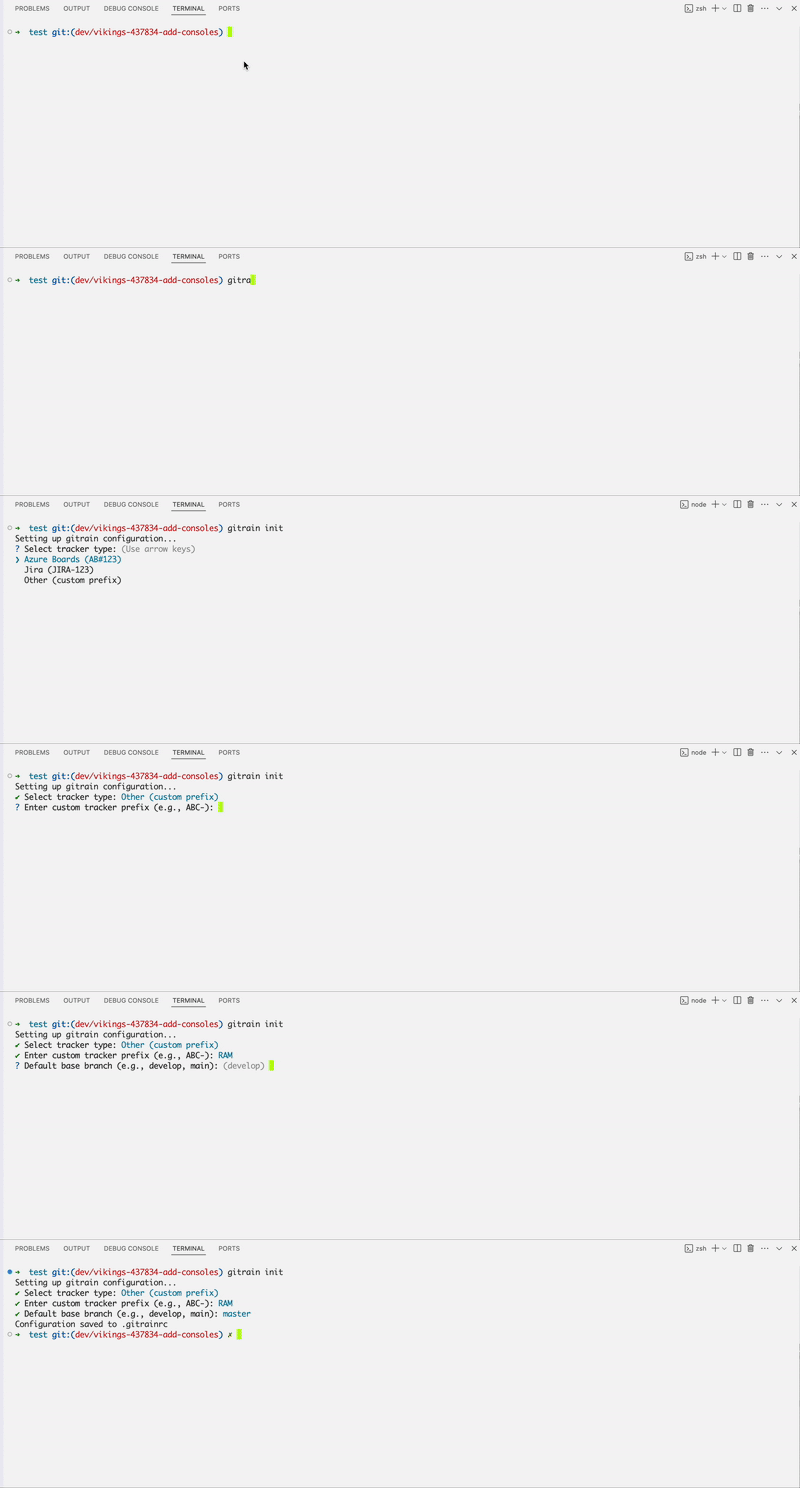
This will create a .gitrainrc like:
{
  "tracker": "custom",
  "trackerPrefix": "RAM-",
  "baseBranch": "master"
}
You can still override these using CLI flags:
gitrain pr --base main --tracker jiraCustom Commit Types and Emojis
If you want to override the default commit types and emojis used in commit messages, you can manually extend your .gitrainrc:
{
  "tracker": "custom",
  "trackerPrefix": "RAM-",
  "baseBranch": "master",
  "useEmoji": true, // default (true)
  "commitTypes": {
    "feature": "🦄",
    "bugfix": "🐞"
  }
}commitTypes: Define your preferred commit types with or without emojis.useEmoji(default: true):true: Emojis will be included in commit messages (e.g., 🦄 feature: add unicorn mode)false: Only type is shown (e.g., feat: add unicorn mode)
You can define types however you like:
{
  "commitTypes": {
    "feature": "",
    "bugfix": ""
  }
}
This gives you full control over commit formatting.
Branch Format
Your branch name should include a story number to auto-generate a proper PR title (e.g., AB#12345 or JIRA-123).
The CLI will extract the story number and a readable title from your branch.
Supported Branch Formats
dev-11223-add-icons
dev/ui-123456-add-login
dev/12345-add-some-lines
dev/vikings-12345-add-button
hotfix/squad-78910-fix-header
feature/98765-fix-api-response
Resulting PR Titles
AB#123456 add loginJIRA-98765 fix api response(if using--tracker jira)
If the story number is missing from the branch, gitrain will prompt you to enter it manually.
Windows Troubleshooting
On some Windows 10 machines, you may need to add npm’s global bin path to your system PATH if gitrain is not recognized after install.
Run npm config get prefix to locate it (e.g., C:\Users\YourName\AppData\Roaming\npm) and add that to your environment variables.
Need Help or Found a Bug?
If you run into issues, feel free to open an issue on GitHub.
Whether it’s a bug report, feature request, or general question, all input is appreciated.