
glass-gl
v0.4.0
Published
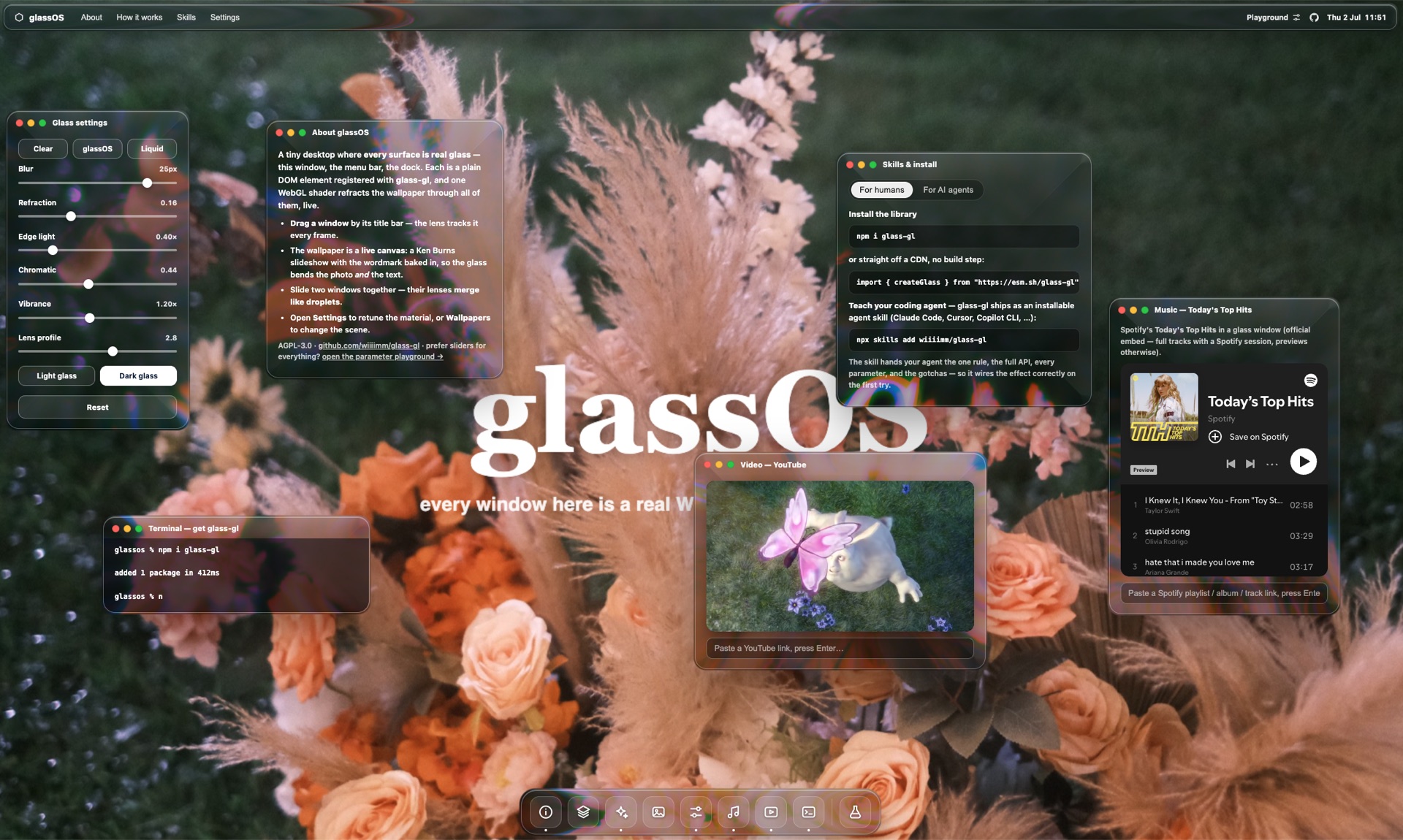
Real WebGL liquid glass for the web — any element refracts the background like a glass lens (not just backdrop-filter blur).

Maintainers
 wiiiimm
Readme
glass-gl
Real WebGL liquid glass for the web. A tiny, framework-agnostic engine that makes any
DOM element refract the background behind it like a physical glass lens — bend, magnify,
frost, edge-light — not just a backdrop-filter blur.
⚠️ Experimental. Early and evolving — the API, parameters, and visuals may change without notice, and it is not production-hardened. Use at your own risk.
Install
Building with an AI coding agent? This is the easiest path — install the skill, then just ask for liquid glass. Your agent gets the full API, the limits, and the one rule:
npx skills add wiiiimm/glass-glOtherwise, add the package with a bundler:
npm install glass-gl…or import with no build step from a CDN (@latest = newest release):
import { createGlass } from "https://esm.sh/glass-gl@latest";Use
import { createGlass } from "glass-gl";

const glass = createGlass({ canvas, background: "/bg.jpg" });

glass.register(el);          // any element becomes liquid glass
glass.setParams({
  refraction: 0.22,          // lens strength
  blur: 1.2,                 // frost
  liquidness: 0.0,           // milky mix toward tint
  edgeLight: 1.0,            // directional rim glint strength
  edgeFrost: 0.22,           // frosted rim band (0 = none)
  dispersion: 0.2,           // chromatic aberration at the rim
  saturation: 1.25,          // vibrancy of the refracted backdrop
  curve: 2.8,                // lens profile: 1 linear → ~3 droplet
  lightAngle: 35,            // rim-glint light direction (deg, 0 = top)
  radius: 30,                // match the element's border-radius
  tint: [1, 1, 1],
});

glass.unregister(el);
glass.setBackground("/other.jpg");   // string / <img> = static; <canvas> / <video> = live
glass.destroy();
Options (createGlass({ … }))
dpr— retina-sharp by default: the canvas renders atdevicePixelRatio(clamped to 2). Pass a number for a custom cap, orfalse/0for legacy 1:1.transparent: true— draw only the glass surfaces and leave every other pixel transparent (premultiplied alpha). Use it when the background you refract is the page's own live canvas (a three.js scene, a game, a visualisation): the page's pixels stay crisp and the engine composites just the lenses on top. Default (opaque) mode paints the background across the whole canvas — right for glass over a media backdrop you hand to the engine.size: () => ({ w, h })— size the canvas to a custom box instead of the viewport, so it can be a positioned / scrolled element rather than a fixed full-screen one. Surfaces are mapped relative to the canvas's own box, so it no longer has to sit at the viewport origin. Handy for immersive iOS 26 Safari layouts: make the canvas cover a scroll band taller than the screen and the glass background bleeds under the translucent status/address bars.
// glass over YOUR live canvas (e.g. three.js) — no background re-display:
const glass = createGlass({ canvas: glassCanvas, background: sceneCanvas, transparent: true });
Behaviour change in 0.3.0:
edgeFrost: 0now means no rim band. Earlier versions kept a faint hard-coded rim even at 0 — scenes relying on it should setedgeFrost: ~0.17.
When to use it (and when not to)
glass-gl is JavaScript + WebGL, not CSS. It renders the glass on a <canvas> behind
your page and refracts a background layer you give it. That buys real light-bending
(not just blur) — but it comes with one hard rule.
The one rule: it bends a background, not the page
The shader only samples the background texture you provide. It has no access to your DOM, so it cannot refract other HTML elements sitting behind it.
| Arrangement | Works? |
|---|---|
| Content (text, images) on top of a glass surface | ✅ yes |
| Glass refracting a background image / canvas / video / gradient | ✅ yes |
| Glass refracting a live DOM element behind it (e.g. a <p> of text) | ❌ no — it refracts the background, not the element |
Bending live DOM would mean rasterising the page every frame (slow, CORS-bound) — which is why even Apple's Liquid Glass runs in the OS compositor, not the browser.
Reach for CSS instead when…
If you want a frosted panel over live, scrolling content (text, a feed, a list), use the
browser's own backdrop-filter: blur() — it blurs real DOM behind it, live and for free. It
just can't refract. Use glass-gl for glass over a media background: hero sections,
photo/video backdrops, draggable tiles, showpieces.
Limitations
Beyond the one rule above:
- Rounded rectangles only. Every surface is a rounded-box lens (a circle is just
radius = size / 2). Triangles, blobs and other shapes aren't supported. - Up to 16 glass surfaces at once (the shader's array size); extras are skipped.
- Continuous render loop. One
requestAnimationFramekeeps the GPU awake so the glass tracks moving elements every frame — for mobile / always-on UI, pause it when idle or offscreen. - External images need CORS (
crossOrigin="anonymous"+Access-Control-Allow-Origin), or the WebGL texture upload fails. Same-origin / bundled images are simplest. - Needs WebGL —
createGlassthrows if a context can't be created. - Needs a busy/colourful background to read — never a flat colour.
- Experimental — not production-hardened; API and defaults may change.
License
AGPL-3.0-or-later © wiiiimm · https://github.com/wiiiimm/glass-gl — see the bundled LICENSE. If you run a modified version as part of a network service, the AGPL requires you to offer its source to users. (Versions ≤ 0.0.2 were published under MIT.)