
glasshive
v2.1.0
Published
Glass-walled observation hive for AI agents — a read-only local dashboard of running sessions, subagents, issues, and git


Readme
glasshive
Watch your AI agents work, through glass.




What you see · Read-only by design · Options · Development
English · 日本語 · 简体中文 · 繁體中文 · 한국어 · Español · Français · Deutsch
glasshive is a read-only local dashboard for Claude Code. It reads
the session logs already sitting on your disk and puts the projects you watch — their
sessions and subagents, what each one is doing right now, their issues, and their live git branches —
on one screen. Think htop for agent sessions, without the kill key: glasshive never writes to
~/.claude, to your repositories, or to your issue tracker, and it cannot start, stop, or steer an
agent.
npx glasshiveIt serves on 127.0.0.1:4483 only and opens your browser. No install step, no configuration, and
nothing leaves your machine until you open the GitHub view — the published package has zero runtime
dependencies. You need Node.js 22.12 or
newer and at least one Claude Code session under ~/.claude/projects. It is built and tested on
macOS and Linux; on Windows the live agent count comes back as unobservable, because reading it
needs ps and either /proc/<pid>/cwd or lsof.
What you see
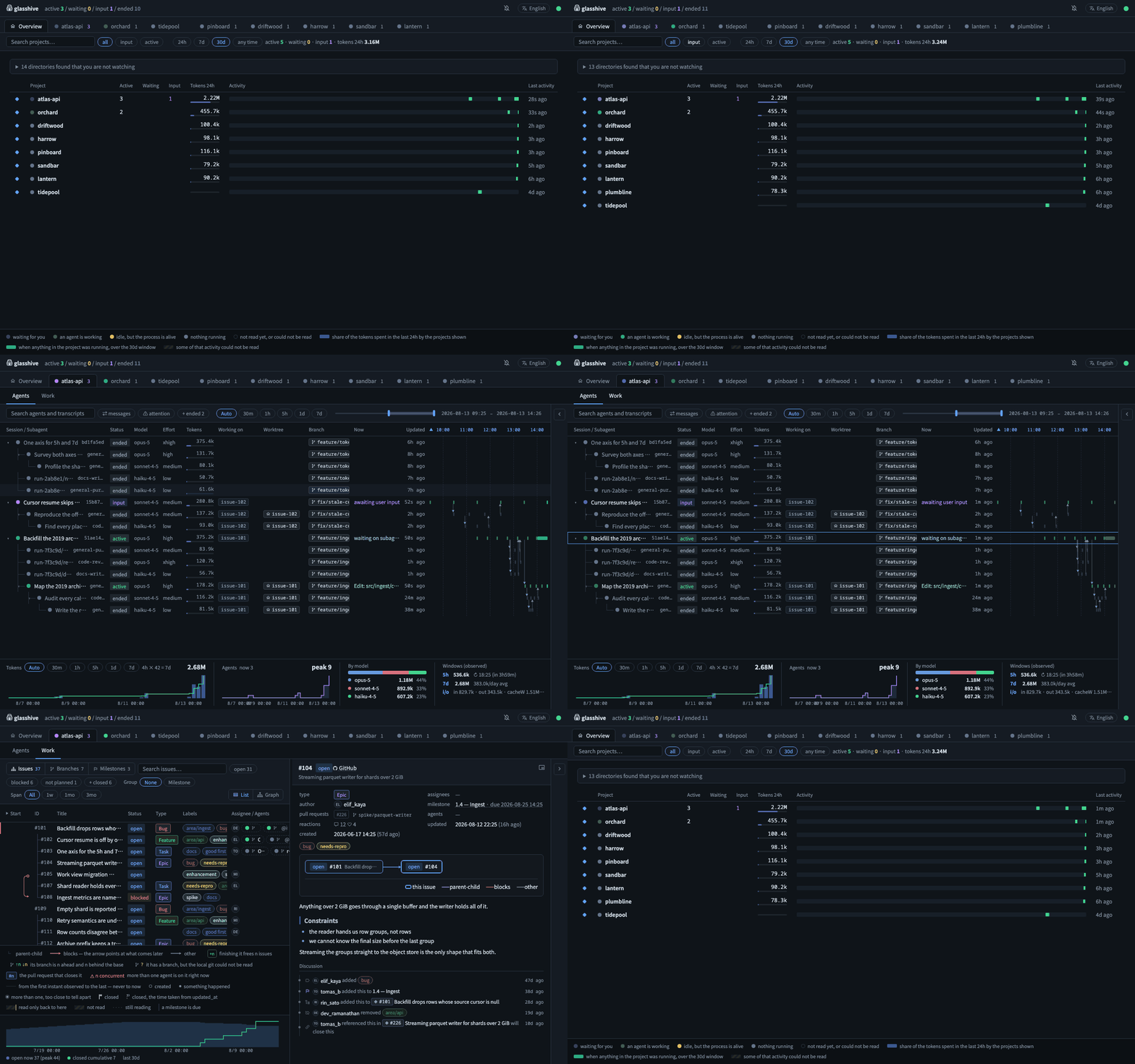
Overview
The projects you watch. The ones waiting for your input come first, then the ones still running.
Filter by name, state, or time span, and reorder the tab bar. It starts empty: run glasshive in a
repository and that repository is watched from then on, or pick one from the directories glasshive
found but is not watching, listed above the table.
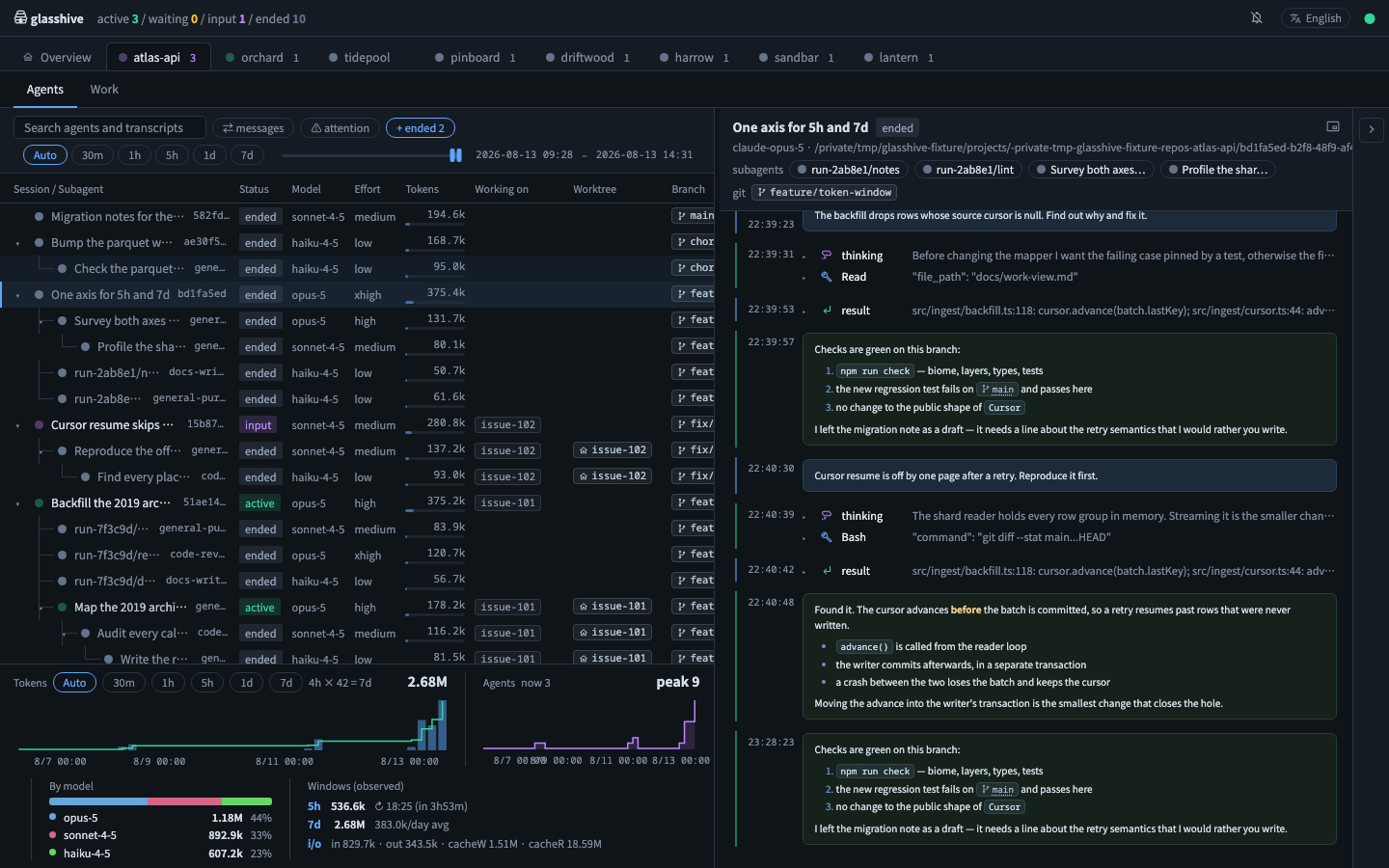
Agents
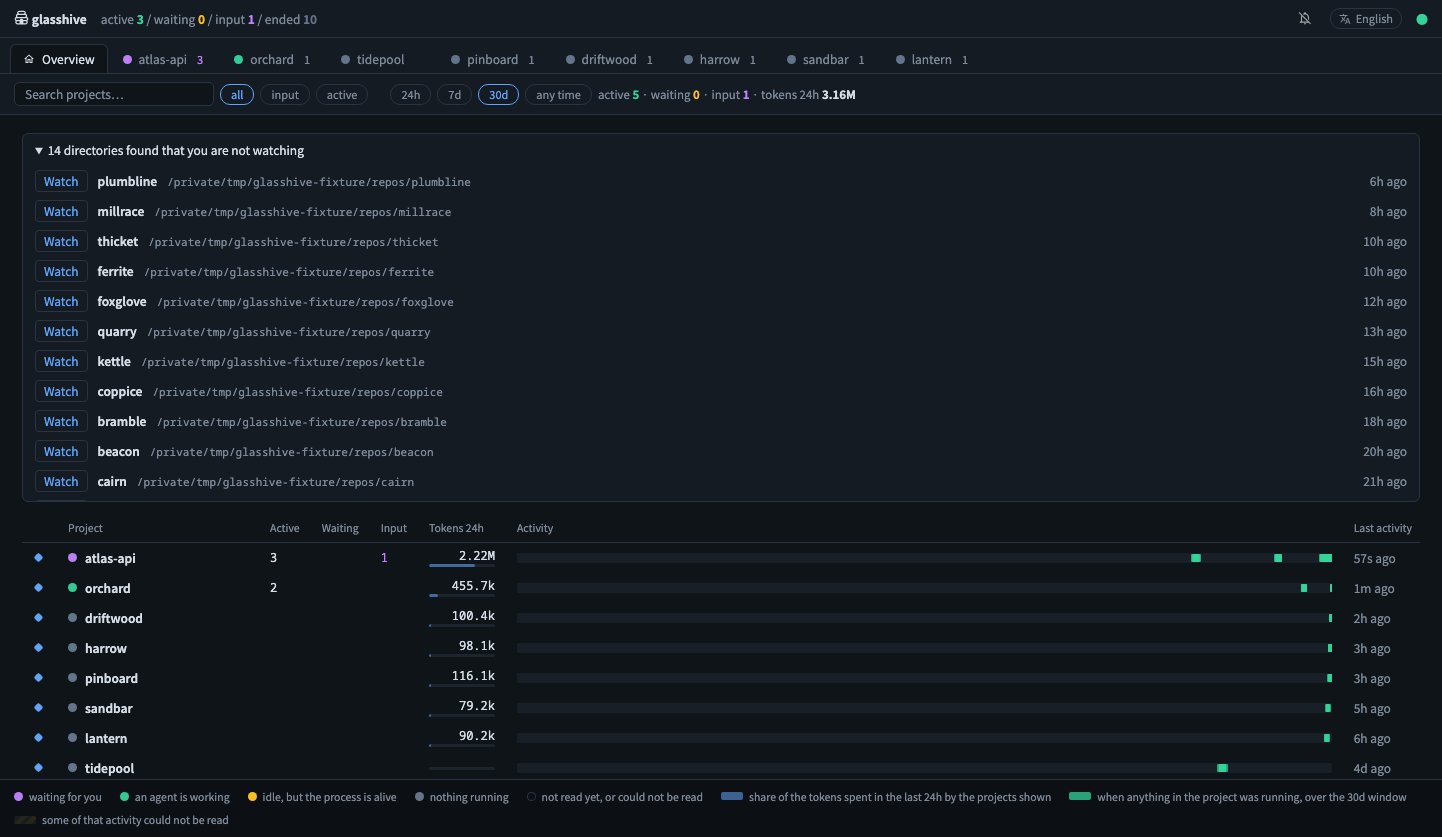
Sessions and their subagents as one tree: status, model, effort, tokens, the issue and worktree each one is working in, the tool it is running right now, and an activity timeline you can pan and zoom. Token and concurrency statistics sit underneath, scoped to the same window.
Work
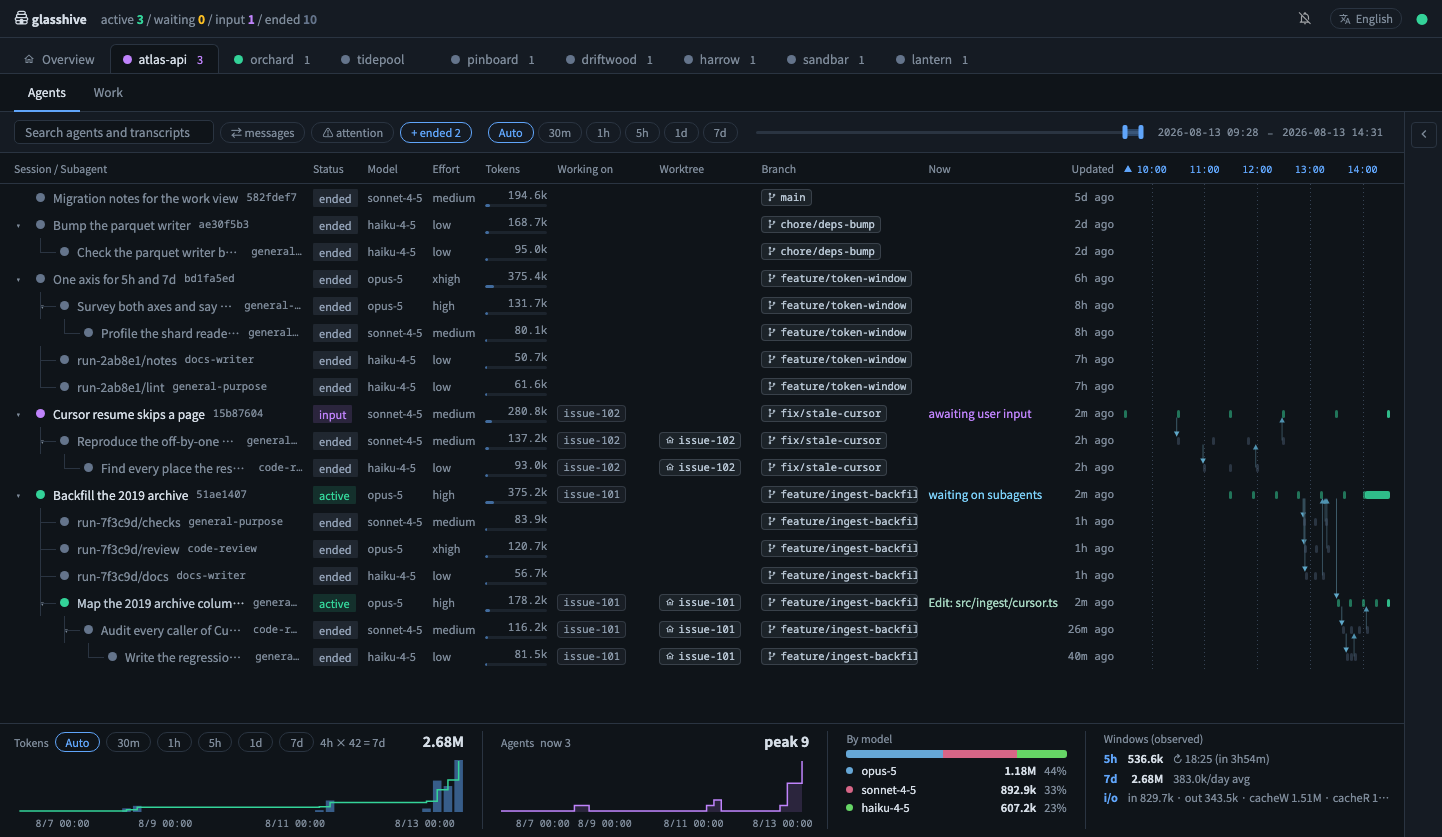
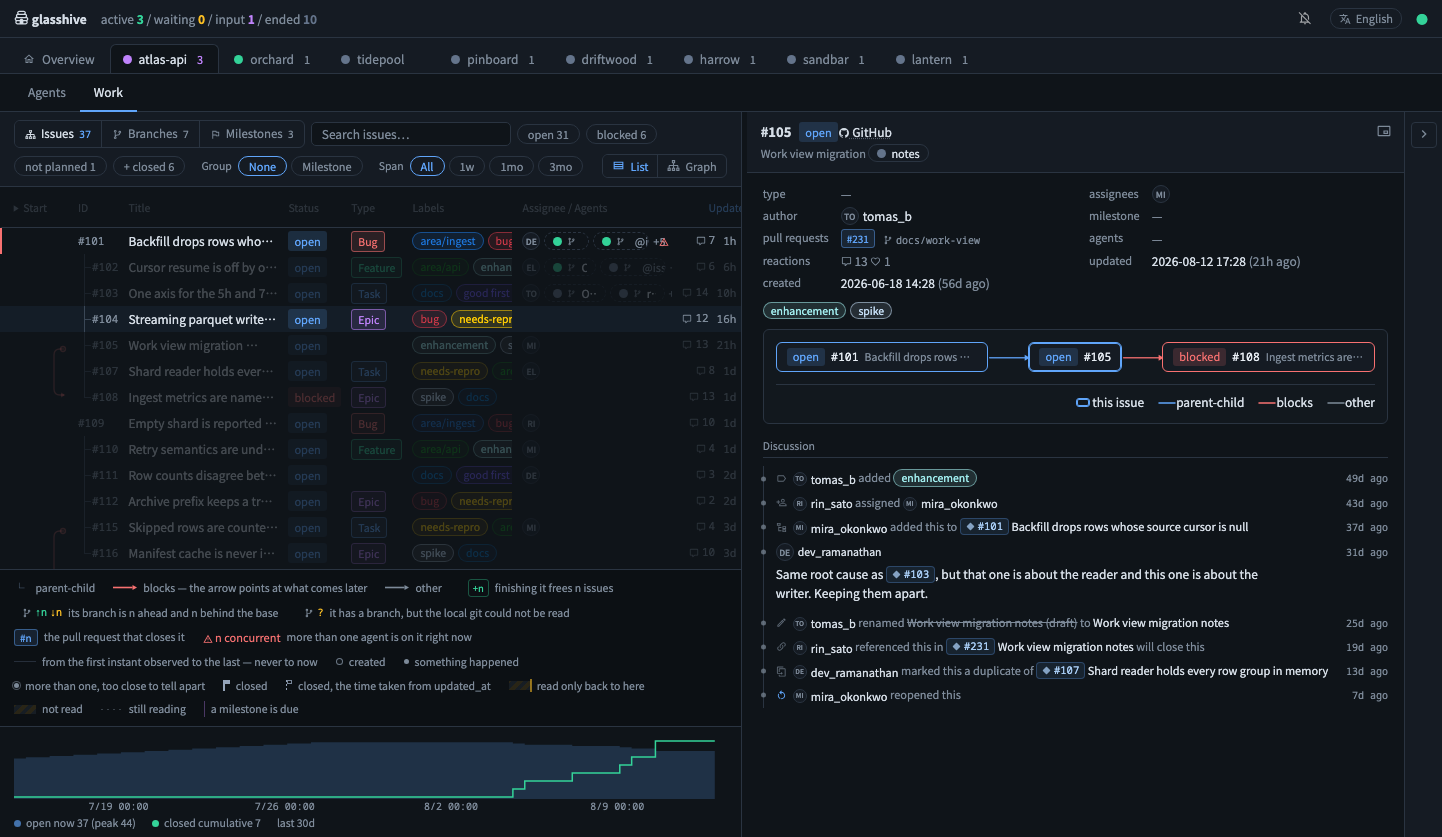
Issues, branches, and milestones on one screen, because they are the same work seen from three sides. Switch between them without leaving the view.
Issues come from GitHub through the gh CLI — glasshive asks gh which
repository your remotes point at, the same way gh decides it. Sub-issues nest, blocked by is
drawn as a dependency edge, and issue types, labels, milestones and assignees come along.
Branches and worktrees are drawn over the main worktree's branch, so you can see who is where. Pairs heading for the same files are lifted to the top. Pick a ref to get its commits, diff stats, and which agents have been active on it. An issue and a branch are joined only by a pull request's head branch — a near-miss is left unjoined rather than guessed.
Side panel
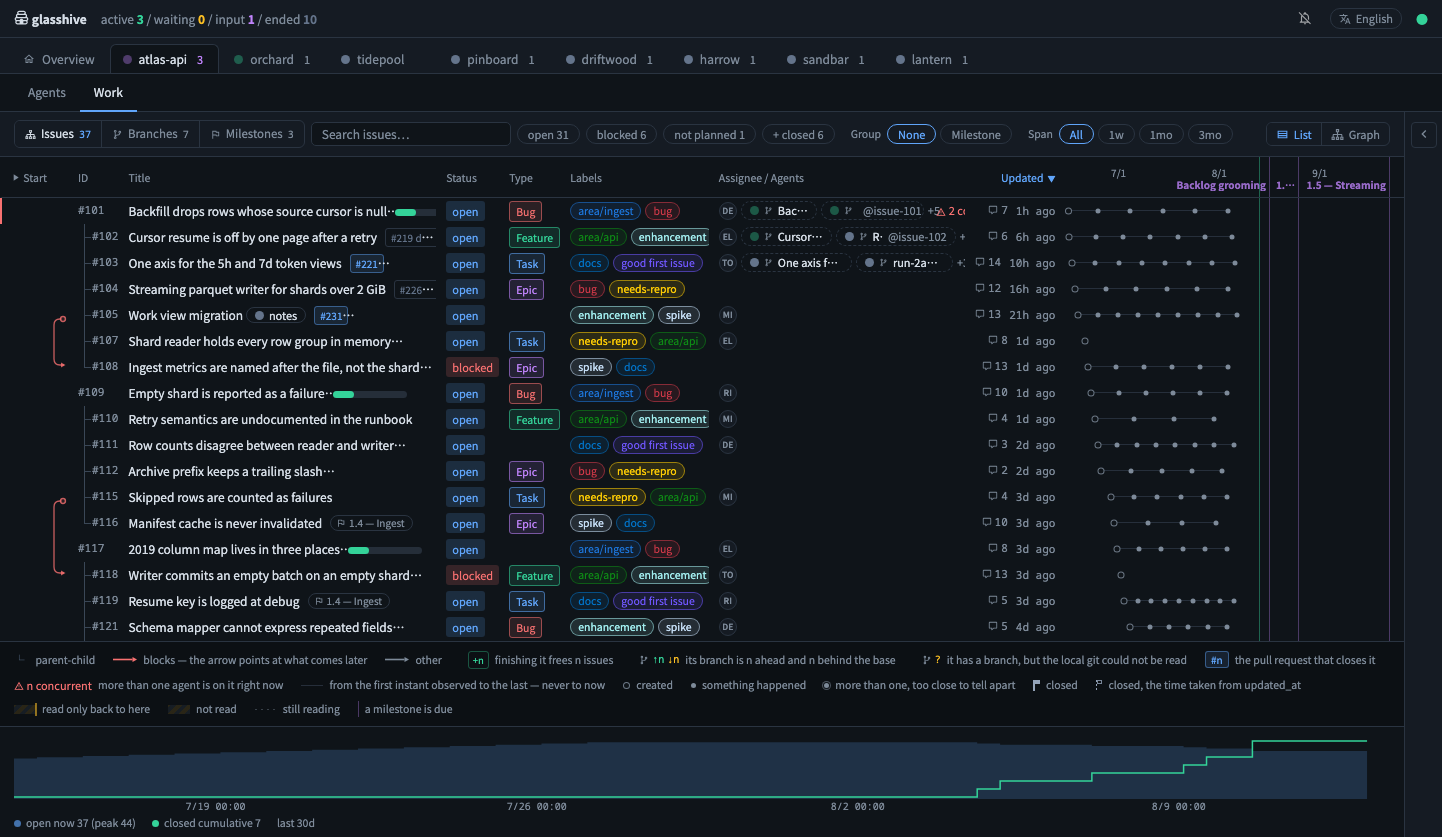
Conversations, issues, and refs open in a panel on the right. What is open lives in the URL, so pasting the link opens the same thing on someone else's screen. Markdown, code, and tool calls are rendered; the raw transcript is never rewritten.
An issue brings its comments and its timeline along: who labelled it, what it was blocked by, and which pull request referenced it, read next to the agents working on it right now.
Read-only by design
- It reads three things and writes to none of them. Claude Code session logs
(
~/.claude/projects/**/*.jsonl),git, and — through theghCLI — the issues of the GitHub repository your remotes point at. No transcript, repository, or issue is ever modified. - The one file it writes is its own.
~/.config/glasshive/preferences.jsonholds the directories you watch and your view preferences. Before writing, glasshive checks that the path is not inside~/.claude, the transcripts root, or a.gitor.beadsdirectory belonging to a project it can see, and refuses if it is — writing to what it observes is blocked by construction, not by convention. Delete that one file and nothing glasshive has ever written is left behind. - The published package is traceable to this repository. Every version is published from GitHub
Actions over OIDC and carries a provenance attestation, so
npm audit signaturescan check the package you installed against the workflow and the commit it was built from. - Two things leave your machine, and both are about issues you can already see. glasshive binds
to
127.0.0.1, rejects requests whoseHostheader is not local (so a hostile page cannot reach it by DNS rebinding), and bundles its own fonts instead of fetching them from a CDN. The GitHub view makes the two outbound calls there are: the issue query, which goes throughgh— so glasshive never reads, holds, or stores a token of its own — and the assignee avatars, which glasshive's own process fetches fromavatars.githubusercontent.comwith credentials omitted and keeps in memory only, so your browser is never handed a GitHub URL. Nothing about your sessions is ever sent anywhere. - "Empty" and "could not read" never look the same. A field that could not be read is carried as
nullwith the reason attached, so a quiet screen is never ambiguous. - Bad options fail loudly. An unreadable flag exits with an error instead of silently falling back to a default.
Options
npx glasshive                       # http://127.0.0.1:4483 — watch this repository
npx glasshive .                     # just this repository
npx glasshive ~/src/foo             # or that one, from anywhere
npx glasshive --port 8080           # listen somewhere else
npx glasshive --no-open             # do not open the browser
npx glasshive --status              # where is it running, and since when
npx glasshive --stop                # end it, from any terminal
npx glasshive --active-threshold 120  # seconds since last write that still counts as active
npx glasshive --config-dir ~/somewhere  # where preferences.json is kept
Run glasshive --help for the full list.
Naming a directory is how you start watching it. glasshive . watches this repository and
opens it; a bare glasshive does the same when you are inside a git repository, and lands on the
Overview when you are not. The path resolves to the repository it belongs to, so a subdirectory or a
worktree gets you to the same place, and the other projects of that repository are named next to it.
Watching is what you see, not what glasshive may read. Every directory under
~/.claude/projects is still found by name, and the Overview lists the ones you are not watching so
you can add them in one click. Only what you watch is read in full — the rest costs one line of one
transcript, just enough to know where it is. Stop watching a project from its tab and it goes back to
that list; nothing is deleted.
One server, however many times you run it. Running glasshive again does not start a second
one. It finds the server already listening, hands it the path you named, and opens that window —
the scan, the index, and everything git has already answered are reused, so the second window
arrives about as fast as switching tabs. Only the command line can name a directory this way; a page
open in your browser cannot. The default port falls through to the next free one only when something
that is not glasshive is holding it.
Because there is one, you never have to remember which terminal has it:
$ glasshive --status
glasshive: http://127.0.0.1:4483 (pid 61651, up 2h 15m)

$ glasshive --stop
glasshive: stopped http://127.0.0.1:4483 (pid 61651, up 2h 15m)
--status lists every glasshive it can find and exits non-zero when there is none, so it reads as a
condition in a script. --stop ends all of them and is happy to find nothing.
Keyboard
| Key | Does |
| --- | --- |
| ⌘1 … ⌘9 | Jump to a tab by position (1 is Overview) |
| ⌘⇧← / ⌘⇧→ | Move the tab you are on one place left or right |
| Tab | Move through rows, chips, sort headers, and handles |
| Esc | Close the panel |
Everything is reachable from the keyboard, and the focused element is always outlined. Ctrl
replaces ⌘ on non-Apple keyboards.
Development
npm install
npm run dev        # http://127.0.0.1:4483
npm run dev -- .   # the dev server takes the same arguments as glasshive itself
npm run check      # format, layer boundaries, types, tests
npm run build
Bun works as-is — swap npm for bun. See CONTRIBUTING.md
for the architecture, the quality gates, and how to work on this.
Support
Found a bug, or want something glasshive does not do? Open an issue.
License
MIT — see LICENSE.