
glitchless-deck
v0.1.0
Published
Send a game build from any computer (macOS, Windows or Linux) to a Steam Deck on your network, put it in the Deck's library, launch it and measure it with Glitchless. Godot, Unity, Unreal and web games; made for coding agents too.

Maintainers
 banjtheman
Readme
glitchless-deck
Test your game on a real Steam Deck from the computer you build it on. One command builds the game, sends it to the Deck over your network and puts it in the Deck's library. Another starts it there, and another measures how it runs, so you can tell whether a change made it slower on the hardware your players have.
npx glitchless-deck pair                    # once: approve it on the Deck
npx glitchless-deck init                    # once per project: writes glitchless.deck.json
npx glitchless-deck send --launch           # build, send, start
npx glitchless-deck measure --save baseline # frame times on the Deck, before a change
npx glitchless-deck measure                 # after it: compared, exit 1 on a regression
Building SkyRacer: Godot Linux export
Sending SkyRacer (71 MB on disk; rsync sends only what changed).
Done in 7s. On the Deck: Library > Non-Steam > Devkit Game: SkyRacer- Any computer: macOS, Windows 10+ and Linux, with Node 20+ and the OpenSSH they already have. Nothing to install on the Deck.
- Any engine: Godot, Unity and Unreal builds, and web games (Three.js, Phaser) as an Electron app or full screen in the Deck's browser.
- No Desktop Mode, no USB stick. The game shows up in Gaming Mode as "Devkit Game: ", with your artwork.
- Made for coding agents. It ships with a skill, and the Glitchless MCP server has
glitchless_deck_sendandglitchless_deck_measure, so "put this on my Deck and check it didn't get slower" is one sentence to Claude Code, Codex or Cursor.
glitchless-deck is the cross-platform successor of Deck Delivery, and reads its deck_delivery.json files too.
Pair your Deck (once)
On the Deck, in Gaming Mode:
- Settings > System > Enable Developer Mode.
- Settings > Developer > Pair new host, and leave it open.
Then on your computer:
npx glitchless-deck pair                 # finds the Deck on the network
npx glitchless-deck pair 192.168.1.42    # or give its address (Settings > Internet on the Deck)
Approve the request on the Deck. If several Decks answer, it lists them and asks which one (or takes a name or address). If the router later gives the Deck a new address, it finds it again by itself.
Set up a project
In the project's root folder:
npx glitchless-deck initIt looks at what is there (project.godot, Unity's ProjectSettings, a .uproject, a package.json) and writes glitchless.deck.json:
{
  "games": [
    { "id": "SkyRacer", "name": "Sky Racer", "engine": "godot" }
  ]
}
The engine fills in how to build, where the build goes and how it starts:
| engine | Build | Folder and start | What it needs |
| --- | --- | --- | --- |
| godot | --export-release with the project's Linux preset, then checks the file was really made | build/deck, ./<id>.x86_64 | A Linux export preset (x86_64) and export templates. Godot on the PATH, or GODOT. |
| unity | -batchmode -buildTarget Linux64 -buildLinux64Player, minus the debug folders | build/deck, ./<id>.x86_64 | Linux Build Support for the project's Unity version; the Editor closed on the project. UNITY overrides the Editor path. |
| unreal | RunUAT BuildCookRun for Win64 (on Windows) or Linux (on Linux, or Windows with the cross-compile toolchain) | build/deck, ./Windows/<Project>.exe played through Proton, or ./Linux/<Project>.sh | UE_ROOT (found under C:\Program Files\Epic Games otherwise). A Mac can't build for the Deck: build elsewhere, send with "build": false. |
| web | npm run build | dist, served on the Deck and opened full screen in Chrome or Chromium | A browser on the Deck from Discover (Desktop Mode, once). |
| web with "web": { "mode": "electron" } | electron-builder --linux dir --x64, or Electron Forge | dist/linux-unpacked or out/<name>-linux-x64, started with --no-sandbox | |
Every field can be set by hand, and what you set wins:
| Field | Meaning |
| --- | --- |
| id | The game's name on the Deck ("Devkit Game: "): letters, digits, _ and ., starting with a letter. Unique across your projects. |
| name | What the page and games call it. |
| engine | godot, unity, unreal or web. Optional. |
| folder | The build, relative to the project. It is mirrored: a file deleted here is deleted on the Deck. Never the project root (sends refuse it). |
| run | The start command inside the folder, with arguments. |
| build | A shell command run in the project before sending, or false to send what is there. If it fails, nothing is sent. |
| root | The project folder relative to this file (default: the file's own folder). |
| proton | true for a Windows build, played through Proton Stable ("experimental" for Proton Experimental). |
| env | Environment variables for the game on the Deck. |
| settings | Extra devkit settings for Steam. |
| artwork | Library art: capsule (600x900), wide (920x430), hero (3840x1240), logo, icon. PNG or JPG paths. |
| godot, unity, unreal, web | Engine options: godot.preset, godot.binary, unity.editor, unreal.target (win64 or linux), unreal.project, unreal.engine, unreal.config, web.mode, web.port, web.query (added to the page's URL, such as ?autoplay=1). |
Add the build folder and .glitchless/ to .gitignore. A project in another folder can be listed with glitchless-deck add <its glitchless.deck.json>, so it can be sent from anywhere.
Before anything is sent, the build is checked: the folder has to be a build and not the project, and the start file has to be something the Deck runs. A macOS or ARM build, a Windows build without "proton": true, a Linux build with proton on, a script with Windows line endings, or an empty or missing start file stops the send with a message that says which.
Send, start, read
glitchless-deck send                 # build, check, send, add to the library
glitchless-deck send --no-build      # send what is already built
glitchless-deck send --launch        # and start it
glitchless-deck launch               # start it (closing a copy already running)
glitchless-deck logs                 # what its last run printed
glitchless-deck stop                 # close it
glitchless-deck remove               # take it off the Deck: files, library entry, artwork
A send copies only what changed, so the second one takes seconds. launch asks Steam to start the library entry, so the game runs the way players see it: Gaming Mode, gamescope, the Steam overlay and the Deck's own frame limiter. Linux builds start through a small wrapper that keeps what they print for logs. Saves live in the game's own user folder on the Deck and are never touched.
Measure on the Deck
Unity, Godot and Unreal builds with the Glitchless SDK measure themselves when started with --glitchless-measure=SECONDS. measure starts the game on the Deck that way, waits while it records, and brings the numbers back:
glitchless-deck measure --save baseline       # before changing the code
# change the code
glitchless-deck send
glitchless-deck measure                       # compared with baseline
## Steam Deck measure: GlitchlessDemo (FAIL, 1 regression)
| Measure | Value |
| --- | ---: |
| Frames per second | 55.4 |
| Frame time p50 / p95 / p99 (ms) | 16.78 / 16.78 / 17.46 |
| Slow frames (% over budget) | 0.9 |
| Update CPU p50 (ms) | 11.25 |
...
### Regressions
| Metric | Before | After | Change |
| --- | ---: | ---: | ---: |
| Update CPU per frame (ms) | 0.3 | 11.25 | +3650% |That run is real: a planted busy loop in the Godot demo, measured on a Steam Deck. The frame time stayed at 16.78 ms because the Deck's 60 Hz vsync hides a slower build until it runs out of headroom; the time the game's own code takes per frame doesn't hide it, and that is what failed the run.
The comparison uses the same rules as glitchless-playtest: a metric regresses only when it is worse by both a relative and an absolute margin, so noise doesn't fail a build. Runs are saved in .glitchless/deck/<id>/<name>.json; glitchless-deck compare baseline latest compares two saved runs again. --seconds and --warmup set how long to measure and how long to wait for loading first; arguments after -- go to the game (glitchless-deck measure -- --level=3 --autoplay). measure exits 1 on a regression.
The measure run is a second library entry, "Devkit Game: _measure", that points at the same files and adds the measure flags. A web game measures in the browser instead: use glitchless-playtest or the glitchless_measure WebMCP tool.
Report to Glitchless
glitchless-deck send --glitchlessstarts the game with --glitchless --glitchless-intake=http://<this computer>:7777, so its sessions show up in the Glitchless dashboard running on your computer (npm run server in the Glitchless repo). Before that, it checks the server answers on your network address, not only on localhost, and that the Deck itself can reach it; if a firewall is in the way it says where to allow it. --glitchless-intake=URL uses another server. For a web game in kiosk mode, localhost:7777 on the Deck forwards to that server, so a game that reports to http://localhost:7777 needs no change.
The page
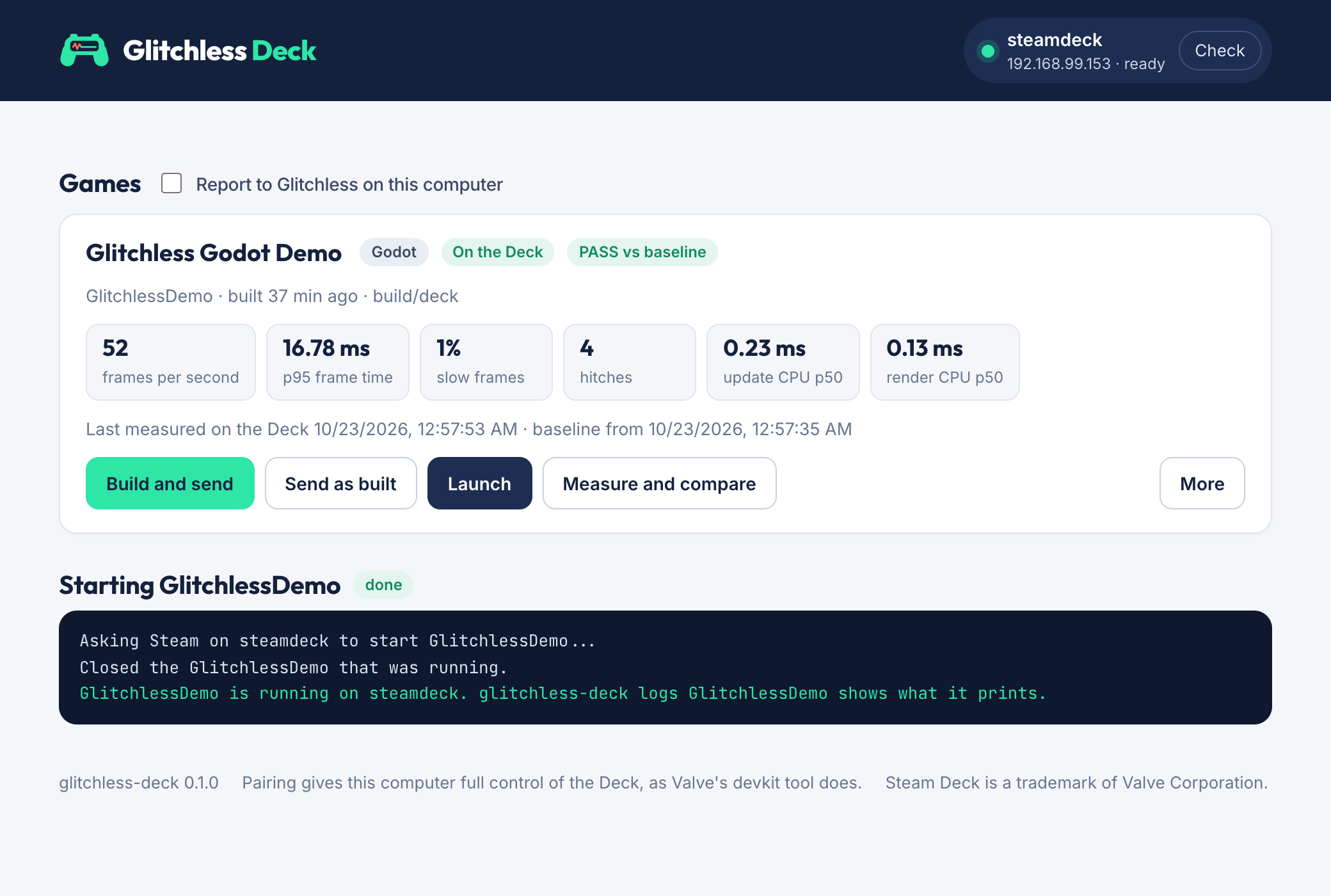
glitchless-deck uiA page at http://localhost:8791 with the Deck's state, every game this computer can send, Build and send, Launch, Measure (with the last measurement and how it compares with the baseline), Close, Logs and Remove, and the live output of whatever is running. It answers only this computer (see Security).
For coding agents
- Skill:
glitchless-deck skill --installcopies it to~/.claude/skills,~/.codex/skillsand~/.cursor/skills(whichever exist);glitchless-deck skillprints it for any other agent. The Glitchless Claude Code plugin has it as/glitchless:deck. - MCP: the Glitchless MCP server (
npx glitchless-mcp) hasglitchless_deck_send(build, send, optionally start) andglitchless_deck_measure(measure, save, compare), with the same results as the commands. --jsonon any command prints the result as JSON on stdout, with progress on stderr.
Pairing is never automatic: it needs the person to approve it on the Deck.
Commands
| Command | What it does |
| --- | --- |
| pair [name or address] | Pair with a Deck in Developer Mode. |
| init [--engine E] [--id ID] | Write glitchless.deck.json for the project in this folder. |
| add <file> / forget <file> | List or stop listing another project's file. |
| status | Whether the Deck answers, whether Steam is running, what is on it. |
| games | Every game this computer can send. |
| send [game] [--no-build] [--launch] [--glitchless] [--transfer rsync\|tar] | Build, check, send, add to the library. |
| launch [game] / stop [game] | Start it on the Deck, or close it. |
| logs [game] [--lines N] [--all] | What its last run printed (--all: earlier runs and the engine's log). |
| art [game] | Set its library artwork again. |
| remove [game] | Take it off the Deck. A game no project lists needs --yes. |
| measure [game] [--seconds S] [--warmup W] [--save NAME] [--compare NAME] [-- game args] | Measure it on the Deck and compare. |
| compare [game] A B | Compare two saved runs. |
| ui [--port N] | The page. |
| skill [--install] | The agent skill. |
| guide | This file. |
--deck NAME picks one of several paired Decks (the last one paired is the default). [game] can be left out when the project in the current folder has one game. Exit codes: 0 done, 1 a measure regressed, 2 something went wrong.
When it goes wrong
| It says | What to do |
| --- | --- |
| Not paired with a Deck yet | Pair it (above). |
| No Deck answered | The Deck is asleep, on another network, or Developer Mode is off. Give its address: glitchless-deck pair <address>. |
| The Deck turned the pairing down (403) | Pair new host was not open on the Deck, or the request was declined. Open it and pair again. |
| Cannot reach the Deck | It is asleep or off the network. Wake it and try again. |
| Steam is not running on the Deck | The Deck is in Desktop Mode or still starting. Switch to Gaming Mode. The files are already in place. |
| Steam did not answer | Developer Mode was probably switched off. Turn it back on. |
| The Godot export did not make ... | The log it names says why; usually missing export templates (Editor > Manage Export Templates). |
| Unity ... has no Linux Build Support | Unity Hub > Installs > the version > Add modules > Linux Build Support (Mono). |
| ... is a macOS program / a Windows program / for arm64 | The build is for the wrong system. The Deck runs Linux x86-64, or Windows x64 through Proton ("proton": true). |
| ... did not write a measurement | The build has no Glitchless SDK, or it waits for input before playing. logs shows what it printed. |
| The Deck cannot reach the Glitchless server | Allow incoming connections to Node: on macOS, System Settings > Network > Firewall > Options; on Windows, allow Node.js on private networks. |
How it works
A Steam Deck with Developer Mode on runs Valve's devkit service. glitchless-deck is a client for the same protocol as Valve's steamos-devkit tool (MIT; see NOTICE.md), written in plain Node with the system's OpenSSH:
- Finding the Deck. It asks for
_steamos-devkit._tcp.localover mDNS on every network interface (plain UDP, no Bonjour library), and reads the Deck's name, address and login from the answers. - Pairing posts this computer's public key, followed by the marker phrase Valve's client appends, to
http://<deck>:32000/register. The Deck shows a prompt; once approved, this computer logs in over ssh with that key. - Sending mirrors the build to
~/devkit-game/<id>/on the Deck. With rsync (macOS and Linux have it) that isrsync -a --deleteover ssh. Without it (Windows) both sides list their files with a SHA-1 hash (the Deck keeps its hashes between sends), the changed files go as one tar stream into the Deck'starover ssh, and files the build no longer has are deleted. The tar stream is written in Node, so Windows needs nothing extra. - Adding it to the library writes
~/devkit-game/<id>-argv.jsonand-settings.json(steam_playandcompat_tool, as Valve's client sets them) and writes adevkit-1request,create-shortcut, to Steam's pipe at~/.steam/steam.pipewith the session token from~/.steam/steam.token. Steam answers in the file the request names. - Launching sends the
run-gamerequest on the same pipe, as Valve'ssteam-devkit-rpc run-game gameid=<id>does. Steam starts the entry through its own launcher (reaper SteamLaunch AppId=...), so the game runs in Gaming Mode on the Deck's screen.stopends the processes whose working folder is the game's. - Artwork: Steam keeps devkit entries in
userdata/<account>/config/shortcuts.vdfwith aDevkitGameIDand the entry's app id. The pictures go to that account'sconfig/grid/folder under the names Steam uses for custom art (<appid>p.png,<appid>.png,<appid>_hero.png,<appid>_logo.png,<appid>_icon.png); on a Steam Deck on SteamOS 3 they showed in the library straight away, without restarting Steam. - Removing sends
delete-shortcut, then deletes the game's files, its settings and its artwork.
Steps 4 to 7 run as a small Python script on the Deck (SteamOS has Python 3), fed over ssh. glitchless-deck keeps its own things on the Deck in ~/.local/share/glitchless-deck/ (logs, measurements, hashes).
Security
- Pairing puts an ssh key for this computer on the Deck. That is full control of the Deck from this computer, the same as Valve's tool. The key, the Decks you paired and your list of projects stay in
~/.config/glitchless-deck/(GLITCHLESS_DECK_HOMEmoves it). - The page listens on 127.0.0.1 only, answers only requests addressed to localhost, and refuses to act unless the request carries its own header, so another website open in your browser can't drive it.
- A game's
buildcommand runs on your computer as you. Only send projects you trust.
Uninstall
rm -rf ~/.config/glitchless-deck # the pairing and the project list, on this computerglitchless-deck remove takes a game off the Deck. Pairing added this computer's public key (~/.config/glitchless-deck/devkit_rsa.pub) to ~/.ssh/authorized_keys on the Deck; delete that line there to unpair. Other tools that paired from the same computer have their own key with the same devkit-client:<you>@<computer> comment, so match the key, not the comment.
Development
npm install
npm test
The tests need no Deck. A pretend one stands in: a scratch folder for its home, a stand-in ssh that runs commands there (rsync goes through it too), a pretend Steam answering on its pipe and keeping shortcuts.vdf, the pairing endpoint and an mDNS responder. They cover pairing, discovery, both transfers (the tar way with platform: 'win32'), the library entry, artwork, launching, measuring and comparing, removing, the page's guard and the command line. GLITCHLESS_DECK_SSH, GLITCHLESS_DECK_MDNS and GLITCHLESS_DECK_DEVKIT_PORT are the hooks they use.