
glory-components
v0.3.41
Published
search-form,select-user,table-select
Downloads
200

Maintainers
 forrest-glory
Readme
glory-components
Project setup
npm install glory-components --save-dev全部组件
引入组件
import gloryComponents from 'glory-components'SearchForm 示例
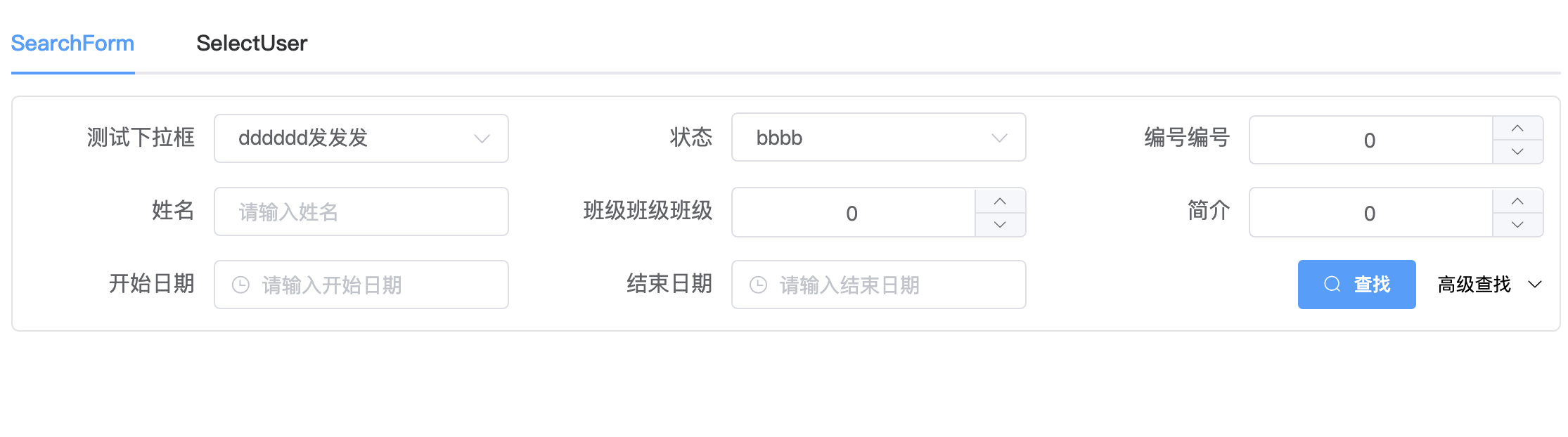
<template>
  <SearchForm :search-button="searchButton" :search-data-list="searchDataList" @searchEvent="searchHandler" @changeEvent="changeHandler" > </SearchForm>
</template>
<script>
import { SearchForm } from 'glory-components'
export default {
  name: "DemoSearchForm",
  components: {
    SearchForms
  },
  data() {
    return {
      searchButton: {
        label: "查找", // 按钮名
        defaultValue: 3 //插入位置
      },
      searchDataList: [
        {
          field: "newStatus",
          label: "测试下拉框",
          type: "Array",
          defaultValue: 2,
          props: [
            { value: 0, label: '全部' },
            { value: 1, label: '发送到发送' },
            { value: 2, label: 'dddddd发发发' },
            { value: 3, label: '试试试试试试' },
            { value: 4, label: '饿呜呜呜呜呜呜呜呜呜呜呜呜' },
          ]
        },
        {
          field: "status",
          label: "状态",
          type: "Array",
          defaultValue: 2,
          props: [
            { value: 0, label: '全部' },
            { value: 1, label: 'aaaa' },
            { value: 2, label: 'bbbb' },
            { value: 3, label: 'cccc' },
            { value: 4, label: 'dddd' },
          ]
        },
        {
          field: "id",
          label: "编号编号",
          type: "Number",
          defaultValue: 0
        },
        {
          field: "name",
          label: "姓名",
          type: "Text",
          defaultValue: null
        },
        {
          field: "class",
          label: "班级班级班级",
          type: "Number",
          defaultValue: null
        },
        {
          field: "desc",
          label: "简介",
          type: "Number",
          defaultValue: null
        },
        {
          field: "beginDate",
          label: "开始日期",
          type: "Date",
          defaultValue: null
        },
        {
          field: "endDate",
          label: "结束日期",
          type: "Date",
          defaultValue: null
        },
        {
          field: 'dateRange',
          label: '日期范围',
          type: 'DateRange',
          defaultValue: null
        },
        {
          field: 'numberRange',
          label: '数值范围',
          type: 'NumberRange',
          defaultValue: null
        }
      ]
    };
  },
  methods: {
    changeHandler($event) {
      if ($event.newStatus) {
        this.searchDataList.forEach((item, index) => {
          switch (item.field) {
            case 'status':
              item.props = [
                { value: 0, label: '全部' },
                { value: 1, label: '11111111' },
                { value: 2, label: '22222222' },
              ]
              this.searchDataList.splice(index, 1, item)
              break;
          }
          item.defaultValue = $event[item.field]
        })
      }
    },
    searchHandler($event) {
      window.console.log($event);
    }
  }
};
</script>
SelectUser 示例
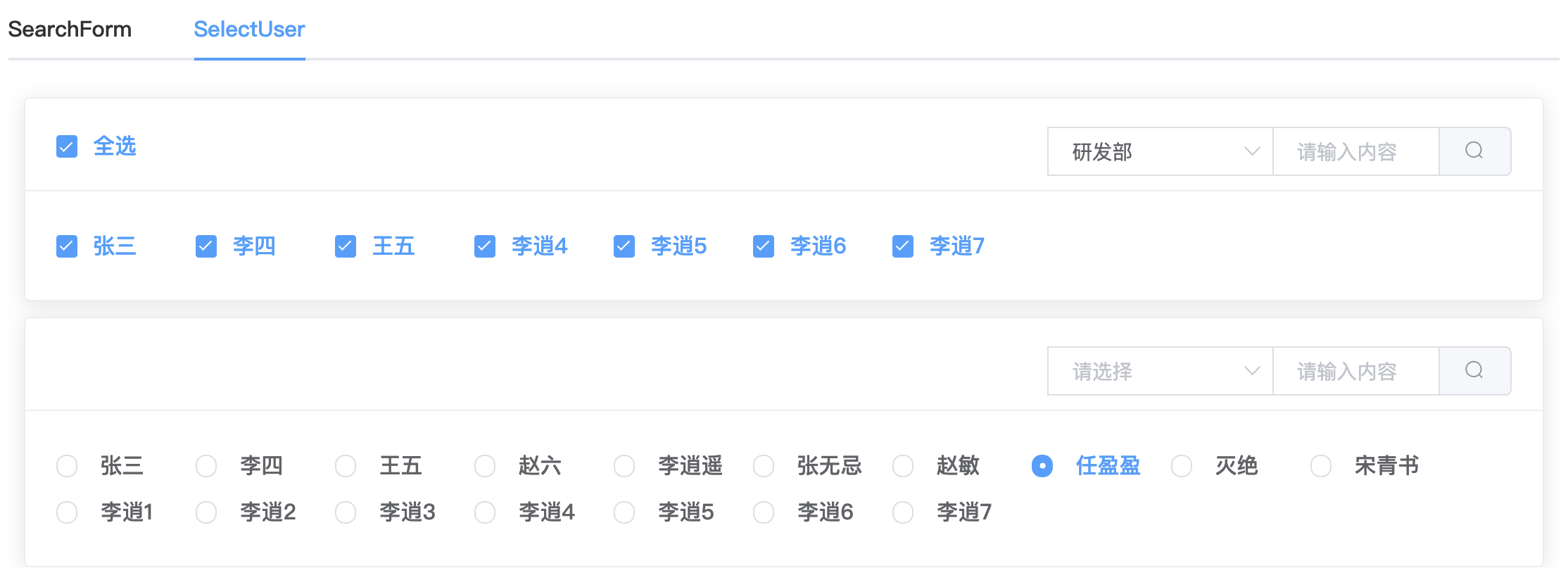
<template>
  <div class="demo">
    <SelectUser :checkedType="'checkbox'" :props="{value:'userId',label:'userName',category:'department'}" :departmentList="departmentList" :dataList="dataList" :checkedList="checkedList"  @selectedEvent="changeHandler"></SelectUser>
    <SelectUser :checkedType="'radio'" :props="{value:'userId',label:'userName',category:'department'}" :dataList="dataList"  :checked="checked" @selectedEvent="changeHandler"></SelectUser>
  </div>
</template>
<script>
import { SelectUser } from ".././../packages/main";
export default {
  name: "app",
  components: {
    SelectUser
  },
  data() {
    return {
      departmentList:[
        {value:'研发部',department:'研发部'},
        {value:'研发部',department:'实施部'},
        {value:'设计部',department:'设计部'},
        {value:'测试部',department:'测试部'}
      ],
      dataList:[
        {userId:'1',userName:'张三',department:'研发部'},
        {userId:'2',userName:'李四',department:'研发部'},
        {userId:'3',userName:'王五',department:'研发部'},
        {userId:'4',userName:'赵六',department:'测试部'},
        {userId:'5',userName:'李逍遥',department:'设计部'},
        {userId:'6',userName:'张无忌',department:'设计部'},
        {userId:'7',userName:'赵敏',department:'设计部'},
        {userId:'8',userName:'任盈盈',department:'设计部'},
        {userId:'9',userName:'灭绝',department:'设计部'},
        {userId:'10',userName:'宋青书',department:'测试部'},
        {userId:'11',userName:'李逍1',department:'测试部'},
        {userId:'12',userName:'李逍2',department:'测试部'},
        {userId:'13',userName:'李逍3',department:'设计部'},
        {userId:'14',userName:'李逍4',department:'研发部'},
        {userId:'15',userName:'李逍5',department:'研发部'},
        {userId:'16',userName:'李逍6',department:'研发部'},
        {userId:'17',userName:'李逍7',department:'研发部'},
      ],
      checkedList:['1', '3', '4', '12', '6'],
      checked:'8'
    };
  },
  methods: {
    changeHandler($event) {
      window.console.log($event);
    }
  }
};
</script>
TableSelect 示例
<template>
  <div class="demo">
    <TableSelect
      :value="value"
      :data-list="dataList"
      :options="options"
      @change="changeHandler"
    />
  </div>
</template>
<script>
import '@riophae/vue-treeselect/dist/vue-treeselect.css'
import gloryComponents from '.././../packages'
export default {
  name: 'App',
  components: {
    ...gloryComponents
  },
  data() {
    return {
      value: ['2', '3'],
      options: {
        seqWidth: 60,
        id: 'userId',
        label: 'name',
        placeholder: '请选择...',
        disabled: false,
        multiple: true,
        showTitle: true, // 是否展示表格Title
        bindFieldList: [
          { flex: 1, fieldName: 'name', nickName: '姓名' },
          { flex: 1, fieldName: 'phone', nickName: '电话号码' },
          { flex: 1, fieldName: 'email', nickName: '电子邮件' },
          { flex: 2, fieldName: 'address', nickName: '工作地址' }
        ]
      },
      dataList: []
    }
  },
  mounted () {
    this.$nextTick(() => {
      setTimeout(() => {
        this.dataList = [
          { userId: '1', name: '张三丰', age: '666', phone: '13619280412', email: '[email protected]', address: '深圳市光明区宝安大道1108号' },
          { userId: '2', name: '李逍遥', age: '777', phone: '13619280326', email: '[email protected]', address: '深圳市光明区宝安大道1108号' },
          { userId: '3', name: '小鱼儿', age: '888', phone: '13619280121', email: '[email protected]', address: '深圳市光明区宝安大道1108号' },
          { userId: '4', name: '花无缺', age: '999', phone: '13619280909', email: '[email protected]', address: '深圳市光明区宝安大道1108号' },
          { userId: '5', name: '小燕子', age: '999', phone: '13619280909', email: '[email protected]', address: '深圳市光明区宝安大道1108号' },
          { userId: '6', name: '柳青', age: '999', phone: '13619280909', email: '[email protected]', address: '深圳市光明区宝安大道1108号' },
          { userId: '7', name: '柳红', age: '999', phone: '13619280909', email: '[email protected]', address: '深圳市光明区宝安大道1108号' } ]
        // this.options.value.push('7')
        // this.options.value = '7'
      }, 1000)
    })
  },
  methods: {
    changeHandler(value) {
      window.console.log(value)
    }
  }
}
</script>
<style lang="less" scoped>
  .demo{
    width:300px;
    /deep/.vue-treeselect__menu-container > div:first-child{
      width:800px;
    }
  }
</style>
更新内容
- 新增 SelectUser组件
- SelectUser组件新增props属性
- 修复SelectUser组件全选返回undefind Bug