npm package discovery and stats viewer.

Discover Tips

  • General search

    [free text search, go nuts!]

  • Package details

    pkg:[package-name]

  • User packages

    @[username]

Sponsor

Optimize Toolset

I’ve always been into building performant and accessible sites, but lately I’ve been taking it extremely seriously. So much so that I’ve been building a tool to help me optimize and monitor the sites that I build to make sure that I’m making an attempt to offer the best experience to those who visit them. If you’re into performant, accessible and SEO friendly sites, you might like it too! You can check it out at Optimize Toolset.

About

Hi, 👋, I’m Ryan Hefner  and I built this site for me, and you! The goal of this site was to provide an easy way for me to check the stats on my npm packages, both for prioritizing issues and updates, and to give me a little kick in the pants to keep up on stuff.

As I was building it, I realized that I was actually using the tool to build the tool, and figured I might as well put this out there and hopefully others will find it to be a fast and useful way to search and browse npm packages as I have.

If you’re interested in other things I’m working on, follow me on Twitter or check out the open source projects I’ve been publishing on GitHub.

I am also working on a Twitter bot for this site to tweet the most popular, newest, random packages from npm. Please follow that account now and it will start sending out packages soon–ish.

Open Software & Tools

This site wouldn’t be possible without the immense generosity and tireless efforts from the people who make contributions to the world and share their work via open source initiatives. Thank you 🙏

© 2026 – Pkg Stats / Ryan Hefner

google-font-cli

v3.1.0

Published

Fork of google-font-installer with bug fixes and maintenance updates

Downloads

993

Readme

Google Font CLI

npm version GitHub stars Downloads

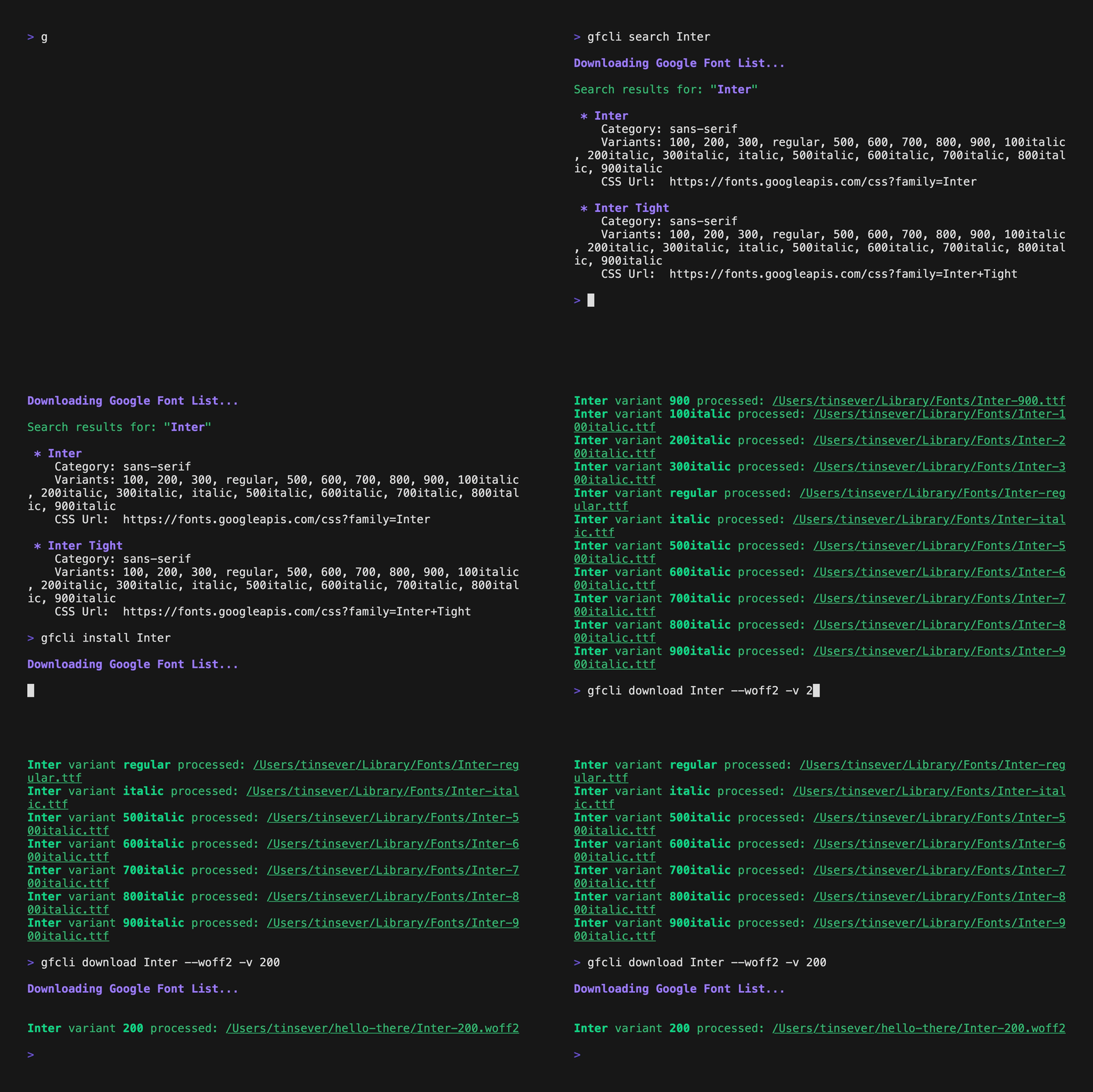
how gfcli works

This tool uses google-webfonts-helper to access Google Fonts without requiring an API key.

Google Font CLI is a NodeJS module/CLI that lets you Search, Download and Install fonts offered by Google Fonts.

Why use this?

  • Cross-platform: Automatic installation for Linux, macOS, and Windows
  • Smart Search: Fuzzy matching for font names makes finding fonts effortless
  • Developer Friendly: Use as a CLI or integrate as a Node.js library
  • Multiple Formats: Support for both TTF and WOFF2 formats

You can use it in two ways:

  • install the module system wide and use the Command Line Interface (CLI)
  • require the module in your project and use the APIs

Quick start

After installing it via npm or homebrew tap you can use the CLI!

$ gfcli install "Open Sans" -v regular,700

Table of content

Font installation footnote

In Linux and OSX, the font will be installed in the user's font directory (~/.local/share/fonts for Linux, ~/Library/Fonts for OSX). In Windows, due to the fact that font installation require some register modifications, I prefered to create a little WScript (a windows script that use ActiveX windows interface) and spawn a cscript process to install the font in a 'windows native way'.

Installation

You can install gfcli using...

npm

or anything that can access npm such as bun!

$ npm install -g google-font-cli

homebrew using tap

$ brew tap tinsever/google-font-cli
$ brew install gfcli

CLI

From your terminal emulator, you can use the command gfcli

Caching

  • The Google Fonts metadata list is cached for 24h at ~/.gfcli/cache.json.
  • Use --refresh-cache on any command to force a fresh download.
  • If the cache is valid, commands skip the download step for faster startup.

Search a font

$ gfcli search [family_name]

The search is really permissive, so you can specify only few characters and view all the font families that contains these characters. Words order is also not important. For instance, search for Source Sans or Sans Source will produce the same result.

Download a font

$ gfcli download [family_name|"family1,family2"] [-d|--dest destination_folder] [-v|--variants comma_separated_variants] [--ttf|--woff2] [--refresh-cache]

If family_name will match more than one family, nothing will be downloaded: a list of alternatives will help you better specify the font family name.

Download command accepts these options:

  • -d or --dest let you specify the folder where to download the fonts. If this option is omitted the fonts will be download in the folder in which the command was called (or in the home directory if this folder is not writable by the user)
  • -v or --variants let you specify which variants of the font will be downloaded. You have to write each variant separated by the other with a comma. For example $ gfcli download Source Sans Pro -v 300,400. If omitted, all variants will be downloaded.
  • --ttf downloads the font in TTF format (default)
  • --woff2 downloads the font in WOFF2 format (optimized for web use)
  • Multiple families: pass a comma-separated list in quotes, e.g. $ gfcli download "Inter,Roboto" --woff2 -d ./fonts
  • --refresh-cache forces a fresh font list download and ignores the local cache

Install a font

$ gfcli install [family_name|"family1,family2"] [-v|--variants comma_separated_variants] [--refresh-cache]

If family_name will match more than one family, nothing will be installed: a list of alternatives will help you better specify the font family name.

Install command accepts only one option:

  • -v or --variants let you specify which variants of the font will be installed. You have to write each variant separated by the other with a comma. For example $ gfcli install Source Sans Pro -v 300,400. If omitted, all variants will be downloaded.
  • Multiple families: pass a comma-separated list in quotes, e.g. $ gfcli install "Inter,Roboto" -v 400,700
  • --refresh-cache forces a fresh font list download and ignores the local cache

Copy font CSS url

$ gfcli copy [family_name] [-v|--variants comma_separeted_variants]

If family_name will match more than one family, nothing will be copied: a list of alternatives will help you better specify the font family name.

Examples

Search the source keyword

$ gfcli search source

Search results for: "source"

 * Source Code Pro
    Category: monospace
    Variants: 200, 300, regular, 500, 600, 700, 900
    CSS Url: https://fonts.googleapis.com/css?family=Source+Code+Pro
 * Source Sans Pro
    Category: sans-serif
    Variants: 200, 200italic, 300, 300italic, regular, italic, 600, 600italic, 700, 700italic, 900, 900italic
    CSS Url: https://fonts.googleapis.com/css?family=Source+Sans+Pro
 * Source Serif Pro
    Category: serif
    Variants: regular, 600, 700
    CSS Url: https://fonts.googleapis.com/css?family=Source+Serif+Pro

Download Source Sans Pro 600 and 700italic

$ gfcli download source sans pro -v 600,700italic

Source Sans Pro variant 600 downloaded in /home/user/someFolder/SourceSansPro-600.ttf
Source Sans Pro variant 700italic downloaded in /home/user/someFolder/SourceSansPro-700italic.ttf

Download Inter in WOFF2 format

$ gfcli download inter --woff2

Inter variant regular downloaded in /home/user/someFolder/Inter-regular.woff2
Inter variant 100 downloaded in /home/user/someFolder/Inter-100.woff2
Inter variant 200 downloaded in /home/user/someFolder/Inter-200.woff2
...

Download Inter and Roboto in one command (WOFF2)

$ gfcli download "Inter,Roboto" --woff2 -d ./fonts

Install Inter and Roboto with selected variants

$ gfcli install "Inter,Roboto" -v regular,700

Force refresh of the cached font list

$ gfcli search inter --refresh-cache

Install Lato 100

$ gfcli install lato -v 100

Lato variant 100 downloaded in /home/user/.local/share/fonts/Lato-100.ttf

Copy font url for Work Sans variants 200, normal and 600

$ gfcli copy work sans -v 200,400,600

"work sans" font url has been copied to your clipboard.

(https://fonts.googleapis.com/css?family=Work+Sans:200,400,600 will be available in your clipboard)

APIs

First of all you have to install the module in you NodeJS project:

$ npm install google-font-cli --save

And then you can require it in your code:

var GoogleFontList = require('google-font-cli');

GoogleFontList

GoogleFontList is a class that downloads the font list from google-webfonts-helper.

var GoogleFontList = require('google-font-cli');
var fontList = new GoogleFontList();

Events

'success'

Emitted when the Font List is downloaded from google-webfonts-helper and the data are converted, stored and processed. Callback contains only one argument for convenience: the object itself

'error'

Emitter if something go wrong in downloading, coverting or processing data. The Callback argument is the error object.

Public properties

data [Array]

Array of GoogleFont instances, a class that extends the data provided by google-webfonts-helper. Empty until 'success' event.

Public methods

downloadList()

Download the list from google-webfonts-helper. Called internally, but public for convenience if someone prefers to use the object without downloading the list (ex. cached data).

populate(jsonData)
  • jsonData [Array] An array of font objects.

Populate the object data property with an array of GoogleFont instances, based on the data provided by google-webfonts-helper.

clone()
  • Returns [GoogleFontList] A new instance of GoogleFontList

Return a new instance of the object, with the same data properties.

searchFont(term, field, callback)
  • term [String] The string to search for.
  • field [String] The property of the GoogleFont instance to test.
  • callback(err, fontList) [Function] Mandatory callback with optional error obj and a new instance of GoogleFontList with the searched subset of Fonts

Function with callback used to search a font inside the object data property: it's case insensitive, words order insensitive and test if the field CONTAIN that words (ex. source sans, source Sans and sans source will produce the same result).

searchFontByName(term, callback)
  • term [String] The string to search for.
  • callback(err, fontList) [Function] Mandatory callback with optional error obj and a new instance of GoogleFontList with the searched subset of Fonts

Same as searchFont, but specific for the Family property. (the font name)

searchFontByType(term, callback)
  • term [String] The string to search for.
  • callback(err, fontList) [Function] Mandatory callback with optional error obj and a new instance of GoogleFontList with the searched subset of Fonts

Same as searchFont, but specific for the Category property. (for instance serif, sans-serif, display, etc)

getFont(term, field, callback)
  • term [String] The string to search for.
  • field [String] The property of the GoogleFont instance to test.
  • callback(err, fontList) [Function] Mandatory callback with optional error obj and a new instance of GoogleFontList with the searched subset of Fonts

Function with callback used to get a specific font where a field and the term exactly match (case insensitive)

getFontByName(term, callback)
  • term [String] The string to search for.
  • callback(err, fontList) [Function] Mandatory callback with optional error obj and a new instance of GoogleFontList with the searched subset of Fonts

Same as getFont, but specific for the Family property. (the font name)

getFontByType(term, callback)
  • term [String] The string to search for.
  • callback(err, fontList) [Function] Mandatory callback with optional error obj and a new instance of GoogleFontList with the searched subset of Fonts

Same as getFont, but specific for the Category property. (for instance serif, sans-serif, display, etc)

getFirst()
  • Returns [GoogleFont|Boolean] If not empty, return the first GoogleFont instance inside GoogleFontList data property, else return false.
isSingle()
  • Returns [Boolean] Returns true if the is only one GoogleFont in GoogleFontList data property, else return false.
forEachFont(fn, callback)
  • fn(el, index) [Function] The function to execute for each element of the list, with element and index as parameters.
  • callback(err) [Function] Optional callback that will be executed after the end of the loop

Execture fn foreach GoogleFOnt in GoogleFontList data property. It's async.

GoogleFont

Class that extends data structure provided by google-webfonts-helper.

It's instanced by the populate method of GoogleFontList, called internally by the constructor or by parseRawData method.

Every object inside the data property of GoogleFontList is an instance of this class.

Public properties

| Property | Type | Description | |----------|------|-------------| | family | String | The font family name (e.g., "Open Sans") | | category | String | Font category (e.g., sans-serif, serif, monospace) | | version | String | The version of the font | | lastModified | String | Last modification date | | subsets | Array | Available character subsets for the font | | variants | Array | Available weights (e.g., ['300', 'regular', '700']) | | files | Object | URLs to font files for each variant |

Public methods

getFamily() getCategory() getVariants() getSubsets() getVersion() getLastMod() getFileList() getCssUrl()

Method to access to the public properties: it's a better idea use them insteed the properties for a future-proof reason. Maybe someday google will decide to changhe his properties names. All returns the type of the property, except GetLastMod() that return a new Date instance.

hasVariant(variant)
  • variant [String] The name of a variant (300, 500, etc);
  • Returns [Boolean] true if the font has that variant, else returns false.
getFiles(variants)
  • variants [String|Array] A string of the variant or an array with multiple variants.
  • Returns [Boolean] Returns an object with key the requested variant and value the respetive file (or false if the is no file for that variant).
saveAt(variants, destFolder, callback)
  • variants [String|Array] A string of the variant or an array with multiple variants.
  • destFolder [String] A valid path of the destination folder for the file download.
  • callback(err, result) [Function] Optional callback with eventually an error obj and and the result Array of Objects.
    • result [Array] An Array containing one object for each downloaded file, with the following properties:
      • family: the downloaded font family
      • variant: the downloaded variant
      • path: the path of the downloaded file

Download specified variants of the font in the destination folder directory.

download(variants, callback)
  • variants [String|Array] A string of the variant or an array with multiple variants.
  • callback(err, result) [Function] Optional callback with eventually an error obj and and the result Array of Objects.
    • result [Array] An Array containing one object for each downloaded file, with the following properties:
      • family: the downloaded font family
      • variant: the downloaded variant
      • path: the path of the downloaded file

Download specified variants of the font in the current directory (where the script is called).

install(variants, callback)
  • variants [String|Array] A string of the variant or an array with multiple variants.
  • callback(err, result) [Function] Optional callback with eventually an error obj and and the result Array of Objects.
    • result [Array] An Array containing one object for each installed file, with the following properties:
      • family: the installed font family
      • variant: the installed variant
      • path: the path of the installed file

Install specified variants of the font. The destination folder depends on the platform used:

  • Linux: ~/.local/share/fonts/
  • OSX: ~/Library/Fonts/
  • Windows: The file is not copied into c:\Windows\Fonts, but is used a WScript that install the font invoking the font install windows function.

Examples

var GoogleFontlist = require('google-font-cli');
var fontList = new GoogleFontList();

fontList.on('success', function(){
	this.searchFontByName('Source Sans Pro', function(err, filteredList) {
		if (err)
			throw err;
		filteredList.getFirst().download(['300', '400'], function(err, result){
			if (err)
				throw err;
			result.forEach(function(el, index){
				console.log('Variant %s of %s downloaded in %s', el.variant, el.family, el.path);
			})
		});
	})
})

fontList.on('error', function(err){
	throw err;
})