
google-spreadsheets-i18n-angular
v1.0.0
Published
The objective of this project is to use google spread sheets as source for a i18n mechanism using angularjs. To setup the source for the i18n follow the commands bellow.


Readme
Google spreadsheets i18n for Angular
The objective of this project is to use google spread sheets as source for a i18n mechanism using angularjs. To setup the source for the i18n follow the commands bellow.
Google Spreadsheets
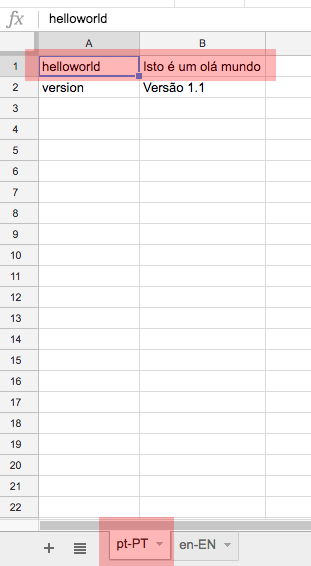
Create a spreadsheet with the following structure. https://docs.google.com/spreadsheets/d/1QUICVJzTyIDcH2vk3UfnR4t0seo4r-cs3GuNum8Gz_M/edit?usp=sharing
- Multiple sheets for multiple languages
- Pair key value for messages
Google API Key
To use this plugin you will need to create a google api key and enable googlespread sheets API. Use the link below to create your api key https://console.developers.google.com/
Install
NPM
npm install --save-dev google-spreadsheets-i18n-angularBower
bower install --save-dev google-spreadsheets-i18n-angularSetup
googleSpreadsheetI18nAngular.init(
      "spreadSheetKey",//Ex: "1QUICVJzTyIDcH2vk3UfnR4t0seo4r-cs3GuNum8Gz_M",
      "googleApiKey", // ex: "AIsasdaSdsazaSyB2CXqQxOfe22dYZlcpTAY20kjK0c",
      "defaultLanguage" // ex: "en-EN"
    )

    // Retrive languages from sheets
    googleSpreadsheetI18nAngular.getLanguage("pt-PT")
    googleSpreadsheetI18nAngular.getLanguage("en-EN")

    // Init scope variable
    $scope.i18n = googleSpreadsheetI18nAngular
Use
<h1>{{i18n.message('helloworld')}}</h1>
<h5>{{i18n.message('version')}}</h5>
<button ng-click="i18n.changeLang('pt-PT')">pt-PT</button>
<button ng-click="i18n.changeLang('en-EN')">en-EN</button>
License
Licensed under MIT.