
googlemaps-vue3
v2.0.4
Published
Google Maps Javascript Library Api For Vue.js 3


Readme
Google Maps For Vue.js 3
Javascript Library Api
Demo App
This package created for using google maps in vue.js 3
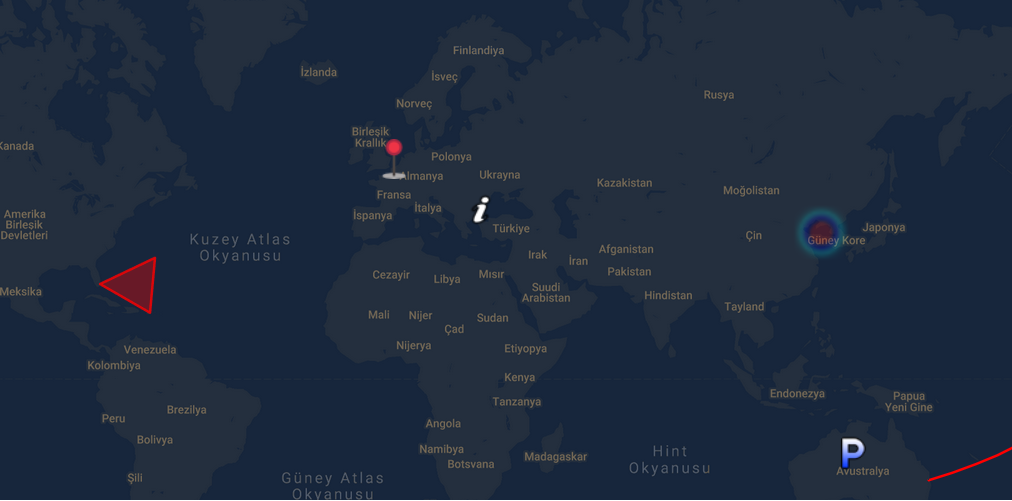
Features
- [x] Markers
- [x] Get User Location (using: https://geolocation-db.com/json/)
- [x] Street View
- [x] Polylines
- [x] Polygons
- [x] Layers (Traffic, Transit, Bicycle)
- [x] Reverse Geocode
- [x] Heat Map
- [x] Custom Tile
- [x] Add Marker OnClick
- [x] Custom OnClick Function
- [x] Custom Center Change Function
Setup
import GoogleMap from 'googlemaps-vue3'

createApp(App)
.use(GoogleMap, { apiKey: 'YOUR API KEY' })
...
Initialize Google Map
 const initializeGoogleMap = {
      streetViewControl: true,
      scaleControl: true,
      center: { lat: 34.04924594193164, lng: 34.04924594193164 },
      zoom: 2,
    };

<GoogleMap :init="initializeGoogleMap" />
Markers
Custom Icon
You can set custom icon or use default icon  Note: Default Icon From TurkHub
- When you add new marker map will be re-render
 const markers = reactive([
      {
        lat: 48.8566,
        lng: 2.3522,
        content: { content: `Paris Capital of <b>France</b>` },
        icon:
          "https://developers.google.com/maps/documentation/javascript/examples/full/images/parking_lot_maps.png",
      },
      {
        lat: 51.5074,
        lng: 0.1278,
        content: { content: `London Capital of <b>England</b>` },
        icon:
          "https://developers.google.com/maps/documentation/javascript/examples/full/images/info-i_maps.png",
      },
      {
        lat: 41.9028,
        lng: 12.4964,
        content: { content: `Roma Capital of <b>Italy</b>` },
      },
      {
        lat: 41.9028,
        lng: 12.4964,
        content: { content: `Roma Capital of <b>Italy</b>` },
      },
      {
        lat: 40.4168,
        lng: 3.7038,
        content: { content: `Madrid Capital of <b>Spain</b>` },
      },
      {
        lat: 39.9334,
        lng: 32.8597,
        content: { content: `Ankara Capital of <b>Turkey</b>` },
      },
    ]);
    <GoogleMap :init="initializeGoogleMap" :markers="markers" />
    <GoogleMap :init="initializeGoogleMap" :addMarkerOnClick="true" :markers="markers" />
Get Lat/Lng
<GoogleMap :init="initializeGoogleMap" :markers="markers" @clicked="customCoordinates = $event" />Custom OnClick Event
- If you need custom event use this prop
    function customClick(){
        console.log('custom click')
    }
    <GoogleMap
        :init="initializeGoogleMap"
        :markers="markers"
        :customClickFunction="() => customClick()"
        @clicked="customCoordinates = $event" />
Get User Position
Note: User Position Icon  From Alfredo Hernandez
<GoogleMap :init="initializeGoogleMap" :markers="markers" :getUserLocation="true" />
Polylines
 const polyineData = {
      path: [
        { lat: 37.772, lng: -122.214 },
        { lat: 21.291, lng: -157.821 },
        { lat: -18.142, lng: 178.431 },
        { lat: -27.467, lng: 153.027 },
      ],
      geodesic: true,
      strokeColor: "#FF0000",
      strokeOpacity: 1.0,
      strokeWeight: 2,
    };
`<GoogleMap :init="initializeGoogleMap" :polylines="polyineData" />`
Polygons
 const polygonData = {
      paths: [
        { lat: 25.774, lng: -80.19 },
        { lat: 18.466, lng: -66.118 },
        { lat: 32.321, lng: -64.757 },
        { lat: 25.774, lng: -80.19 },
      ],
      strokeColor: "#FF0000",
      strokeOpacity: 0.8,
      strokeWeight: 2,
      fillColor: "#FF0000",
      fillOpacity: 0.35,
    };
`<GoogleMap :init="initializeGoogleMap" :polygon="polygonData" />`
Layers
- Layers = [trafficLayer, bicycleLayer, transitLayer]
<GoogleMap :init="initializeGoogleMap" :markers="markers" :layers="['trafficLayer', 'bicycleLayer']" />
Custom Tile
<GoogleMap :init="initializeGoogleMap" :tile="'http://mt1.google.com/vt/lyrs=y&x=1325&y=3143&z=13'" />
Heat Map
   const heatMapDatas = reactive([
      {
        lat: 37.782551,
        lng: -122.445368,
      },
      {
        lat: 37.782745,
        lng: -122.444586,
      },
      {
        lat: 37.782842,
        lng: 122.443688,
      },
      {
        lat: 37.782919,
        lng: -122.442815,
      },
      {
        lat: 37.7831,
        lng: 122.441461,
      },
      {
        lat: 37.783206,
        lng: -122.440829,
      },
      {
        lat: 37.783273,
        lng: -122.440324,
      },
      {
        lat: 37.783316,
        lng: -122.440023,
      },
      {
        lat: 37.783357,
        lng: -122.439794,
      },
      {
        lat: 37.783371,
        lng: -122.439687,
      },
      {
        lat: 37.783368,
        lng: -122.439666,
      },
    ]);
<GoogleMap :init="initializeGoogleMap" :heatMap="heatMapDatas"
  />
Reverse Geocoding
:useReverseGeocode="true"
@geocoding="geo = \$event"
/>`