
gpot-ui
v1.1.13
Published
UI KIT for Taro


Readme
R Taro UI 开发手册
组件库使用介绍
环境
node = 8+
npm = 5+
构建
编译并预览
进入项目目录开始开发,可以选择小程序预览模式,或者 H5 预览模式,若使用微信小程序预览模式,则需要自行下载并打开微信开发者工具,选择预览项目根目录下 dist 目录。
1、示例-微信小程序
$ npm run dev:weapp2、示例-H5
$ npm run dev:h53、文档站点
$ npm run dev:doc项目打包
1、 打包小程序示例代码
$ npm run build:weapp2、打包 H5 示例代码
$ npm run build:h53、打包文档站点代码
$ npm run build:doc4、打包组件库代码
$ npm run build:component发布
1、发布组件库
$ npm publish2、发布组件库 beta 版
$ npm run beta3、发布文档
去sdp 站点上选择分支进行发布
开发流程
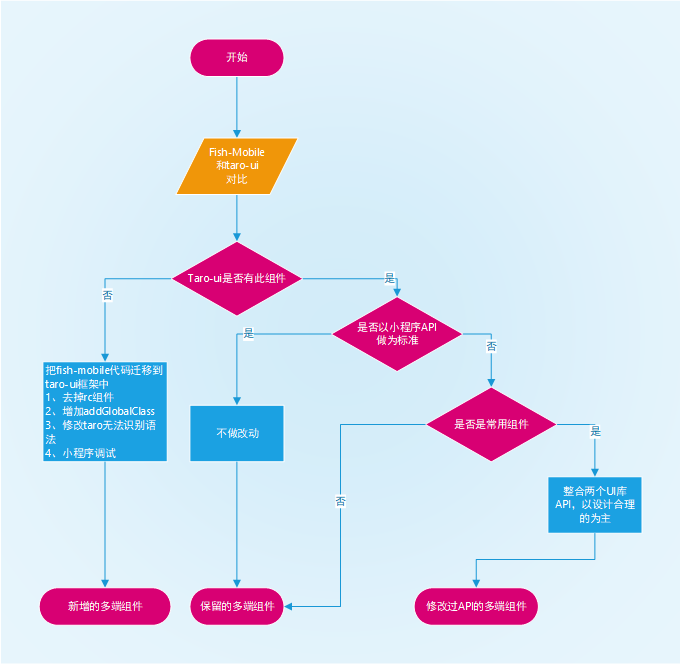
开发规范
代码规范
1、 安装如下插件,方便代码检查
2、 安装 Pretter,方便识别.prettierrc格式化代码
3、提交代码 commit 时,commit 信息需要遵循 Angular Style Commit Message Conventions。
4、当有测试用例时,请给你提交的代码也添加相应的测试用例。
目录规范
├── build                  文档配置目录
├── config                 示例配置目录
|   ├── dev.js             开发时配置
|   ├── index.js           默认配置
|   └── prod.js            打包时配置
├── dist                   默认构建输出目录
├── docs                   文档系统源码目录
|   ├── assets             静态资源
|   ├── components         公共组件目录
|   ├── lib                动画,主题变量
|   ├── markdown           API文档源文件
|   ├── pages              页面文件目录
|   ├── view               API文档页面入口
|   ├── babel.lrc          文档系统babel配置
|   ├── app.jsx            文档系统项目入口js文件
|   ├── index.html         文档系统项目入口文件
|   ├── nav.config.yml     菜单配置
|   ├── page-route.js      路由配置
├── site                   发布文档目录
├── src                    源码目录
|   ├── assets             示例 i静态资源
|   ├── common             组件 公共方法库目录
|   ├── components         组件 目录
|   ├── main               sdp环境配置文件
|   ├── pages              示例 页面文件目录
|   |   ├── index          示例 index 页面目录
|   |   |   ├── banner     示例 页面 index 私有组件
|   |   |   ├── index.js   示例 index 页面逻辑
|   |   |   └── index.css  示例 index 页面样式
|   ├── style              组件 样式
|   ├── app.scss           示例 总通用样式
|   ├── index.html         示例 入口html文件
|   ├── app.js             示例 入口js文件
|   ├──index.js            组件 全包入口js文件(含样式)
|   ├──project.config.json 示例 小程序配置文件
|   └── ui.js              组件 全包入口js文件(无样式)
└── WEB-INF                sdp发布配置文件
└── package.json
API 规范
- 尽量符合简单明了原则,参考 taro-ui 和 antd-mobile 已有的设计方式。
- 设计先行,输出用例图和类图,讨论确认后再开发。
- 组件名以
-分割, 例如picker-view,文件后缀名统一为.tsx,对外开放组件名称增加前缀At(规避 taro 构建工具无法区分基础组件的问题)
新增组件流程
组件源码
在
src\components下新增组件名目录,存放 tsx 源码和测试用例在
src\index.js和src\ui.js引入上一步新增的文件,子组件也需要单独引入,参考AtList和AtListItem在
src\style\components下新增组件名.scss,存放组件样式,开发时尽量使用变量替换通用样式在
src\style\components\index.scss中引入上一步新增的样式文件- 如果不是 ts 语法写的组件,需要修改
@types下的类型文件
- 组件必须引入
import Taro from '@rtarojs/taro',没使用也要引入
- 组件必须增加属性
static options = { addGlobalClass: true }或者继承AtComponent(import AtComponent from '../../common/component')
- 如果不是 ts 语法写的组件,需要修改
示例源码
- 在
src\pages中组件对应的分类下新增组件示例源码 - 在
src\app.js中新增组件示例路由 - 在
src\pages\panel\index.js中新增组件示例菜单
文档源码
在
docs\markdown下新增组件名.md存放 API 文档在
docs\view中新增组件名目录(大驼峰),引入上一步新增的组件名.md在
docs\page-route.js中新增组件路由在
docs\nav.config.yml中新增文档系统菜单- 示例源码需要放入md文档里的
示例标题下的js里,样式放到scss里 - API参数如果不是全端支持,需要增加两列
微信小程序和h5,表明支持程度
- 示例源码需要放入md文档里的