
gqlint
v1.8.0
Published
GraphQL Linter

Maintainers
 michielwesterbeek
Readme
GQLint


GQLint is a GraphQL linter with custom rules.
Please create tickets with new ideas for GraphQL rules.
Table of Contents
- Installation
- Usage
- Command line
- Configuration
- Rules
- Plugins
- TODO
- Inspiration
Installation
npm:
npm install -g gqlintUsage
  Usage: gqlint [options] <path>

  Lint GraphQL queries and schemas.

  Options:

    -h, --help                  output usage information
    -V, --version               output the version number
    -r, --reporter <reporter>   the reporter to use: stylish (default), compact, json
    -c, --config <config>       the config file to use: .gqlint (default)
URL
You can also use the tool get-graphql-schema to lint your running API.
get-graphql-schema https://graphql-url.com/graphql | gqlint --reporter codeframeThe Codeframe reporter is used to also show the position of the error within the code.
Command line
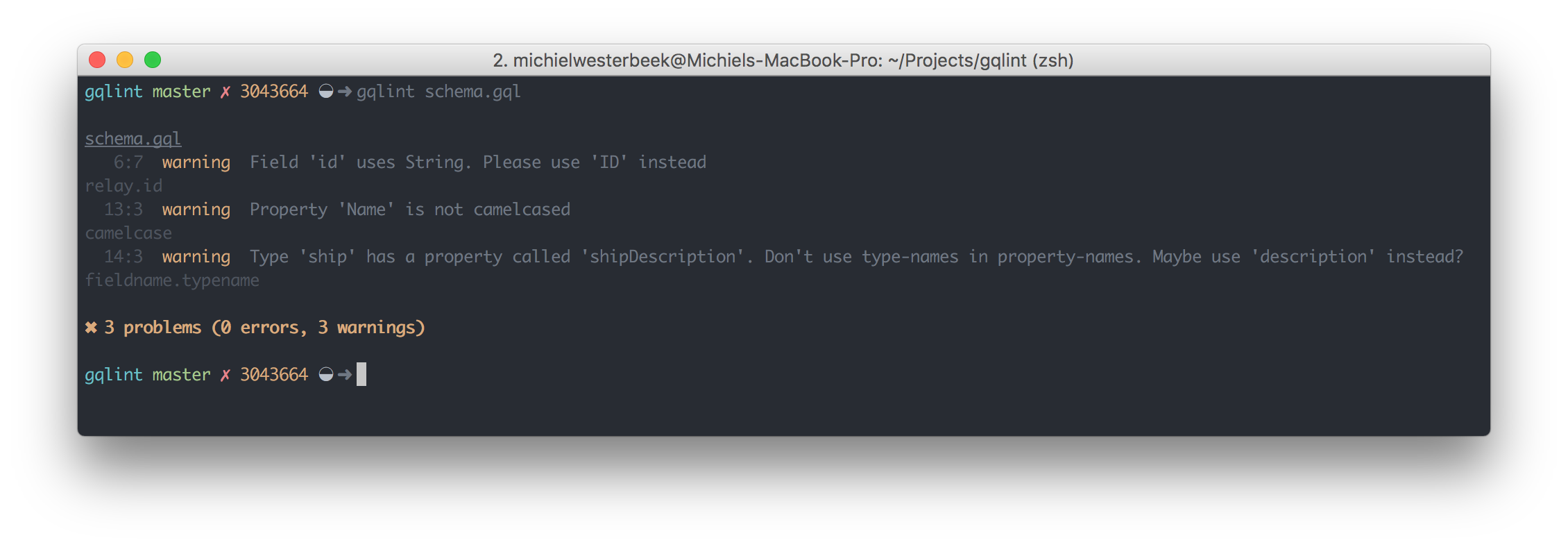
Configuration
You can create your own .gqlint file which contains the list of rules you want to check, and to what severity. This is mostly the same format as used by ESLint.
{
  "rules": {
    "camelcase": "warn",
    "fieldname.typename": "warn",
    "relay.connection": "warn",
    "relay.id": "warn",
    "singular.mutations": "warn",
    "enum.casing": "warn",
    "description.type": "off",
    "description.field": "off"
  }
}
The keys of the rules object are the names of the GQLint rules we currently have in GQLint. The value is the error level of the rule and can be one of these values:
"off"or0- turn the rule off"warn"or1- turn the rule on as a warning (doesn't affect exit code)"error"or2- turn the rule on as an error (exit code will be 1)
The three error levels allow you control over how GQLint applies rules.
Rules
CamelCase
Verifies if properties are camelcased.
Property 'Name' is not camelcased.
Fieldname Typename
Checks if you use the name of the type in your field.
Type 'User' has a property called 'userId'. Don't use type-names in property-names. Maybe use 'id' instead?
Relay Connection
Checks if Types ending with Connection have 'edges' and 'pageInfo'.
Connection 'UserConnection' does not have fields 'edges, pageInfo'.
Relay ID
Checks if fields that have 'id' in them use the ID type instead of others (string, integer, etc.)
Field 'id' in Type 'User' uses 'String'. Please use 'ID' instead.
Singular Mutations
Checks if mutations are singular (createUser) and not plural (createUsers).
Mutation 'createUsers' is plural. It's better to use singular mutations.
Remove/Delete Mutations
Checks if mutations on single entities use 'delete' (deleteUser) and not 'remove' (removeUser).
Also checks if mutations on relationships use 'remove' (removeUserFromGroup) and not 'delete' (deleteUserFromGroup).
Mutation 'removeUser' uses 'remove' for a single entity. It's better to use 'deleteUser'.
Mutation '${name}' uses 'delete' for a mutation on a relationship. It's better to use '${suggestion}'.
Enum Casing
Checks if all the values of a ENUM-type are uppercase. In the future this could take a value like 'uppercase | lowercase | camelCase | snake_case'.
Property 'Currency' has invalidly cased values. Please uppercase them.
Description Type
Checks if all Types have a description.
Type 'Person' has no description.
Description Field
Checks if all Fields have a description.
Field 'name' has no description.
Plugins
Vim
I created a plugin for ALE in the plugins/vim folder. You can add this to your vim config after installing the tool. If you want me to make a plugin for your editor, please open an issue (or a PR).
TODO
- [x] Create .gqlint file to enable/disable rules.
- [ ] Make more rules.
- [ ] Refactor.