
grapesjs-ai-agent
v1.0.11
Published
GrapesJS AI Agent


Readme
GrapesJS AI Agent
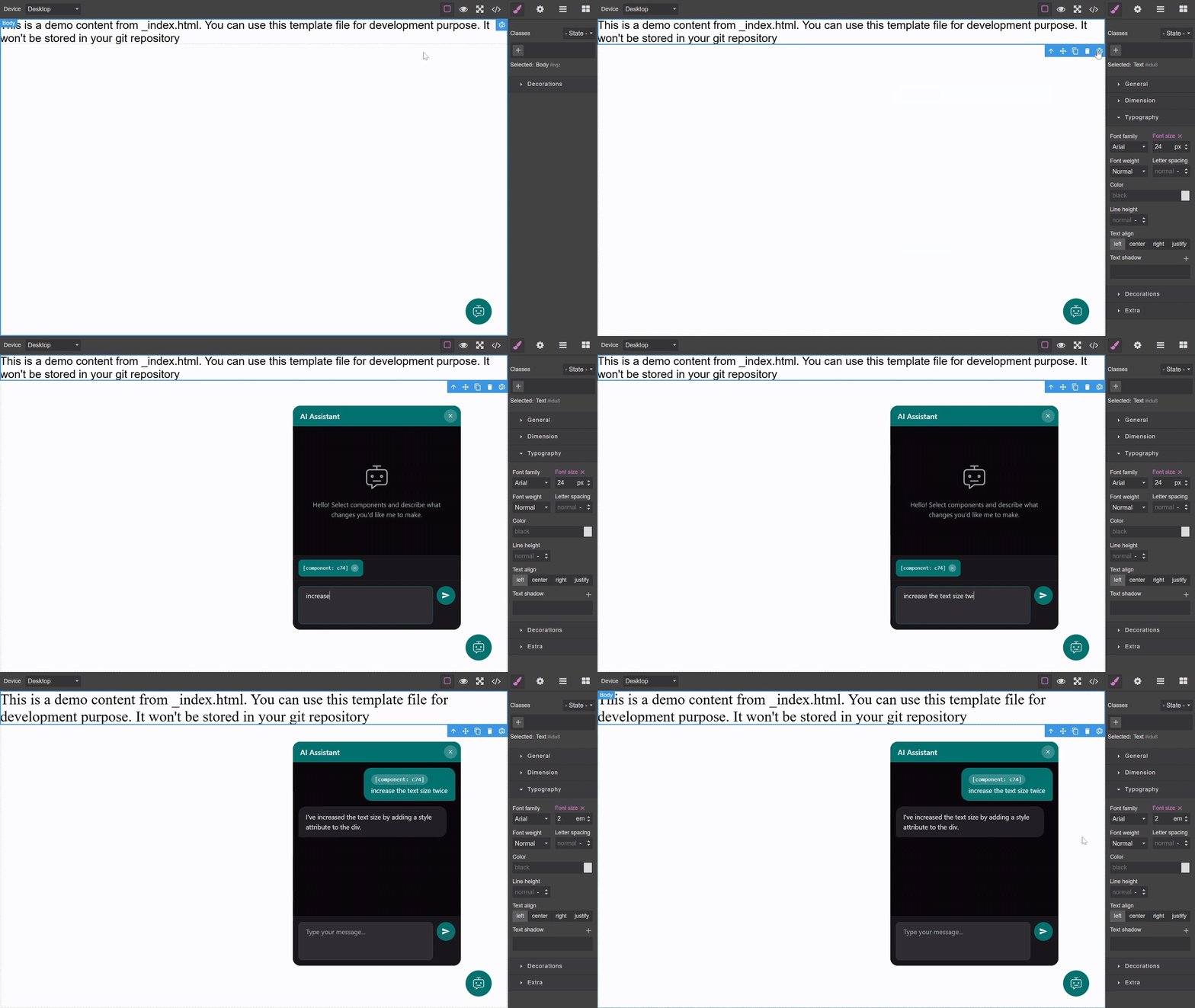
A GrapesJS plugin that adds an AI-powered chatbot interface for modifying page components through natural language.
Features
- Draggable FAB - Floating Action Button that can be positioned anywhere in the editor
- Chatbot Interface - Clean, modern chat panel for AI interactions
- Component Integration - Select components and reference them in chat messages
- Live Modifications - AI responses directly update component HTML
- Session Persistence - FAB position and chat history persist during the session
- Follow-up Context - Subsequent messages automatically reference previously selected components
Installation
CDN
<link href="https://unpkg.com/grapesjs/dist/css/grapes.min.css" rel="stylesheet">
<script src="https://unpkg.com/grapesjs"></script>
<script src="https://unpkg.com/grapesjs-ai-agent"></script>
NPM
npm i grapesjs-ai-agentUsage
Browser
<link href="https://unpkg.com/grapesjs/dist/css/grapes.min.css" rel="stylesheet"/>
<script src="https://unpkg.com/grapesjs"></script>
<script src="path/to/grapesjs-ai-agent.min.js"></script>

<div id="gjs"></div>

<script>
  var editor = grapesjs.init({
    container: '#gjs',
    plugins: ['grapesjs-ai-agent'],
    pluginsOpts: {
      'grapesjs-ai-agent': {
        api: 'https://your-api-endpoint.com/chat'
      }
    }
  });
</script>
Modern JavaScript
import grapesjs from 'grapesjs';
import aiAgentPlugin from 'grapesjs-ai-agent';
import 'grapesjs/dist/css/grapes.min.css';

const editor = grapesjs.init({
  container: '#gjs',
  plugins: [aiAgentPlugin],
  pluginsOpts: {
    [aiAgentPlugin]: {
      api: 'https://your-api-endpoint.com/chat',
      panelWidth: 400,
      panelHeight: 500
    }
  }
});
Options
| Option | Type | Default | Description |
|--------|------|---------|-------------|
| api | string | '' | Required. API endpoint for chatbot requests. |
| headers | object | {} | Optional. Additional headers for API requests. |
| fabPosition | object | { x: null, y: null } | Starting coordinates for the FAB. |
| panelWidth | number | 360 | Width of the chatbot panel in pixels. |
| panelHeight | number | 480 | Height of the chatbot panel in pixels. |
| classPrefix | string | 'gaia' | CSS class prefix to avoid conflicts. |
| chatTitle | string | 'AI Assistant' | Custom title for the chat panel header. |
| inputPlaceholder | string | 'Type your message...' | Custom placeholder text for the input field. |
| emptyMessage | string | 'Hello! Select components...' | Custom message shown when chat is empty. |
| i18n | object | {} | Localization overrides. |
API Integration
Request Format
When a user submits a message, the plugin sends a POST request to your API endpoint:
{
  "history": [
    { "role": "assistant", "content": "Hello!" },
    { "role": "user", "content": "Change the button color", "components": ["c123"] }
  ],
  "message": "Make it red",
  "components": ["c123", "c456"],
  "componentData": {
    "c123": "<button class=\"btn\">Click me</button>",
    "c456": "<div class=\"container\">...</div>"
  }
}
Response Format
Your API should return:
{
  "reply": "I've updated the button color to red.",
  "modifications": {
    "c123": "<button class=\"btn\" style=\"background: red;\">Click me</button>"
  }
}
The modifications object maps component IDs to their new HTML. The plugin will automatically update the corresponding components in the editor.
Component Toolbar
When you select any component in the editor, a "Send to AI Chat" button appears in the component toolbar. Clicking it adds the component's ID as a badge in the chat input, allowing you to reference multiple components in a single message.
Public API
The plugin exposes methods via editor.AiAgent:
// Panel control
editor.AiAgent.open();
editor.AiAgent.close();
editor.AiAgent.toggle();
editor.AiAgent.isOpen();

// Visibility control
editor.AiAgent.show();
editor.AiAgent.hide();

// Component management
editor.AiAgent.addComponent('component-id');
editor.AiAgent.removeComponent('component-id');
editor.AiAgent.getPendingComponents();

// Chat history
editor.AiAgent.getHistory();
editor.AiAgent.clearHistory();

// API module access
const api = editor.AiAgent.api();
Demo Backend
A demo backend server is included for testing. It proxies requests to OpenRouter.
Set your API key in
scripts/demo-server.js:const OPENROUTER_API_KEY = 'your-key-here';Run both frontend and backend:
npm startThe demo server runs at
http://localhost:3000/api/chat
See backend_prompt.md for the system prompt and security guidelines used by the demo server.
Styling
The plugin uses a CSS class prefix (default: gaia) to avoid conflicts. Override these classes to customize:
.gaia-fab- Floating Action Button.gaia-panel- Chatbot panel container.gaia-message- Chat message bubbles.gaia-badge- Component reference badges.gaia-input- Text input field
Development
# Clone repository
git clone https://github.com/a-hakim/grapesjs-ai-agent.git
cd grapesjs-ai-agent

# Install dependencies
npm install

# Start dev server (frontend + demo backend)
npm start

# Build for production
npm run build
License
MIT License