
grapesjs-alpinejs
v1.0.8
Published
GrapesJS plugin to integrates Alpine.js directives, allowing reactive components.


Readme
GrapesJS AlpineJS
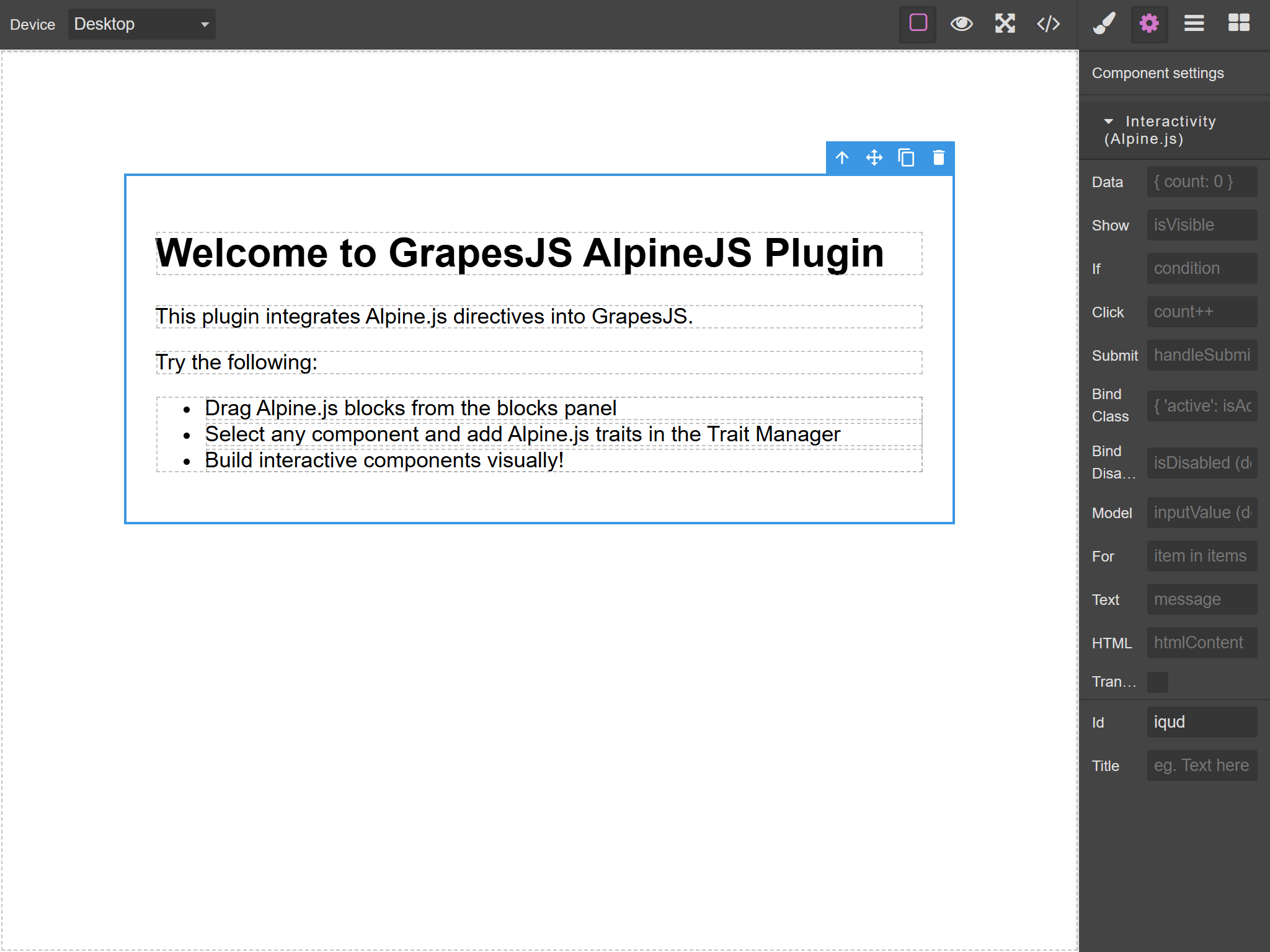
A GrapesJS plugin that seamlessly integrates Alpine.js directives into the visual editor, allowing you to build interactive components without writing code.
Demo
Try it live! Demo Link
Quick Start
<link href="https://unpkg.com/grapesjs/dist/css/grapes.min.css" rel="stylesheet">
<script src="https://unpkg.com/grapesjs"></script>
<script src="https://unpkg.com/grapesjs-alpinejs"></script>

<div id="gjs"></div>

<script>
const editor = grapesjs.init({
  container: '#gjs',
  height: '100%',
  fromElement: true,
  storageManager: false,
  plugins: ['grapesjs-alpinejs'],
  pluginsOpts: {
    'grapesjs-alpinejs': {
      alpineCdn: 'https://cdn.jsdelivr.net/npm/[email protected]/dist/cdn.min.js'
    }
  }
});
</script>
Features
Alpine.js Traits** - Add Alpine.js directives to any component via the Trait Manager Live Preview** - See Alpine.js interactivity work directly in the canvas Clean Export - Export fully functional HTML with Alpine.js directives
Summary
- Plugin name:
grapesjs-alpinejs - Alpine.js Traits (available for all components)
x-data- Define reactive data scopex-show- Toggle visibilityx-if- Conditional renderingx-on:click- Click event handlerx-on:submit- Submit event handlerx-bind:class- Dynamic class bindingx-bind:disabled- Dynamic disabled statex-model- Two-way data bindingx-for- List renderingx-text- Text content bindingx-html- HTML content bindingx-transition- Transition effects
Options
| Option | Description | Default |
| ----------------- | -------------------------------------- | --------------------------------------------------------------- |
| alpineCdn | CDN URL for Alpine.js library | https://cdn.jsdelivr.net/npm/[email protected]/dist/cdn.min.js |
| categoryLabel | Label for Alpine.js trait category | Alpine.js |
| i18n | Custom internationalization messages | {} |
Download
- CDN
https://unpkg.com/grapesjs-alpinejs
- NPM
npm i grapesjs-alpinejs
- GIT
git clone https://github.com/a-hakim/grapesjs-alpinejs.git
Usage
Browser
<link href="https://unpkg.com/grapesjs/dist/css/grapes.min.css" rel="stylesheet"/>
<script src="https://unpkg.com/grapesjs"></script>
<script src="path/to/grapesjs-alpinejs.min.js"></script>

<div id="gjs"></div>

<script type="text/javascript">
  var editor = grapesjs.init({
      container: '#gjs',
      height: '100%',
      fromElement: true,
      storageManager: false,
      plugins: ['grapesjs-alpinejs'],
      pluginsOpts: {
        'grapesjs-alpinejs': {
          // Alpine.js CDN URL (Alpine.js 3.x)
          alpineCdn: 'https://cdn.jsdelivr.net/npm/[email protected]/dist/cdn.min.js',
          // Category labels
          categoryLabel: 'Interactivity (Alpine.js)',
          // Trait labels
          traitLabels: {
            'x-data': 'Data',
            'x-show': 'Show',
            'x-if': 'If',
            'x-on:click': 'Click',
            'x-on:submit': 'Submit',
            'x-bind:class': 'Bind Class',
            'x-bind:disabled': 'Bind Disabled',
            'x-model': 'Model',
            'x-for': 'For',
            'x-text': 'Text',
            'x-html': 'HTML',
            'x-transition': 'Transition',
          },
        }
      }
  });
</script>
Modern JavaScript
import grapesjs from 'grapesjs';
import plugin from 'grapesjs-alpinejs';
import 'grapesjs/dist/css/grapes.min.css';

const editor = grapesjs.init({
  container : '#gjs',
  height: '100%',
  fromElement: true,
  storageManager: false,
  plugins: [plugin],
  pluginsOpts: {
    [plugin]: {
      alpineCdn: 'https://cdn.jsdelivr.net/npm/[email protected]/dist/cdn.min.js'
    }
  }
});
How to Use
1. Adding Alpine.js Directives to Any Component
- Select any component in the canvas
- Open the Trait Manager panel
- Find the "Alpine.js" category
- Add any Alpine.js directive (x-data, x-show, x-on:click, etc.)
- See the interactivity work in real-time!
2. Exporting Your Work
When you export your HTML:
- All Alpine.js directives are included in the HTML attributes
- Remember to include Alpine.js in your final webpage:
<script src="https://cdn.jsdelivr.net/npm/[email protected]/dist/cdn.min.js" defer></script>Examples
Creating a Toggle Button
- Add a button to the canvas
- Add a div below it
- On the parent container, add
x-datatrait:{ visible: false } - On the button, add
x-on:clicktrait:visible = !visible - On the div, add
x-showtrait:visible - Done! Click the button to toggle the div
Creating a Form with Two-way Binding
- Add a form with an input and a paragraph
- On the form, add
x-datatrait:{ name: '' } - On the input, add
x-modeltrait:name - On the paragraph, add
x-texttrait:'Hello ' + name - Type in the input to see real-time updates!
Development
Clone the repository
$ git clone https://github.com/a-hakim/grapesjs-alpinejs.git
$ cd grapesjs-alpinejs
Install dependencies
$ npm iStart the dev server
$ npm startBuild the source
$ npm run buildContributing
Contributions are welcome! Please feel free to submit a Pull Request.
License
MIT