
grapesjs-devtools
v1.4.5
Published
In-editor developer panel for GrapesJS — component/style inspection, event log, REPL, AI assistant and more. Built by gjs.market for the GrapesJS community.
Downloads
762

Maintainers
 gjs_market
Readme
grapesjs-devtools
Developer panel inside the GrapesJS editor — like the browser DevTools, but for the editor's internal state.
Built by gjs.market for the whole GrapesJS community. ♥ Need custom GrapesJS work? → gjs.market/services
🧩 Plugin page: gjs.market/products/grapesjs-devtools 📖 Full documentation: DOCS.md
A dockable, toggleable panel that lets you inspect the component tree, edit
attributes/traits live, watch the editor's event firehose, evaluate JavaScript
against the running editor, and even ask an AI for GrapesJS code examples —
without leaving the canvas.
Live demo
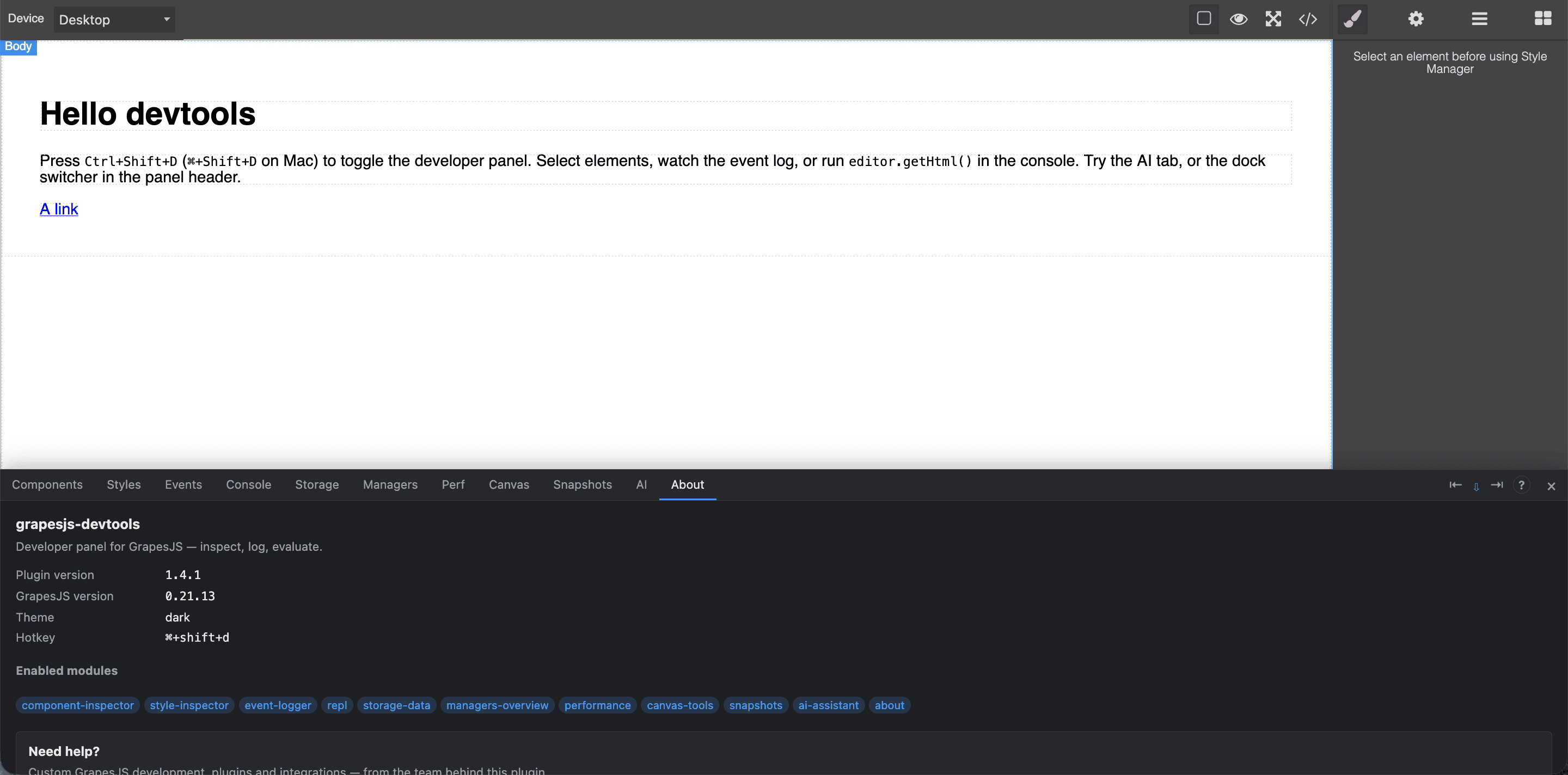
▶ Open the live demo — switch between the standard Webpage preset and GrapesJS Studio with the toggle at the top, then press Ctrl+Shift+D (⌘+Shift+D on macOS) to open the devtools panel.
All feature modules are implemented:
| Module | What it does |
| --- | --- |
| Components | Live component tree, two-way selection with the canvas, inline attribute/trait editing, breadcrumbs, Copy JSON. |
| Styles | CSS rules applying to the selection (with cascade-override strike-through + inline editing), a searchable table of all project rules, and a dead-rule scanner. |
| Events | Single-listener event log with group + text filters, pause/clear, a virtualized list, a stats/frequency view, and per-event payload inspection. |
| Console | REPL with editor and $0 in scope, history, editor. autocomplete, and quick snippets. |
| Storage | Project-data JSON tree, structural diff between snapshots, export/import, live syntax-highlighted HTML/CSS, and a storage-event log. |
| Managers | Accordion overview of Blocks, Traits, Selectors, Devices and configured Plugins; click a selector to filter it in the Styles module. |
| Perf | Live metrics (components, CSS rules, selectors, editor listeners, undo stack), UndoManager controls, a canvas re-render timer, and a baseline/compare leak detector. |
| Canvas | Overlay tools: highlight every component (colour by depth) with the box model of the selection, a canvas-body pointer-events killer, and scroll-to-selected. |
| Snapshots | Capture/restore full project state (data + selection + device), with export/import and optional localStorage persistence. |
| AI | Pick any part of the editor (a panel, a button, a manager) or use the canvas selection as context, then ask a question and get a GrapesJS code example + explanation (FAQ-style, Markdown with copyable code). Providers: Claude, ChatGPT, Gemini. |
| About | Versions, enabled modules, and links to the docs and gjs.market development services. |
Notes on private-API reliance
The Perf module's editor listeners metric reads editor.getModel()._events
(an internal Backbone structure) and the undo-stack entry details are not part of
the public API; both are isolated in try/catch and render n/a rather than
throwing if GrapesJS changes these internals. The Canvas overlays account for
Canvas.getZoom() and are drawn above the iframe — they never mutate its DOM
(the only exception is the explicit pointer-events toggle on the canvas body).
Style Inspector — matching limitations
Applied rules are found with element.matches(selector) against the element's
current DOM state, so:
- State rules (
:hover,:active, …) are matched on their base selector (state stripped) and shown as applying, even though the state isn't live in the canvas. - Pseudo-elements (
::before/::after) and other non-rendered states can't be verified against a real element; they are listed and flagged. @mediarules for non-active devices are listed with their media label but not evaluated for the current viewport.
The dead-rule scan uses the same base-selector matching against the canvas document, so a rule that only ever applies in a non-active state/device is not reported as dead.
Install
npm install grapesjs-devtoolsgrapesjs is a peer dependency. Compatible with GrapesJS >= 0.21.0.
Usage
import grapesjs from 'grapesjs';
import devtools from 'grapesjs-devtools';
import 'grapesjs-devtools/dist/style.css';

const editor = grapesjs.init({
  container: '#gjs',
  plugins: [devtools],
  pluginsOpts: {
    'grapesjs-devtools': {
      enabled: false,          // auto-open the panel on start
      hotkey: 'ctrl+shift+d',  // toggle hotkey
      position: 'bottom',      // 'right' | 'left' | 'bottom'
      panelWidth: 360,         // px, for position: 'right'
      panelHeight: 280,        // px, for position: 'bottom'
      theme: 'dark',           // 'dark' | 'light' | 'auto'
      eventLogLimit: 500,      // ring-buffer size for the event log
      ai: {                    // AI assistant (optional; also settable in the panel)
        provider: 'claude',    // 'claude' | 'openai' | 'gemini'
        apiKey: '',            // your key (or enter it in the panel's Settings)
        model: 'claude-opus-4-8',
        stream: true,          // stream the response token-by-token
        endpoint: '',          // optional custom endpoint (proxy or base URL)
        sendKeyToEndpoint: false, // true = send key to endpoint (OpenAI-compatible)
      },
      // modules: ['component-inspector', 'style-inspector', 'event-logger',
      //           'repl', 'storage-data', 'managers-overview', 'performance',
      //           'canvas-tools', 'snapshots', 'ai-assistant', 'about'],
    },
  },
});
Toggle the panel with Ctrl+Shift+D (⌘+Shift+D on macOS) or the
devtools:toggle command:
editor.runCommand('devtools:toggle');
editor.stopCommand('devtools:toggle');
Options
| Option | Type | Default | Notes |
| --- | --- | --- | --- |
| enabled | boolean | false | Show the panel on start. |
| hotkey | string | 'ctrl+shift+d' | GrapesJS keymap syntax. Every ctrl+… combo is auto-bound to ⌘+… as well, so it works on macOS. |
| position | 'right' \| 'left' \| 'bottom' | 'bottom' | Docking side (also switchable live from the panel header, and persisted). |
| panelWidth | number | 360 | Width in px (position: 'right' \| 'left'). |
| panelHeight | number | 280 | Height in px (position: 'bottom'). |
| modules | ModuleId[] | all | Which modules to enable. |
| eventLogLimit | number | 500 | Event-log ring-buffer size. |
| theme | 'dark' \| 'light' \| 'auto' | 'dark' | auto follows prefers-color-scheme. |
| ai | { provider, apiKey, model, stream, endpoint, sendKeyToEndpoint } | {} | AI assistant config. provider: 'claude' | 'openai' | 'gemini'. stream (default true). endpoint: optional proxy/base-URL. sendKeyToEndpoint (default false): send the key to the endpoint (OpenAI-compatible mode). All fields can also be set in the panel (stored in localStorage). |
AI assistant
The AI tab answers GrapesJS questions with example code. Set a provider and API key in the tab's ⚙ Settings (stored only in your browser's localStorage), click 🎯 Pick element and click any part of the editor — a panel, a button, a manager — or just select a component on the canvas, then ask (e.g. "how do I add another button here?"). Responses stream in and render as Markdown with copyable code.
By default, requests are sent directly from the browser to the chosen
provider via fetch (no backend, no SDK) — a development-only convenience,
flagged with a warning in the UI. Anthropic calls use the
anthropic-dangerous-direct-browser-access header and default to claude-opus-4-8.
Proxy mode (keep your key server-side)
Set ai.endpoint (or the Proxy endpoint field in Settings) to route requests
through your own server so the API key is never sent from the browser. It's a
transparent pass-through: the browser POSTs the provider-native body (including
stream) to your endpoint with a x-devtools-provider: <provider> header and no
auth; your proxy adds the provider's key/headers, forwards to the provider, and
streams the response straight back. A minimal proxy:
// POST /api  — forwards to Anthropic, injecting the key
app.post('/api', async (req, res) => {
  const upstream = await fetch('https://api.anthropic.com/v1/messages', {
    method: 'POST',
    headers: {
      'content-type': 'application/json',
      'x-api-key': process.env.ANTHROPIC_API_KEY,   // key stays here
      'anthropic-version': '2023-06-01',
    },
    body: JSON.stringify(req.body),                  // provider-native body
  });
  res.setHeader('content-type', upstream.headers.get('content-type') || 'application/json');
  upstream.body.pipe(res);                           // stream SSE straight through
});
OpenAI-compatible / self-hosted backends
To use OpenRouter, Ollama, LM Studio, Together or any OpenAI-compatible
gateway, set provider: 'openai', put the base URL in endpoint, and turn on
sendKeyToEndpoint (the "Endpoint is a provider (send API key)" checkbox in
Settings). The key is then sent to that endpoint (unlike proxy mode). Examples:
// OpenRouter
ai: { provider: 'openai', endpoint: 'https://openrouter.ai/api/v1/chat/completions',
      apiKey: 'sk-or-…', model: 'meta-llama/llama-3.1-8b-instruct', sendKeyToEndpoint: true }

// Ollama (local, no key needed)
ai: { provider: 'openai', endpoint: 'http://localhost:11434/v1/chat/completions',
      apiKey: 'ollama', model: 'llama3.1', sendKeyToEndpoint: true }
Other niceties: Esc cancels an in-progress request, and only the most recent turns are kept in the conversation sent to the provider (bounded token usage).
Architecture
src/
├── index.ts                 # plugin entry: options, devtools:toggle command, hotkey
├── core/
│   ├── DevtoolsPanel.ts     # docked container: tabs, resize, docking, theme
│   ├── ModuleRegistry.ts    # lazy mount + activate/deactivate lifecycle
│   ├── EditorBridge.ts      # tracked editor subscriptions + disposeAll()
│   └── theme.css            # CSS variables (dark default, .gjs-dt-light)
├── modules/                 # component-inspector, style-inspector, event-logger,
│                            #   repl, storage-data, managers-overview, performance,
│                            #   canvas-tools, snapshots, ai-assistant, about
└── utils/                   # dom, serialize, json-viewer, debounce, format
Design principles
- No leaks. Every module subscribes to editor events only through
EditorBridge, which removes all subscriptions when the panel is torn down —editor._eventsreturns to baseline. - Lazy. Modules mount on first tab open; timers/RAF loops stop on
deactivate(). - Non-intrusive. The panel is a
position: fixedoverlay; it never writes into the canvas iframe. - Zero runtime deps. UI is vanilla DOM; large lists (event log) are virtualized and the component tree renders children lazily, so 1000+ component projects stay responsive.
Writing a module
import type { DevtoolsModule, ModuleContext } from 'grapesjs-devtools';

class MyModule implements DevtoolsModule {
  id = 'my-module';
  title = 'My Module';
  constructor(private ctx: ModuleContext) {}
  mount(el: HTMLElement) {
    this.ctx.bridge.on('component:selected', (c) => { /* … */ });
  }
  deactivate() { /* stop timers */ }
  destroy() { /* release resources */ }
}
Development
npm install
npm run dev        # starts Vite and opens the demo at http://localhost:5173
npm run typecheck  # tsc --strict
npm test           # vitest (pure-util unit tests)
npm run build      # ESM + UMD + d.ts into dist/ (the published package)
npm run build:site # builds the demo site into dist-site/ (what Netlify publishes)
npm run dev serves the demo/ site — the plugin loaded from source into a full
GrapesJS editor, with a top switcher between the standard Webpage preset
and GrapesJS Studio (GrapesJS is resolved from node_modules, no CDN). Open
http://localhost:5173 and press Ctrl+Shift+D.
The preset switcher lives only in the demo (
demo/), which is not part of the published npm package (filesshipsdist,src,README.md). Installing the plugin into your own project gives you just the devtools panel — no switcher.
Support & services
This plugin is free and open source, built by gjs.market
for the GrapesJS community. You can also reach it any time from the panel — the
? in the header and the About tab link straight to our services.
Need custom GrapesJS development — plugins, integrations, a tailored editor, or help wiring this into your product?
- 🧩 Plugin page: gjs.market/products/grapesjs-devtools
- ▶ Live demo: sunny-strudel-d54292.netlify.app
- 📖 Full documentation: DOCS.md
- 🐛 Issues / contributions: GitHub
- 🛠️ More GrapesJS plugins & tools: gjs.market
License
MIT — © gjs.market