
graphmind-mcp
v1.1.10
Published
Local semantic code graph for AI agents. Adds codebase-aware MCP tools (search, dependencies, architecture map) to Claude Code, Cursor, Windsurf, and Codex — runs entirely on your laptop, no API keys, no cloud.

Maintainers
 adharsh
Readme
GraphMind
Local semantic code graph for AI agents.
Lets Claude Code, Cursor, Windsurf, and Codex search and reason about your codebase by meaning and structure — not just text. Runs entirely on your laptop. No API keys. No cloud. Code never leaves the machine.
GraphCodeBERT (768-d embeddings) + a Graph Attention Network on top + FAISS, running on Apple Silicon MPS, CUDA, or CPU. Exposes 13 MCP tools to your editor over stdio or streamable-http.
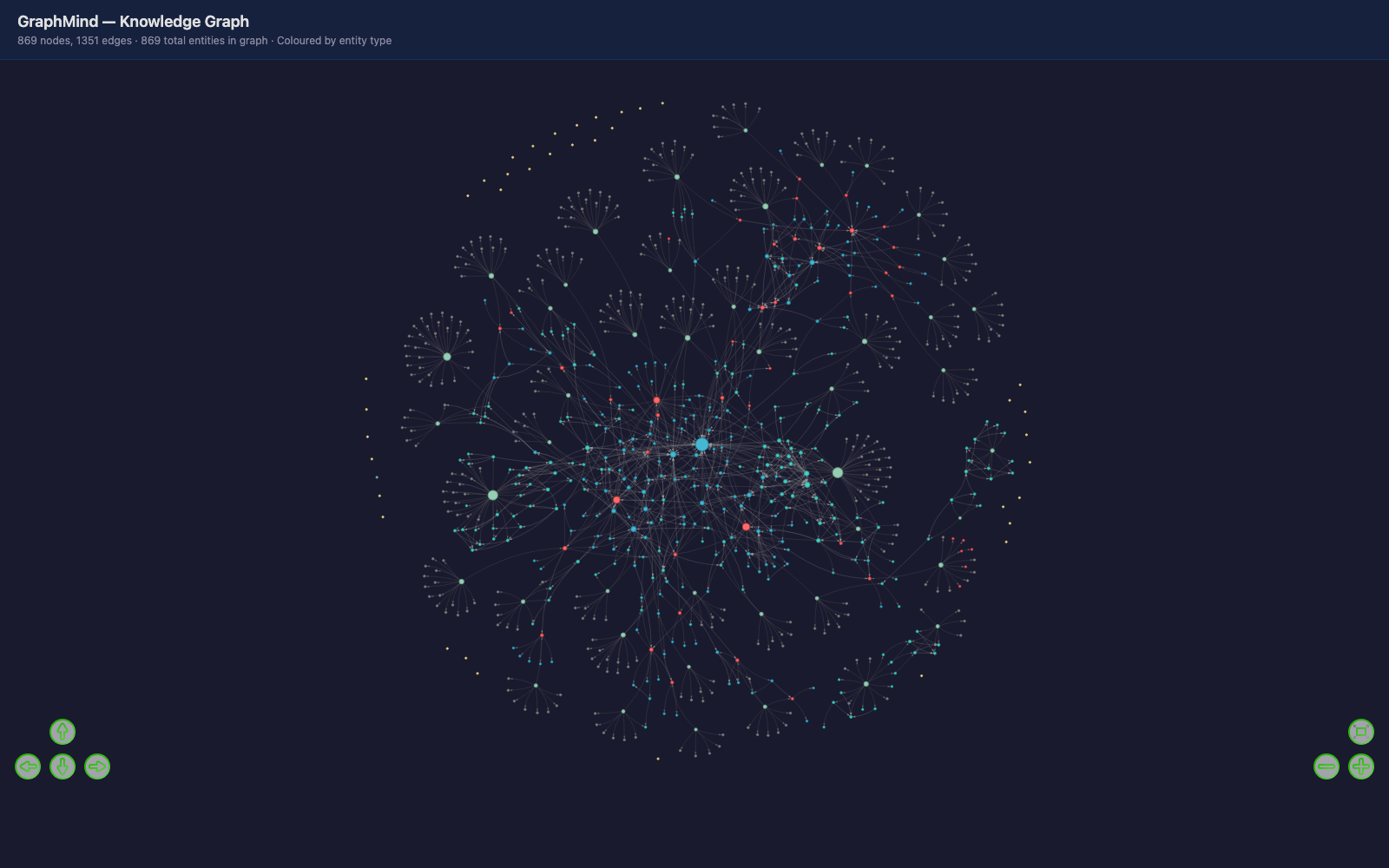
The GraphMind project visualised through itself — every dot is a function, class, or module; every edge is a real call or import; clusters are auto-detected modules.
Why GraphMind
| | grep / ripgrep | GraphMind |
| ------------------------------------------------ | -------------- | ------------------------------------ |
| Find code by literal name / text | ✅ instant | ✅ |
| Find code by intent ("retry backoff logic") | ❌ | ✅ GraphCodeBERT embeddings |
| Call graph + dependency chains | ❌ | ✅ resolved across files |
| Cross-language unified graph | ❌ | ✅ Py / JS / TS / Go / Rust / Java / C++ |
| Module / community detection | ❌ | ✅ Louvain |
| Cloud ingest required | — | ❌ everything stays local |
| Setup time | 0 | one npx command |
Install
Prerequisites: macOS or Linux (Windows via WSL), Node 18+, ~2 GB disk for the model cache.
npx graphmind-mcp installThat single command:
- Sets up
~/.graphmind/venv/with all Python dependencies - Installs a launchd agent (macOS) or systemd user unit (Linux) — auto-starts on login, auto-restarts on crash
- Wires the MCP server (
http://127.0.0.1:7890/mcp) into every AI editor it finds: Claude Code, Cursor, Windsurf, Codex
Restart your editor after install. To verify:
graphmind-mcp status            # daemon + editor configs
tail -f ~/.graphmind/logs/graphmind.log
What your AI assistant gets
13 MCP tools, hot-loaded into the editor:
| Tool | What it answers |
|------|-----------------|
| search_code | "Find code that handles retry backoff" — semantic + structural, not keyword |
| get_entity_details | Full source, signature, callers, callees |
| find_dependencies | "What calls this? What does it call?" with confidence tags |
| analyze_file | Every entity in a file + its inbound / outbound edges |
| get_community | "Show me everything in the auth module" — Louvain clusters |
| shortest_path | "How does X connect to Y?" — architectural path |
| god_nodes | Top-connected entities = your codebase's core abstractions |
| surprising_connections | Cross-module edges — accidental coupling, architectural smells |
| analyze_nesting | Closure / nested-fn complexity hot-spots |
| graph_summary | One-shot architectural health (entities, communities, confidence) |
| export_graph | Standalone interactive HTML visualization |
| suggest_questions | LLM-friendly prompts derived from your graph |
| regenerate_report | Refresh the auto-generated GRAPH_REPORT.md |
Plus an auto-generated GRAPH_REPORT.md at your project root — ~8 KB
plain-language architectural overview your AI can read once at session start
instead of crawling files.
Quick start
cd /path/to/your/project
# The shell cd-hook auto-sets the active project for all AI editors.
# Or explicitly via Claude Code: /mcp → graphmind → register_project {"path": "/abs/path"}
Indexing runs in the background — ~1–3 minutes for a 50K-LoC codebase. The GraphCodeBERT model downloads once on first use (~500 MB).
Try asking your assistant:
- "Search the codebase for authentication logic"
- "Show me the god nodes"
- "What depends on
UserSession?" - "How is
AuthMiddlewareconnected toDatabasePool?" - "Export the graph as HTML so I can see it"
When to use it
Shines on:
- Repos > 20 K LoC where ripgrep returns too many hits to skim
- Cross-language codebases where you want one unified call graph
- Architectural questions — what's connected to what, where a module ends
- Onboarding to unfamiliar code
Marginal on:
- Tiny repos (< 5 K LoC) where grep finishes in one turn
- Pure editing where you already know the file
- Exact-string lookups (error messages, log lines) — use grep
Out of scope: linting, type-checking, formatting, build tooling.
Data + privacy
Everything stays on your machine.
- Source, embeddings, FAISS index, communities →
<project>/.graphmind/(already in the default.gitignoretemplate). - Daemon listens on
127.0.0.1:7890only. Never bound to a public interface. - Sensitive files (
.env,*.pem,*.key,credentials.*,secrets.yaml, SSH keys) are skipped by filename automatically — they never enter the index.
No API keys. No telemetry. Your code never leaves the machine.
Operating the daemon
# Start / stop (macOS)
launchctl load   ~/Library/LaunchAgents/com.graphmind.daemon.plist
launchctl unload ~/Library/LaunchAgents/com.graphmind.daemon.plist

# Start / stop (Linux)
systemctl --user start graphmind
systemctl --user stop graphmind

# Force restart (pick up a code change)
launchctl unload ~/Library/LaunchAgents/com.graphmind.daemon.plist && \
launchctl load   ~/Library/LaunchAgents/com.graphmind.daemon.plist

# Logs
tail -f ~/.graphmind/logs/graphmind.log
Optional: git hook
Idempotent post-commit hook that logs commit stats. Respects core.hooksPath,
preserves existing hooks.
cd /path/to/your/git/repo
graphmind-mcp hook install
graphmind-mcp hook status
graphmind-mcp hook uninstall
Uninstall
graphmind-mcp uninstall
# Removes launchd/systemd unit + MCP entries from editor configs.
# Leaves ~/.graphmind/ intact — nuke manually with: rm -rf ~/.graphmind
Per-project indexes at <project>/.graphmind/ can be removed the same way.
Tradeoffs by design
- Closure-scope resolution is global. Two
helperfunctions in different parent scopes tag asAMBIGUOUS. Conservative by design — the call direction is correct, only the label is noisy. .graphmindignoreloads once at watcher start. Edit the file andregister_projectagain to pick up changes — keeps the watcher cheap.- Performance: validated up to ~1 K nodes. Larger repos in active testing — please share what you find.
- One DOCUMENT entity per markdown file, not per-heading.
.htmlfiles are not indexed by design (usually generated build output). - PDF ingestion requires
pip install pypdfin~/.graphmind/venv; self-disables otherwise.
Feedback
Actively maintained. Most useful signal from early users:
- Did
npx graphmind-mcp installJust Work? (OS / Node / Python / editor) - First question you asked it — did it help or confuse?
- Surprises — anything obviously wrong, or weirdly good
- Speed on your biggest repo
- Tools or queries you wanted that aren't there
Email: [email protected] — screenshots / logs welcome. Daemon log lives at ~/.graphmind/logs/graphmind.log.