
greenly
v1.2.0
Published
Config-driven project check runner. Define your lint/format/typecheck/test/custom steps in greenly.config.ts and run them with one command.

Maintainers
 yusifaliyevpros
Readme





Config-driven project check runner. Define your lint / format / typecheck / test / custom steps once in
greenly.config.tsand run them with a single command.
Why greenly
greenly runs all your lint, format, typecheck, test, build, and custom checks from one config file with a single command.
Instead of pushing and waiting for CI to catch a formatting slip or a type error, run
pnpm greenly before you open a PR. It puts your CI checks and local checks in the same
place, so if everything is green locally, it is green in CI. Checks run in order with
their output streamed live, and greenly offers to auto-fix the ones that have a fixer.
It works where your tools do. In an interactive terminal greenly prompts before running a
fixer; in an agent terminal or CI (non-TTY) it skips prompts and just reports pass or
fail, so it never hangs and an agent can run greenly directly.
Quick start
Run this and greenly sets everything up for you, based on the tools your project already uses:
pnpx greenly init
# or: npx greenly init
Install
Or set it up manually:
pnpm add -D greenlyCreate a greenly.config.ts at your project root:
import { defineConfig } from "greenly";

export default defineConfig({
  name: "MyProject",
  checks: [
    { name: "TypeScript", command: "pnpm tsc --noEmit" },
    { name: "Format", command: "pnpm oxfmt --check", onFail: "pnpm oxfmt" },
    { name: "Lint", command: "pnpm oxlint" },
    { name: "Build", command: "pnpm build", optional: true },
  ],
});
Run it:
pnpm greenlyOr wire it into your scripts so pnpm check works too:
{
  "scripts": {
    "check": "greenly"
  }
}
How it works
- Checks run in order. Each
commandruns in your shell with its output streamed live, so failures show up immediately. - If a check fails and declares an
onFail, greenly asks Yes/No whether to run the fixer, then continues. - A check is warned (not clean, but not blocking) when:
- it is marked
optional: trueand fails, or - its command exits
0but prints warnings (e.g. oxlint'sFound 2 warnings and 0 errors., ESLint's(0 errors, 2 warnings)), so nobody (human or AI agent) mistakes it for a clean run. SetignoreWarnings: trueon a check to opt out.
- it is marked
- greenly exits with code
1if any non-optional check is still failing (with--strict, also if any check warned), otherwise0. - In a monorepo, greenly uses the nearest
greenly.config.*in the current folder or a parent (up to the repository root) and runs the commands from that config's folder. - In AI agent terminals (Claude Code, Cursor, Codex, Gemini CLI, Copilot CLI, ...), a short usage box listing
--strict,--yesand the check names is printed after the run. Its last line names--no-hints, which hides it on later runs to save the agent's context. Normal terminals and plain CI don't show it.
Use it in CI
The same command you run locally is the command CI runs. Replace your separate check steps with one:
       - run: pnpm install --frozen-lockfile

-      - name: TypeScript
-        run: pnpm tsc --noEmit
-
-      - name: Oxfmt
-        run: pnpm fmt:check
-
-      - name: Oxlint
-        run: pnpm lint
-
-      - name: Tests
-        run: pnpm test
-
-      - name: Build
-        run: pnpm build
-
-      - name: Version
-        run: node --no-warnings scripts/version-check.ts
-
+      # pnpm greenly
+      - name: Run checks
+        run: pnpm check
Examples in the wild
Real greenly.config.ts files that mix the usual checks with project-specific ones:
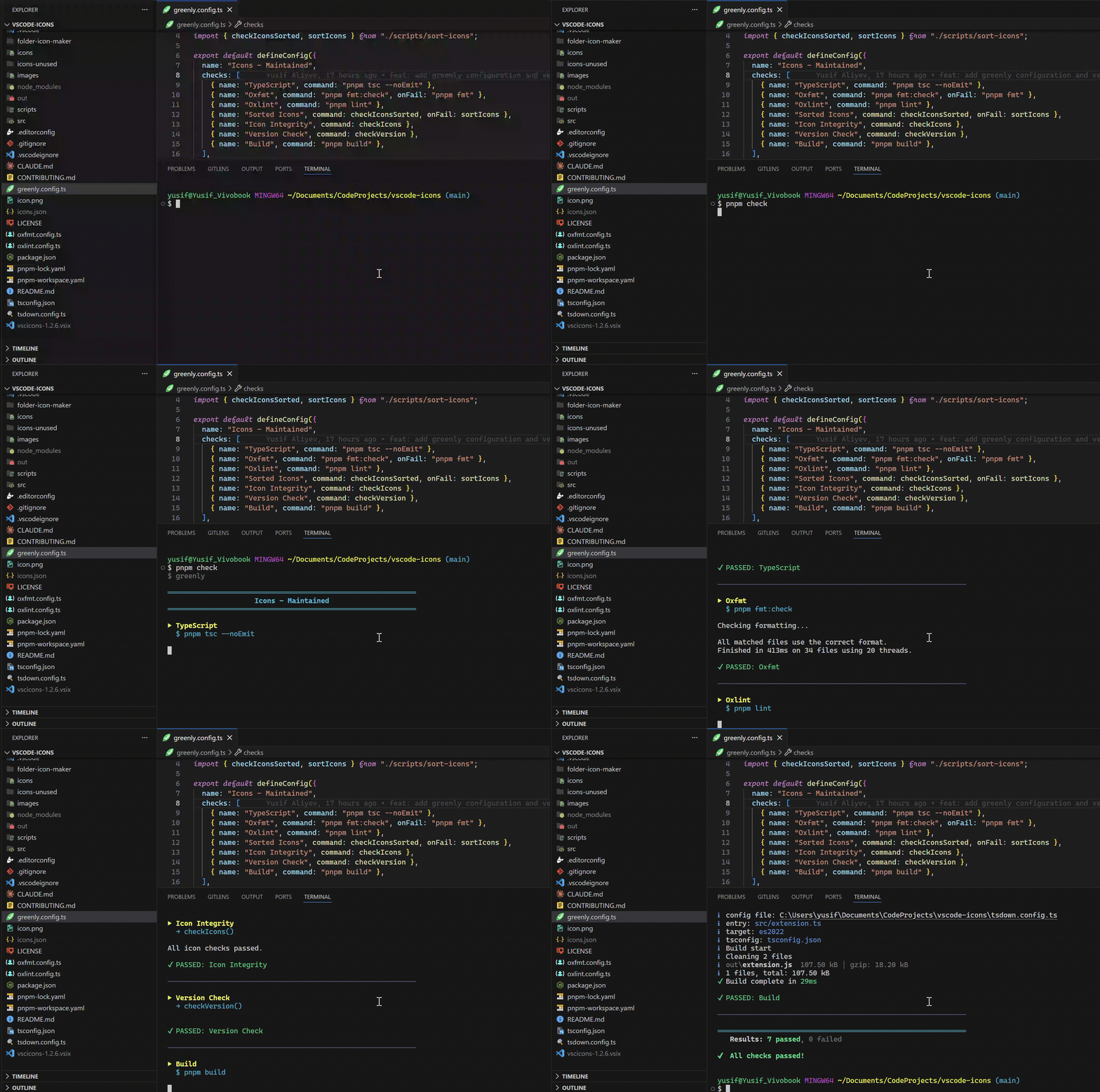
- vscode-icons - adds custom "Sorted Icons" (auto-fixed), "Icon Integrity", and "Version Check" steps, so the icon set and version bump are validated by the same command as everything else instead of a separate script nobody remembers to run.
- countries - alongside typecheck / format / lint / test / build, a custom "Sorted data" check keeps the country dataset in order and auto-sorts it on failure, so a misordered entry can never slip into a PR.
- Azerbaijan GitHub Community / blog - a custom "Validate Posts" check runs on every contribution, so a malformed blog post is caught automatically instead of during review.
- Azerbaijan GitHub Community / showcase - a custom "Validate projects" check verifies each submitted showcase entry, so contributor PRs are checked the same way locally and in CI.
Config reference
| Field | Type | Description |
| ------------------------- | ------------------------------------------ | ------------------------------------------------------------------------- |
| name | string? | Project name shown in the banner. |
| checks | Check[] | Ordered list of checks. |
| checks[].name | string | Label shown while running and in the summary. |
| checks[].command | string \| () => void \| Promise<void> | Shell command (e.g. "pnpm tsc --noEmit"), or a function run in-process. |
| checks[].onFail | string \| (ctx) => void \| Promise<void> | Fixer run (after a Yes/No prompt) when the check fails. |
| checks[].optional | boolean? | When true, a failure warns instead of failing the run. |
| checks[].ignoreWarnings | boolean? | When true, warnings in a passing command's output are not reported. |
command can be a function instead of a shell string. It may be async, and it must throw (or reject) to mark the check as failed. When it throws, greenly prints only the error's message (and its cause if present) - not a stack trace - so make the message descriptive:
export default defineConfig({
  checks: [
    {
      name: "Env vars",
      command: () => {
        if (!process.env.API_KEY) throw new Error("API_KEY is not set");
      },
    },
  ],
});
onFail can also be a function, useful for custom fix logic:
export default defineConfig({
  checks: [
    {
      name: "Generated files",
      command: "pnpm verify:generated",
      onFail: async ({ check }) => {
        await regenerate();
        console.log(`Regenerated files for ${check.name}`);
      },
    },
  ],
});
Config file formats
Any of these are auto-discovered in the current folder, then each parent folder up to the repository root (nearest folder wins, then this order):
greenly.config.ts   greenly.config.mts   greenly.config.cts
greenly.config.js   greenly.config.mjs   greenly.config.cjs
greenly.config.json
CLI
| Command / Flag | Description |
| ---------------------- | ------------------------------------------------------------------------------------------------------------------------------------------------------ |
| greenly | Run the checks from greenly.config.*. |
| greenly init | Set up a config by answering a few questions, then install greenly. |
| greenly <check>... | Run only the named checks, e.g. greenly oxlint tests. A check's name is its lowercase name with spaces as dashes (Expo Doctor -> expo-doctor). |
| -y, --yes, --fix | Auto-run every onFail fixer without prompting (great for CI / agents). |
| --no-fix | Run all checks, never prompt or fix, just report. |
| --strict | Warned checks (warnings, failed optional checks) also exit 1. |
| --no-hints | Don't print the usage box shown in AI agent terminals. |
| -v, --version | Print the version. |
| -h, --help | Show help. |
When stdout is not a TTY (CI, piped output), greenly is non-interactive by default, so it never prompts and nothing hangs. Use --yes there to auto-apply fixes.
Demo
Here is pnpm check running greenly on a real project (vscode-icons):
Contributing
If you face any problem, please open a PR or issue according to CONTRIBUTING.md.
License
LGPL-2.1-or-later © Yusif Aliyev