
groupapp-react-native-draftjs-editor
v0.0.23
Published
A full fledged React Native Rich Text editor based on draft.js

Maintainers
 groupapp
Readme
React Native Draft.js Editor
A full fledged React Native Rich Text editor based on Draft.js!!
Not actively maintained
This project is not actively maintained (there's an implementation for TypeScript & Expo Support but not published). If you need any help, reach out to me on Twitter.
Installation
React Native Webview
This project requires the latest version of React Native Webview to be installed and linked to work properly.
Install using npm:
npm i react-native-draftjs-editorInstall using yarn:
yarn add react-native-draftjs-editorFor Android alone
After installation, add the following lines to the end of your android/app/build.gradle file
project.afterEvaluate {
    apply from: '../../node_modules/react-native-draftjs-editor/copyHtml.gradle';
    copyEditorHtmlToAppAssets(file('../../node_modules/react-native-draftjs-editor'))
}
iOS installation does not require any additional steps.
API
RNDraftView
Props
| Name | Type | Description | | ------------------ | ----------------------------------------------------------------------------- | -------------------------------------------------------------------------------------------------------------------------------------------------------------------------------------------------- | | defaultValue | String | The default value with which the editor should be populated. Should be an HTML string generated from draft.js using draft-js-export-html. | | onEditorReady | Function | A callback function that will be called when the editor has loaded and is ready to use. Ensure this function is called before you apply any instance methods. | | style | React Native View Style | Use this to style the View Component that is wrapping the rich text editor. | | placeholder | String | A placeholder string for the text editor. | | ref | React Ref Object | Pass a ref here to access the instance methods. | | onStyleChanged | Function | Will call a function with an Array of styles [] in the current editor's context. Use this to keep track of the applied styles in the editor. | | onBlockTypeChanged | Function | will call a function with a block type in the current editor's context. Use this to keep track of the applied block types in the editor. | | styleMap | Object | A custom style map you can pass to add custom styling of elements in your text editor. Refer Draft.js Docs | | styleSheet | String | A CSS string which you can pass to style the HTML in which the rich text editor is running. This can be used if you want to change fonts and background colors of the editor etc. |
styleMap and styleSheet are parsed as strings and are sent over to the webview. To prevent the string parsing from failing, please do not use single quotes ' within the styleMap object's keys and values or inside the styleSheet string.
Instance methods
| Name | Params | Description |
| -------------- | ----------------------------------------------------------------------------------------------------------------------------------------------------------- | -------------------------------------------------------------------------------------------------------------------------------------------- |
| focus | - | shift focus to the rich text editor |
| blur | - | removes focus from the rich text editor |
| setStyle | BOLD, ITALIC, UNDERLINE and CODE | call this instance method to apply a style to the selected/active text. Call this again with the same style to remove it. |
| setBlockType | Supports the default block types supported by draft.js editor | Call this instance method to apply and call it again to remove the style. |
| getEditorState | - | Returns the current editor state as a HTML string exported using draft-js-export-html. |
Sample Usage
import React, { useState, useEffect } from "react";
import {
  SafeAreaView,
  StyleSheet,
  TouchableOpacity,
  View,
  Text,
  Platform
} from "react-native";
import KeyboardSpacer from "react-native-keyboard-spacer";
import RNDraftView from "react-native-draftjs-editor";

const ControlButton = ({ text, action, isActive }) => {
  return (
    <TouchableOpacity
      style={[
        styles.controlButtonContainer,
        isActive ? { backgroundColor: "gold" } : {}
      ]}
      onPress={action}
    >
      <Text>{text}</Text>
    </TouchableOpacity>
  );
};

const EditorToolBar = ({
  activeStyles,
  blockType,
  toggleStyle,
  toggleBlockType
}) => {
  return (
    <View style={styles.toolbarContainer}>
      <ControlButton
        text={"B"}
        isActive={activeStyles.includes("BOLD")}
        action={() => toggleStyle("BOLD")}
      />
      <ControlButton
        text={"I"}
        isActive={activeStyles.includes("ITALIC")}
        action={() => toggleStyle("ITALIC")}
      />
      <ControlButton
        text={"H"}
        isActive={blockType === "header-one"}
        action={() => toggleBlockType("header-one")}
      />
      <ControlButton
        text={"ul"}
        isActive={blockType === "unordered-list-item"}
        action={() => toggleBlockType("unordered-list-item")}
      />
      <ControlButton
        text={"ol"}
        isActive={blockType === "ordered-list-item"}
        action={() => toggleBlockType("ordered-list-item")}
      />
      <ControlButton
        text={"--"}
        isActive={activeStyles.includes("STRIKETHROUGH")}
        action={() => toggleStyle("STRIKETHROUGH")}
      />
    </View>
  );
};

const styleMap = {
  STRIKETHROUGH: {
    textDecoration: "line-through"
  }
};

const App = () => {
  const _draftRef = React.createRef();
  const [activeStyles, setActiveStyles] = useState([]);
  const [blockType, setActiveBlockType] = useState("unstyled");
  const [editorState, setEditorState] = useState("");

  const defaultValue =
    "<h1>A Full fledged Text Editor</h1><p>This editor is built with Draft.js. Hence should be suitable for most projects. However, Draft.js Isn’t fully compatible with mobile yet. So you might face some issues.</p><p><br></p><p>This is a simple implementation</p><ul>  <li>It contains <strong>Text formatting </strong>and <em>Some blocks formatting</em></li>  <li>Each for it’s own purpose</li></ul><p>You can also do</p><ol>  <li>Custom style map</li>  <li>Own css styles</li>  <li>Custom block styling</li></ol><p>You are welcome to try it!</p>";

  const editorLoaded = () => {
    _draftRef.current && _draftRef.current.focus();
  };

  const toggleStyle = style => {
    _draftRef.current && _draftRef.current.setStyle(style);
  };

  const toggleBlockType = blockType => {
    _draftRef.current && _draftRef.current.setBlockType(blockType);
  };

  useEffect(() => {
    /**
     * Get the current editor state in HTML.
     * Usually keep it in the submit or next action to get output after user has typed.
     */
    setEditorState(_draftRef.current ? _draftRef.current.getEditorState() : "");
  }, [_draftRef]);
  console.log(editorState);

  return (
    <SafeAreaView style={styles.containerStyle}>
      <RNDraftView
        defaultValue={defaultValue}
        onEditorReady={editorLoaded}
        style={{ flex: 1 }}
        placeholder={"Add text here..."}
        ref={_draftRef}
        onStyleChanged={setActiveStyles}
        onBlockTypeChanged={setActiveBlockType}
        styleMap={styleMap}
      />
      <EditorToolBar
        activeStyles={activeStyles}
        blockType={blockType}
        toggleStyle={toggleStyle}
        toggleBlockType={toggleBlockType}
      />
      {Platform.OS === "ios" ? <KeyboardSpacer /> : null}
    </SafeAreaView>
  );
};

const styles = StyleSheet.create({
  containerStyle: {
    flex: 1,
    marginTop: 36
  },
  toolbarContainer: {
    height: 56,
    flexDirection: "row",
    backgroundColor: "silver",
    alignItems: "center",
    justifyContent: "space-around"
  },
  controlButtonContainer: {
    padding: 8,
    borderRadius: 2
  }
});

export default App;
The above code will create the following editor view:
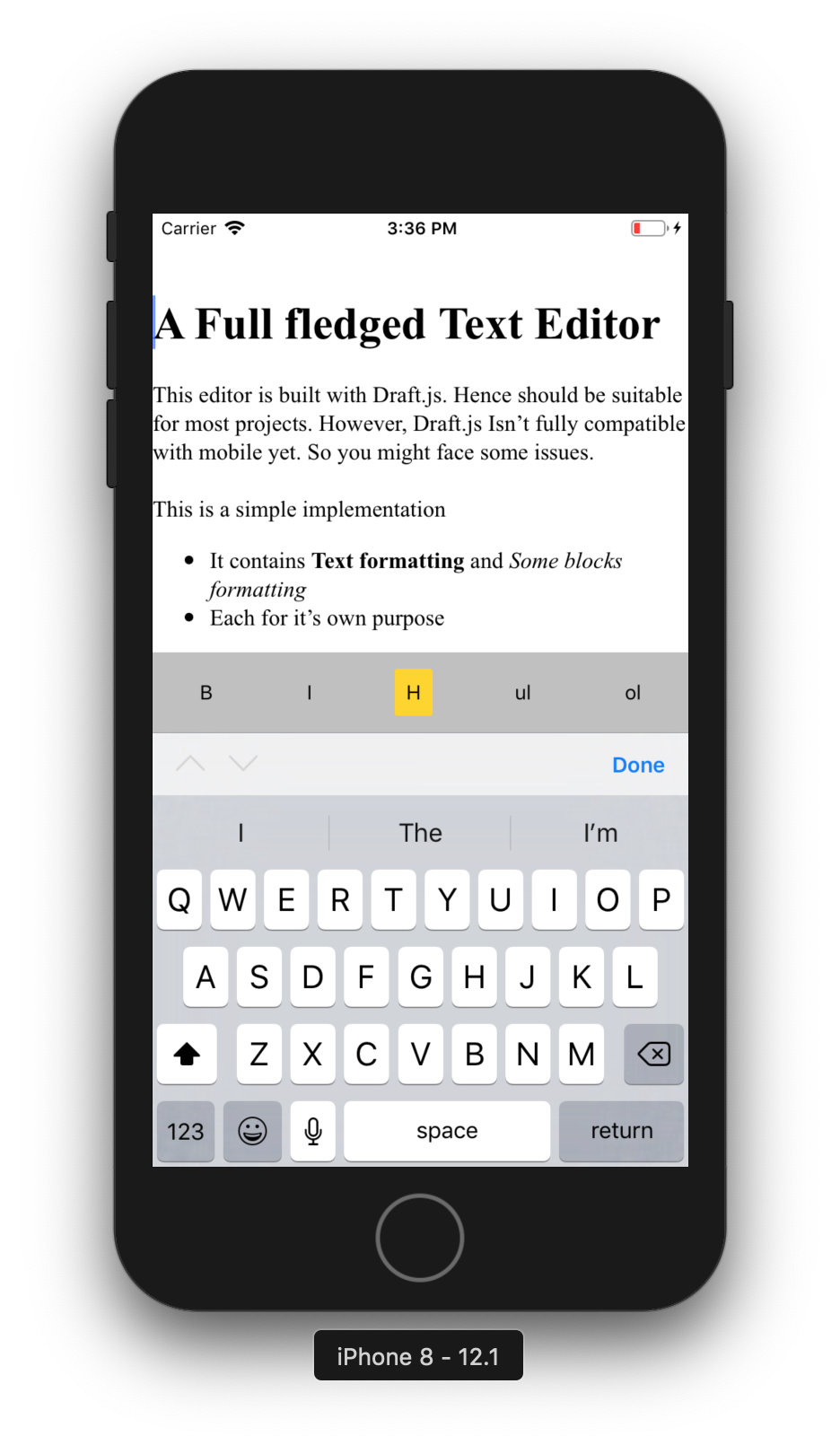
Refer the working example in ReactNativeDraftjsExample/ directory
If you run across any issues, please note that Draft.js is not fully mobile compatible yet. Before raising any issues in this repository please check if your issue exists in the following lists:
- https://github.com/facebook/draft-js/labels/android
- https://github.com/facebook/draft-js/labels/ios
TODO
- [x] Custom Style map.
- [ ] Custom Block Components.
- [x] CSS Styling of the editor
- [ ] Test Cases
- [ ] Native iOS and Android libraries