
grunt-pepper
v0.5.8
Published
coffee-script tool: adds info objects to log calls, inserts data from json files and generates ascii-art headers.

Maintainers
 monsterkodi
Readme
grunt-pepper
... a little tool that parses my coffee-script files before they get translated to javascript.
It replaces log function calls with alternative calls that receive an info object as its first argument.
The info object contains the file-path and line-number as well as class-, method- and agrument-names of the place where the log occurred.
For example, in a file ./drink/some.coffee ...
class Hello

  sayHello: =>
    # ... it would replace the following log:
    log "hello", "world!"

    # ... with this one:
    log {file: 'drink/some.coffee', line: 5, class: 'Hello', method: 'sayHello'},
        "hello", "world"
It can also replace special markers with values from a json file:
# ... the following:

@version = '::package.json:version::'

# ... gets replaced by:

@version = '1.2.3'
Installation
npm install grunt-pepper --save-devGruntfile.coffee
module.exports = (grunt) ->

  grunt.initConfig

    pepper:
      options:
        dryrun:   false      # if true, no files are written,
                             # just prints what would be done
        verbose:  false      # if true, the parse result is printed to stdout
        quiet:    false      # if true, almost no information is printed
        join:     true       # if true, files are joined into one target file
        outdir:   '.pepper'  # directory where the parse results are written to
        type:     '.coffee'  # suffix of the parse result files
        template: '::'       # replaces ::file.json:key:: with value of
                             # property key from object in file.json
                             # set to false to disable templating

        pepper: ['console.log']

                # function calls that get peppered
                #
                # if specified as a map:
                #       key:   original function name that gets replaced
                #       value: replacement function that gets called instead
                #
                # if specified as a list:
                #       preserves the original function names
                #
                #  the replacement function receives one additional 1st argument:
                #       an object with keys: file, line, method, type, args

        paprika: ['dbg']

                # names of functions that get paprikaed :-)
                #
                # same as pepper, but variable arguments get
                #                 prefixed with their names:
                #
                # dbg foo, bar
                #
                # gets replaced with
                #
                # dbg {...pepper...}, 'foo:', foo, 'bar:', bar

        paprikaPrefix:  ''
        paprikaPostfix: ':'

    task:
      files:
        'spiced': [ file(s) ] # will parse all file(s) and write the result
                              # to file '.pepper/spiced.coffee' if join is true
                              # if join is false, the original file structure
                              # will be replicated in outdir

  grunt.loadNpmTasks 'grunt-pepper'
Have a look at the Gruntfile of my other pet project if you need another example.
... and salt ...
In addition to the pepper task, there is another task which is called salt.
It can add an ascii header to files which start with an empty block comment.
For example, in a file salt.coffee it would replace ...
###
###
... with the following header:
###

 0000000   0000000   000      000000000
000       000   000  000         000
0000000   000000000  000         000
     000  000   000  000         000
0000000   000   000  0000000     000

###
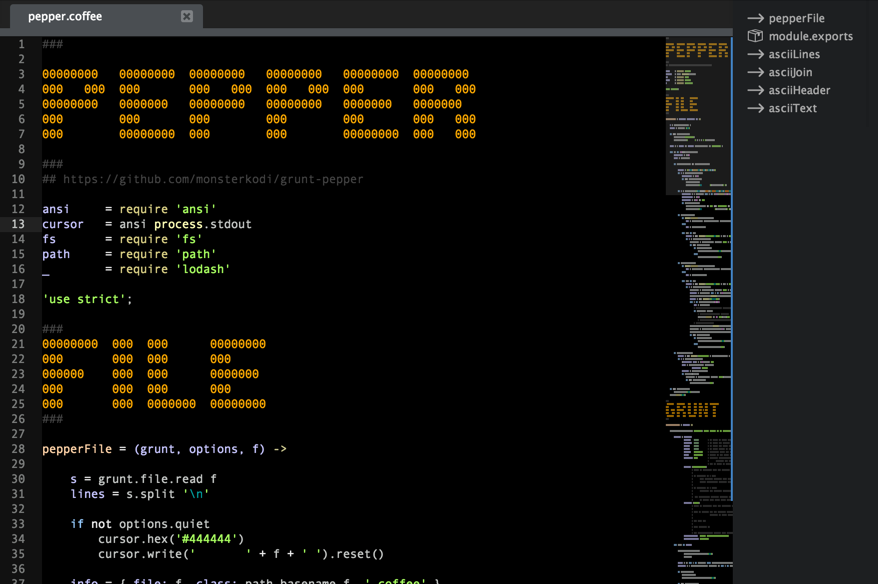
I think these headers give me a nicer looking minimap:
Gruntfile.coffee
    salt:
        options:
            dryrun:        false
            quiet:         false
            verbose:       true
        headers:
            options:
                headerStart : "###" # filename will be put between this ...
                headerEnd   : "###" # ... and this marker
                refresh     : false # if true, it will replace all ascii headers,
                                    # false: only empty block comments are filled
            files:
                'asciiHeader': ['./coffee/**/*.coffee']

        # 'asciiText' mode replaces special comments with ascii art text
        #                  anywhere in the specified files:

        coffee:
            textMarker  : "#!!" #   text following this comment will be transformed
            textPrefix  : "###" #   this is put before the replacing lines
            textFill    : ""    #   each replacing line starts with these characters
            textPostfix : "###" #   this is put after the replacing lines
            files:
                'asciiText': ['./coffee/**/*.coffee']

        # this is what I use to generate text in my stylus files:

        style:
            options:
            textMarker  : "//!!" #   text following this comment will be transformed
            textPrefix  : "/*"
            textFill    : "* "
            textPostfix : "*/"
            files:
                'asciiText': ['./style/*.styl']
This stuff works for me, but I won't guarantee that it works for you as well. Therefore: don't forget to backup your files before you try it out! use at your own risk!