
gsap-timeline-viewer
v0.1.26
Published
A lightweight, framework-agnostic timeline viewer for GSAP animations

Maintainers
 rebo89
Readme
GSAP Timeline Viewer
A lightweight, framework-agnostic development tool for visualizing and debugging GSAP timelines. Inspect your animations with a visual timeline panel.
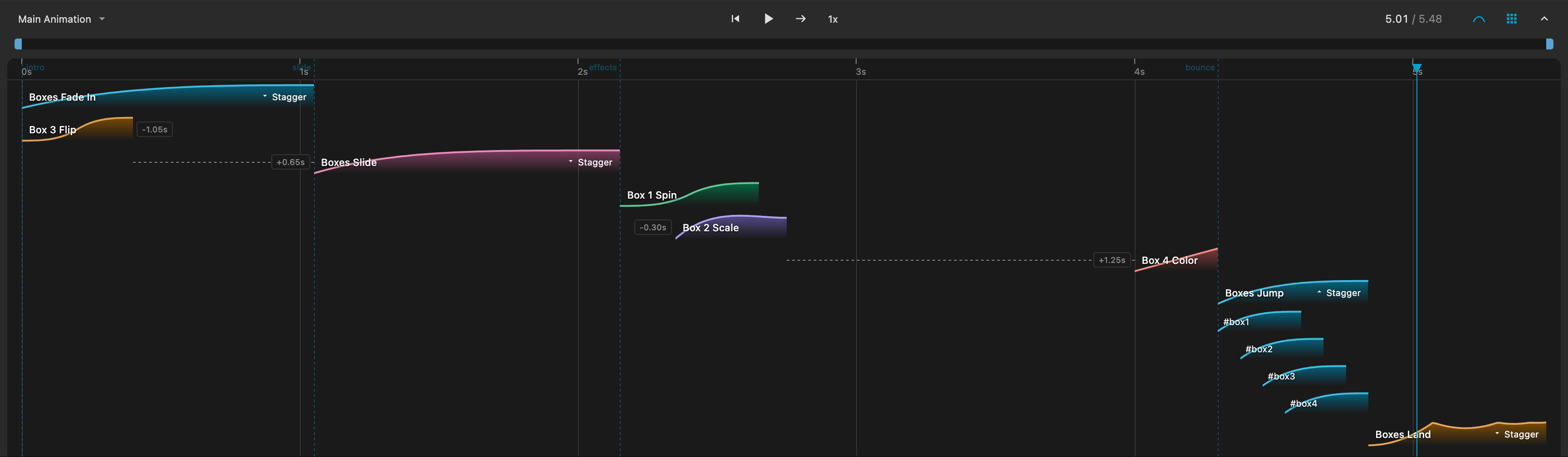
~14 KB gzipped | Works with React, Vue, Angular, Svelte, or vanilla JS
Features
- Auto-detection - Automatically captures all
gsap.timeline()calls - Visual timeline - Colored tracks for each tween with labels
- Playback controls - Play/pause, reverse, skip, speed (0.25x–4x), loop modes
- Playrange bar - Drag handles to set playback boundaries
- Ease curve visualization - Toggle to see ease curves as track shapes
- Repeat/yoyo curves - Ease curves visualize repeat iterations and yoyo direction
- Nested timeline groups - Collapsible groups for child timelines with tween counts
- Stagger expansion - Expand staggered animations to see individual targets
- Scrubbing - Click or drag anywhere on the timeline
- Resizable & collapsible - Drag to resize, minimize when not in use
- Keyboard shortcuts - Full keyboard control for playback and navigation
- Persistent settings - Panel size, playrange, and preferences saved
Quick Start
npm install gsap gsap-timeline-viewerimport gsap from 'gsap';
import { TimelineViewer } from 'gsap-timeline-viewer';
// One line to activate (pass gsap instance)
TimelineViewer.create({ gsap });
// Your animations are auto-detected
const tl = gsap.timeline({ id: 'My Animation' });
tl.to('.box', { x: 100, duration: 1, id: 'Slide Right' })
.to('.box', { y: 50, duration: 0.5, repeat: 2, yoyo: true, id: 'Bounce' });Tip: Add id to timelines and tweens for better labels in the viewer.
Script Tag (CDN)
<script src="https://unpkg.com/gsap"></script>
<script src="https://unpkg.com/gsap-timeline-viewer"></script>

<script>
  GSAPTimelineViewer.TimelineViewer.create();

  gsap.timeline({ id: 'My Animation' })
    .to('.box', { x: 100, duration: 1, id: 'Slide Right' })
    .to('.box', { y: 50, duration: 0.5, repeat: 2, yoyo: true, id: 'Bounce' });
</script>
API
TimelineViewer.create(config?)
Creates and attaches the viewer. Call once - subsequent calls return the existing instance.
TimelineViewer.create({
  gsap: gsap,                      // Required for ES modules, optional for script tag
  height: 200,                     // Initial panel height (default: 200)
  collapsed: false,                // Start collapsed (default: false)
  defaultTimeline: 'My Animation', // Auto-select this timeline
  autoDetect: true,                // Auto-detect timelines (default: true)
});
TimelineViewer.register(name, timeline)
Manually register a timeline:
const tl = gsap.timeline({ paused: true });
TimelineViewer.register('Hero Animation', tl);
TimelineViewer.unregister(name)
Remove a timeline from the viewer.
TimelineViewer.getInstance()
Get the current viewer instance:
const viewer = TimelineViewer.getInstance();
viewer.select('Other Timeline');
Keyboard Shortcuts
| Key | Action |
|-----|--------|
| Space | Play / Pause |
| R | Reverse |
| J | Jump to previous point |
| K | Jump to next point |
| O | Oneshot mode |
| L | Loop mode |
| P | Ping-pong mode |
| [ | Set playrange start |
| ] | Set playrange end |
| \ | Reset playrange |
Browser Support
Works in all modern browsers that support Web Components (Chrome, Firefox, Safari, Edge).
License
MIT