
gsheets-i18n
v1.0.3
Published
Generate i18n JSON files from a Google Spreadsheet
Downloads
531

Maintainers
 najtal
Readme
📊🤌 gsheets-i18n
Manage app translations in Google Sheets. Generate i18n JSON files with one command.





1. Overview
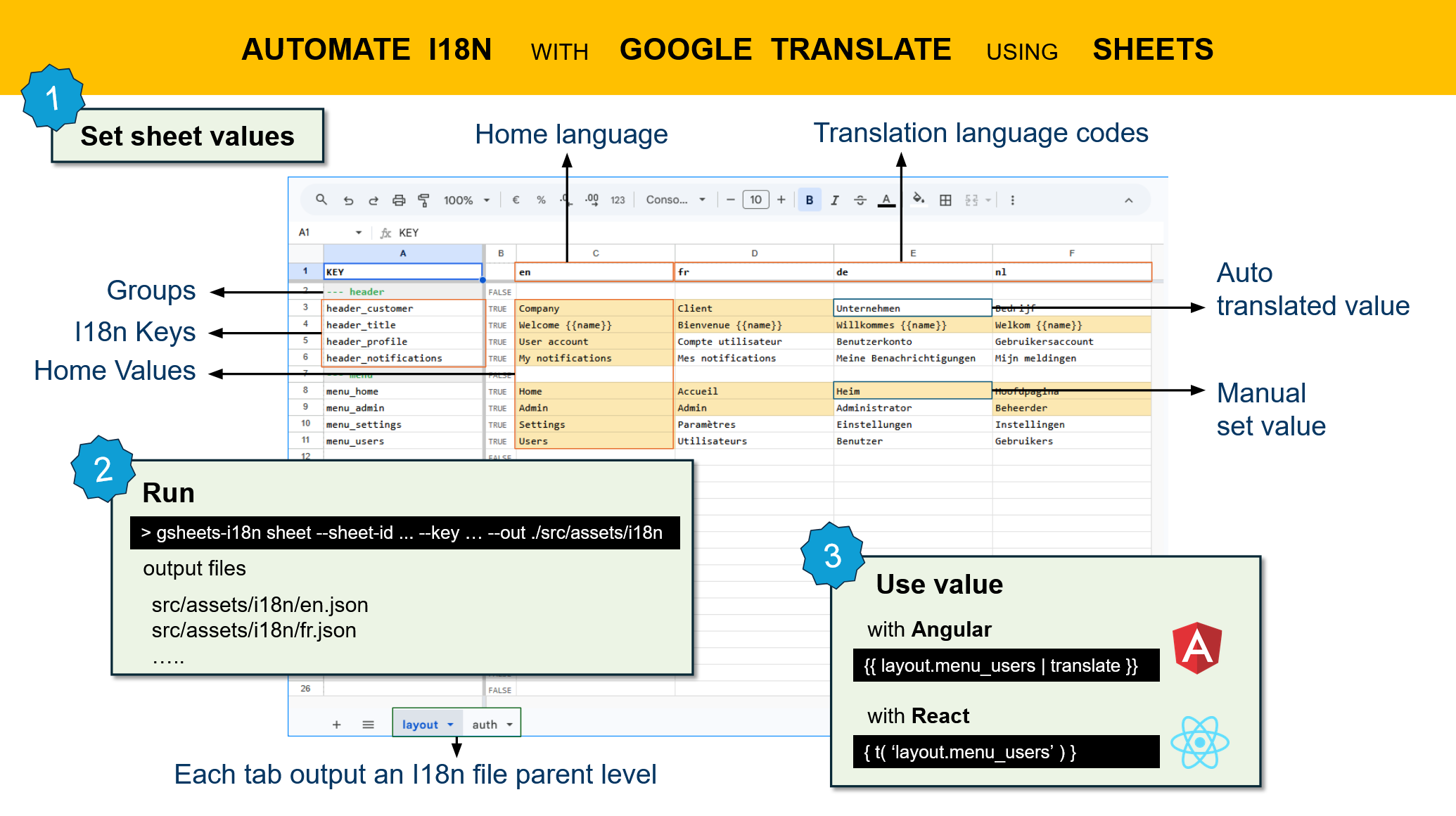
2. Why gsheets-i18n?
- Single source of truth — Translators edit Google Sheets, developers pull JSON
- Real-time collaboration — No version conflicts, no code required for non-devs
- Framework-agnostic — Works with i18next, Vue i18n, Angular, etc.
- Nested keys — Dot notation (
modal.title) auto-generates hierarchical JSON - Batch processing — Extract from multiple spreadsheets at once
- Zero production overhead — Generates static JSON, no runtime dependencies
Table of Contents
- 1. Overview
- 2. Why gsheets-i18n?
- 3. Quick Start
- 4. How It Works
- 5. How It Compares
- 6. CLI Reference
- 7. Programmatic API
- 8. Supported Languages
- 9. Advanced Features
- 10. FAQ
- 11. Troubleshooting
- 12. Contributing
- 13. Show Your Support
- 14. License
3. Quick Start
3.1 Copy demo Google Sheet to your Drive
Import the demo spreadsheet into your Google Drive and start right away.
3.2 Install
npm install --save-dev gsheets-i18n3.3 Set up Google authentication
- Go to Google Cloud Console
- Create a service account and download the JSON key
- Share your spreadsheet with the service account email (grant Viewer access)
3.4 Pull translations
gsheets-i18n sheet \
  --sheet-id YOUR_SHEET_ID \
  --key ./service-account.json \
  --out ./src/locales
Done. Your en.json, fr.json, etc. are ready.
Add to package.json:
{
  "scripts": {
    "i18n:pull": "gsheets-i18n sheet --sheet-id YOUR_ID --key ./service-account.json --out ./src/locales"
  }
}
4. How It Works
4.1 Spreadsheet Format
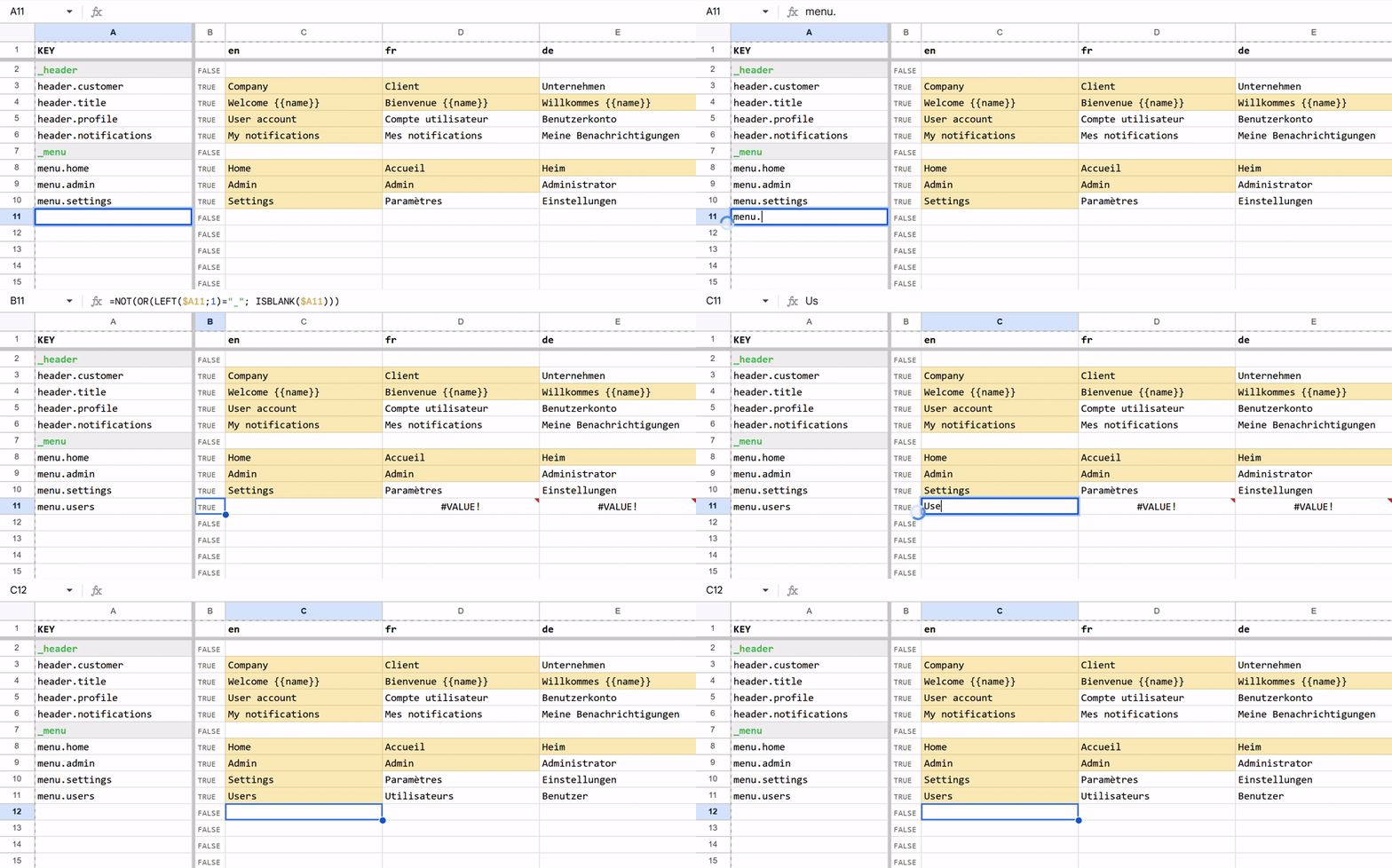
| key | EN | FR | DE |
|-----|----|----|-----|
| save | Save | Enregistrer | Speichern |
| modal.title | Confirm action | Confirmer l'action | Aktion bestätigen |
| errors.404 | Not found | Non trouvé | Nicht gefunden |
Rules:
- Row 1: Language codes (EN, FR, DE, etc. — see supported languages)
- Column A: Translation keys (dot notation creates nested objects)
- Other columns: One language per column
4.2 Output
{
  "save": "Save",
  "modal": {
    "title": "Confirm action"
  },
  "errors": {
    "404": "Not found"
  }
}
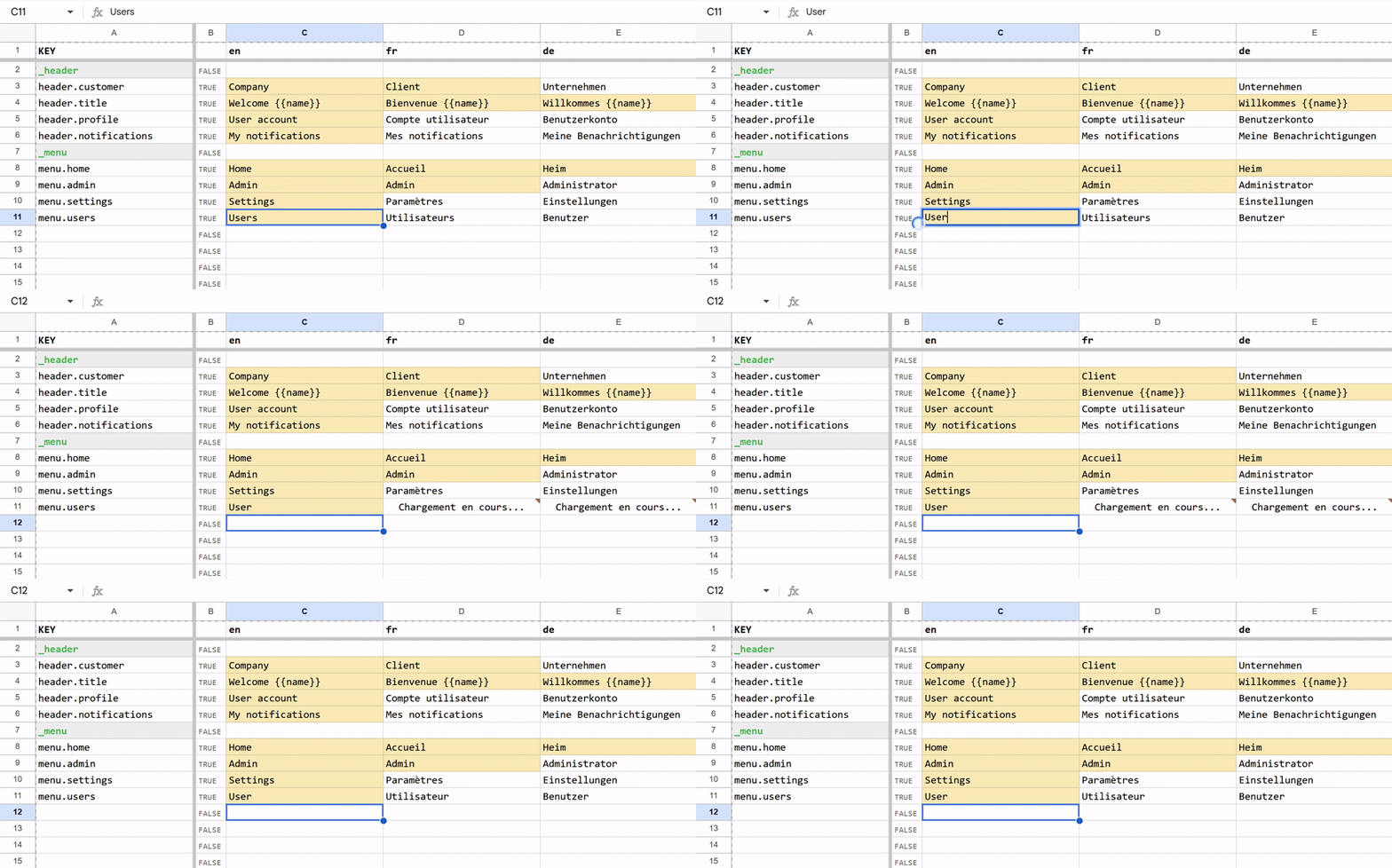
4.3 Update translations
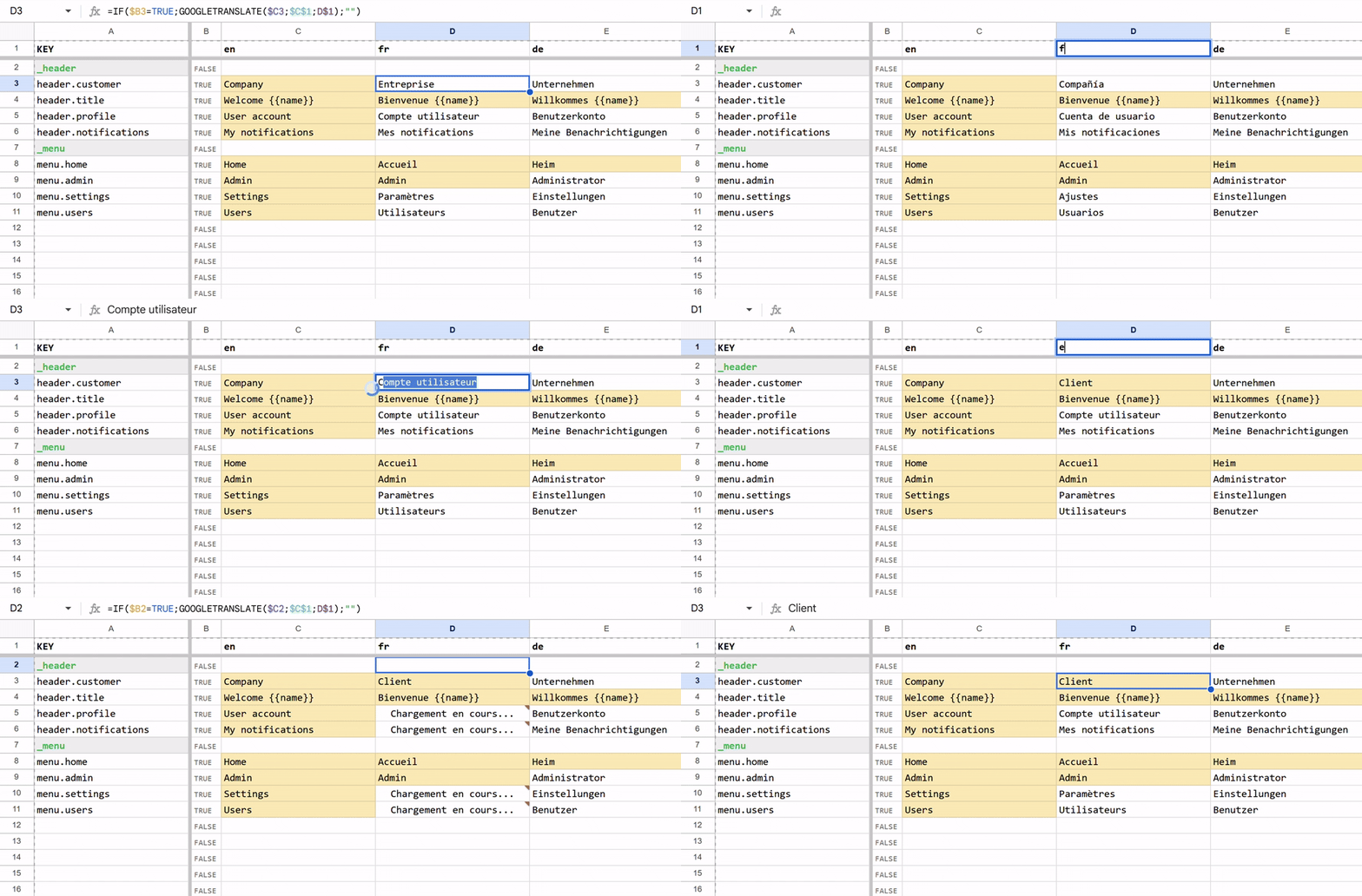
4.4 Use Automatic or Static Values
4.5 Multiple Tabs = Namespaces
Each tab becomes a top-level namespace:
Sheet tab "actions" + key "save"
  → { "actions": { "save": "..." } }

Sheet tab "errors" + key "404"
  → { "errors": { "404": "..." } }
5. How It Compares
| Feature | gsheets-i18n | Crowdin | Lokalise | Phrase | |---------|------------------|---------|----------|--------| | Setup time | 5 min | 30+ min | 30+ min | Days | | Cost | Free | Freemium | $999+/mo | Enterprise | | Uses Google Sheets | ✅ | ❌ | ❌ | ❌ | | No vendor lock-in | ✅ | ❌ | ❌ | ❌ | | Static JSON output | ✅ | ❌ (SaaS API) | ❌ (SaaS API) | ❌ | | Open source | ✅ | ❌ | ❌ | ❌ | | Works offline | ✅ (JSON files) | ❌ | ❌ | ❌ |
6. CLI Reference
6.1 Single Spreadsheet
gsheets-i18n sheet \
  --sheet-id <spreadsheet-id> \
  --key <path-to-service-account.json> \
  --out <output-dir>
| Flag | Default | Description |
|------|---------|-------------|
| -s, --sheet-id | — | Required. Spreadsheet ID from URL |
| -k, --key | ./service-account.json | Service account JSON key |
| -o, --out | ./i18n | Output directory |
| -t, --tab-id | all | Extract specific tab only |
| --include-empty | false | Include keys with empty values |
| --indent | 2 | JSON indentation (2, 4, or "tab") |
Find tab ID: Right-click a sheet tab → Copy link → URL contains #gid=<tabId>
6.2 Multiple Spreadsheets (Folder Mode)
gsheets-i18n folder \
  --folder-id <drive-folder-id> \
  --key <path-to-service-account.json> \
  --out <output-dir>
Recursively extracts all spreadsheets from a Drive folder, creating a nested namespace structure.
7. Programmatic API
import { extract } from "gsheets-i18n";

const result = await extract({
  serviceAccountKey: "./service-account.json",
  source: {
    mode: "sheet",
    spreadsheetId: "YOUR_SHEET_ID",
  },
  outputDir: "./src/locales",
});

console.log(`Generated ${result.files.length} files`);

for (const file of result.files) {
  console.log(`${file.locale}: ${file.keyCount} keys`);
}
8. Supported Languages
Column headers are auto-mapped to language codes using Google's official language codes.
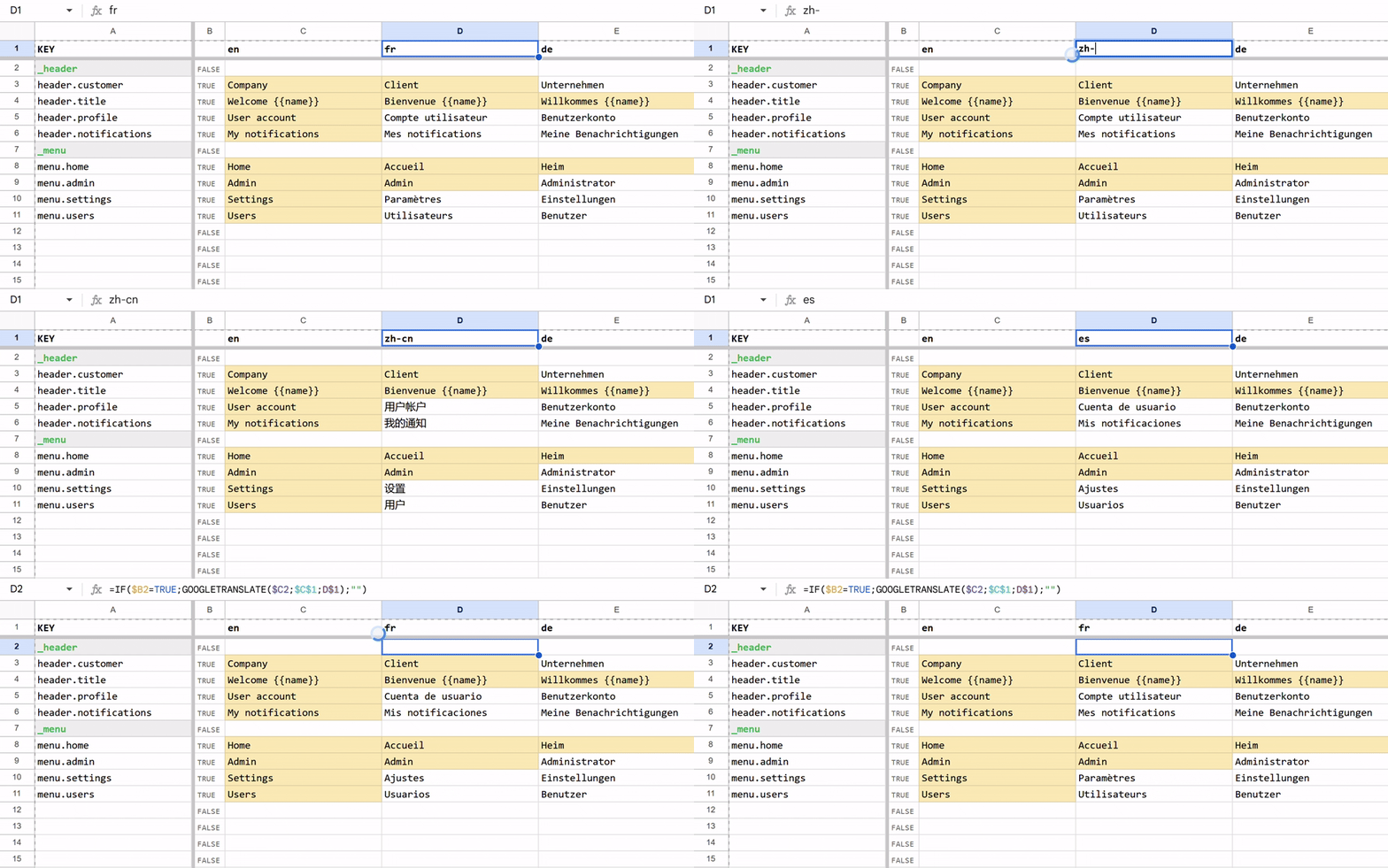
Common examples:
| Header | Code | Header | Code |
|--------|------|--------|------|
| EN, English | en | ES, Spanish | es |
| EN-GB, English (UK) | en-GB | PT-BR, Portuguese (Brazil) | pt-BR |
| FR, French | fr | DE, German | de |
| FR-CA, French (Canada) | fr-CA | JA, Japanese | ja |
| ZH-CN, Chinese (Simplified) | zh-CN | ZH-TW, Chinese (Traditional) | zh-TW |
Supports 100+ languages. See full list in Google's documentation.
9. Advanced Features
9.1 Skip Tabs & Columns
Prefix with _ to exclude:
- Tab
_notes— ignored entirely - Column
_dev— excluded from output
If rows have no values, those are skipped as well. Using the template, prefix the key with _ to skip that row.
- Row with key
_ menu— excluded from output.
9.2 Custom Locale Mapping
Create a tab named _keymap to override header-to-locale mapping:
| — | fr | en |
|---|------|------|
| Français | fr | en |
| English | en | en |
10. FAQ
Q: Can non-developers edit translations?
A: Yes. Share the Google Sheet with your team. No coding knowledge needed.
Q: What happens to translations when I pull?
A: New JSON files are generated in your ./src/locales folder. Review and commit to Git.
Q: Can I use this with my existing translations?
A: Yes. Copy your existing JSON structure into Google Sheets (use dot notation for nesting).
Q: Does this work offline?
A: The CLI requires internet to fetch from Google Sheets, but the output JSON works offline.
Q: Can I automate this with CI/CD?
A: Yes. Add the service account key to your repo secrets and call npm run i18n:pull in your GitHub Actions/GitLab CI workflow.
Q: How often should I pull translations?
A: As often as needed. Many teams pull before each deployment, or on every commit to the main branch.
Q: What if a translation is missing?
A: By default, missing translations are skipped. Use --include-empty to include empty cells in output.
Q: How does I support versioning?
A: You can support versioning using google drive versioning feature.
Q: Can I use this for pluralization or complex formatting?
A: Yes. Store JSON-formatted values in your cells, e.g., {"one":"1 item","other":"{{count}} items"}, and they'll be parsed correctly. (This might require an updated mapper or pipe depending on your front end framework)
11. Troubleshooting
11.1 "Permission denied" Error
- Verify the service account email is Viewer access on the spreadsheet
- Check the service account key file exists and is readable
11.2 No files generated
- Verify the first row contains language codes
- Check that key cells (Column A) are not empty
- Ensure you have at least one column with translations
11.3 Language code not recognized
Verify the column header matches an official code from Google's language list.
12. Contributing
Contributions welcome! Please open an issue or submit a PR on GitHub.
13. Show Your Support
💡 Enjoying gsheets-i18n? ⭐ Star us on GitHub to show your support!
Found a bug? Open an issue
Have an idea? Start a discussion
14. License
MIT