
gut-cli
v0.1.36
Published
Git Utility Tool - AI-powered git commands for smarter workflows

Maintainers
 gitton-dev
Readme
gut-cli
Git Utility Tool - AI-powered git commands for smarter workflows.
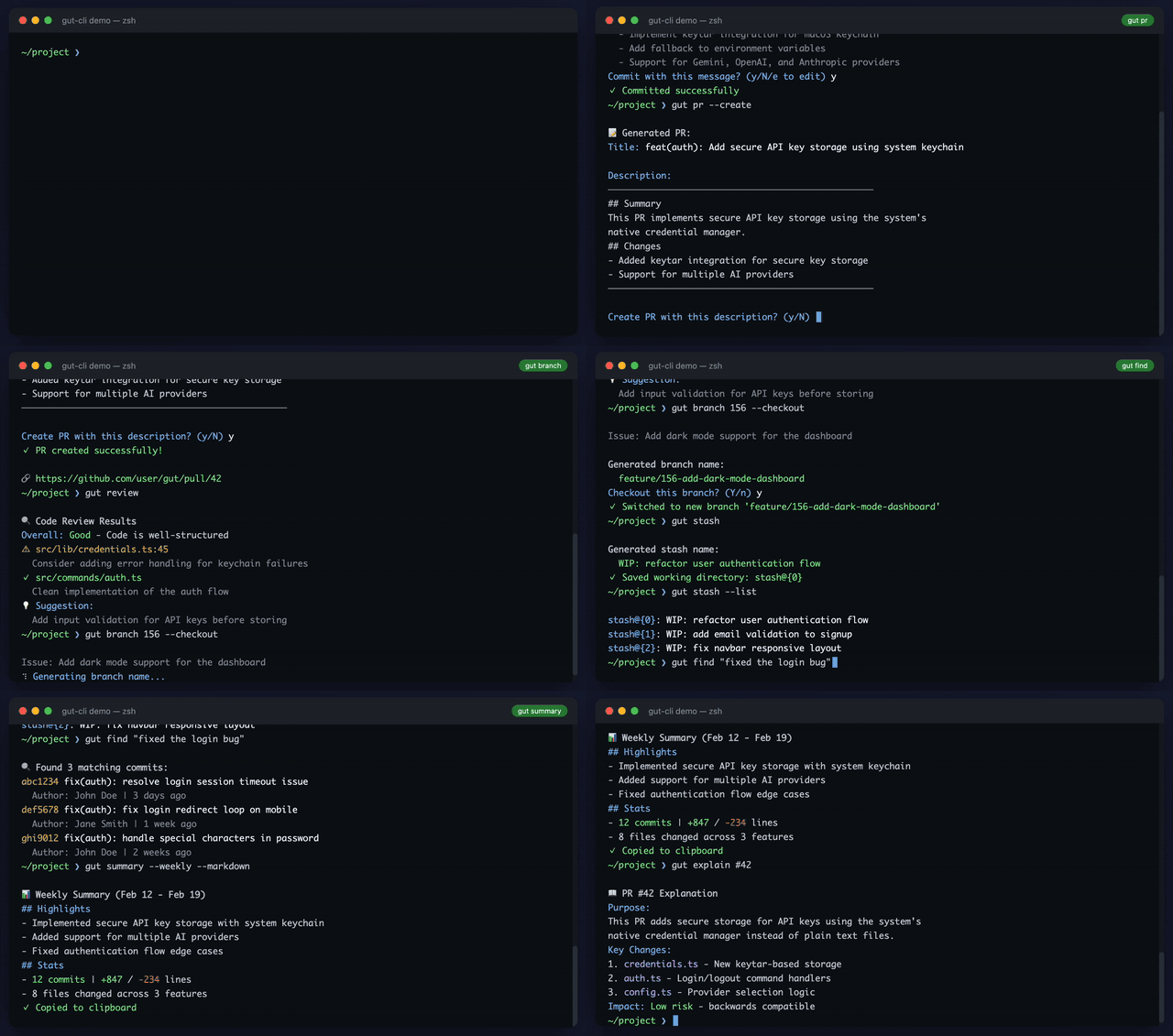
Why gut?
Working with git involves many small decisions that add up: writing clear commit messages, naming branches, describing pull requests, coming up with stash names you'll actually remember. These tasks aren't hard, but they interrupt your flow and take more time than they should.
gut handles these for you. Unlike AI coding assistants that analyze your entire codebase, gut focuses only on git operations—so it's fast. You get results in seconds, not minutes.
No subscription required. Just bring your own API key from Gemini, OpenAI, or Anthropic. Your keys are stored securely in your system's native keychain, never in plain text.
Installation
npm install -g gut-cliQuick Start
# 1. Set up your API key (stored securely in system keychain)
gut auth login --provider gemini

# 2. Start using gut
gut commit          # Generate commit message
gut pr              # Generate PR description
gut review          # Get AI code review

# 3. (Optional) Customize templates for your project
gut init            # Creates .gut/ with editable prompt templates
Supported providers: gemini (default), openai, anthropic
See Authentication and Template Configuration for more details.
Commands
| Command | Description |
|---------|-------------|
| gut commit | Generate commit messages |
| gut pr | Generate PR descriptions |
| gut review | Code review |
| gut merge | Resolve merge conflicts |
| gut explain | Explain changes, commits, PRs, or files |
| gut find | Find commits by vague description |
| gut branch | Generate branch names from description |
| gut checkout | Generate branch name from diff and checkout |
| gut changelog | Generate changelogs |
| gut sync | Sync with remote (fetch + rebase/merge) |
| gut stash | Stash with AI-generated names |
| gut summary | Generate work summary (daily/weekly reports) |
| gut config | Manage configuration (language, etc.) |
| gut lang | Set or show output language |
| gut init | Initialize .gut/ templates in your project |
| gut gitignore | Generate .gitignore from codebase |
| gut completion | Generate shell completion script |
gut commit
Generate commit messages using AI.
# Generate commit message (auto-stages if nothing staged)
gut commit

# Auto-commit with generated message
gut commit --commit

# Force stage all changes
gut commit --all

# Use specific provider
gut commit --provider openai
Template Support: Create .gut/commit.md to customize the commit message prompt.
gut pr
Generate pull request title and description using AI.
# Generate PR description
gut pr

# Specify base branch
gut pr --base develop

# Create PR directly (requires gh CLI)
gut pr --create

# Copy to clipboard
gut pr --copy
Template Support: Automatically uses GitHub's .github/pull_request_template.md if present, or falls back to .gut/pr.md.
gut review
Get AI code review of your changes or GitHub PRs.
# Review all uncommitted changes
gut review

# Review staged changes only
gut review --staged

# Review specific commit
gut review --commit abc123

# Review a GitHub PR by number
gut review 123

# Output as JSON
gut review --json
gut merge
Merge branches with AI-powered conflict resolution.
# Merge a branch with AI conflict resolution
gut merge feature/login

# Use specific provider
gut merge feature/login --provider openai

# Don't auto-commit after resolving
gut merge feature/login --no-commit
gut explain
Get AI-powered explanations of changes, commits, PRs, or file contents.
# Explain uncommitted changes (default)
gut explain

# Explain staged changes only
gut explain --staged

# Explain a specific commit
gut explain abc123
gut explain HEAD

# Explain a PR (requires gh CLI)
gut explain 123
gut explain #123

# Explain a file's purpose and contents
gut explain src/index.ts

# Explain file's recent change history
gut explain src/index.ts --history

# Explain multiple recent commits for a file
gut explain src/index.ts --history -n 5

# Output as JSON
gut explain --json
Project Context Support: Create .gut/explain.md to provide project-specific context for better explanations.
gut find
Find commits matching a vague description using AI.
# Find commits related to a feature
gut find "login feature"

# Find bug fixes
gut find "fixed the crash"

# Search with filters
gut find "API changes" --author "John" --since "2024-01-01"

# Limit search scope
gut find "refactoring" --path src/lib --num 50

# Output as JSON
gut find "authentication" --json
Options:
-n, --num <n>- Number of commits to search (default: 100)--path <path>- Limit to commits affecting this path--author <author>- Limit to commits by this author--since <date>- Limit to commits after this date--until <date>- Limit to commits before this date--max-results <n>- Max matching commits to return (default: 5)
Project Context Support: Create .gut/find.md to provide project-specific context for better search results.
gut branch
Generate branch names from GitHub issue or description using AI.
# Generate branch name from issue number (requires gh CLI)
gut branch 123
gut branch #123

# Auto-checkout the branch
gut branch 123 --checkout

# Specify branch type
gut branch 123 --type fix

# Use description instead of issue
gut branch -d "add user authentication"
Template Support: Create .gut/branch.md for custom naming rules.
gut checkout
Generate a branch name from current diff and checkout.
# Generate branch name from uncommitted changes
gut checkout

# Auto-checkout without confirmation
gut checkout --yes

# Use only staged changes
gut checkout --staged

# Use specific provider
gut checkout --provider openai
Template Support: Create .gut/checkout.md to customize the prompt.
gut sync
Sync current branch with remote (fetch + rebase + push).
# Sync current branch (fetch + rebase + push)
gut sync

# Auto-stash changes before sync
gut sync --stash

# Use merge instead of rebase
gut sync --merge

# Skip push
gut sync --no-push
gut stash
Stash changes with AI-generated descriptive names.
# Stash with AI-generated name
gut stash

# Stash with custom name
gut stash "working on auth"

# List all stashes
gut stash --list

# Apply latest stash
gut stash --apply

# Apply specific stash
gut stash --apply 2

# Pop stash
gut stash --pop

# Drop stash
gut stash --drop 1

# Clear all stashes
gut stash --clear
gut summary
Generate a work summary from your commits (for daily/weekly reports).
# Today's summary (default: your commits)
gut summary

# Daily report
gut summary --daily

# Weekly report
gut summary --weekly

# Custom date range
gut summary --since "2024-01-01" --until "2024-01-31"

# Include diff for more detail
gut summary --weekly --with-diff

# Output as markdown (great for Slack/docs)
gut summary --weekly --markdown

# Copy to clipboard
gut summary --daily --copy

# Specify different author
gut summary --author "John Doe"
Options:
--daily- Generate daily report (since today)--weekly- Generate weekly report (since 1 week ago)--since <date>- Start date (default: today)--until <date>- End date--author <author>- Filter by author (default: current git user)--with-diff- Include diff analysis for more detail--markdown- Output as markdown--copy- Copy to clipboard
gut changelog
Generate a changelog from commits.
# Generate changelog for last 10 commits
gut changelog

# Generate changelog between refs
gut changelog v1.0.0 v1.1.0

# Generate changelog since a tag
gut changelog --tag v1.0.0

# Output as JSON
gut changelog --json
Template Support: Create .gut/changelog.md to customize the changelog format.
gut lang
Set or show AI output language (shortcut for gut config set lang).
# Show current language
gut lang

# Set to Japanese
gut lang ja

# Set to English
gut lang en

# Set for current repository only
gut lang en --local
gut config
Manage gut configuration settings.
# List all settings
gut config list

# Set language to Japanese (global)
gut config set lang ja

# Set language for current repository only
gut config set lang en --local

# Get current language
gut config get lang

# Open global config folder
gut config open

# Open global templates folder
gut config open --templates

# Open project's .gut/ folder
gut config open --local
Available settings:
lang- Output language for AI responses (en,ja)
Configuration precedence:
- Local:
.gut/config.json(per-repository) - Global:
~/.config/gut/config.json
gut init
Initialize templates for customization (project-level or global).
# Copy all templates to .gut/ (translates if language is not English)
gut init

# Initialize global templates (~/.config/gut/templates/)
gut init --global

# Initialize and open folder
gut init --open
gut init --global --open

# Force overwrite existing templates
gut init --force

# Skip translation (copy English templates as-is)
gut init --no-translate

# Use specific provider for translation
gut init --provider openai
To open templates folder without initializing, use gut config open --templates.
Templates are automatically translated to your configured language (set via gut lang).
Template precedence:
- Project templates:
.gut/(highest priority) - Global templates:
~/.config/gut/templates/ - Built-in templates (lowest priority)
gut gitignore
Generate a .gitignore file by analyzing your project structure.
# Generate .gitignore (prompts before overwriting)
gut gitignore

# Auto-overwrite without confirmation
gut gitignore --yes

# Print to stdout instead of file
gut gitignore --stdout

# Use specific provider
gut gitignore --provider openai
How it works:
- Scans your project structure (files and directories)
- Detects config files (package.json, Cargo.toml, go.mod, pyproject.toml, etc.)
- Identifies the language/framework stack
- Generates appropriate ignore patterns
Template Support: Create .gut/gitignore.md to customize the generation prompt.
gut cleanup
Delete merged branches safely.
# Show merged branches that can be deleted
gut cleanup --dry-run

# Delete all merged local branches (with confirmation)
gut cleanup

# Also delete remote branches
gut cleanup --remote

# Skip confirmation prompt
gut cleanup --force
gut auth
Manage API keys for AI providers.
# Save API key to system keychain
gut auth login --provider gemini

# Check which providers are configured
gut auth status

# Remove API key
gut auth logout --provider gemini
Supported providers: gemini (default), openai, anthropic
API keys can also be set via environment variables:
GUT_GEMINI_API_KEYorGEMINI_API_KEYGUT_OPENAI_API_KEYorOPENAI_API_KEYGUT_ANTHROPIC_API_KEYorANTHROPIC_API_KEY
gut completion
Enable shell tab completion (Bash, Zsh, or Fish).
# Install completion (auto-detects your shell)
gut completion install

# Uninstall completion
gut completion uninstall
After installation, restart your shell or source your profile. Then:
gut c<TAB>→ suggestscommit,config,changelog, etc.gut commit --<TAB>→ suggests--provider,--model, etc.gut commit --provider <TAB>→ suggestsgemini,openai,anthropic,ollamagut auth <TAB>→ suggestslogin,logout,status
Security
API keys are stored securely using your operating system's native credential storage:
- macOS: Keychain
- Windows: Credential Vault
- Linux: Secret Service API (libsecret)
Keys are never stored in plain text files or configuration files. When you run gut auth login, the key is encrypted and managed by your OS.
Template Configuration
gut supports customizable templates at two levels:
Project templates (.gut/): Repository-specific customizations that apply only to the current project.
Global templates (~/.config/gut/templates/): User-wide defaults that apply across all projects.
Precedence: Project > Global > Built-in
Each template uses {{variable}} syntax for dynamic content.
| File | Purpose |
|------|---------|
| commit.md | Commit message prompt |
| pr.md | PR description prompt |
| branch.md | Branch naming rules |
| checkout.md | Checkout branch name prompt |
| merge.md | Merge conflict resolution rules |
| review.md | Code review criteria |
| explain.md | Explanation context |
| explain-file.md | File explanation context |
| find.md | Commit search context |
| changelog.md | Changelog format |
| stash.md | Stash name prompt |
| summary.md | Work summary format |
| gitignore.md | Gitignore generation prompt |
Special case: .github/pull_request_template.md is prioritized over pr.md for PR descriptions.
Custom API Endpoints
Configure custom base URLs for AI providers (useful for proxies, local instances, or API-compatible services):
Global Configuration
# Set base URL for all AI commands
gut config set baseUrl https://api.example.com/v1

# View current config
gut config list
Per-Command Override
gut commit --base-url https://api.example.com/v1
gut pr --base-url https://my-proxy.com
Local (Project-Specific)
gut config set baseUrl https://api.example.com/v1 --localExamples
# OpenAI-compatible API (Groq)
gut config set provider openai
gut config set baseUrl https://api.groq.com/openai/v1

# Local Ollama on different port
gut commit --provider ollama --base-url http://192.168.1.100:11434/api
Priority Order
- CLI flag
--base-url(highest) - Local config (
.gut/config.json) - Global config (
~/.config/gut/config.json) - Provider defaults (lowest)
Note: For Ollama, the legacy ollamaBaseUrl config takes priority over baseUrl for backward compatibility.
Development
# Install dependencies
npm install

# Build
npm run build

# Watch mode
npm run dev

# Link for local testing
npm link
Related
Prefer a GUI? Check out Gitton - a modern Git client for desktop.
License
MIT