
hallway
v0.10.0
Published
The front door for everything you vibe-coded on a random port: a local-only dashboard of every web server on your machine, with health, memorable hostnames and bookmarks.

Maintainers
 edspencer
Readme
Hallway
The front door for everything you vibe-coded on a random port.
Coding agents make small web apps nearly free to build — dashboards, decks, viewers, tools. Each one ends up on some port, started in a session that has long since ended. Days later you can't remember what's running, where, or how it got started; then a reboot quietly kills the lot.
Hallway gives them all a front door:
- A live directory of every local web server — the ones you registered and the ones it finds simply by looking at what's listening, identified by project, directory and git branch.
- Health at a glance — state and uptime history for each, calm when things are intentionally off, loud only when something that should be running isn't.
- Memorable HTTPS hostnames —
https://review.localhostinstead oflocalhost:5622, with no DNS setup by default (or under your own domain).hallway setupruns Caddy as you, never as root, can work with no admin rights at all, shows its whole plan and asks before it runs any of it. - Survives reboots — the things you want kept alive run as native OS services (launchd on macOS, systemd on Linux, a per-user scheduled task on Windows), and after a restart Hallway lists what was running before and didn't come back, with one click to start each again.
- A glance at each app — favicons by default; opt in to screenshots on the doors (
hallway thumbs enable), or draw every door as a generated card. - Your jumping-off page — groups of bookmarks to the remote things you can never remember the URL of.
- Agent-friendly — plain YAML files an agent can edit with the UI updating live, an agent guide and
/llms.txt, and one command (hallway run) for an agent to start a server that won't become an orphan. An MCP server (/mcp, orhallway mcpon stdio) offers the same operations as typed tools, and an optional Claude Code hook (hallway hook check-command) stops agents starting dev servers directly.
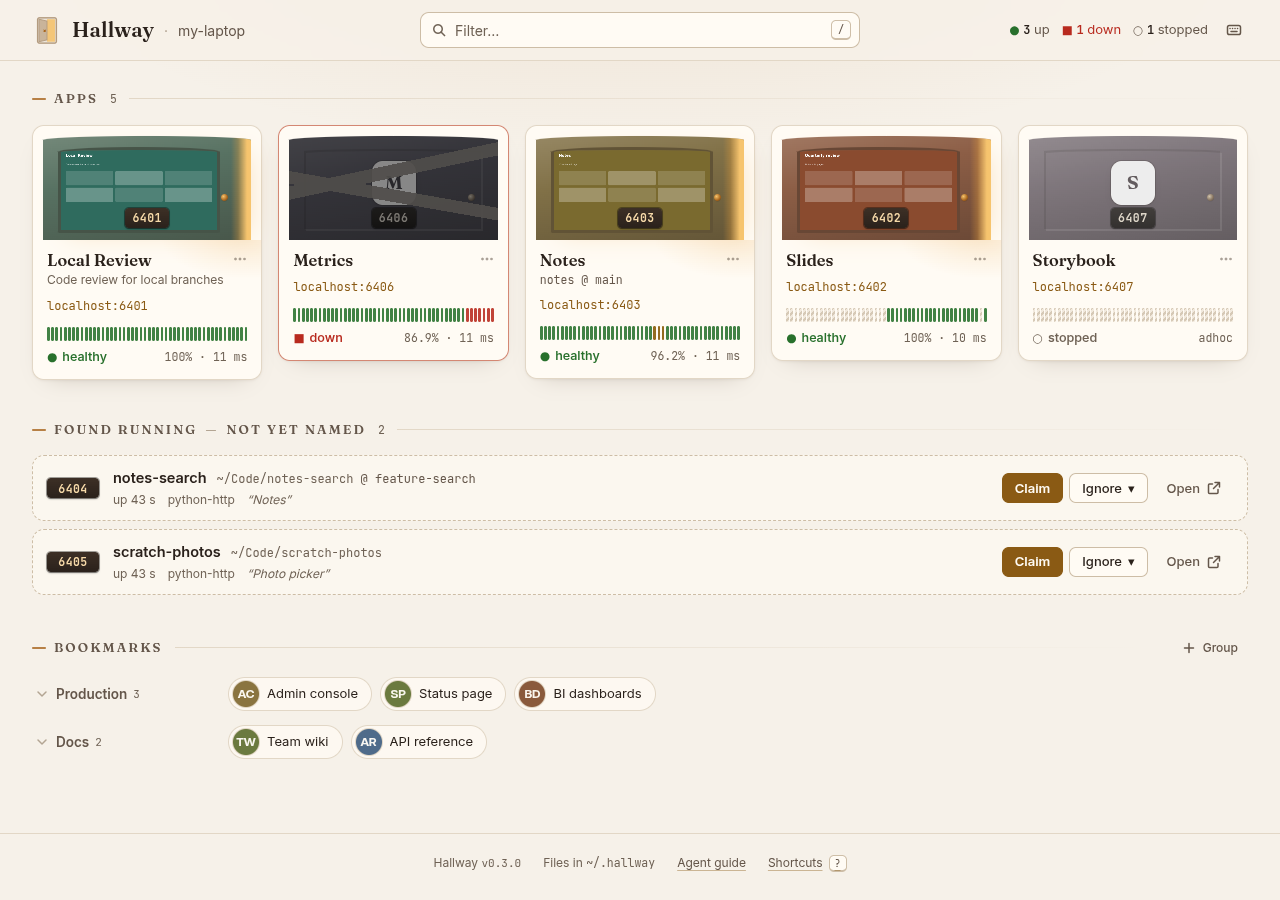
Demo data on a throwaway data home: made-up apps, example.com bookmarks.
Quick start
You need Node.js 22.13 or later, on macOS or Linux. Windows is supported where feasible, best effort: the dashboard, health checks, the port scanner, bookmarks and managed services (as scheduled tasks that start at logon) run there, without fronted mode. So far it has run only on GitHub's Windows runners, not on a real Windows desktop (details).
npm i -g hallway
hallway service install    # run the daemon at login: a LaunchAgent (macOS), systemd user unit (Linux) or scheduled task (Windows)
hallway open               # or browse to http://localhost:4255
To try it first, npx hallway runs the dashboard in the foreground until you close the terminal. To keep it, install
it: npm i -g hallway && hallway service install. (Hallway won't install a service from npx: npm can delete its
cache at any time, which would break the service at the next login.) If the service is already running, npx hallway
says where and exits.
To upgrade: npm i -g hallway@latest && hallway service install. The second command restarts a daemon that's still
running the old version (and says so); hallway doctor flags one that is.
Local domains (https://hallway.localhost, https://<app>.localhost) are off until you run hallway setup; the
startup banner, the dashboard's Local domains panel and hallway doctor all say so, and how.
Hallway now lists every web server it finds listening on this machine. Claim one to give it a door (that writes
~/.hallway/apps/<slug>.yaml), or declare one yourself:
hallway app add my-app --port 5173     # or write ~/.hallway/apps/my-app.yaml: `name: My App` and `port: 5173`
hallway bookmark add production https://status.example.com --title "Status page"
hallway status                         # every app's state, address and uptime
hallway doctor                         # checks, with fixes
On Linux, run loginctl enable-linger once if the daemon should keep running when you're not logged in.
For your coding agents, paste this into CLAUDE.md or AGENTS.md (hallway guide --snippet prints it):
Never start a long-running dev or preview server directly (
npm run dev,vite,astro dev,next dev,python -m http.server, …). Start it withhallway run <slug> -- <command>, which keeps it running outside this session on a stable port and prints its URL. Runhallway guidefor details.
An agent can also read http://localhost:4255/llms.txt: what this Hallway has, and how to register a server.
HTTPS names (optional)
hallway setup --print      # the whole plan; runs nothing
hallway setup              # asks which tier, then https://<app>.localhost and https://hallway.localhost
hallway setup --domain myname.internal    # or under your own domain (System-wide certificate)
hallway teardown           # undo it all, back to http://localhost:<port>
Setup has three tiers (--trust user|system|none); User certificate is the recommended one:
| | macOS | Linux | Asks for |
| --- | --- | --- | --- |
| User certificate (user) | https://<app>.localhost | https://<app>.localhost:4443 | macOS: your own Touch ID or password, once (not an admin prompt). Linux: nothing. The certificate is trusted for your account only (on Linux, by Chrome and Chromium). |
| System-wide certificate (system) | https://<app>.localhost | https://<app>.localhost | sudo. Trusted for every account; custom domains need it. |
| No HTTPS (none) | http://<app>.localhost | http://<app>.localhost:4480 | Nothing. Plain HTTP: Safari drops Secure cookies. |
Caddy runs as you, on loopback ports 4443 and 4480. On macOS, launchd holds loopback 443 and 80 for it, with no
sudo, in every tier. Privileged changes happen only in System-wide certificate, each printed and run through sudo: trusting
Hallway's local certificate authority system-wide, on Linux redirecting ports 443 and 80 to Caddy, and, for a custom
domain, a resolver entry for that domain only. On macOS, install Hallway with npm i -g hallway first. It needs
Caddy 2.7 or later. Details: Fronted mode.
Status
Released (0.5.0 is the latest). All of v0 and v1 and most of v2 are built (docs/08-roadmap.md):
- 0.1.0 (v0): the dashboard, live YAML files, health checks with uptime history, the port scanner with claim and
ignore, bookmarks, the agent guide,
hallway service installandhallway doctor, plus v1's managed servers (hallway run,stop,start,restart,logs,service add). - 0.2.0: v1's fronted mode (
hallway setup, HTTPS names, custom domains), and v2's MCP server and agent hook. - 0.3.0: v1's "Lost at last reboot", and v2's screenshot thumbnails, generated cards and a fast 90-day view.
- 0.3.1: a fix:
hallway lost dismiss --all. - 0.4.0: Windows, best effort: the daemon, dashboard and CLI run natively, and the port scanner finds Windows'
listeners with their directories, without administrator rights.
hallway setuprefuses there. - 0.5.0: Windows managed services:
hallway service installandhallway run, as per-user scheduled tasks.
What's left is v2's last criterion: running everything on a real Mac. Everything has been run end to end on Linux;
on macOS it's tested on CI (including real launchd jobs, hallway setup with launchd's sockets on 443 and 80 and a
trusted certificate, and teardown). On a developer's Mac, Safari, Chrome and Apple's curl have accepted a
certificate whose root is trusted for the user only (the User certificate tier's way), but nothing has been checked across a real reboot, and Firefox
is untried. Windows has run only on CI's runners: a real logon starting the scheduled tasks, and an
interactive desktop user's dev servers, are untested. Reports are welcome. The design is in spec.md and docs/.
Development quick start
You need Node.js 22.13 or later and git.
git clone https://github.com/edspencer/hallway.git
cd hallway
npm ci
npm run dev        # dashboard with hot reload on http://localhost:4255, daemon on :4256
Or build and run it the way an installed copy runs, with a throwaway data home:
HALLWAY_HOME=$(mktemp -d) npm start            # http://localhost:4255
curl http://localhost:4255/api/health          # {"ok":true,"version":"<package.json version>"}
Checks, conventions and how to send a pull request: CONTRIBUTING.md. Agents working on this repo: AGENTS.md.
License
MIT.