
harness-aim-mcp
v1.0.46
Published
AIM — AI Maestro for the Harness platform. Your personal Harness Architect, powered by the Harness Adoption MCP server.
Downloads
2,248

Maintainers
 richpaul1
Readme
AIM — AI Maestro for the Harness platform
"I'm AIM — AI Maestro for the Harness platform. I am your personal Harness Architect."
AIM (AI Maestro for the Harness platform) is your personal Harness Architect, powered by the Harness Adoption MCP server. The MCP server supplies the specific playbooks and APIs that up-level your LLM to a Harness Subject Matter Expert — equipped with deep domain knowledge, live account access, best practices, and the ability to take action across the full platform.
You don't open a new tool or log into a separate product. You connect the MCP server to your AI IDE, and AIM becomes your co-pilot across Cloud Cost Management (CCM / FinOps), Continuous Delivery (CD), Internal Developer Portal (IDP), IaCM, and Chaos Engineering.
What It Does
Ask questions in plain language inside your AI environment:
"Which business units are overspending this month?" "What caused the AWS cost spike on April 8?" "Are any of our CD pipelines missing approval gates?" "Generate a Business Value Review report for Acme Corp." "Which IDP scorecards are failing across my catalog?"
AIM handles all API calls, chart rendering, and report assembly. You just ask the question — AIM flies the mission.
Quick Start
Prerequisites — Node.js v22 LTS
AIM requires Node.js v22 LTS or later. npx comes bundled with Node — nothing else to install.
Why v22? Node v20 will run the server, but
http-proxy-middleware@4(a transitive dependency) requires Node ≥ 22. Running on v20 produces anEBADENGINEwarning and risks future compatibility issues.
Pick the method that matches your platform:
macOS
Option A — Homebrew (recommended)
If you have Homebrew installed (most developers do):
brew install node@22After installing, link it so node and npx resolve from your shell:
brew link node@22 --forceVerify:
node --version   # should print v22.x.x
npx --version
Option B — Official installer
Download and run the macOS installer from nodejs.org/en/download. Choose the v22 LTS tab, then the .pkg file for your Mac (Apple Silicon or Intel).
Option C — nvm (manage multiple Node versions)
nvm lets you switch between Node versions without uninstalling anything:
# Install nvm (copy-paste from https://github.com/nvm-sh/nvm#installing-and-updating)
curl -o- https://raw.githubusercontent.com/nvm-sh/nvm/v0.40.1/install.sh | bash

# Open a new terminal, then:
nvm install 22
nvm use 22
nvm alias default 22   # makes v22 the default in new terminals
Windows
Option A — Official installer (simplest)
- Go to nodejs.org/en/download
- Select the v22 LTS tab
- Download the Windows Installer (.msi) — choose 64-bit unless you know you need 32-bit
- Run the installer, accept the defaults, and check "Automatically install the necessary tools" on the optional tools page
- Open a new Command Prompt or PowerShell and verify:
node --version   # v22.x.x
npx --version
Option B — winget (Windows Package Manager)
On Windows 10 (1709+) and Windows 11, winget is built in:
winget install OpenJS.NodeJS.LTSRestart your terminal after installation.
Option C — nvm-windows (manage multiple Node versions)
nvm-windows is the Windows equivalent of nvm:
- Download the latest
nvm-setup.exefrom github.com/coreybutler/nvm-windows/releases - Run the installer
- Open a new terminal as Administrator, then:
nvm install 22
nvm use 22
Verify with node --version.
Already have Node but on the wrong version? Run
node --version. If it shows v20 or earlier, use one of the options above to install v22 alongside it, or upgrade in-place using the official installer or your package manager.
How to find your Token
Log in to your Harness account, then open DevTools (F12 / Cmd+Option+I) and go to the Application tab. Select Storage > Cookies on the left. Select your Harness cookie and look for your Token entry to copy the value.
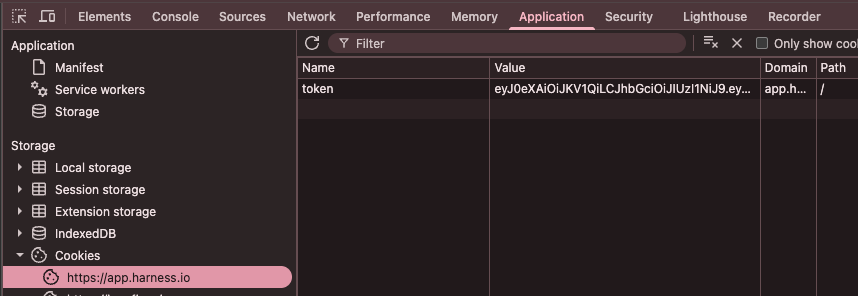
Token expiry: the token is a short-lived browser session JWT. When API calls start returning 401 errors, repeat the steps above, update
HARNESS_BEARER_TOKENin your config, and restart your AI client.
Step 1 — Add AIM to your AI client
Cursor
Add to ~/.cursor/mcp.json (global, works in all workspaces) or .cursor/mcp.json in your project root (workspace-local, takes precedence over global):
{
  "mcpServers": {
    "aim": {
      "command": "npx",
      "args": ["-y", "harness-aim-mcp@latest"],
      "env": {
        "HARNESS_BEARER_TOKEN": "<your bearer token>",
        "HARNESS_ACCOUNT_ID": "<your account id>",
        "HARNESS_BASE_URL": "https://app.harness.io"
      }
    }
  }
}
Restart Cursor. Cursor spawns and manages the process automatically.
Visual Studio Code (Copilot)
Add to your VS Code settings.json (Cmd+Shift+P → Open User Settings JSON):
{
  "mcp": {
    "servers": {
      "aim": {
        "type": "stdio",
        "command": "npx",
        "args": ["-y", "harness-aim-mcp@latest"],
        "env": {
          "HARNESS_BEARER_TOKEN": "<your bearer token>",
          "HARNESS_ACCOUNT_ID": "<your account id>",
          "HARNESS_BASE_URL": "<your account url>"
        }
      }
    }
  }
}
AWS Kiro
Add to .kiro/mcp.json in your project root (create the file if it doesn't exist):
{
  "mcpServers": {
    "aim": {
      "command": "npx",
      "args": ["-y", "harness-aim-mcp@latest"],
      "env": {
        "HARNESS_BEARER_TOKEN": "<your bearer token>",
        "HARNESS_ACCOUNT_ID": "<your account id>",
        "HARNESS_BASE_URL": "<your account url>"
      }
    }
  }
}
Step 2 — Run first-time setup
Once connected, type this in your AI chat:
aim: setupAIM will install its workflow rules into your workspace and set up PDF export. Follow any instructions it returns, then restart your AI client.
Step 3 — Get started
Ask AIM what you can do with your Harness account:
aim: what can you help me with?Or jump straight into a module:
| If you work with... | Try asking... | |---|---| | Cloud costs / FinOps | "What are my top 5 cloud cost drivers this month?" | | Cost anomalies | "Are there any unusual cost spikes in the last 7 days?" | | Commitments / RI | "How is my Reserved Instance utilization looking?" | | CD pipelines | "Which pipelines have the lowest success rate this week?" | | IaCM workspaces | "Are any Terraform workspaces drifted or out of compliance?" | | IDP catalog | "Which catalog entities are failing their scorecards?" | | Chaos Engineering | "Is my infrastructure ready for chaos experiments?" | | Business Value Review | "Generate a FinOps BVR for Acme Corp." |
AIM handles all API calls, chart rendering, and report assembly automatically.
On first run npx downloads the package (~5 MB) and its dependencies. @latest keeps you on the latest version automatically.
Token expiry:
HARNESS_BEARER_TOKENis a browser session JWT that expires periodically. Update the value in your config file and restart your AI client to refresh it.
Configuration changes: any change to the config file — including token refresh — requires a full restart of your AI client to take effect.
Tools
Session
| Tool | Description |
|------|-------------|
| harness_adoption_guide | Call this first every session. Loads the full AIM protocol — domain routing, tool conventions, BVR playbooks, chart and report rules. Also sent as instructions on initialize. |
| harness_adoption_setup | First-time setup: installs AIM workflow rules for the IDE you are running in (passed via the client parameter — cursor, vscode, kiro, claude, or agents for the universal AGENTS.md fallback) and checks/installs the Playwright Chromium browser for PDF export. Invoke with aim: setup. |
| harness_adoption_whoami | Identity probe — returns company name, account ID, base URL, auth method, and active licensed modules. |
Core (cross-module API access)
| Tool | Description |
|------|-------------|
| harness_adoption_core_list | List any Harness resource type with filtering and pagination |
| harness_adoption_core_get | Get a single Harness resource by ID |
| harness_adoption_core_describe | Discover available resource types, supported operations, and filter fields — no API call |
CCM / FinOps
| Tool | Description |
|------|-------------|
| harness_adoption_ccm_guide | Load the full CCM/FinOps agent guide — tool conventions, resource types, spike investigation, BVR playbook |
| harness_adoption_ccm_cloud_cost_breakdown | Fetch cloud cost breakdown by service, account, region, or tag |
| harness_adoption_ccm_cost_anomaly | Detect and investigate cost anomalies |
| harness_adoption_ccm_budget_health | One-call budget risk sweep — classifies budgets as over_budget, at_risk, or on_track |
| harness_adoption_ccm_commitment_utilization | RI / Savings Plans commitment utilization and coverage analysis |
| harness_adoption_ccm_optimize_costs | Rightsizing and cost optimization recommendations |
| harness_adoption_ccm_rightsizing | EC2/compute rightsizing recommendations |
| harness_adoption_ccm_chart | Render a bar or line chart PNG from cost data |
| harness_adoption_ccm_json | Parse CCM JSON into a normalized chart spec |
| harness_adoption_ccm_cost_category_chart | Grouped-bar PNG comparing cost by category across two time windows |
| harness_adoption_ccm_maturity_chart | FinOps Maturity spider chart (Crawl / Walk / Run) from per-dimension scores |
| harness_adoption_ccm_health_assessment | Full FinOps health assessment across budgets, anomalies, recommendations, and commitments |
| harness_adoption_ccm_bvr | Generate a Business Value Review report for a CCM customer |
| harness_adoption_ccm_showcase | Build a CCM capability showcase for a customer |
| harness_adoption_ccm_curriculum | Generate a FinOps learning curriculum |
| harness_adoption_ccm_packs | List available customer report packs |
| harness_adoption_ccm_packs_guide | Load the report pack authoring guide |
Continuous Delivery (CD)
| Tool | Description |
|------|-------------|
| harness_adoption_cd_guide | Load the full CD agent guide |
| harness_adoption_cd_pipelines_list | List CD pipelines with filtering |
| harness_adoption_cd_pipeline_get | Get a single pipeline definition |
| harness_adoption_cd_pipeline_health | Assess pipeline health — success rates, failure patterns |
| harness_adoption_cd_pipeline_analyze | Deep analysis of a pipeline — stages, approvals, triggers, maturity |
| harness_adoption_cd_pipeline_summary | Summarise a pipeline for a BVR or report |
| harness_adoption_cd_pipeline_timeseries | Execution frequency and success rate over time |
| harness_adoption_cd_pipeline_validate | Validate a pipeline YAML for best practices |
| harness_adoption_cd_pipeline_variables | List pipeline input variables and runtime inputs |
| harness_adoption_cd_pipeline_triggers | List triggers configured on a pipeline |
| harness_adoption_cd_executions_list | List pipeline executions with filtering |
| harness_adoption_cd_executions_metrics | Aggregate execution metrics (DORA, frequency, duration) |
| harness_adoption_cd_repos_list | List Git repositories connected to Harness |
| harness_adoption_cd_filters_list | List available filter presets for CD queries |
| harness_adoption_cd_bvr | Generate a Business Value Review report for a CD customer |
IaCM (Infrastructure as Code Management)
| Tool | Description |
|------|-------------|
| harness_adoption_iacm_guide | Load the full IaCM agent guide |
| harness_adoption_iacm_list | List IaCM workspaces |
| harness_adoption_iacm_get | Get a single workspace |
| harness_adoption_iacm_describe | Describe available IaCM resource types |
| harness_adoption_iacm_scan | Deep scan of workspace state, drift, and compliance |
| harness_adoption_iacm_feature_scan | Scan workspace for feature adoption and gaps |
| harness_adoption_iacm_maturity | IaCM maturity assessment across workspaces |
| harness_adoption_iacm_growth | IaCM adoption growth analysis |
| harness_adoption_iacm_opa_scan | OPA policy compliance scan across workspaces |
| harness_adoption_iacm_chart | Render an IaCM chart |
Internal Developer Portal (IDP)
| Tool | Description |
|------|-------------|
| harness_adoption_idp_guide | Load the full IDP agent guide |
| harness_adoption_idp_catalog_list | List catalog entities |
| harness_adoption_idp_catalog_get | Get a single catalog entity |
| harness_adoption_idp_catalog_by_refs | Fetch multiple catalog entities by entity refs |
| harness_adoption_idp_catalog_filters | List available catalog filters |
| harness_adoption_idp_catalog_kinds | List entity kinds in the catalog |
| harness_adoption_idp_scorecards_list | List scorecards and their scores |
| harness_adoption_idp_checks_list | List scorecard checks |
| harness_adoption_idp_plugins_list | List installed IDP plugins |
| harness_adoption_idp_plugins_config | Get plugin configuration |
| harness_adoption_idp_plugins_custom | List custom plugins |
| harness_adoption_idp_plugins_recommend | Recommend plugins based on catalog content |
| harness_adoption_idp_workflow_candidates | Identify catalog entities that would benefit from self-service workflows |
| harness_adoption_idp_workflows_history | List workflow execution history |
| harness_adoption_idp_data_sources_list | List configured data sources |
| harness_adoption_idp_banners_active | Get active IDP banners |
| harness_adoption_idp_home_get | Get IDP home page layout |
| harness_adoption_idp_layout_get | Get IDP page layout |
| harness_adoption_idp_layout_get_by_id | Get a specific IDP layout by ID |
| harness_adoption_idp_backstage_search | Full-text search across the Backstage catalog |
| harness_adoption_idp_backstage_entity_get | Get a Backstage entity |
| harness_adoption_idp_backstage_entities_query | Query Backstage entities with filters |
| harness_adoption_idp_backstage_entities_by_refs | Fetch Backstage entities by ref list |
| harness_adoption_idp_backstage_ancestry | Get entity ancestry graph |
| harness_adoption_idp_backstage_facets | Get catalog facets for filter discovery |
| harness_adoption_idp_backstage_locations | List Backstage catalog locations |
| harness_adoption_idp_backstage_actions_list | List available scaffolder actions |
| harness_adoption_idp_backstage_task_get | Get a scaffolder task status |
| harness_adoption_idp_backstage_techdocs_metadata | Get TechDocs metadata for an entity |
| harness_adoption_idp_backstage_template_schema | Get a scaffolder template's input schema |
| harness_adoption_idp_backstage_health_failed | Get failed Backstage health checks |
| harness_adoption_idp_bvr | Generate a Business Value Review report for an IDP customer |
Chaos Engineering
| Tool | Description |
|------|-------------|
| harness_adoption_chaos_guide | Load the full Chaos Engineering agent guide |
| harness_adoption_chaos_onboard | Onboarding assessment — readiness, infrastructure, experiment recommendations |
| harness_adoption_chaos_report | Generate a chaos experiment report |
| harness_adoption_chaos_bvr | Generate a Business Value Review for a Chaos Engineering customer |
| harness_adoption_chaos_training | Generate chaos engineering training materials |
| harness_adoption_chaos_pod_api_block | Construct a pod API block for a chaos experiment |
Reports & Exports
| Tool | Description |
|------|-------------|
| harness_adoption_reports_render | Register a markdown file with the report renderer and return a live browser URL. Supports themed HTML, PDF export, and PPTX. |
| harness_adoption_reports_diagram | Render a Mermaid diagram as an SVG asset and embed it in a report |
| harness_adoption_reports_chart | Render a chart PNG for use in a report |
| harness_adoption_reports_pptx | Export a report as a PowerPoint presentation |
| harness_adoption_reports_register_pack | Register an external customer report pack directory |
| harness_adoption_markdown_to_pdf | Convert a markdown file directly to PDF |
| harness_adoption_markdown_to_docx | Convert a markdown file to a Word document |
Jira Integration
| Tool | Description |
|------|-------------|
| harness_adoption_jira_attach | Attach a file or report to a Jira issue |
| harness_adoption_jira_download | Download an attachment from a Jira issue |
Configuration
| Variable | Required | Description |
|----------|----------|-------------|
| HARNESS_BEARER_TOKEN | Yes* | Browser session JWT from your Harness account. Copy from the browser DevTools network tab. Expires periodically — refresh and restart your AI client when it does. |
| HARNESS_ACCOUNT_ID | Yes* | Your Harness account ID. Found in Account Settings → Overview. Auto-extracted from PAT tokens. |
| HARNESS_BASE_URL | No | Override for self-managed or non-production Harness. Default: https://app.harness.io. |
| HARNESS_REPORT_PORT | No | Port for the report browser UI. Default: 4321. |
AIM Commands
Once connected, AIM responds to aim: prefixed commands in chat:
| Command | What it does |
|---|---|
| aim: setup | First-time setup — installs workflow rules and configures PDF export |
AIM Workflow Rules
aim: setup writes workflow rule files for one client at a time — the IDE/agent runtime
where you ran the command. The calling agent passes client matching its own runtime:
| Client | File(s) written |
|---|---|
| cursor | .cursor/rules/aim-workflow.mdc |
| vscode | .github/copilot-instructions.md + .github/instructions/aim-workflow.instructions.md |
| kiro | .kiro/steering/aim-workflow.md |
| claude | CLAUDE.md |
| agents (default / universal fallback) | AGENTS.md |
If you switch IDEs later, run aim: install rules for <client> to add that runtime's rule
file. Existing rule files for other runtimes are left in place so the workspace stays
portable across teams using different agents.
Report Renderer
The server includes an in-process report renderer that converts markdown files into themed, interactive HTML documents with one-click PDF export.
Usage
- Query cost data and generate chart PNGs using
harness_adoption_ccm_chartorharness_adoption_ccm_maturity_chart - Write a markdown report with YAML frontmatter (see below)
- Call
harness_adoption_reports_renderwith the absolute path to the markdown file
The tool returns a live browser URL. Switch themes via the sidebar dropdown. Click Export PDF to download.
Markdown frontmatter
---
title: Amazon SageMaker Spend Analysis
subtitle: Cost deep-dive · Mar 17 – Apr 16, 2026
customer: Acme Corp
date: April 16, 2026
author: Harness CCM FinOps Agent
classification: Confidential
---
Supported callout blocks
::: critical High spend concentration
93% of SageMaker spend is in a single account.
:::

::: success Optimization in progress
Three rightsizing recommendations applied this month.
:::

::: metrics
- label: 30-Day Total
  value: $1,471,113
  trend: +15.8% vs prior period
  tone: risk
:::
Callout types: critical, risk, warning, success, info, action, quote.
Charts are referenced as standard markdown images. Image paths resolve relative to the markdown file's directory — copy or output_path charts into the same folder.
Themes
| Theme | Feel | Best for |
|---|---|---|
| harness | Corporate executive, navy + amber | Customer-facing BVRs |
| modern | Editorial, near-black + coral | Internal or bold designs |
| glass | Adaptive liquid-glass | High-visual-impact presentations |
| kinetic | Scrollytelling + motion | Interactive web viewing |
Development
# Build (TypeScript + copy static assets)
pnpm build

# MCP server + report renderer on localhost:3000 (watch mode)
pnpm dev

# Report server only — stdio MCP + HTTP browser UI on localhost:4321 (watch mode)
pnpm dev:report

# Type check only
pnpm typecheck

# Tests
pnpm test

# Interactive MCP Inspector (stdio mode)
pnpm inspect
Project Structure
src/
  index.ts                          # Server entrypoint, HTTP + stdio transport
  config.ts                         # Env var validation (Zod)
  client/
    harness-client.ts               # HTTP client (auth, retry, rate limiting)
  registry/
    index.ts                        # Registry class + dispatch logic
    extractors.ts                   # Response extractors for CCM API shapes
    toolsets/
      ccm.ts                        # All CCM resource definitions
  tools/
    harness-list.ts                 # harness_ccm_finops_list
    harness-get.ts                  # harness_ccm_finops_get
    harness-describe.ts             # harness_ccm_finops_describe
    harness-ccm-chart.ts            # harness_ccm_finops_chart
    harness-ccm-json.ts             # harness_ccm_finops_json
    harness-ccm-cost-category-period-chart.ts  # harness_ccm_finops_cost_category_chart
    harness-ccm-budget-health.ts    # harness_ccm_finops_budget_health
    harness-ccm-maturity-chart.ts   # harness_ccm_finops_maturity_chart
    harness-ccm-report-render.ts    # harness_ccm_finops_report_render
    harness-ccm-guide.ts            # harness_ccm_finops_guide
    markdown-to-pdf.ts              # markdown_to_pdf
  report-renderer/
    index.ts                        # Multi-document registry + Express routes
    render.ts                       # Markdown → HTML pipeline (markdown-it + plugins)
    pdf.ts                          # Playwright PDF export
    themes.ts                       # Theme discovery and resolution
    plugins/
      callouts.ts                   # :::critical / :::success / etc.
      metric-cards.ts               # ::: metrics grid blocks
    static/
      themes/                       # harness / modern / glass / kinetic
        <theme>/
          manifest.json
          template.js               # Server-side HTML shell renderer
          app.js                    # Client-side JS (TOC scrollspy, PDF export)
          theme.css                 # Typography and document styles
          web.css                   # Web app chrome (sidebar, header)
          print.css                 # Paged media / PDF styles
      public/
        theme-switch.js             # Theme dropdown client logic
  docs/
    finops-guide.md                 # Combined 19-section agent guide source
  utils/
    logger.ts                       # stderr-only structured logger
    errors.ts                       # Error normalization
    rate-limiter.ts                 # Client-side rate limiting
tests/                              # Vitest unit tests
Architecture
  AI Agent (Cursor / Claude / Windsurf / etc.)
         │
         ├── MCP stdio/http ──────────────────────────────────────────┐
         │                                                            │
         │  harness-aim-mcp  (stdio or :3000)                        │
         │  ├── MCP Tools  (harness_ccm_finops_*, harness_adoption_*) │
         │  ├── Registry  (CCM + platform resource types)             │
         │  ├── HarnessClient  ──────────────► Harness APIs           │
         │  ├── Report Renderer  (/reports/*)                         │
         │  └── Chart Engine  (PNG via @napi-rs/canvas)               │
         │                                                            └─
         └── MCP stdio ──────────────────────────────────────────────┐
                                                                     │
            harness-aim-mcp reports  (:4321)                        │
            ├── register_report / list_reports / open_report tools   │
            └── Report browser UI  (localhost:4321/reports/*)        │
                                                                     └─
PDF Export Setup
PDF export is powered by Playwright's headless Chromium. The browser binary is not included in the package and must be installed once before your first PDF export.
Run this once in your terminal after installing harness-aim-mcp:
npx -y harness-aim-mcp@latest install-browsersThis installs the exact Chromium version required by the bundled Playwright — no version mismatch, no manual cache hunting.
When to re-run it:
- First time using PDF export
- After
harness-aim-mcpupgrades to a new Playwright version
AIM will warn you at startup if Chromium is not installed, so you'll know before your first PDF attempt rather than getting a silent error.
Manual fallback — if install-browsers fails
If the bundled installer ever errors out (e.g. ENOENT on the playwright binary on harness-aim-mcp ≤ 1.0.16), run the playwright CLI directly. This invokes the same playwright package that ships with harness-aim-mcp, so the Chromium version still matches:
macOS / Linux:
PLAYWRIGHT_BROWSERS_PATH="$HOME/.harness-aim-browsers" \
  npx --package=harness-aim-mcp@latest -- playwright install chromium
Windows (PowerShell):
$env:PLAYWRIGHT_BROWSERS_PATH = "$HOME\.harness-aim-browsers"
npx --package=harness-aim-mcp@latest -- playwright install chromium
The PLAYWRIGHT_BROWSERS_PATH value must be ~/.harness-aim-browsers — that's the fixed location AIM looks in at runtime. Pointing it elsewhere means the install succeeds but AIM still can't find the binary.
Restart your AI client after the install completes.
Troubleshooting
| Symptom | Cause | Fix |
|---------|-------|-----|
| cost_breakdown returns no data | perspective_id missing | Always pass perspective_id; get it from cost_metadata or the cost_perspective list |
| AWS breakdowns show "No Service" with extreme trends | RI/SP billing artifacts included | Add filter_aws_line_item_type: "Usage" to every AWS service-level query |
| Report renders HTTP 500 | Static assets not built | Run pnpm build to copy theme files into build/ |
| Report 404 after server restart | Registry file missing | Registry persists to ~/.harness-aim/report-registry.json; check HARNESS_AIM_DATA_DIR is consistent across restarts |
| PDF export fails / HTTP 500 on download | Chromium not installed for this package version | See PDF export setup below |
| HARNESS_ACCOUNT_ID is required | API key is not a PAT | Set HARNESS_ACCOUNT_ID explicitly in env or .env |
| CCM queries return 401 | Bearer token expired | Refresh HARNESS_BEARER_TOKEN from your browser session |
| npx slow on first run | Installing package + dependencies | One-time cost (~5 MB package); Chromium (~150 MB) only downloads on first PDF request |
Contributing Feedback
The agent can passively collect improvement suggestions during live customer sessions and write them to a structured report you can send back to the development team. This helps us improve the tooling based on real-world usage rather than test cases.
How to enable
Add one line to your .env:
ANALYZE_RESULTS_PROVIDE_FEEDBACK=trueWhat it does
With this flag set, the agent silently monitors every API call during the session and logs genuine improvement opportunities to:
.maestro/feedback-for-maestro-developers.mdThe file is append-only and accumulates across sessions. Each entry is tagged with
a module (CCM, CD, IDP, IaCM, Chaos, Core, Reports) and a feature area
so the development team can route it to the right person immediately.
At the end of every session the agent will tell you how many items were logged.
What gets logged
- Missing fields — data visible in the Harness UI but absent from API responses
- Shape inconsistencies — field naming mismatches across endpoints
- Wrong types — timestamps as strings, percentages as decimals, etc.
- Better endpoints — documented Tier A paths that could replace UI-only gateway paths
- Tool gaps — workflows that needed 3+ round trips and could be one tool
- Bugs — incorrect parsing, silent errors, null-handling issues
- Feature requests — capabilities that would materially improve a customer session
Nothing sensitive is logged — only API field names, shapes, and endpoint paths.
How to contribute
Once you have a .maestro/feedback-for-maestro-developers.md with useful entries, open a GitHub
issue and paste the relevant entries, or attach the file directly. The development team
reviews all submissions and credits contributors in the changelog.
License
Apache 2.0