
hcd-ueditor-plus
v2.0.0
Published
基于 UEditor 的增强版富文本编辑器

Maintainers
 c1027079268
Readme
UEditor Plus
基于 UEditor 二次开发的富文本编辑器,让UEditor重新焕发活力
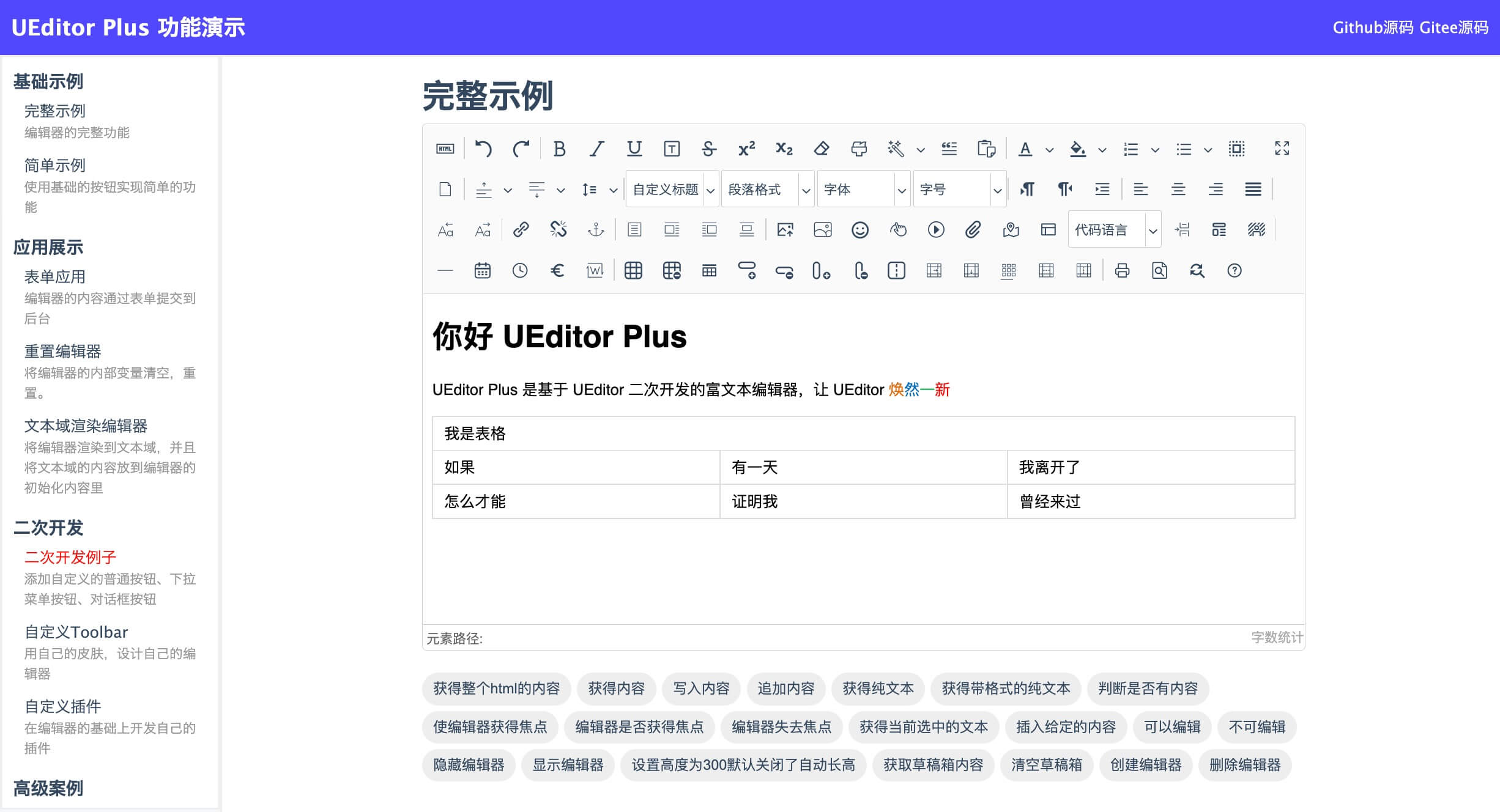


/dist/和/dist-min/目录分别为构建的非压缩和压缩版代码,可直接使用
功能亮点
- 支持文档一键导入,支持Word文档(docx)、Markdown文档(md)文档
- 全新的UI外观,使用字体图标替换原有图片图标
- 移除过时、无用的插件支持,不断完善使用体验
- 图片、文件、视频上传配置化定制增强
- 演示界面重构,右上角可直接查看当前演示界面代码
- 兼容现有UEditor,实现无缝切换
相关链接
- 在线演示:https://open-demo.modstart.com/ueditor-plus/_examples/
- 使用文档: https://open-doc.modstart.com/ueditor-plus
使用遇到问题
自开源以来,UEditor Plus 已经被大家广泛关注,也收到了很多反馈。
为提高问题解决的效率,在提交问题时,请大家自行搭建一个最小可复现的环境代码(zip 压缩包 或 git 仓库地址),不提供的问题或者 issue 将不予解决和解答。
使用教程
原生使用
<script id="editor" type="text/plain" style="height:300px;"></script>
<script type="text/javascript" src="/path/to/UEditorPlus/ueditor.config.js"></script>
<script type="text/javascript" src="/path/to/UEditorPlus/ueditor.all.js"></script>
<script>
    var ue = UE.getEditor('editor', {
        // ... 更多配置
    });
</script>
vue2 使用
① 安装插件支持
npm i --save [email protected]
# 或
yarn add --save [email protected]
② 解压 UEditorPlus 到静态资源目录
复制 dist-min 到项目 public/static/UEditorPlus/ 目录
③ 引入组件并使用
<template>
    <div>
        <vue-ueditor-wrap v-model="content"
                          editor-id="editor"
                          :config="editorConfig"
                          :editorDependencies="['ueditor.config.js','ueditor.all.js']"
                          style="height:500px;"/>
    </div>
</template>
<script>
    import VueUeditorWrap from 'vue-ueditor-wrap'

    export default {
        components: {
            VueUeditorWrap
        },
        data() {
            return {
                content: '<p>Hello UEditorPlus</p>',
                editorConfig: {
                    // 后端服务地址,后端处理参考
                    // https://open-doc.modstart.com/ueditor-plus/backend.html
                    serverUrl: '/api/path/to/server',
                    UEDITOR_HOME_URL: '/static/UEditorPlus/',
                    UEDITOR_CORS_URL: '/static/UEditorPlus/',
                }
            }
        }
    }
</script>
vue3 使用
① 安装插件支持
npm i --save [email protected]
# 或
yarn add --save [email protected]
② 解压 UEditorPlus 到静态资源目录
复制 dist-min 到项目 public/static/UEditorPlus/ 目录
③ 引入组件并使用
main.js
import {createApp} from 'vue'
import App from './App.vue'
import VueUeditorWrap from 'vue-ueditor-wrap';

createApp(App).use(VueUeditorWrap).mount('#app')
App.vue
<template>
    <div>
        <vue-ueditor-wrap v-model="content"
                          editor-id="editor"
                          :config="editorConfig"
                          :editorDependencies="['ueditor.config.js','ueditor.all.js']"
                          style="height:500px;"/>
    </div>
</template>

<script setup>
    import {ref} from 'vue';

    const content = ref('<p>Hello UEditorPlus</p>');
    const editorConfig = {
        // 后端服务地址,后端处理参考
        // https://open-doc.modstart.com/ueditor-plus/backend.html
        serverUrl: '/api/path/to/server',
        UEDITOR_HOME_URL: '/static/UEditorPlus/',
        UEDITOR_CORS_URL: '/static/UEditorPlus/',
    }
</script>
react 使用
① 安装插件支持
npm i --save react-ueditor-wrap
# 或
yarn add --save react-ueditor-wrap
② 解压 UEditorPlus 到静态资源目录
复制 dist-min 到项目 public/static/UEditorPlus/ 目录
③ 引入组件并使用
import RcUeditor from 'react-ueditor-wrap';

function App() {
    const hanldeChage = (value) => {
        console.log('RcUeditor', value);
    }
    return (
        <div className="App">
            <div style={{margin: '0 auto', maxWidth: '800px'}}>
                <RcUeditor
                    value={'<p>Hello UEditorPlus</p>'}
                    ueditorUrl={'/static/UEditorPlus/ueditor.all.js'}
                    ueditorConfigUrl={'/static/UEditorPlus/ueditor.config.js'}
                    editorConfig={{
                        // 后端服务地址,后端处理参考
                        // https://open-doc.modstart.com/ueditor-plus/backend.html
                        initialFrameWidth: '100%',
                        serverUrl: '/api/path/to/server',
                        UEDITOR_HOME_URL: '/static/UEditorPlus/',
                        UEDITOR_CORS_URL: '/static/UEditorPlus/',
                    }}
                    onChange={hanldeChage}/>
            </div>
        </div>
    );
}

export default App;
关于Bug反馈与维护
- 众所周知 UEditor 使用的人数多,目前已经累积了N个Bug,开源不易需要大家共同维护
- 对于在实际使用中遇到的问题,如果急需解决推荐使用 悬赏Issue,这样让更多有能力的开发者有共同维护的动力
✉️ 使用交流
添加好友请备注 UEditorPlus
二次开发
第一步,clone代码到本地
git clone https://gitee.com/modstart-lib/ueditor-plus.git第二步,开始功能开发
使用浏览器打开 _examples/index.html 页面相关内容,完成功能开发
第三步,打包
npm install
grunt default
UEditor相关链接
- UEditor 官网:http://ueditor.baidu.com
- UEditor API 文档:http://ueditor.baidu.com/doc
- UEditor 文档:http://fex.baidu.com/ueditor/
- UEditor API 文档:http://ueditor.baidu.com/doc
更新日志
好项目推荐
- 开源数字人系统 AigcPanel
- 智能桌面助理 FocusAny
- 安卓连接助手 LinkAndroid
- 快速开发框架 ModStart
- 企业内容建站系统 ModStartCMS
- 现代化个人博客系统 ModStartBlog
开源协议
- Apache 2.0