
hcg-split-pane
v1.0.0
Published
A tiny, dependency-free vanilla JavaScript library for resizable split layouts with two or more panes. Supports horizontal and vertical direction, pointer-drag gutters, per-pane minimum and maximum sizes, and percentage or pixel-based sizes.
Downloads
122

Maintainers
 html-code-generator
Readme
hcg-split-pane
A tiny, dependency-free vanilla JavaScript library for resizable split layouts with two or more panes. Drag gutters with mouse or touch (Pointer Events), set per-pane minimum and maximum sizes, and use percentage or pixel-based sizes.
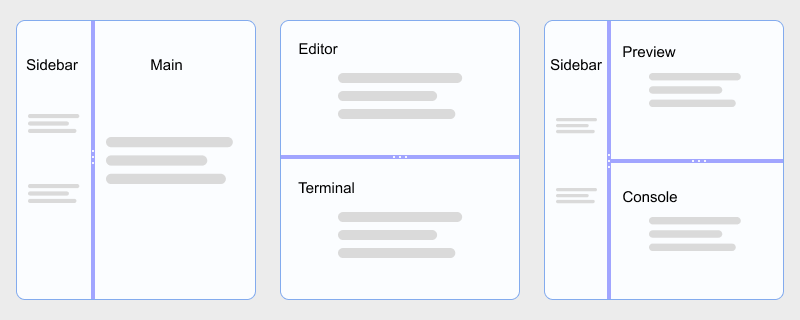
- Pure vanilla JavaScript, zero dependencies, no frameworks
- 2, 3, or N panes in one instance
- Horizontal or vertical direction
- Optional
panesarray to pick elements by selector sizeUnit: 'pixel'withminSize/maxSizein px- Nested layouts via multiple instances
- UMD / AMD / CommonJS / global friendly
Links
- Demo & documentation: https://www.html-code-generator.com/javascript/split-pane
- GitHub: https://github.com/html-code-generator/hcg-split-pane
- Direct JS: https://www.html-code-generator.com/js/library/hcg-split-pane.js
- Direct CSS: https://www.html-code-generator.com/styles/library/hcg-split-pane.css
Install
npm install hcg-split-paneUsage
Node.js / bundlers (Vite, webpack, Rollup)
import HcgSplitPane from 'hcg-split-pane';
import 'hcg-split-pane/hcg-split-pane.css';

const split = new HcgSplitPane('#split', {
  direction: 'horizontal',
  sizes: [50, 50],
  minSize: [120, 200]
});
CommonJS:
const HcgSplitPane = require('hcg-split-pane');
const split = new HcgSplitPane('#split');
Vanilla JavaScript in the browser
<link rel="stylesheet" href="hcg-split-pane.css" />
<script src="hcg-split-pane.js"></script>
<script>
  const split = new HcgSplitPane('#split', {
    direction: 'horizontal',
    sizes: [50, 50],
    minSize: [150, 150]
  });
</script>
React
import { useEffect, useRef } from 'react';
import HcgSplitPane from 'hcg-split-pane';
import 'hcg-split-pane/hcg-split-pane.css';

export default function SplitLayout() {
  const ref = useRef(null);
  useEffect(() => {
    const split = new HcgSplitPane(ref.current, {
      direction: 'horizontal',
      sizes: [35, 65],
      minSize: [120, 200]
    });
    return () => split.destroy();
  }, []);
  return (
    <div ref={ref} style={{ height: 320 }}>
      <div>Left</div>
      <div>Right</div>
    </div>
  );
}
Options
| Option | Type | Default | Description |
| ------------- | --------------------------------- | -------------- | -------------------------------------------------------- |
| direction | 'horizontal' \| 'vertical' | 'horizontal' | Split axis |
| panes | (string \| Element)[] \| null | null | Pane selectors/elements; default = host children |
| sizes | number[] | even split | Initial sizes (percent or px - see sizeUnit) |
| sizeUnit | 'percent' \| 'pixel' | 'percent' | Unit for sizes, getSizes(), and setSizes() |
| minSize | number \| number[] | 0 | Minimum pane size in pixels |
| maxSize | number \| number[] | Infinity | Maximum pane size in pixels |
| gutterSize | number | 6 | Gutter width or height in px |
| disabled | boolean | false | Disable all gutter dragging |
| onDragStart | (detail) => void | null | Fired when a drag begins |
| onDrag | (detail) => void | null | Fired while dragging |
| onDragEnd | (detail) => void | null | Fired when a pointer drag ends |
With sizeUnit: 'pixel', getSizes() and setSizes() use pixels (rounded). Sizes are stored internally as percentages.
Callback detail
{
  event,         // pointer event
  sizes,         // current sizes (percent or px per sizeUnit)
  gutterIndex    // which gutter is active (0 = between pane 0 and 1)
}
this inside callbacks is the HcgSplitPane instance.
Methods
split.getSizes();              // => [50, 50] or [180, 412] when sizeUnit is 'pixel'
split.setSizes([25, 75]);      // length must match pane count
split.option('minSize', [100, 200]);
split.option('maxSize', [240, Infinity]);
split.option('direction', 'vertical');
split.enable();
split.disable();
split.destroy();               // restores DOM when panes option was used

HcgSplitPane.version;          // '1.0.0'
Instance properties: split.panes (array), split.paneA / split.paneB (first two, backward compat).
Patterns
Nested splits - create multiple instances (outer horizontal + inner vertical):
new HcgSplitPane('#outer', { direction: 'horizontal', sizes: [30, 70] });
new HcgSplitPane('#inner', { direction: 'vertical', sizes: [55, 45] });
Dynamic add/remove panes - there is no addPane() API. Use destroy() and recreate with an updated panes list:
split.destroy();
split = new HcgSplitPane('#host', {
  panes: ['#a', '#b', '#c'],
  sizes: [25, 50, 25],
  maxSize: [Infinity, Infinity, 220]
});
Pixel sizes with max width:
new HcgSplitPane('#split', {
  sizeUnit: 'pixel',
  sizes: [180, 360],
  minSize: [120, 160],
  maxSize: [240, Infinity]
});
CSS classes
.hcg-split-pane- container.hcg-split-pane-horizontal/.hcg-split-pane-vertical- direction.hcg-split-pane_pane- each pane.hcg-split-pane_gutter- draggable divider (one between each pair).hcg-split-pane-disabled- dragging disabledbody.hcg-split-pane-dragging- added during a pointer drag
Theme variables: --hcg-split-gutter-bg, --hcg-split-gutter-hover, --hcg-split-gutter-active.
License
MIT