
headbreaker-ts
v4.0.8
Published
Jigsaw puzzles library written in TypeScript


Readme
:jigsaw: :exploding_head: Headbreaker
Jigsaw Puzzles Framework written in TypeScript — v4.0.8
headbreaker - a Spanish pun for rompecabezas - is a TypeScript framework for building all kinds of jigsaw puzzles.
:white_check_mark: Features · :package: Install · :hourglass_flowing_sand: TL;DR · :checkered_flag: Quick Start · :atom_symbol: React · :green_heart: Vue · :eyes: Docs · :question: Questions · :building_construction: Develop


[!WARNING] This is a new version of headbreaker (
headbreaker-ts) and may contain bugs. If you encounter any issues, please open a bug report — it's greatly appreciated!
[!NOTE] Documentation is still being updated for v4. Some pages may reflect older behavior — if something doesn't match, the source code and tests are the best reference.
:ballot_box_with_check: Features
- Written in TypeScript with full type declarations
- Headless domain-model support
- Highly tested with Vitest
- Customizable data-model
- Zero-dependencies — Konva.js is an optional rendering backend that can be replaced with custom code
- ES Module and CommonJS output formats
:package: Installing
npm install headbreaker-ts

# or, with Bun
bun add headbreaker-ts

# optional: add konva if you want to use it as the rendering backend
bun add konva
:hourglass_flowing_sand: TL;DR sample
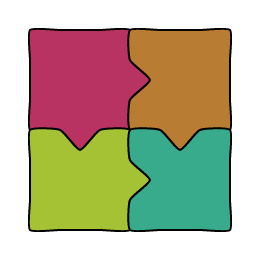
If you just want to see a — very basic — 2x2 puzzle in your web-browser, then create an HTML file with the following contents 😁:
<script src="https://ShadowNineX.github.io/headbreaker/js/headbreaker.js"></script>
<body>
  <div id="puzzle"></div>
  <script>
    const autogen = new headbreaker.Canvas('puzzle', {
      width: 800, height: 650,
      pieceSize: 100, proximity: 20,
      borderFill: 10, strokeWidth: 2, lineSoftness: 0.18,
    });
    autogen.autogenerate({
      horizontalPiecesCount: 2,
      verticalPiecesCount: 2,
      metadata: [
        {color: '#B83361'},
        {color: '#B87D32'},
        {color: '#A4C234'},
        {color: '#37AB8C'}
      ]
    });
    autogen.draw();
  </script>
</body>
And voilà! 🎊
:checkered_flag: Quick start
headbreaker is a library which solves two different — but related — problems:
- It implements a jigsaw-like data-structure, which can be used in tasks like modelling, traversing, importing, exporting, and — of course — rendering. This data-structure has no dependencies and can be used both in browsers and headless environments.
- It implements a simple and generic rendering system for the Web.
headbreakerships a fully functional Konva.js-based implementation viapainters.Konva, but you may develop and use your own implementation by implementing thePainterinterface.
headbreaker is designed to be installed as an npm package, but you can also import it directly in static pages from https://ShadowNineX.github.io/headbreaker/js/headbreaker.js.
HTML Puzzle
<!-- just add a div with an id... -->
<div id="my-canvas">
</div>

<script>
  // ...and a script with the following code:
  const dali = new Image();
  dali.src = 'static/dali.jpg';
  dali.onload = () => {
    const canvas = new headbreaker.Canvas('my-canvas', {
      width: 800, height: 800, image: dali
    });
    canvas.autogenerate();
    canvas.shuffle(0.7);
    canvas.draw();
  };
</script>
Generated puzzles use deterministic, subtle per-edge shape variation by default. Both sides of a seam share the same profile, so matching pieces remain visually coherent while neighboring tabs and slots are no longer identical. You can tune or disable this behavior when generating a puzzle:
canvas.autogenerate({
  horizontalPiecesCount: 4,
  verticalPiecesCount: 3,
  shapeVariation: { offset: 0.08, width: 0.06, depth: 0.05 },
})

// restore legacy uniform outlines
canvas.autogenerate({ shapeVariation: false })
For headless generation, call manufacturer.withPieceShapeVariation(options) or pass false to disable variation. The generated profile is exposed on piece.shape, is included in piece exports, and does not change insert matching or piece metadata.
Canvas is a visual representation of a Puzzle and mirrors many of its common methods. If you need to access the underlying Puzzle object directly, use the puzzle accessor:
// create and configure the canvas
const canvas = new headbreaker.Canvas(...);
// ...

// access and interact with the puzzle object
const puzzle = canvas.puzzle;
Headless Puzzle
headbreaker provides a Puzzle class that lets you fully manipulate the model and its individual Pieces without any visual representation. It can be used in headless environments such as a Node.js server:
import { Puzzle, Slot, Tab, vector } from 'headbreaker-ts'

// Create a puzzle
const puzzle = new Puzzle()
puzzle
  .newPiece({ right: Tab })
  .locateAt(0, 0)
puzzle
  .newPiece({ left: Slot, right: Tab })
  .locateAt(3, 0)
puzzle
  .newPiece({ left: Slot, right: Tab, down: Slot })
  .locateAt(6, 0)
puzzle
  .newPiece({ up: Tab })
  .locateAt(6, 3)

// Connect puzzle's nearby pieces
puzzle.autoconnect()

// Translate puzzle
puzzle.translate(10, 10)

// Shuffle pieces
puzzle.shuffle(100, 100)

// Relocate pieces to fit into a bounding box
// while preserving their relative positions, if possible
puzzle.reframe(vector(0, 0), vector(20, 20))

// Directly manipulate pieces
const [a, b, c, d] = puzzle.pieces

// Drag a piece 10 steps right and 5 steps down
a.drag(10, 5)

// Connect two pieces (if possible)
a.tryConnectWith(b)

// Add custom metadata to pieces
a.metadata.flavour = 'chocolate'
a.metadata.sugar = true
b.metadata.flavour = 'chocolate'
b.metadata.sugar = false

c.metadata.flavour = 'vainilla'
c.metadata.sugar = false
d.metadata.flavour = 'vainilla'
d.metadata.sugar = true

// Require pieces to match a given condition in order to be connected
puzzle.attachConnectionRequirement((one, other) => one.metadata.flavour === other.metadata.flavour)

// Alternatively, set individual requirements for horizontal and vertical connections
puzzle.attachVerticalConnectionRequirement((one, other) => one.metadata.flavour === other.metadata.flavour)
puzzle.attachHorizontalConnectionRequirement((one, other) => one.metadata.sugar !== other.metadata.sugar)

// Remove all connection requirements
puzzle.clearConnectionRequirements()

// Export and import puzzle
const dump = puzzle.export()
const otherPuzzle = Puzzle.import(dump)
:atom_symbol: React Puzzle
import { Canvas, painters } from 'headbreaker-ts'
import { useEffect, useRef } from 'react'

function DemoPuzzle({ id }: { id: string }) {
  const puzzleRef = useRef<HTMLDivElement>(null)

  useEffect(() => {
    if (!puzzleRef.current) return
    const canvas = new Canvas(puzzleRef.current.id, {
      width: 800,
      height: 650,
      pieceSize: 100,
      proximity: 20,
      borderFill: 10,
      strokeWidth: 2,
      lineSoftness: 0.18,
      painter: new painters.Konva(),
    })

    canvas.autogenerate({
      horizontalPiecesCount: 2,
      verticalPiecesCount: 2,
      metadata: [
        { color: '#B83361' },
        { color: '#B87D32' },
        { color: '#A4C234' },
        { color: '#37AB8C' },
      ],
    })

    canvas.draw()
  }, [])

  return <div ref={puzzleRef} id={id}></div>
}

export default function Home() {
  return (
    <main>
      <h1>Headbreaker From React</h1>
      <DemoPuzzle id="puzzle" />
    </main>
  )
}
:green_heart: Vue Puzzle
<template>
  <div id="app">
    <div>Headbreaker from Vue</div>
    <div id="puzzle"></div>
  </div>
</template>

<script setup lang="ts">
import { Canvas, painters } from 'headbreaker-ts';
import { onMounted } from 'vue';

onMounted(() => {
  const autogen = new Canvas('puzzle', {
    width: 800,
    height: 650,
    pieceSize: 100,
    proximity: 20,
    borderFill: 10,
    strokeWidth: 2,
    lineSoftness: 0.18,
    painter: new painters.Konva(),
  });

  autogen.autogenerate({
    horizontalPiecesCount: 2,
    verticalPiecesCount: 2,
    metadata: [
      { color: '#B83361' },
      { color: '#B87D32' },
      { color: '#A4C234' },
      { color: '#37AB8C' },
    ],
  });

  autogen.draw();
});
</script>
:question: Questions
Do you have any questions or doubts? Please feel free to check the existing discussions or open a new one 🙋.
:building_construction: Develop
# install project
$ bun install
# run tests
$ bun test
# type-check
$ bun run typecheck
# lint
$ bun run lint
# lint and auto-fix
$ bun run lint:fix
# build library (CJS + ESM + DTS)
$ bun run build
# run all checks and build
$ bun run all
# start docs site locally (Astro Starlight)
$ cd docs && bun install && bun run dev