
herotable
v1.1.6
Published
Herotable


Readme
Herotable
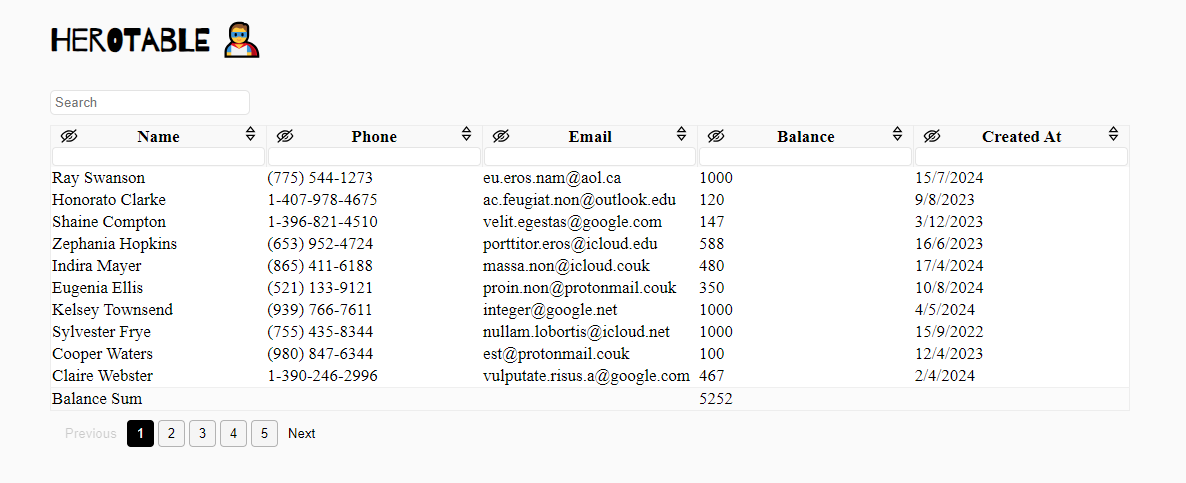
Herotable is a plug-in for the jQuery Javascript library, to make your tables have the ability to filter, sort and hide and a lot of another features.
Installing
npm install herotableFrom CDN :
<link rel="stylesheet" href="https://cdn.jsdelivr.net/npm/herotable@latest/dist/css/main.min.css"><script src="https://cdn.jsdelivr.net/npm/herotable@latest/dist/js/index.js"></script>Note:
You must import the jquery plugin before the herotable.
Usage
$('table').herotable();with options :
$('table').herotable({
    // options
});
Available options:
| Name | Description |
|--------------------| ---------------------|
|isRTL | If the table is in RTL direction, make it rtl in herotable, Boolean (default: false)|
|GeneralSearch | Show the general search input above the table, Boolean (default: false) |
|scrollableWrapper | Make the table scrollable, Boolean (default: false)|
|columnSearch | Enable searching on each column, Boolean (default: true)|
|columnResizer | Enable resizing feature on columns, Boolean (default: true)|
|hideColumn | Enalbe the hide column feature, Boolean (default: true) |
|noAvailableData | When the table is empty, would you like to show the empty row or not, Boolean (default: true)|
|afterResizeCallback | You can call your callback function after column resizing, there is passed parameter to function is data contains on (new_width and col_index), function (default: null)|
|afterHideCallback | You can call your callback function after column hiding, function (default: null)|
|afterShowHiddenColsCallback| You can call your callback function after show the hidden columns, function (default: null)|
|hideFooterIfBodyEmpty| You can hide the footer when you search on something and the no results, Boolean (default: true)|
|columns | From columns option you can edit the column width and column visibility at the begining, Object (default: {sizes: {}, hidden: [], types: []})|
|enableSumValuesOnColumns | You can enable sum values on columns and put the summation in footer, Array(default: [])|
|sumValuesCell | When you enable the summation on column, the summation will be displayed in td tag in the same index in footer, but you can determine nested element inside td, string (default: 'td')|
|decimalNumberLength| If you enabled the summation on columns, you can make the summation with decimal like: 50.016 through define the length, Number(default: 0)|
|withPagination | For enable the pagination feature, you must make the value is true, Boolean(default: false)|
|rowsPerPage | If you enabled the pagination feature, you maybe would like to change the rows count per page, Number(default: 15)|
|lang | Change the default text on elements, like (generalSearch, noAvailableData, showHiddenColumn, nextPaginateBtn, prevPaginateBtn, all)|
|dateFormatFunc| The default format for date columns is ISO 8601, the date that you added in the table cells will passed to new Date() method automatically, but if you want a custom date format, use dateFormatFunc and return a timestamp value.|
|preserveState | Preserve the state in the search inputs when return back to the page. Boolean(default: true)|
Example:
$('table').herotable({
    afterHideCallback: function(data) {
        console.log(`Column index is: ${data.col_index}`);
        console.log(`New width is: ${data.new_width}`);
    },
    lang: {
        generalSearch: "Search on products",
    }
});
Another Example:
$('table').herotable({
    columns: {
        sizes: {0: 100, 1: 50}, // first column will take "100px", and the second "50px"
        hidden: [2, 3], // hide the third and fourth columns
    },
});
For a scrollableWrapper optionm you can determine the max height of the wrapper in your css :
.scrollable-herotable-wrapper {
    max-height: 350px !important;  /* default is 50vh */
}
Date Format :
// you can use any date library you want, we'll use moment.js as an example.
<script src="//momentjs.com/downloads/moment-with-locales.js"></script>

$('table').herotable({
    dateFormatFunc: function(date) {
        // If we show the dates in table by this format (DD/MM/YYYY), so
        // we'll parse it to timestamp like that through moment.js
        return +moment(date, 'DD/MM/YYYY');
    }
});
Columns Types : There are an automatically types detector for columns, and you can also define the columns types manually like that:
$('table').herotable({
    // available types: number - string - date
    columns: {
        types: ['number', 'number', 'string', 'date'],
    }
});
If you would like to destroy the herotable :
let instance = $('table').herotable();
instance[0].herotable.destroy();
Sometimes you would like to initialize the herotable in a global place, so you don't have the instance direcly, you can do this:
$('#table-id').herotable(); // in a global place

$('#table-id')[0].herotable.destroy();
And you can pass the destroy argument to herotable directly like this:
$('#table-id').herotable('destroy');