
hevy-mcp
v6.1.12
Published
A Model Context Protocol (MCP) server implementation that interfaces with the Hevy fitness tracking app and its API.


Readme
Hevy MCP Server
Talk to your Hevy workout data from Claude, Cursor, Codex, and other MCP clients.






Connect to the hosted MCP · Watch the 18-second demo · Explore all 22 tools
hevy-mcp is an open-source Model Context Protocol (MCP)
server for the Hevy fitness and workout tracking
app. It lets AI assistants read, analyze, create, and update your Hevy workouts,
routines, exercise templates, and body measurements through authenticated Hevy
API requests.
A Hevy API key, available with Hevy PRO, is required.
See it in action
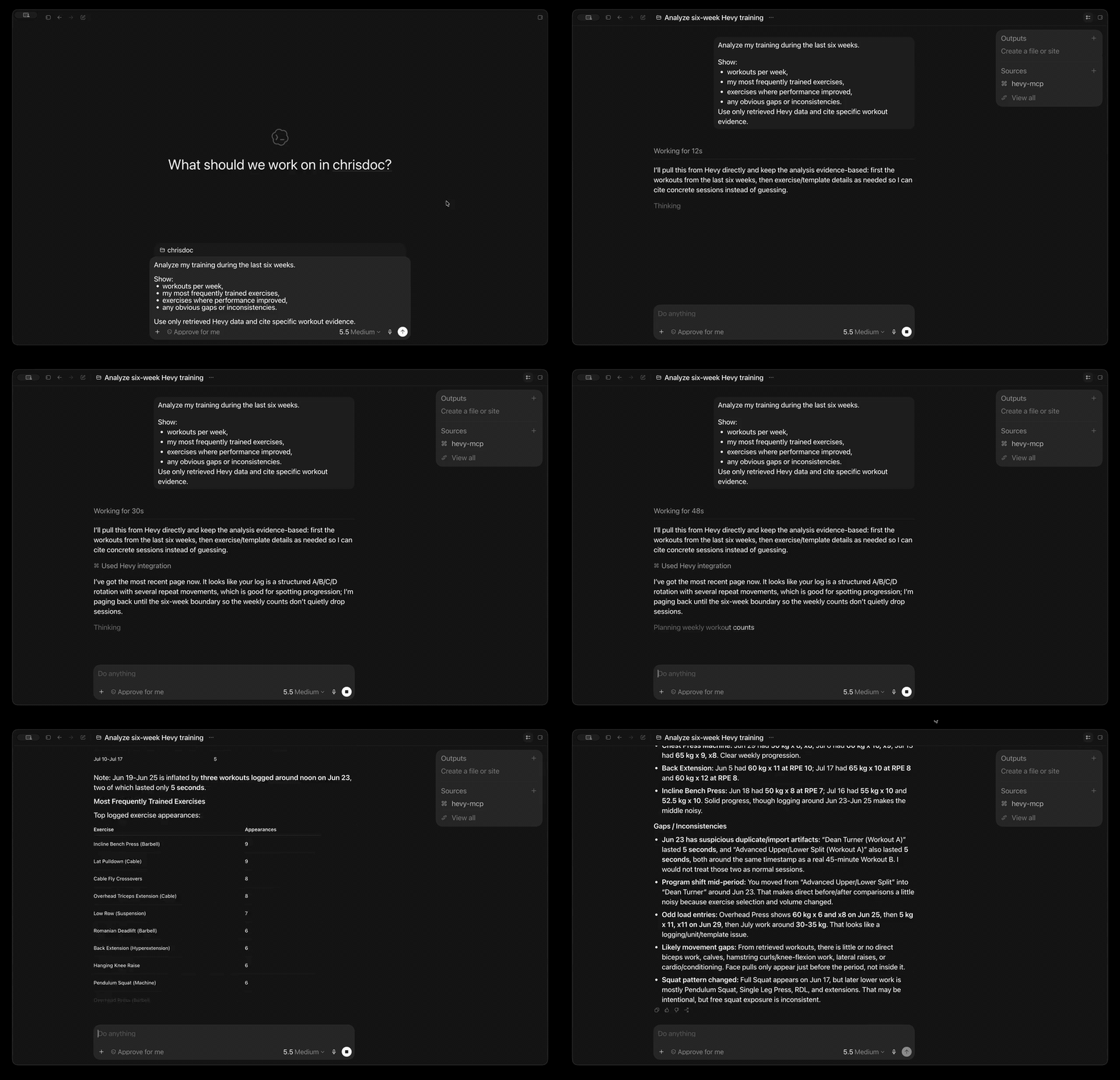
In the demo, the assistant retrieves real Hevy data and answers a multi-part training question with evidence from the user's workout history.
What can you do with it?
- Analyze training progress: summarize 1-12 weeks of workouts and body measurements in one tool call.
- Ask questions in plain language: find recent sessions, frequently trained exercises, consistency gaps, routine details, or exercise history.
- Plan and log training: create or update workouts, routines, routine folders, custom exercises, and body measurements.
- Search without huge responses: discover routines and exercise templates with compact, AI-friendly results.
- Connect from your preferred MCP client: use the hosted Streamable HTTP endpoint or run locally with Codex, Claude Desktop, Cursor, and other clients.
- Start without installing anything: connect directly to the production Cloudflare Worker—no Node.js, package download, or Docker container required.
- Keep local control when you want it: run the same server with
npx,bunx, or the official Docker image.
Try asking:
Analyze my training over the last six weeks. Show workouts per week, my most frequently trained exercises, any obvious gaps or inconsistencies, and cite the workout evidence you used.
Find my push-day routine and show its exercises and sets.
Compare my recent body measurements with my training consistency.
Create a completed workout from my saved routine. Ask me for any missing set results before writing it to Hevy.
Quick start
1. Get your Hevy API key
Create an API key in Hevy's API settings, then keep it somewhere secure. API access currently requires a Hevy PRO subscription.
2. Connect hevy-mcp to your client
The hosted Cloudflare endpoint is the fastest way to start. It runs remotely, so your client does not need Node.js, Bun, Docker, or a local server process.
Connect to the hosted endpoint
Production URL:
https://mcp.hevy-mcp.dev/mcpThe endpoint uses Streamable HTTP. Send your Hevy API key as a bearer token on every request.
Codex
Codex CLI, the Codex desktop app, and the IDE extension share the same MCP configuration. Make your Hevy API key available in the environment that starts Codex, then add the hosted server:
export HEVY_API_KEY=your-hevy-api-key
codex mcp add hevy \
  --url https://mcp.hevy-mcp.dev/mcp \
  --bearer-token-env-var HEVY_API_KEY
Codex stores the environment variable name, not the key itself, in its MCP
configuration. Restart Codex or begin a new session, then run codex mcp list
to verify the server is configured.
Other Streamable HTTP clients
Clients that accept a remote MCP URL and fixed headers commonly use this shape:
{
	"mcpServers": {
		"hevy": {
			"url": "https://mcp.hevy-mcp.dev/mcp",
			"headers": {
				"Authorization": "Bearer your-hevy-api-key"
			}
		}
	}
}
Exact configuration keys vary by client. The hosted server requires support for
Streamable HTTP and a fixed Authorization header.
[!IMPORTANT] Treat the bearer value like a password. The Worker validates it with Hevy for each request, does not store it, and forwards it to Hevy only as the required
api-keyheader.
Run locally instead
Choose local stdio if you prefer to run the server on your own machine or your client cannot attach a fixed authorization header to remote MCP requests.
Codex
codex mcp add hevy \
  --env HEVY_API_KEY=your-hevy-api-key \
  -- npx -y hevy-mcp
Claude Desktop or Cursor
Add this mcpServers entry to your client configuration:
{
	"mcpServers": {
		"hevy": {
			"command": "npx",
			"args": ["-y", "hevy-mcp"],
			"env": {
				"HEVY_API_KEY": "your-hevy-api-key"
			}
		}
	}
}
Common local configuration locations:
- Claude Desktop on macOS:
~/Library/Application Support/Claude/claude_desktop_config.json - Claude Desktop on Windows:
%APPDATA%\Claude\claude_desktop_config.json - Cursor:
~/.cursor/mcp.json
Restart or reconnect the client after saving the file.
Any stdio MCP client
Configure your client to launch this command with HEVY_API_KEY in the child
process environment:
npx -y hevy-mcpnpx requires Node.js 20 or newer. Restart or reconnect your client after
saving its configuration.
Programmatic API
The package exposes two named functions for applications that embed the MCP server:
import { createNodeMcpServer, runStdioServer } from "hevy-mcp";

const server = await createNodeMcpServer({ apiKey: process.env.HEVY_API_KEY! });
// Connect `server` to the transport owned by your application.
For the CLI-owned stdio process, use the executable instead of creating an embedded server:
import { runStdioServer } from "hevy-mcp";

await runStdioServer();
The runtime-owned runners resolve after startup while the transport remains
active. They return a lifecycle handle with an idempotent close() method for
embedding callers that need to initiate shutdown directly.
createNodeMcpServer is the side-effect-free embedding entry: it validates the
supplied key locally, but never reads environment variables, probes Hevy,
connects a transport, initializes telemetry, or installs process lifecycle
handlers. The CLI-only runStdioServer function owns those concerns.
Runtime model
The Node adapter owns the process Scope. Its scoped lifecycle acquires telemetry, signal handlers, and the selected transport, then finalizes them on shutdown. Core owns a nested server Scope for the MCP runtime and shared exercise-template cache. Each tool or resource invocation gets a request Scope whose deadline and MCP request signal interrupt the underlying Effect request.
These internals do not replace the Promise embedding API. createNodeMcpServer
and runStdioServer remain Promise entry points; Effect-typed variants, where
provided, are additive. Importing hevy-mcp remains side-effect-free.
Retry, timeout, and interruption decisions for Hevy requests are Effect-owned in the shared client. The hosted Worker is not Effect-wide: its OAuth, bindings, and request handling remain Promise-based. Tool contracts continue to use Zod, CLI/environment parsing remains throwing parser code, and Kubb generated internals are not part of the public package API.
Requires Bun:
{
	"mcpServers": {
		"hevy": {
			"command": "bunx",
			"args": ["hevy-mcp@latest"],
			"env": {
				"HEVY_API_KEY": "your-hevy-api-key"
			}
		}
	}
}
Official images support linux/amd64 and linux/arm64. Keep stdin open with
-i because the container runs the stdio MCP server:
export HEVY_API_KEY=your-hevy-api-key
docker run -i --rm -e HEVY_API_KEY ghcr.io/chrisdoc/hevy-mcp:latest
For an MCP client, store the key in a protected environment file and configure the client to launch Docker:
{
	"mcpServers": {
		"hevy": {
			"command": "docker",
			"args": [
				"run",
				"-i",
				"--rm",
				"--env-file",
				"/absolute/path/to/hevy-mcp.env",
				"ghcr.io/chrisdoc/hevy-mcp:latest"
			]
		}
	}
}
Pin an exact image tag such as ghcr.io/chrisdoc/hevy-mcp:X.Y.Z when you need
reproducible upgrades.
You can also add the npm server to supported clients with
add-mcp:
npx add-mcp hevy-mcp --env "HEVY_API_KEY=your-hevy-api-key"3. Ask your first question
Try one of these after restarting or reconnecting your MCP client:
- “Give me a training summary for the last four weeks.”
- “What routines do I have saved on Hevy?”
- “Show my three most recent workouts.”
- “Find exercise templates containing squat.”
- “Which Hevy account is connected?”
Your assistant should ask for approval before mutation tools when the client supports tool confirmations.
How it works
Hosted:  Your AI assistant  →  Streamable HTTP  →  Cloudflare Worker  →  Hevy API
Local:   Your AI assistant  →  MCP over stdio   →  local hevy-mcp     →  Hevy API
The hosted endpoint creates a fresh MCP server and Hevy client for each request. It validates the supplied key with Hevy, keeps no shared user session, and does not persist the key. The local server follows the same tool contract but runs on your machine and receives the key through its child-process environment.
In either mode, read tools retrieve data; mutation tools create or replace data only when your assistant calls them.
Guided prompts
These server-provided MCP prompts coordinate common multi-step workflows:
| Prompt | Arguments | Workflow |
| ----------------------------- | ------------------------------------------ | ---------------------------------------------------------------------------------------------------------------------- |
| analyze-workout-progress | Optional weeks from 1-12; default 4 | Calls get-training-summary, then analyzes workout activity and body-measurement trends from the returned evidence. |
| create-workout-from-routine | Required routine_id and UTC start_time | Loads a routine, collects actual completed-set data and an end time, then creates a workout without inventing results. |
[!NOTE] With MCP SDK v1.29.0, clients invoking
analyze-workout-progresswith its default value must sendarguments: {}. Omitting the entireargumentsobject is rejected by that SDK version before the default is applied.
Tools
hevy-mcp registers 22 tools. Read-only tools are safe for exploration; create
and update tools are exposed with MCP mutation annotations so compatible clients
can request confirmation.
| Category | Tool | Description |
| ------------------ | --------------------------- | ---------------------------------------------------------------------------------------------------------------------- |
| Training analysis | get-training-summary | Summarize 1-12 weeks of workout activity and body-measurement trends in one call. |
| Workouts | get-workouts | List workouts in Hevy API order, not by start time, with exercise and timing details. |
| Workouts | get-workout | Get complete details for one workout by ID. |
| Workouts | get-workout-events | List workout update and delete events since a timestamp. |
| Workouts | create-workout | Create a completed workout in Hevy. |
| Workouts | update-workout | Patch workout metadata by ID; is_private is required, while other omitted fields and all exercises remain unchanged. |
| Workouts | replace-workout-exercises | Replace all exercises and sets; is_private is required and updated, while other workout metadata remains unchanged. |
| Routines | search-routines | Search routine titles and return compact metadata for discovery. |
| Routines | get-routines | List custom and default workout routines. |
| Routines | get-routine | Get one routine and its exercise configuration by ID. |
| Routines | create-routine | Create a reusable workout routine. |
| Routines | update-routine | Replace an existing routine's content. |
| Routine folders | get-routine-folder | Get one routine folder's metadata by ID. |
| Routine folders | create-routine-folder | Create a routine folder. |
| Exercise templates | get-exercise-template | Get complete metadata for one exercise template by ID. |
| Exercise templates | search-exercise-templates | Search the full exercise catalog by title substring. |
| Exercise templates | create-exercise-template | Create a custom exercise template. |
| Exercise history | get-exercise-history | Get past performed sets for one exercise template. |
| Body measurements | get-body-measurements | List dated body measurements. |
| Body measurements | get-body-measurement | Get the body measurement entry for one date. |
| Body measurements | create-body-measurement | Create a dated body measurement. |
| Body measurements | update-body-measurement | Update the body measurement for an existing date. |
create-routine and update-routine require a top-level routine envelope with a non-empty exercises array; each exercise must contain at least one set, and fields use snake_case at every level:
{
	"routine": {
		"title": "Full Body A",
		"folder_id": 123,
		"notes": "First four exercises are the minimum viable workout",
		"exercises": [
			{
				"exercise_template_id": "30E293E3",
				"superset_id": null,
				"rest_seconds": 120,
				"notes": "Controlled active ROM",
				"sets": [
					{
						"type": "normal",
						"rep_range": {
							"start": 6,
							"end": 10
						}
					}
				]
			}
		]
	}
}
The Hevy API currently exposes no delete endpoints for workouts, routines, routine folders, exercise templates, or body measurements, so there are no corresponding delete tools.
Resources
| Name | URI | Description |
| -------------------- | --------------------------- | -------------------------------------------- |
| user-profile | hevy://user | Authenticated Hevy user profile. |
| workout-count | hevy://workout-count | Total number of workouts in the account. |
| exercise-templates | hevy://exercise-templates | Full formatted exercise template catalog. |
| routine-folders | hevy://routine-folders | Full formatted list of Hevy routine folders. |
Hosted Cloudflare endpoint
The production MCP server is live at:
https://mcp.hevy-mcp.dev/mcpIt is the quickest way to use hevy-mcp: there is nothing to install or keep
running locally, and it exposes the same 22 tools as the npm package and Docker
image.
The Cloudflare Worker uses stateless Streamable HTTP at POST /mcp.
Clients must send their Hevy API key as a fixed authorization header:
{
	"mcpServers": {
		"hevy": {
			"url": "https://mcp.hevy-mcp.dev/mcp",
			"headers": {
				"Authorization": "Bearer your-hevy-api-key"
			}
		}
	}
}
The bearer value is your Hevy API key, not an OAuth token. The Worker validates
the key with Hevy on each request, does not store it, and forwards it upstream
only as Hevy's required api-key header.
OAuth for Claude.ai and other remote MCP clients
Workers deployed with an OAUTH_KV namespace binding (see
CONTRIBUTING.md) additionally expose a full OAuth 2.1
layer for clients that cannot send a fixed header, such as Claude.ai custom
connectors:
- RFC 8414 / RFC 9728 discovery metadata under
/.well-known/ - Dynamic client registration (
/register) and PKCE token exchange (/token) - An
/authorizepage where you paste your Hevy API key once; the key is validated with Hevy and stored encrypted inside the OAuth grant
Add the Worker URL ending in /mcp as a Claude.ai custom connector and
complete the authorization flow in the browser. Direct
Authorization: Bearer <hevy-api-key> requests keep working unchanged — the
OAuth layer is purely additive — and rotating your Hevy API key invalidates
every OAuth grant created with it.
The endpoint does not expose legacy SSE or a GET event stream. Without the
opt-in OAuth layer, clients that require OAuth discovery, dynamic
registration, or token refresh are not compatible unless they can send the
fixed custom header above.
Self-host the Worker
See CONTRIBUTING.md to deploy the Cloudflare Worker for self-hosted Streamable HTTP.
Advanced configuration
| Setting | Default | Scope | Notes |
| -------------------------------- | -------------------------------- | ----------------------------- | ------------------------------------------------------------------------------------------------------------------------------------------------------------------------------------------------------------------ |
| HEVY_API_KEY | None; required | Local stdio or HTTP | Hevy API key from the Hevy app. Never pass it in a URL. |
| HEVY_MCP_API_TIMEOUT | 60000 ms | Local stdio | Positive Hevy API timeout in milliseconds. Invalid values fall back to 60 seconds. |
| HEVY_MCP_DEBUG | Disabled | Local Node | Set to exactly 1 for privacy-bounded diagnostics on stderr. Stdout remains reserved for MCP JSON-RPC. |
| HEVY_MCP_HTTP_BEARER_TOKEN | None | Non-loopback HTTP | Required when --host is not loopback; use a separate token, never the Hevy API key. |
| HEVY_MCP_HTTP_MAX_SESSIONS | 100 | Local HTTP | Maximum established sessions (including sessions currently initializing); excess requests receive 429 and DELETE, disconnect, or idle eviction frees capacity. Invalid values use the default; capped at 10,000. |
| HEVY_MCP_HTTP_MAX_INITIALIZING | 10 | Local HTTP | Maximum concurrent session initializations; excess requests receive 503 and are not queued. Invalid values use the default; capped at 1,000. |
| HEVY_MCP_HTTP_IDLE_TIMEOUT_MS | 1800000 ms | Local HTTP | Idle established sessions are evicted after 30 minutes; each session request resets the timer. Invalid values use the default; capped at 24 hours. |
| HEVY_MCP_HTTP_BODY_TIMEOUT_MS | 30000 ms | Local HTTP | Application deadline for reading a request body. Stalled bodies receive 408; invalid values use the default; capped at 5 minutes. |
| HEVY_MCP_TELEMETRY | Enabled | Local Node | Set to exactly 0 before launching Node; the scoped lifecycle Layer reads it. Imports stay side-effect-free. |
| HEVY_MCP_TELEMETRY_DIAGNOSTICS | Enabled | Local Node | Set to exactly 0 to keep structural telemetry while suppressing exception messages and stacks. |
| XDG_CACHE_HOME | ~/.cache | Local stdio | Changes the root for the npm update-check cache at hevy-mcp/update-check.json. |
| SENTRY_DSN | Packaged Sentry SaaS project DSN | Optional local Node telemetry | Sentry project DSN override. An empty value disables Sentry export. The Worker does not import Node telemetry. |
| SENTRY_RELEASE | hevy-mcp@<installed-version> | Optional local Node telemetry | Overrides the release label attached to local Sentry error events. |
| -h, --help | N/A | Local stdio CLI | Print supported options and exit. |
| -v, --version | N/A | Local stdio CLI | Print the installed version and exit. |
The local executable uses stdio by default. To opt into Streamable HTTP, run:
HEVY_API_KEY=your-hevy-api-key npx hevy-mcp --transport http --host 127.0.0.1 --port 3000The MCP endpoint is http://127.0.0.1:3000/mcp. For a specific bind host,
HTTP mode validates the Host header and configured port to protect against DNS
rebinding. Loopback is the default. Wildcard binds (0.0.0.0 or ::) accept
any hostname so they can be used behind Docker port mappings or a reverse
proxy; they require HEVY_MCP_HTTP_BEARER_TOKEN and rely on that separate
authentication token. Do not expose an unprotected shared Hevy account to the
public internet. For Docker HTTP mode, publish the port explicitly:
docker run --rm -p 3000:3000 -e HEVY_API_KEY -e HEVY_MCP_HTTP_BEARER_TOKEN \
  ghcr.io/chrisdoc/hevy-mcp:latest --transport http --host 0.0.0.0 --port 3000
Wildcard binds are allowed only with the separate bearer token; publish the container port deliberately and keep that token private.
Cache behavior
search-exercise-templates and hevy://exercise-templates share a
server-scoped in-memory catalog cache:
- Entries live for five minutes, and the cache holds at most one catalog.
- Concurrent catalog requests share an in-flight fetch when possible.
search-exercise-templatesacceptsrefresh: trueto invalidate the cache.- Each hosted Worker request gets a fresh cache, preventing cross-key sharing.
Local Node telemetry and privacy
The local Node package enables project telemetry by default. It is local Node
behavior only; the Cloudflare Worker does not import Node telemetry. Set
HEVY_MCP_TELEMETRY=0 before launching the Node process to disable all project
telemetry. The scoped Node lifecycle Layer reads this process-launch setting;
importing the package remains side-effect-free. Only the literal value 0 opts
out: an unset value, an empty value, 1, false, and every other value remain
enabled. The master setting takes precedence over SENTRY_DSN and packaged or
runtime OTEL_COLLECTOR_TOKEN credentials, so the disabled path creates no
telemetry exporters or periodic metric readers and makes no telemetry network
requests. SENTRY_DSN remains a Sentry-only setting; when telemetry is enabled,
an empty value disables only Sentry export.
When enabled, actionable errors are sent to the Sentry project configured by
SENTRY_DSN; Sentry performance tracing is disabled. Exception messages and
stacks are bounded and scrubbed before export. Set
HEVY_MCP_TELEMETRY_DIAGNOSTICS=0 to keep structural traces and metrics while
suppressing those details. Traces and metrics continue to be sent to the
collector at
https://otel.chrisdoc.dev/v1/traces and
https://otel.chrisdoc.dev/v1/metrics, which forward to Honeycomb. Metrics
export every 30 seconds.
The API key is never exported and is not used to derive a user identity. A per-failure diagnostic ID and OTel trace ID may be attached to actionable errors for support correlation. Structured telemetry contains only bounded service, release, transport, tool, outcome, error, count, retry, duration, session, cache, workflow, API method, normalized endpoint, and status fields.
Exception messages and stacks are treated as diagnostic details: they are
length-limited, scrubbed for credentials, URLs, and local home paths, and
removed entirely when HEVY_MCP_TELEMETRY_DIAGNOSTICS=0. Prompts, tool
arguments, tool results, request bodies, API keys, raw identifiers/queries,
exact dates, workout/routine/folder/template/body-measurement content,
names/titles/descriptions/notes, measurement values, arbitrary client
metadata, and unnormalized endpoint paths remain prohibited.
Security and mutations
- Keep
HEVY_API_KEYout of source control, URLs, logs, and screenshots. - Local clients provide the key through the child process environment.
- Hosted clients send the key only in the
Authorization: Bearerheader. The Worker validates each key with Hevy, does not store it, and sends it upstream only as Hevy'sapi-keyheader. - Browser requests must come from an exact allowlisted origin. The default
allowlist includes Claude.ai, ChatGPT, VS Code for the Web, and github.dev;
self-hosted deployments can override it with
MCP_ALLOWED_ORIGINS. - Create operations can produce duplicates when retried. Update operations replace existing records. Review tool inputs and use client confirmations.
Troubleshooting
- The server does not appear: restart or reconnect your MCP client after changing its configuration.
npxfails: confirm that Node.js 20 or newer is installed, then runnpx -y hevy-mcp --versionin a terminal.- Codex cannot see the server: run
codex mcp list, then start a new Codex session after confirming thehevyentry exists. - Hevy API returns 401: the key is invalid, expired, revoked, or misconfigured. Verify or create an active key at Hevy's API settings, then restart the client.
- Hosted authentication fails: confirm the key belongs to a Hevy PRO
account and is sent as
Authorization: Bearer <HEVY_API_KEY>. - Local authentication fails: confirm the key is active and available to the
MCP child process as
HEVY_API_KEY. - Need diagnostics: set
HEVY_MCP_DEBUG=1. Diagnostic output goes to stderr and does not interfere with MCP messages on stdout.
If you find a bug or have a feature request, open an issue.
Contributing
Contributions are welcome. Developer setup, testing lanes, generated-client workflows, Cloudflare Worker deployment, and pull request rules are documented in CONTRIBUTING.md.
License and acknowledgements
- License: MIT
- Credits: Model Context Protocol and Hevy Fitness