npm package discovery and stats viewer.

Discover Tips

  • General search

    [free text search, go nuts!]

  • Package details

    pkg:[package-name]

  • User packages

    @[username]

Sponsor

Optimize Toolset

I’ve always been into building performant and accessible sites, but lately I’ve been taking it extremely seriously. So much so that I’ve been building a tool to help me optimize and monitor the sites that I build to make sure that I’m making an attempt to offer the best experience to those who visit them. If you’re into performant, accessible and SEO friendly sites, you might like it too! You can check it out at Optimize Toolset.

About

Hi, 👋, I’m Ryan Hefner  and I built this site for me, and you! The goal of this site was to provide an easy way for me to check the stats on my npm packages, both for prioritizing issues and updates, and to give me a little kick in the pants to keep up on stuff.

As I was building it, I realized that I was actually using the tool to build the tool, and figured I might as well put this out there and hopefully others will find it to be a fast and useful way to search and browse npm packages as I have.

If you’re interested in other things I’m working on, follow me on Twitter or check out the open source projects I’ve been publishing on GitHub.

I am also working on a Twitter bot for this site to tweet the most popular, newest, random packages from npm. Please follow that account now and it will start sending out packages soon–ish.

Open Software & Tools

This site wouldn’t be possible without the immense generosity and tireless efforts from the people who make contributions to the world and share their work via open source initiatives. Thank you 🙏

© 2025 – Pkg Stats / Ryan Hefner

hexo-auto-toc

v1.0.12

Published

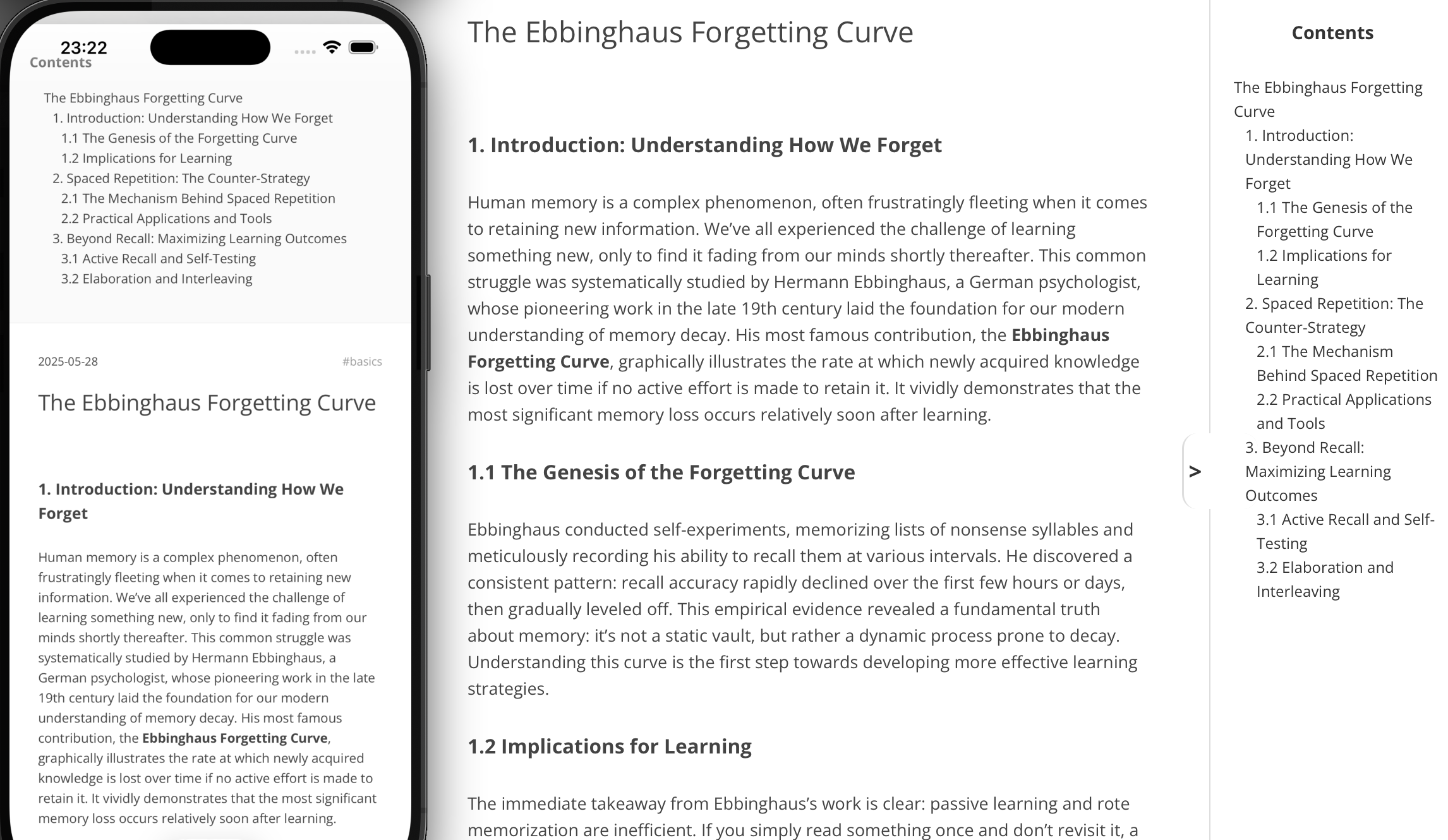
Automatically generates a responsive table of contents that fixes to the side of the article page or above the articles, depending on the user's device.

Downloads

29

Readme

License: MIT Required Hexo version

hexo-auto-toc

Automatically generates a responsive table of contents that fixes to the side of the article page or above the articles, depending on the user's device. It can also automatically choose to be on the left or on the right.

  • Getting Started
  1. Installation
npm install hexo-auto-toc

Requirement cheerio:auto install it replacing npm install cheerio --save

  1. The plugin will automatically parse all content within the <article> tag and generate a table of contents. If your article page structure does not wrap the content inside an <article> element, contents in<body> will be parsed. Or you can add <article> manually — typically in the index.html file under your blog folder, but this is not necessary.
  2. check the effects: hexo clean&&hexo g&&hexo s
  • 使用
  1. 安装(自动安装依赖cheerio)
npm install hexo-auto-toc
  1. 插件会自动对<article>包含下的所有内容进行解析,自动生成目录。如果你的文章页面结构中内容没被<article>包裹,将会解析<body>下的所有内容;你可以自行添加<article>(即blog文件夹下的index.html),但不是必须的。
  2. 查看效果 hexo clean&&hexo g&&hexo s
  • 效果 Example

Example

  • 更新

6.17

更普适多种主题

优化正则表达式匹配

加入cheerio解析html 避免正则表达式弊端

优化toc模块位置,如果有nav则放在nav标签下方

优化toc放置左/右,自动选择放在哪边

  • New Updates

    • version 1.0.6

      Except index page, other pages have TOC if they have kinds of headers.

    • version 1.0.5

      Greater compatibility: Works with a wider variety of themes.

      Performance Boost: Optimized the regular expressions for better matching.

      Reliable Parsing: Integrated the Cheerio library to parse HTML, avoiding the drawbacks and errors common with regular expressions.

      Smarter Positioning: Improved the Table of Contents (TOC) module's location; it will now be placed directly after the element if one is present.

      Automatic Layout: Enhanced the left/right placement of the TOC, allowing it to automatically choose the best side.

7.9 长度优化

Recommendations

  • hexo-everyday-calendar:This is a practical calendar plugin for hexo bloggers, like contribution statistics on GitHub.