
hexo-generator-github
v1.0.1
Published
Github generator for Hexo.


Readme
hexo-generator-github





A generator used to generate page for Hexo from your exists Github project file.
Installation
$ npm install hexo-generator-github --saveUsage
hexo-generator-github can be used as helper/generator/console plugin. hexo server and hexo generate will call the generator of this plugin; A console command is provided to run this generator.
$ hexo github [-r --replace]If -r or --replace option assigned, the generator will call github api and replace the existing github contents cache.
Config
github:
  debug: true # enable debug to log github api request/response
  user: Jamling # your github user name
  timeout: 60000 # set the github api request timeout
  token: your_token # enable Authorization for github api request, the api request limit will grow up from 60 to 5000
  cache_dir: gh_cache # the response of github api will store under the directory.
  repos: # request following repositories, otherwise, all repositories (limit 100) of user will be requested.
    - SmartIM4Eclipse
    - SmartIM4IntelliJ
    - hexo-theme-nova
    - hexo-generator-i18n
    - hexo-generator-github
    - hexo-generator-index2
    - hexo-filter-highlight
    - Android-ORM
    - eclipse-explorer
    - QuickAF
  navs: # project page left default nav menu, you can config for each project in ${blog}/_data/projects.yml
    overview: index.html
    index: index.html
    start: start.html
    release: release.html
    download: download.html
    userguide: userguide.html
    change: change.html
- debug: Whether print debug info
- cache_dir: Github response cache dir, you can run
hexo github -rto remove all cache or remove files in cache manually to refresh cache again - user: Github user name
- repos: Result repositories, return all(limit 100) repositories of user if undefined in _config.yml
- token: See
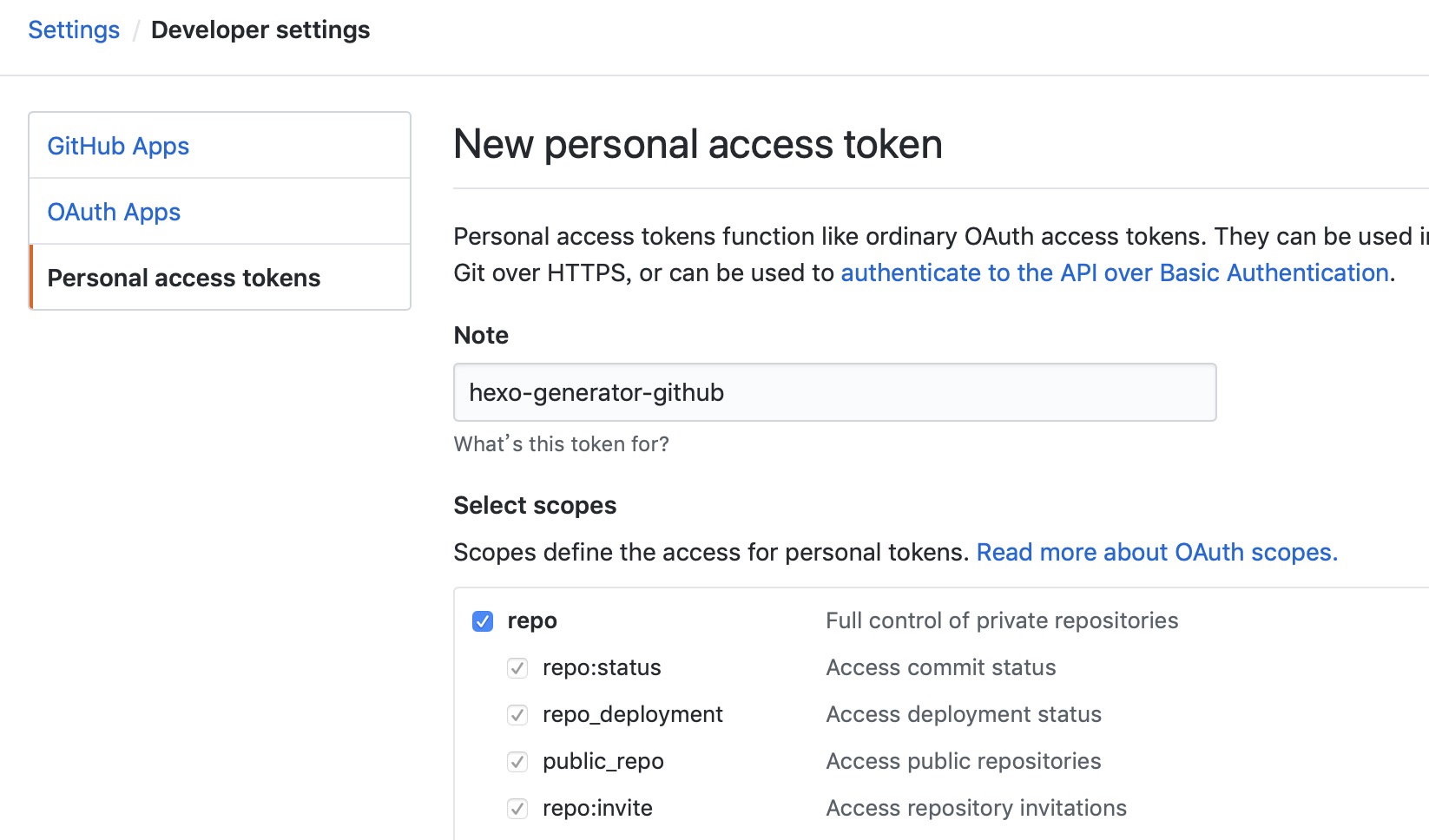 to generate token to grown up github api request limitation
Front-matter
A gh front-matter is nessary in your page to generate github response.
- gh.user the github user, default is github.user in _config.yml, see gh_opts
- gh.repo the github repo, default is fetched from url, see gh_opts
- gh.type
- get_repos get repositories from github, see gh_repos
- get_contents get markdown file under repository, see gh_contents
- get_releases get releases under repository, see gh_releases
Helpers
gh_opts
Return full page.gh. If no user assigned in page gh front-matter, the user will set from hexo.config.github.user If no repo assigned in page gh front-matter, the repo will set from page.path Sample:
- page.path = p/Android-ORM/ => gh.repo = Android-ORM
- page.path = en/p/Android-ORM/ => gh.repo = Android-ORM (The hexo.config.language must contains en in _config.yml)
gh_repos
Return array of github user's repos
  {%- for p in gh_repos() %}
    <!--<div class="col-sx-6 col-sm-6 col-md-6 col-lg-6">-->
      <div class="panel panel-default project">
        <div class="panel-heading">
          <h3>
            <span class="icon nova-repo black-text"></span>
            <a href="./{{ p.name }}" target="_blank" title="{{p.name}}"> {{ p.name }}</a>
            <a href="https://github.com/{{p.owner.login}}/{{p.name}}" target="_blank" title="view on github"><span aria-hidden="true" class="icon nova-github right black-text"></span></a>
          </h3>
        </div>
        <div class="panel-body">
          <p>{{ p.description }}</p>
        </div>
        <div class="panel-footer">
          <iframe src="https://ghbtns.com/github-btn.html?user={{p.owner.login}}&repo={{p.name}}&&type=star&count=true" class="github-iframe" height="20" width="110"></iframe>
          <iframe src="https://ghbtns.com/github-btn.html?user={{p.owner.login}}&repo={{p.name}}&&type=fork&count=true" class="github-iframe" height="20" width="110"></iframe>
        </div>
      </div>
    <!--</div>-->
  {% endfor %}
Option | Description | Default
--- | --- | ---
user | Github user | config.github.user
gh_contents
Return github (markdown file) contents of repository
{% set page.content = gh_contents() %}So the page content will be replaced of content of github.
Option | Description | Default
--- | --- | ---
user | Github user | config.github.user
repo | Github repo | page.gh.repo
path | Github content path | README
ref | Github reference | master
gh_releases
Return array of github repo releases
{% for p in gh_releases() %}
<div class="release">
  <div class="header">
    <a href="{{p.html_url}}">{{p.name}}</a>
    <a href="{{p.author.html_url}}">{{p.author.login}}</a> released this on {{gh_time(p.published_at)}}
  </div>
  <div class="markdown-body">
    {{markdown(p.body)}}
  </div>
  <h2 class="release-downloads-header">Downloads</h2>
  <ul class="release-downloads">
    {% for d in p.assets %}
    <li><a href="{{d.browser_download_url}}">
      <strong>{{d.name}}</strong> ({{d.download_count}} downloads)</a>
    </li>
    {%- endfor %}
  </ul>
</div>
{% endfor %}
Option | Description | Default
--- | --- | ---
user | Github user | config.github.user
repo | Github repo | page.gh.repo
gh_edit_link
Return edit link string of github contents
{{ gh_edit_link() }}gh_aside_nav
Return project content navigator tree
      $('#project_tree').treeview({
        enableLinks: true,
        color: '#428bca',
        expandIcon: 'icon nova-arrow-right2',
        collapseIcon: 'icon nova-arrow-down2',
        //levels: 3,
        //node-icon: '',
        //selectedColor: '#ff0000',
        onNodeSelected: function(event, data) {
          if (data.state.selected){
            return;
          }
        },
        data: {{ gh_aside_nav({parent_color:'#337ab7'}) }}
      });
Option | Description | Default
--- | --- | ---
user | Github user | config.github.user
repo | Github repo | page.gh.repo
path | Github content path | README
ref | Github reference | master
Reference
- Github Developer: see more properties of github response.
- hexo-theme-nova: the nova theme used this plugin to generate project pages.
License
MIT