
hexo-theme-quieter
v1.0.2
Published
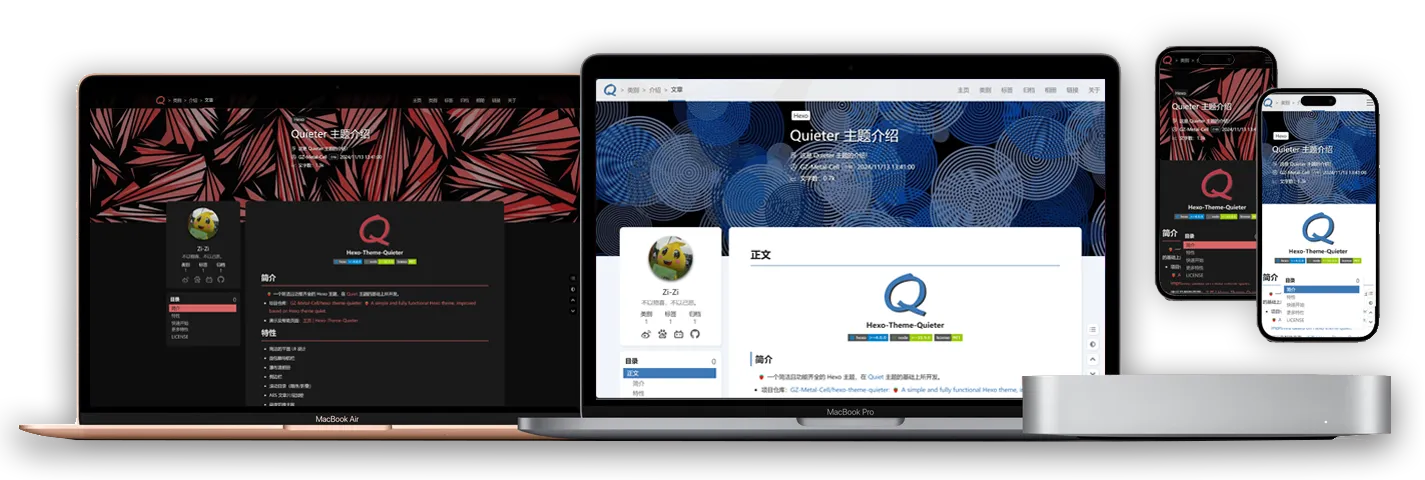
🍓A simple and fully functional Hexo theme, improved based on Hexo theme quiet.

Maintainers
 gz-metal-cell
Readme
中文 | English
简介
🍓一款简洁且功能齐全的 Hexo 主题,在 Quiet 主题的基础上所开发。
演示及帮助页面:主页 | Hexo-Theme-Quieter
特性
- 简洁的平面 UI 设计
- 面包糠导航栏
- 瀑布流相册
- 侧边栏
- 滚动目录(顺序/折叠)
- AES 文章片段加密
- 昼夜切换主题
- 数学公式(Mathjax/Katex)
- 评论系统(giscus/Gitalk)
- 代码块工具
- 字数统计
- 文章置顶
- 自定义封面样式
- 多种 tag 语法支持
- busuanzi 统计
- 百度统计
- fancybox
- 页面打印布局
- ……
多种插件适配优化:
文章加密
hexo-blog-encrypt:D0n9X1n/hexo-blog-encrypt: Yet, just another hexo plugin for security.本地搜索
hexo-generator-search:wzpan/hexo-generator-search: A plugin to generate search data for Hexo.Mermaid 图表
hexo-filter-mermaid-diagrams:webappdevelp/hexo-filter-mermaid-diagrams: mermaid diagrams for hexoAPlayer 播放器
hexo-tag-aplayer:MoePlayer/hexo-tag-aplayer: Embed aplayer in Hexo posts/pages懒加载
hexo-lazyload-image:Troy-Yang/hexo-lazyload-image: lazyload image plugin for Hexo.文章隐藏
hexo-hide-posts:prinsss/hexo-hide-posts: A plugin to hide specific posts from your Hexo blog and make them only accessible by links. (隐藏 Hexo 文章)……
快速开始
可以直接通过 处下载得到空的模板文件,也可以选择手动安装:
下载主题
使用 git 安装(推荐),在 hexo 项目的根目录下:
$ git clone https://github.com/GZ-Metal-Cell/hexo-theme-quieter.git themes/Quieter 或使用 npm 安装(通过 npm 安装并不会在 themes 里生成主题文件夹,而是在 node_modules 里生成):
npm install hexo-theme-quieter配置
修改 Hexo 根目录下的 _config.yml:
- 把主题改为
Quieter:
theme: Quieter- 设置代码高亮:
highlight:
    enable: true
    line_number: false
    auto_detect: false
    tab_replace: ""
    wrap: true
    hljs: true
prismjs:
    enable: false
    preprocess: true
    line_number: true
tab_replace: ""- 设置每页显示的文章数量为 9 篇(可选):
# Home page setting
# path: Root path for your blogs index page. (default = '')
# per_page: Posts displayed per page. (0 = disable pagination)
# order_by: Posts order. (Order by date descending by default)
index_generator:
    path: ""
    per_page: 9
    order_by: -date
# Pagination
## Set per_page to 0 to disable pagination
per_page: 9
pagination_dir: page安装依赖
通过以下命令安装主题所需要的包:
npm i install hexo-renderer-less
npm i hexo-renderer-ejs 将渲染引擎切换成 hexo-renderer-kramed:
npm uninstall hexo-renderer-marked
npm install hexo-renderer-kramed
初始化页面布局
主题下的 _config.yml 设定了导航栏显示的文章类型:
# 导航
menus_link:
    home: /  # 主页
    categories: /categories  # 文章类别
    tags: /tags  # 文章标签
    archives: /archives  # 文章归档/检索
    galleries: /galleries  # 相册页面
    links: /links  # 友情链接
about: /about # 关于页 如果不需要显示某种类别的链接,简便的方法是将这一行删去(或注释掉)。
在 source/ 文件夹下应配置好相应的文章。
类别页
在 source/ 文件夹下创建文件夹及文件 categories/index.md,修改其内容:
---
title: 类别
date: XXXX-XX-XX XX:XX:XX
type: categories
layout: categories
comments: true
aside: true
---
标签页
在 source/ 文件夹下创建文件夹及文件 tags/index.md,修改其内容:
---
title: 标签
date: XXXX-XX-XX XX:XX:XX
layout: "tags"
comments: true
aside: true
---
友情链接页
在 source/ 文件夹下创建文件夹及文件 links/index.md,修改其内容(下面是一个友情链接的范例):
---
title: 链接
date: XXXX-XX-XX XX:XX:XX
type: "links"
layout: "links"
comments: true
aside: true
toc: true
---

{% flink %}
- class_name: '类别 1'
  class_desc: '类别 1 的描述'
  link_list:
    - name: '标题'
      link: '网址'
      avatar: '图标'
      descr: '描述'
    - name: '标题'
      link: '网址'
      avatar: '图标'
      descr: '描述'
    - name: '标题'
      link: '网址'
      avatar: '图标'
      descr: '描述'
- class_name: '类别 2'
  class_desc: '类别 2 的描述'
  link_list:
    - name: '标题'
      link: '网址'
      avatar: '图标'
      descr: '描述'
    - name: '标题'
      link: '网址'
      avatar: '图标'
      descr: '描述'
    - name: '标题'
      link: '网址'
      avatar: '图标'
      descr: '描述'
{% endflink %}
相册页
具体的配置见帮助文档:相册页的配置 | Hexo-Theme-Quiter
关于页
在 source/ 文件夹下创建文件夹及文件 about/index.md,修改其内容(下面是一个关于页的范例):
---
title: 关于
date: XXXX-XX-XX XX:XX:XX
type: "about"
layout: "about"
comments: true
aside: true
---
# 关于
这是一个关于页面的示例!404
在 source/ 文件夹下创建文件 404.md,修改其内容(下面是一个 404 页的范例):
---
title: 404
date: XXXX-XX-XX XX:XX:XX
type: "404"
layout: "404"
comments: false
rightside: false
picture: "https://gz-metal-cell.github.io/images/404/picture.png"
---
评论功能
主题支持 gisus 和 Gitalk 两种评论系统(只可应用一个)。
gisus(推荐)
从 giscus 得到相应的参数,之后在主题文件夹下的 Quieter/_config.yml 下配置:
# Giscus
giscus:
    enable: true  # 只有为 true 才会生效
    repo:
    repo_id:
    category: Announcements
    category_id:
    mapping: title
    strict: 1
    reactions-enabled: 1
    emit_metadata: 0
    input_position: bottom
    # loading: lazy
Gitalk
从 gitalk/gitalk: Gitalk is a modern comment component based on Github Issue and Preact. 处得到相应的参数,之后在主题文件夹下的 Quieter/_config.yml 下配置:
# gitalk
gitalk:
    enable: false
    clientID: # (需要替换)GitHub Application Client ID.
    clientSecret: #(需要替换)GitHub Application Client Secret.
    repo: #(需要替换)GitHub repository.
    owner: #(需要替换)GitHub repository 所有者,可以是个人或者组织。
    admin: #(需要替换)GitHub repository 的所有者和合作者 (对这个 repository 有写权限的用户)。
更多特性
可从 主页 | Hexo-Theme-Quieter 获得更多帮助和配置文档。
LICENSE
MIT