
hgnucomb
v0.2.2
Published
Spatial terminal multiplexer with AI agent orchestration on a hex grid

Maintainers
 kylesnowschwartz
Readme
hgnucomb
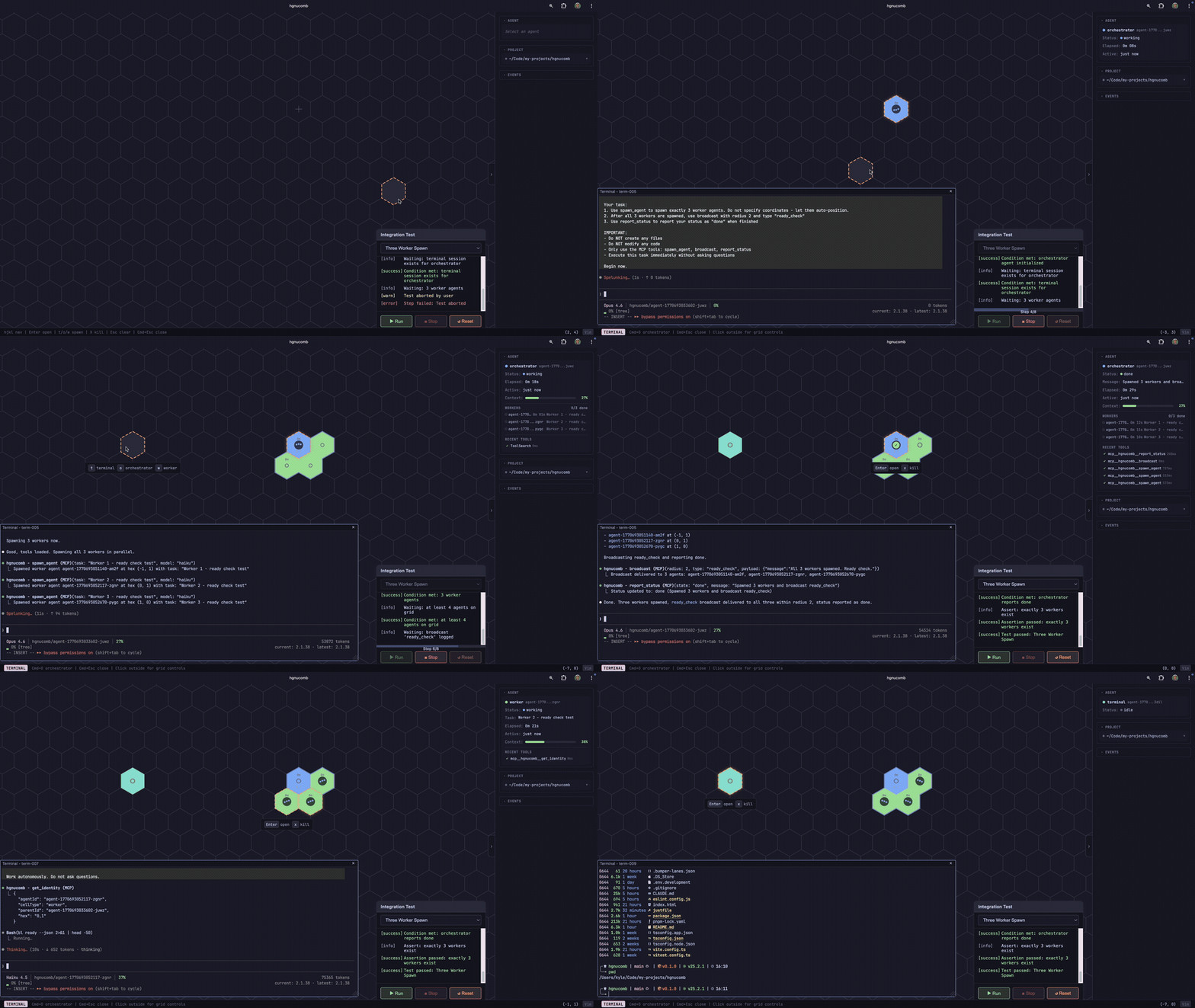
A spatial terminal multiplexer. Your terminals live on a hex grid -- navigate between them like an RTS, build spatial memory of your workspace, and optionally let AI agents coordinate across it.
Vibe amongst the hivemind.
Why
Terminal multiplexers give you tabs and panes. That's a 1D mental model for an multi-dimensional workflow.
hgnucomb puts your terminals on a 2D hex grid. Navigate with vim keys. Build a layout that mirrors how you think about your project. "The API server is up and to the left, the tests are to the right." That spatial memory persists across context switches in a way that "tab 4" never will. Also, it's fun.
AI agents live on the same grid -- spawn them, watch them work, merge their code safely through a staging workflow with human approval.
Quick Start
npm install -g hgnucomb
hgnucomb
Installs the CLI globally, then starts the server and opens the browser. Run hgnucomb from any project directory -- it operates in your current working directory.
Prerequisites
- Node.js 20+
- C++ build tools (node-pty compiles a native addon at install time) --
xcode-select --installon macOS - Claude Code CLI (
claude) -- only needed for AI agents
Development
git clone [email protected]:kylesnowschwartz/hgnucomb.git
cd hgnucomb
just install    # pnpm install
just dev        # frontend :5173 + server :3001
The Grid
Navigate with hjkl or arrow keys. Press t on any empty cell to spawn a terminal. Press Enter to open it. Press Cmd+Escape to close the panel and return to the grid. Your terminal keeps running in the background -- reopen it anytime.
That's it. Spatial terminals. When the terminal panel is open, prepend navigation with cmd + <nav key> to navigate the canvas.
The Terminal
Each cell on the grid is a real terminal -- xterm.js with GPU-accelerated WebGL rendering, backed by a real PTY (node-pty) over WebSocket. JetBrains Mono Nerd Font, Kitty keyboard protocol (so Shift+Enter works in Claude Code), highlight-to-copy, and image drag-and-drop.
It's close to your native terminal -- Your shell, your aliases, your prompt. Close a terminal panel and the session keeps running in the background; reopen it and the output replays from the buffer. The panel is draggable and resizable.
Where the seams show (it's still a browser tab):
- No scrollback search (Ctrl+Shift+F)
- Slight input latency vs iTerm2/Kitty (WebSocket round-trip)
- No native OS integration -- it can't be its own window in Cmd+Tab, can't receive Finder drag-and-drop outside the browser
The grid itself is the pane manager, so there are no splits within a terminal. That's by design -- you navigate between terminals on the hex grid instead of splitting them.
AI Agents
With Claude Code installed, the grid becomes a process supervisor for AI agents.
Press o to spawn an orchestrator -- a Claude agent with MCP tools and its own git worktree. Give it a task:
"Add a /health endpoint. Spawn one worker to implement it and another to write the test and another to prepare a Reddit post about how great it is."
Workers appear on the grid as new hex cells, connected to the orchestrator by edges. Status badges cycle in real time: spawning -> working -> done.
The Merge Safety Net
worker A ──commit──> worktree A ─┐
                                 ├── merge ──> orchestrator staging ──> you review ──> main
worker B ──commit──> worktree B ─┘
Every agent gets its own git worktree. Workers never touch main. The orchestrator merges into its staging branch. You review the diff. You approve. Then it lands.
What this gives you over Claude Code's built-in team mode:
- Git worktree isolation -- three agents editing the same file? No conflicts until you merge.
- Staged merge workflow -- human in the loop before main. Always.
- Visual process control -- see every agent with live status badges. Spawn, monitor, kill.
- Scoped capabilities -- orchestrators get spawn/merge tools, workers get report-only tools. Enforced at the MCP level.
Key Concepts
| Concept | What it is |
| --------- | ----------- |
| Terminal | Plain shell session on the grid. No agent, just a PTY. The foundation. |
| Orchestrator | Claude agent with MCP tools (spawn, merge, broadcast). Gets its own git worktree. |
| Worker | Task-focused agent spawned by an orchestrator. Reports results back. |
| Worktree isolation | Every agent gets git worktree add. Parallel edits are safe. |
| Staging merge | Worker -> orchestrator staging -> human approval -> main. |
Keyboard Shortcuts
Vim-style by default. Arrow keys also work.
Grid
| Key | Action |
| ----- | -------- |
| hjkl / arrows | Move selection |
| Shift+H/J/K/L | Diagonal movement |
| t | Spawn terminal |
| o | Spawn orchestrator |
| w | Spawn worker |
| Enter | Open terminal panel |
| x | Kill (press twice) |
| Escape | Close panel / deselect |
| g | Jump to center |
| ? | Help overlay |
Terminal Panel
| Key | Action |
| ----- | -------- |
| Cmd+Escape | Close panel |
| Cmd+Arrows | Navigate grid with panel open |
CLI
hgnucomb                  Start the server and open the browser
hgnucomb cleanup          Remove all agent worktrees and branches
hgnucomb --port 8080      Run on a custom port
hgnucomb --help           Show usage
Worktree Cleanup
Each orchestrator and worker gets its own git worktree under .worktrees/ with a branch under hgnucomb/. Normally these are cleaned up automatically when agents finish or are killed. But if the server crashes or you Ctrl+C at the wrong moment, orphaned worktrees can pile up.
hgnucomb cleanupThis finds all .worktrees/ directories and hgnucomb/* branches, shows you what it'll remove, and asks for confirmation. Safe to run anytime.
Troubleshooting
Cmd key gets stuck in PWA mode
When running as a PWA (standalone mode), macOS sometimes fails to deliver the keyup event for the Cmd key -- especially after Cmd+Tab to switch apps. This makes hgnucomb think Cmd is still held, so every subsequent keypress looks like a Cmd+key shortcut.
The app has self-healing for this: on any non-Meta keydown, if e.metaKey is false but our tracked state says Meta is down, it resets. So just press any normal key (like j or Escape) and it clears itself. If that doesn't work, click anywhere outside the terminal panel to blur focus, which also resets the modifier state.
This is a browser/macOS limitation, not a bug we can fix. It happens because the OS swallows the keyup when the app loses focus during Cmd+Tab. PWA mode is more susceptible because it captures keyboard events more aggressively than a normal browser tab.
Architecture
React 19 + Vite frontend. Node.js + node-pty + WebSocket server. Konva.js renders the hex grid, xterm.js renders terminals, Zustand manages state, MCP SDK coordinates agents.
See CLAUDE.md for the full architecture reference.
Status
v0.1.0 -- working prototype. Usable for real work, rough around some edges.
What's shipped:
- Hex grid with pan/zoom, vim-style keyboard navigation (hjkl + diagonals)
- Three cell types: terminal, orchestrator, worker -- each with distinct visuals
- Git worktree isolation per agent (parallel edits without conflicts)
- 18 MCP tools for agent coordination (spawn, merge, broadcast, status, cleanup, kill, etc.)
- Staged merge workflow: worker -> orchestrator staging -> human approval -> main
- Merge conflict detection with resolution options
- Non-blocking multi-worker coordination (
check_workers) and blocking single-worker (await_worker) - Live status badges with pulse animations and elapsed time
- Parent-child edge visualization between orchestrators and workers
- Agent telemetry pipeline (transcript watcher, JSONL parsing, HUD observability)
- Worker commit enforcement via Claude Code plugin hooks
- Session reconnection with exponential backoff
- Configurable model per agent (opus/sonnet/haiku)
- Non-git workspace fallback for projects outside git repos
- PWA standalone mode for clean keyboard capture
What's next:
- Audio notifications on agent completion
- Agent timeout and cancellation
- Worker type specialization (typed archetypes with different capabilities)
- Sparse checkout support for large repos
- Refactor into an Electron or Tauri app
Acknowledgements
Built on the shoulders of:
- xterm.js -- terminal emulation and WebGL rendering
- node-pty -- PTY bindings for Node.js
- Konva.js -- canvas rendering for the hex grid
- Zustand -- state management
- MCP TypeScript SDK -- agent coordination protocol
- Catppuccin -- the color palette