
hierarchical-reporter
v0.0.4
Published
A test reporter for mocha which reports results in a hierarchy

Maintainers
 anshulverma
Readme
mocha-hierarchical-reporter




Table of Contents
Summary
Reporter for mocha tests which prints the test statuses in a
hierarchical manner. This reporter is based on the spec reporter
provided by mocha. There are a few differences between this and spec:
- A failing test has a
xin front of it. The failing index suffix has been moved to the end of line.
- The failures are reported in the end as in
spec. The only difference is the name of the failed tests is shown in a hierarchy.
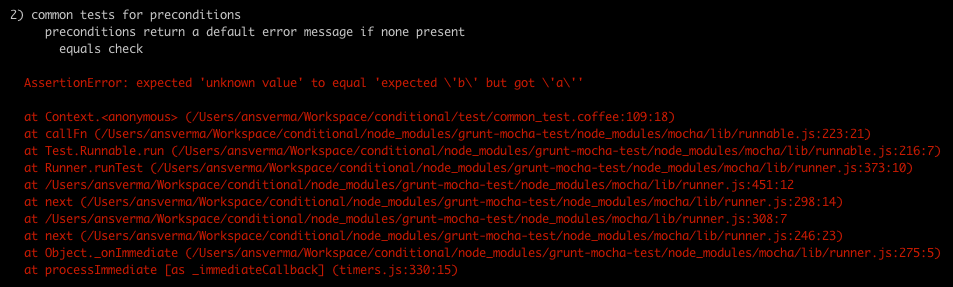
- Object diff is reported properly with a deep colored diff of its contents.

Installation
Install using npm and save it as a development dependency:
npm install hierarchical-reporter --save-dev
Usage
Simply use the --reporter CLI option to specify the reporter you want
to use:
mocha --reporter hierarchical-reporter test/*.js
Building
To get the js source generated form coffee script:
$ grunt coffeeThis will put all js files in lib folder.
Testing
To execute tests, make sure grunt is installed. Then run:
$ grunt testBefore testing, this task will perform a lint check using coffeelint. Tests will be executed if and only if linting succeeds.
The default task of grunt will run this command as well. So, just
typing grunt and pressing RET is also sufficient to run tests.
Documentation
Documentation is generated using
docco and placed in docs
folder. To build documentation:
$ grunt docsBuild + Test + Document
The build task of grunt will check linting, test everything,
generate docs and build javascript source. So, to execute:
$ grunt buildContributing
Feel free to make a change and issue a pull request if you have a patch.
If you have a feature request or if you find a bug, please open a issue.
Author
Anshul Verma :: anshulverma :: @anshulverma
License
The MIT License (MIT)
Copyright (c) 2014 Anshul Verma
Permission is hereby granted, free of charge, to any person obtaining a copy of this software and associated documentation files (the "Software"), to deal in the Software without restriction, including without limitation the rights to use, copy, modify, merge, publish, distribute, sublicense, and/or sell copies of the Software, and to permit persons to whom the Software is furnished to do so, subject to the following conditions:
The above copyright notice and this permission notice shall be included in all copies or substantial portions of the Software.
THE SOFTWARE IS PROVIDED "AS IS", WITHOUT WARRANTY OF ANY KIND, EXPRESS OR IMPLIED, INCLUDING BUT NOT LIMITED TO THE WARRANTIES OF MERCHANTABILITY, FITNESS FOR A PARTICULAR PURPOSE AND NONINFRINGEMENT. IN NO EVENT SHALL THE AUTHORS OR COPYRIGHT HOLDERS BE LIABLE FOR ANY CLAIM, DAMAGES OR OTHER LIABILITY, WHETHER IN AN ACTION OF CONTRACT, TORT OR OTHERWISE, ARISING FROM, OUT OF OR IN CONNECTION WITH THE SOFTWARE OR THE USE OR OTHER DEALINGS IN THE SOFTWARE.