
hnswlib-wasm-core
v0.9.1
Published
typescript and wasm bindings for Hnswlib with storage agnostic

Maintainers
 0xhecker
Readme
hnswlib-wasm-core
This is a WebAssembly (Wasm) version of the hnswlib index library written in C++. This Wasm port was originally created by @ShravanSunder and has been modified by @0xHecker to be storage-agnostic.
Inspired by the library hnswlib-node. @yoshoku has provided some wonderful documentation for hnswlib-node. Thanks, @yoshoku!
hnswlib-wasm-core provides wasm bindings for Hnswlib that implements approximate nearest-neighbor search based on hierarchical navigable small world graphs. It works in browsers and is compiled with Emscripten.
What this solves
The original hnswlib-wasm had a hard dependency on Emscripten's file system (IDBFS) for persistence. This made it difficult to use other storage mechanisms and added unnecessary complexity.
hnswlib-wasm-core solves this by decoupling the core HNSW logic from the persistence layer. It exposes methods to serialize the index to and from an ArrayBuffer, allowing you to use any storage backend you prefer, such as the Origin Private File System (OPFS), IndexedDB, or even a remote server.
Installation
$ npm i hnswlib-wasm-coreSee the npm package here.
Documentation
- hnswlib-node API Documentation by @yoshoku for hnswlib-node provides an accurate description of the API. The TypeScript definitions of the API have been modified to work with Wasm.
Usage
First, create a runtime instance of the library:
import { loadHnswlib } from 'hnswlib-wasm-core';

const lib = await loadHnswlib();
Here is a full example of loading a index if it exists from the Origin Private File System (OPFS), or creating a new index if it doesn't exist:
import { loadHnswlib, HierarchicalNSW } from 'hnswlib-wasm-core';

const INDEX_FILE_NAME = 'hnswlib-index.bin';

const saveIndexToOpfs = async (index: HierarchicalNSW) => {
  const buffer = index.writeIndexToBuffer();
  const root = await navigator.storage.getDirectory();
  const fileHandle = await root.getFileHandle(INDEX_FILE_NAME, { create: true });
  const writable = await fileHandle.createWritable();
  await writable.write(buffer);
  await writable.close();
};

const loadIndexFromOpfs = async (index: HierarchicalNSW, maxElements: number) => {
  const root = await navigator.storage.getDirectory();
  try {
    const fileHandle = await root.getFileHandle(INDEX_FILE_NAME);
    const file = await fileHandle.getFile();
    const buffer = await file.arrayBuffer();
    index.readIndexFromBuffer(new Uint8Array(buffer));
  } catch (error) {
    if (error instanceof Error && error.name === 'NotFoundError') {
      // Index file doesn't exist, so we'll just initialize a new index.
      index.initIndex(maxElements);
    } else {
      throw error;
    }
  }
};

const lib = await loadHnswlib();
const index = new lib.HierarchicalNSW('cosine', 1536);
await loadIndexFromOpfs(index, 100000);

// Now you can use the index
index.addItems(vectors, true);
await saveIndexToOpfs(index);
You can create the index and use it like so.
// Here you're creating a new index with the L2 distance metric and 1000 as the max number of elements
const hnswIndex = lib.HierarchicalNSW('l2', 100);

// Initialize the index with the dimensions (1536), m, efConstruction. See the section below on parameters for more details. These cannot be changed after the index is created.
index.initIndex(1536, 36, 16, 200);

// Set efSearch parameters. This can be changed after the index is created.
index.setEfSearch(efSearch);

// Now you can add items to the index, labels are returned as an array for the vectors.  It will reuse deleted labels if possible based on the second parameter.
const labels = index.addItems(vectors, true);

// Now you can search the index
const result1 = index.searchKnn(vectors[10], 10, undefined);

// You can also search the index with a label filter
const labelFilter = (label: number) => {
  return label >= 10 && label < 20;
}
const result2 = index.searchKnn(testVectorData.vectors[10], 10, labelFilter);
More usage examples to be added.
For now, see the
HierarchicalNSW.test.tsfile in the tests folder and refer to the hnswlib-node API Documentation.
Persistence with ArrayBuffers
The hnswlib-wasm-core library is storage-agnostic. It provides a flexible approach by allowing you to serialize the index to and from an ArrayBuffer. This means you can use any storage mechanism you choose. The recommended approach for modern browsers is the Origin Private File System (OPFS), which provides fast, file-based storage.
Saving and Loading the Search Index
To save the search index, use the writeIndexToBuffer method, which returns an ArrayBuffer:
const buffer = index.writeIndexToBuffer();
// Now you can save the buffer to your preferred storage
To load a previously saved search index, use the readIndexFromBuffer method, which takes an ArrayBuffer:
// Load the buffer from your preferred storage
index.readIndexFromBuffer(buffer);
Helper functions for using OPFS are provided in the opfs-io.ts file and demonstrated in the usage example above.
HNSW Algorithm Parameters for hnswlib-wasm
This section will provide an overview of the HNSW algorithm parameters and their impact on performance when using the hnswlib-wasm library. HNSW (Hierarchical Navigable Small World) is a graph-based index structure for efficient similarity search in high-dimensional spaces.
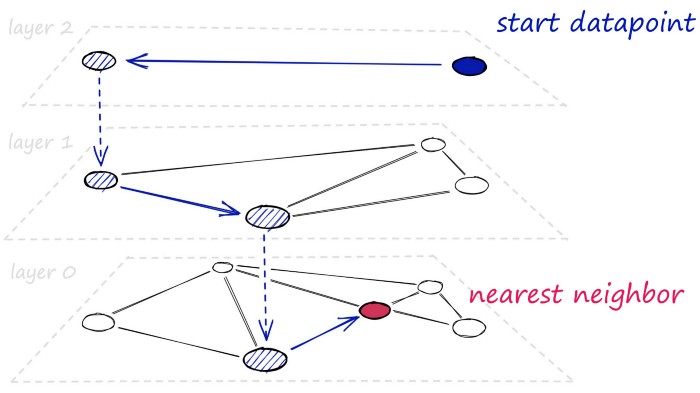 Image from pinecone.io
It has several parameters that can be tuned to control the trade-off between search quality and index size or construction time. Here are some of the key parameters.
Search Parameters: efSearch
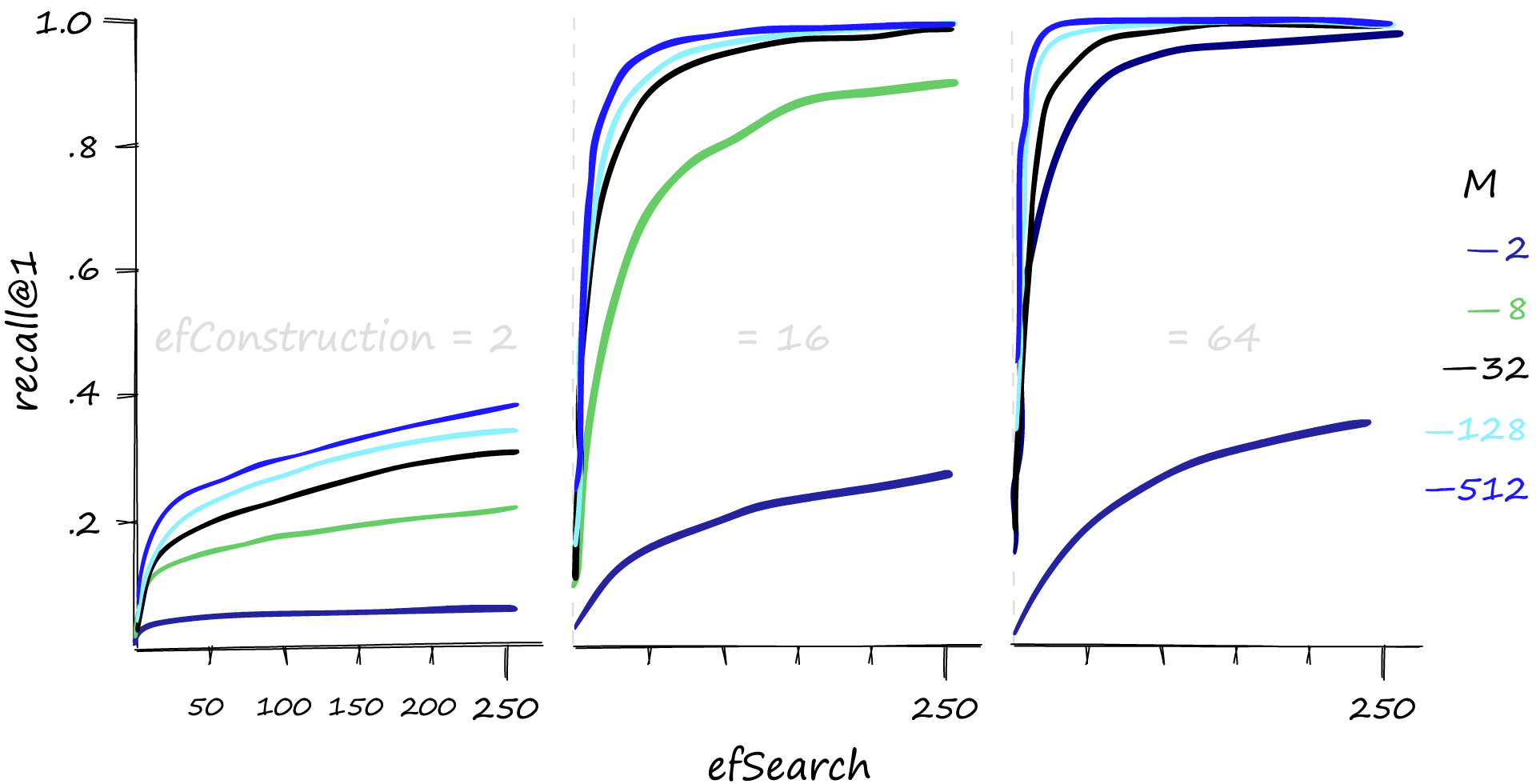
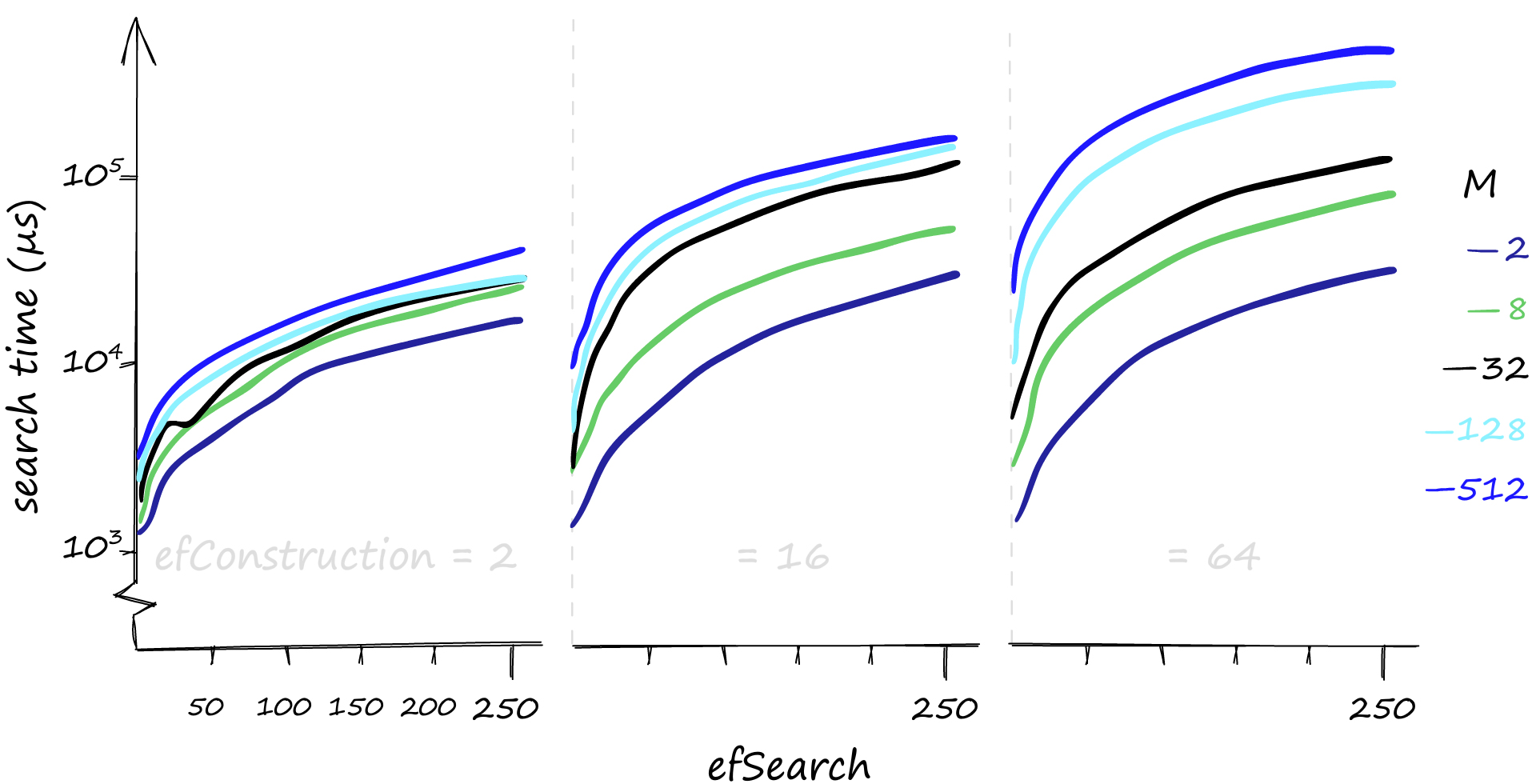
efSearch is the size of the dynamic list for the nearest neighbors used during the search. Higher efSearch values lead to more accurate but slower searches. efSearch cannot be set lower than the number of queried nearest neighbors k and can be any value between k and the size of the dataset.
Construction Parameters: M
M is the number of bi-directional links created for every new element during index construction. A reasonable range for M is 2-100. Higher M values work better on datasets with high intrinsic dimensionality and/or high recall, while lower M values work better for datasets with low intrinsic dimensionality and/or low recall. The parameter also determines the algorithms memory consumption, which is roughly M * 8-10 bytes per stored element.
Construction Parameters: efConstruction
efConstruction controls the index construction time and accuracy. Bigger efConstruction values lead to longer construction times but better index quality. At some point, increasing efConstruction does not improve the quality of the index. To check if the selected efConstruction value is appropriate, measure recall for M nearest neighbor search when efSearch = efConstruction. If the recall is lower than 0.9, there is room for improvement.
Parameter Selection for hnswlib-wasm
When using hnswlib-wasm, it is essential to choose appropriate values for M, efSearch, and efConstruction based on your datasets size and dimensionality. Since hnswlib-wasm is running in the browser, you should consider the available memory and performance limitations. Here are some recommendations:
M:
Choose a value in the range of 12-48, as it works well for most use cases. You may need to experiment to find the optimal value for your specific dataset.
efSearch:
Start with a value close to M and adjust it based on your desired trade-off between search speed and accuracy. Lower values will be faster but less accurate, while higher values will be more accurate but slower.
efConstruction:
Set this value considering the expected query volume. If you anticipate low query volume, you can set a higher value for efConstruction to improve recall with minimal impact on search time, especially when using lower M values.
Remember that higher M values will increase the memory usage of the index, so you should balance performance and memory constraints when choosing your parameters for hnswlib-wasm.
Resources
Images from pinecone.io

Other Notes
License
hnswlib-wasm-core is available as open source under the terms of the Apache-2.0 License.
Contributing
To build
yarn install
make rebuild
yarn build
To test
yarn testContact @0xHecker first!