
hold-to-confirm-vanilla
v0.1.0
Published
Dependency-free hold-to-confirm buttons for vanilla JavaScript, D3, and Svelte.

Maintainers
 angiehjort
Readme
hold-to-confirm-vanilla
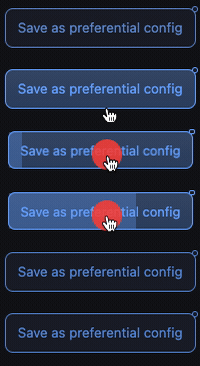
Dependency-free hold-to-confirm buttons for vanilla JavaScript, D3, and Svelte/SvelteKit. The package is buildless ESM, safe to import during SSR, and automatically injects its small default stylesheet in the browser. TypeScript declarations are included.
Install
npm install hold-to-confirm-vanillaVanilla JavaScript
import { holdButton } from 'hold-to-confirm-vanilla';

const control = holdButton(document.querySelectorAll('.delete-button'), {
  duration: 2000,
  variant: 'danger',
  onComplete(element, event, data) {
    element.closest('.item').remove();
  }
});

// Allow the controls to be used again, or remove all listeners.
control.reset();
control.destroy();
The original positional signature also works:
holdButton(document.querySelectorAll('.hold-btn'), onComplete, 2000);Targets may be a DOM element, selector, iterable/NodeList, or D3 selection.
Each control completes only once until reset() is called.
Prefer a native <button> so focus, keyboard behavior, and disabled state work
for everyone. If you attach the behavior to another element, your application
is responsible for giving it equivalent semantics.
D3
The package understands a D3 selection but does not depend on D3. Bound data is passed as the third callback argument.
import { holdButton } from 'hold-to-confirm-vanilla';

const buttons = d3.selectAll('.delete-button');
const control = holdButton(buttons, (element, event, datum) => {
  console.log('delete', datum);
}, 1500);

control.reset();
Svelte / SvelteKit
The package exports a Svelte action without importing Svelte, so it adds no framework code to your bundle. Importing it during server rendering is safe.
<script>
  import { holdToConfirm } from 'hold-to-confirm-vanilla';

  export let item;
  const remove = () => console.log('delete', item.id);
</script>

<button
  use:holdToConfirm={{
    duration: 1800,
    variant: 'danger',
    onComplete: remove
  }}
>
  Hold to delete
</button>
When the action parameters change, Svelte calls the action's update method.
All event listeners and element-level styling are restored on unmount.
Colors and styles
Set CSS custom properties in application CSS:
.delete-button {
  --hold-danger-color: rgb(225 29 72 / 35%);
  --hold-indicator-color: #e11d48;
  --hold-surface-color: white;
}
Or configure them from JavaScript:
holdButton('.delete-button', {
  variant: 'danger',
  colors: {
    danger: 'rgb(225 29 72 / 35%)',
    indicator: '#e11d48',
    surface: 'white'
  },
  onComplete: remove
});
Available color keys / variables are:
| Option | CSS custom property |
| --- | --- |
| progress | --hold-progress-color |
| danger | --hold-danger-color |
| success | --hold-success-color |
| indicator | --hold-indicator-color |
| surface | --hold-surface-color |
The danger variant also recognizes the legacy .delete class. The success
variant recognizes .addnew.
Styles are injected once per document by default. To let your bundler load the CSS instead:
import 'hold-to-confirm-vanilla/styles.css';

holdButton('.delete-button', {
  injectStyles: false,
  onComplete: remove
});
For strict CSP configurations, use that explicit CSS import. The stylesheet is
also available as the exported holdButtonStyles string, and
injectHoldButtonStyles(document) can inject it manually.
Options
| Option | Default | Description |
| --- | --- | --- |
| duration | 1000 | Required hold time in milliseconds. |
| variant | none | danger, success, or an app-defined data variant. |
| colors | none | Element-level custom-property values shown above. |
| keyboard | true | Enable holding Space or Enter. |
| injectStyles | true | Inject the default styles once per document. |
| onStart | none | Called when a valid hold begins. |
| onCancel | none | Called when a hold ends early. |
| onComplete | none | Called after the full duration. |
Callbacks receive (element, event, datum). onCancel also receives a fourth
reason argument (cancelled or blurred). Disabled controls and controls with
aria-disabled="true" do not start.
Local development
npm test
npm run demo
Then open http://localhost:4173.
License
MIT