
homebridge-bewave-mqtt
v1.0.10
Published
BE WAVE (HYBRID) MQTT plugin voor HomeBridge

Maintainers
 rmarobert
Readme
Homebridge BE WAVE MQTT
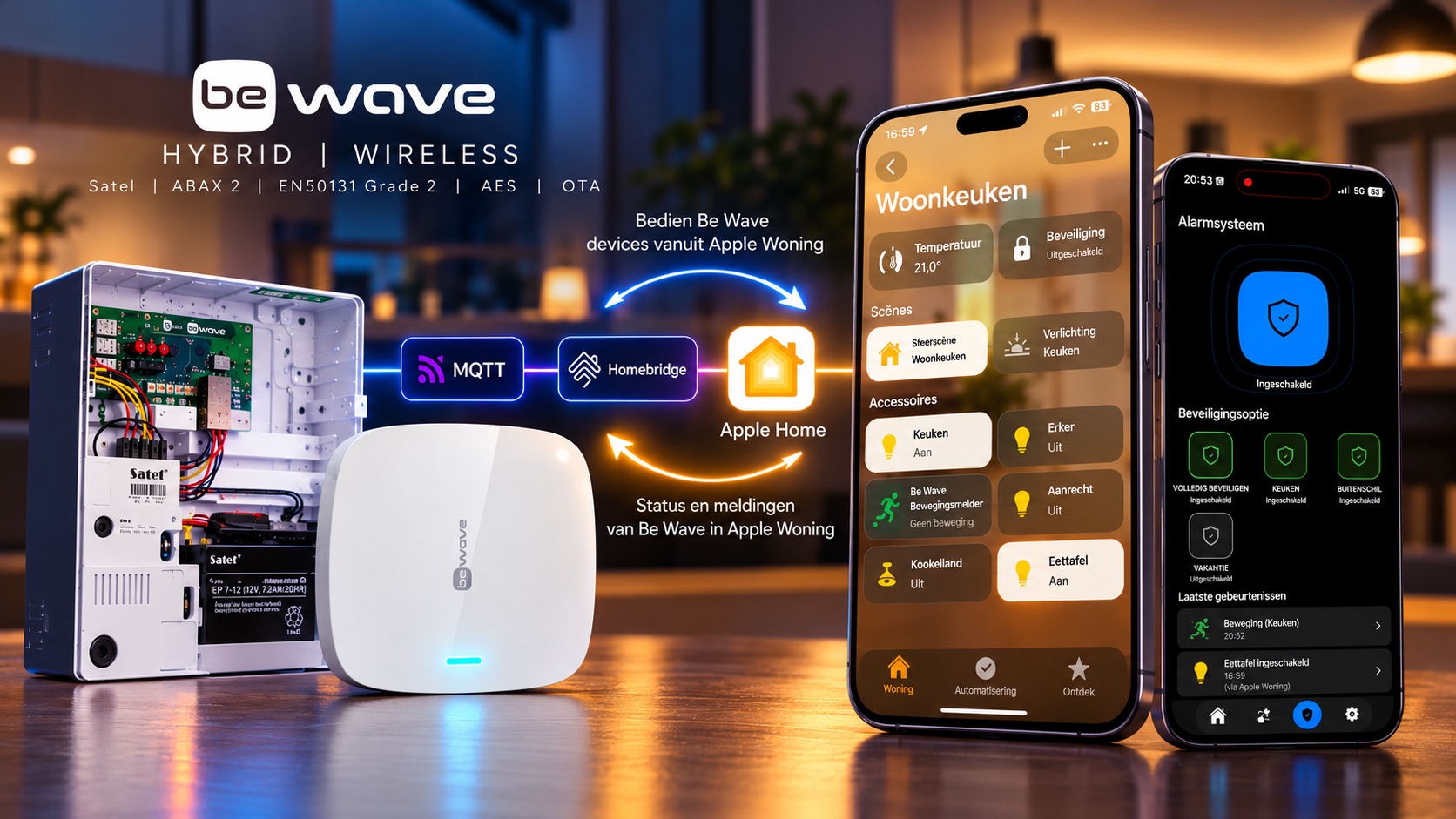
Full Control. Real-Time Response. Two-Way Integration.
Bring the power of SATEL BE WAVE directly into Apple Home.
Unlike traditional SIA-based integrations, which primarily focus on reporting alarm events, Homebridge BE WAVE MQTT provides fast, bidirectional communication between your BE WAVE system and Apple Home.
Go beyond basic alarm monitoring. Control compatible devices, manage supported security functions, and receive status updates — all from the Apple Home app.
Why BE WAVE MQTT?
- Full Control — Control supported BE WAVE devices and security functions directly from Apple Home.
- Lightning-Fast Communication — MQTT-based messaging enables low-latency control and status updates.
- True Bidirectional Integration — Commands flow from Apple Home to BE WAVE, while device states and events flow back automatically.
- Beyond Traditional SIA — Not limited to alarm events. Control compatible switches, dimmers, thermostats and security functions.
- Local and Responsive — Communicate through a local MQTT broker without requiring cloud services for the integration.
- Seamless Apple Home Experience — Bring supported BE WAVE functionality into one familiar interface.
Not just monitoring. Real control.
Features
- MQTT integration with SATEL BE WAVE
- Automatic discovery of supported devices
- Individual selection of devices for Apple Home
- Custom Homebridge configuration interface
- HomeKit security system integration
- Support for switches, dimmers, sensors and thermostats
- Optional scenes and virtual devices
- Automatic MQTT synchronization and reconnection
- Protection against stale alarm states after disconnections
Requirements
- Homebridge 1.6.0 or newer (including Homebridge 2.x)
- Node.js 22 or newer
- An MQTT broker, such as Mosquitto
- A SATEL BE WAVE system with MQTT support enabled and configured
- Network connectivity between Homebridge and the MQTT broker
The plugin is platform-independent and can run on compatible Homebridge installations, including Linux, Raspberry Pi, Docker, NAS, macOS and Windows.
Installation
Homebridge UI (recommended)
- Open the Homebridge web interface.
- Navigate to Plugins.
- Search for
homebridge-bewave-mqtt. - Install the plugin.
- Open the plugin settings.
- Enter your MQTT broker connection details.
- Save the configuration.
- Select the discovered BE WAVE devices you want to expose to Apple Home.
Manual installation
Alternatively, install using npm:
npm install -g homebridge-bewave-mqttMQTT Configuration
Configure your MQTT broker in the plugin settings.
Example broker URL:
mqtt://192.168.1.100:1883Default MQTT topic prefixes:
| Setting | Default | |---------|---------| | Status prefix | bewave/status | | Command prefix | bewave/command |
MQTT authentication is optional, depending on your broker configuration.
The MQTT topics must match those configured in your BE WAVE MQTT integration.
Device Discovery
Supported BE WAVE devices are discovered automatically through MQTT.
You can select which discovered devices should be exposed to Apple Home using the custom configuration interface.
New devices are not automatically added to Apple Home without selection.
Apple Home Integration
Depending on the connected devices and enabled options, supported functionality includes:
- Switches and dimmers
- Motion and contact sensors
- Temperature and humidity information
- Smoke and other supported detectors
- Thermostats
- Security system controls
- Optional scenes and virtual devices
Functionality depends on the connected BE WAVE equipment and its configuration.
Security System
The plugin provides HomeKit security system integration using BE WAVE alarm information.
Alarm states are synchronized through MQTT. After MQTT disconnections, previously received alarm states are invalidated to reduce the risk of displaying outdated information.
This integration is intended for smart home convenience. Do not rely on Homebridge or Apple Home as the sole means of monitoring or controlling your security system.
Troubleshooting
No devices discovered
- Check your MQTT broker address.
- Verify network connectivity.
- Confirm that MQTT is configured correctly in BE WAVE.
- Check the MQTT topic prefixes.
- Review the Homebridge logs.
Devices not appearing in Apple Home
- Verify that the devices were discovered.
- Select the desired devices in the plugin settings.
- Save the configuration.
- Restart Homebridge if necessary.
MQTT connection issues
- Check broker availability.
- Verify MQTT credentials.
- Check network and firewall settings.
- Review the Homebridge logs.
Compatibility
Development and testing have included:
- Node.js 24.16.0
- Homebridge 1.11.4
- Homebridge 2.4.0 (installation and build compatibility)
Compatibility with every supported operating system and Homebridge version has not been independently verified.
Source Code and Support
GitHub: https://github.com/rmarobert/homebridge-bewave-mqtt
npm: https://www.npmjs.com/package/homebridge-bewave-mqtt
Report bugs and suggestions through GitHub Issues.
Disclaimer
This is an independent community project and is not officially affiliated with or endorsed by SATEL.
License
MIT