
homebridge-garage-cli-cmd-trigger
v2.0.0
Published
Garage Opener with command line triggers support for Homebridge

Maintainers
 fasc.pt
Readme
homebridge-garage-cli-cmd-trigger
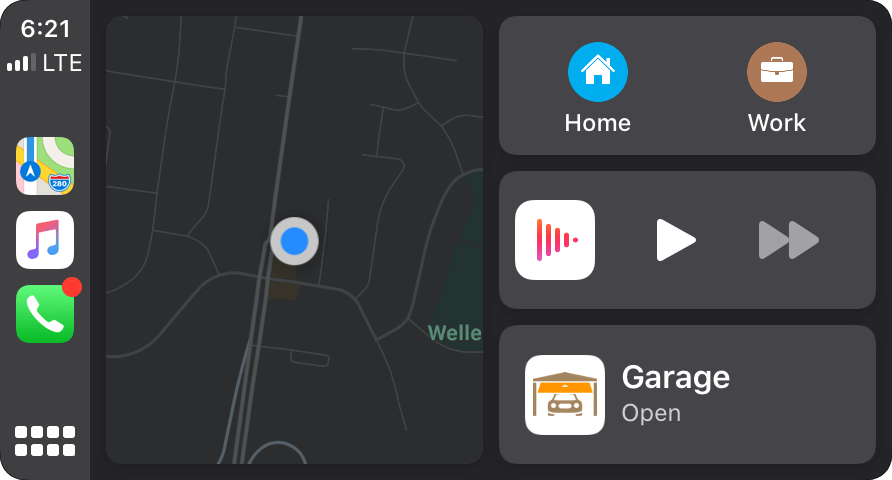
Homebridge plugin to create a HomeKit Garage Door accessory with optional command line triggers. Why? iOS >13 CarPlay allows you to easily access your Garage when arriving and leaving your house. This plug-in allows to to create a Garage door which you can use as an automation trigger and trigger command line, e.g., to run a python script which sends a radio command to the Garage Door. Pull up to your house open the "Garage" on your dash which can unlock your front door, turn lights on, open your garage, etc.
Compatibility
Supports Homebridge v1.6.0 and v2.0.0+. Node.js 18, 20, 22 and 24 are supported.
Installation
- Install Homebridge
- Install this plugin using
npm install -g homebridge-garage-cli-cmd-trigger - Edit your configuration file like the example below and restart Homebridge
Configuration Example
	"accessories": [
		{
			"accessory": "GarageCliCmdTrigger",
			"name": "Garage Command Trigger",
			"autoCloseDelay": 2,
			"openCmd": "echo Garage OPENED",
			"closeCmd": "echo Garage CLOSED"
		}
	]
Configuration Parameters
name(required) Name of Garage to appear in Home appautoCloseDelayNumber of seconds after opening door will automatically close. Remove parameter or set it to 0 to disable.openCmdCLI command that is executed when the garage is opened.closeCmdCLI command that is executed when the garage is closed.
Credits
This plugin is a fork of Homebridge-Controls-Your-Garage-Door-Remote with command line feature borrowed from homebridge-cmdtriggerswitch.