
homebridge-rpc3control
v0.1.3
Published
Direct Telnet control of BayTech RPC PDUs with power and power-aware native reboot switches
Downloads
991

Maintainers
 klidec
Readme
homebridge-rpc3control
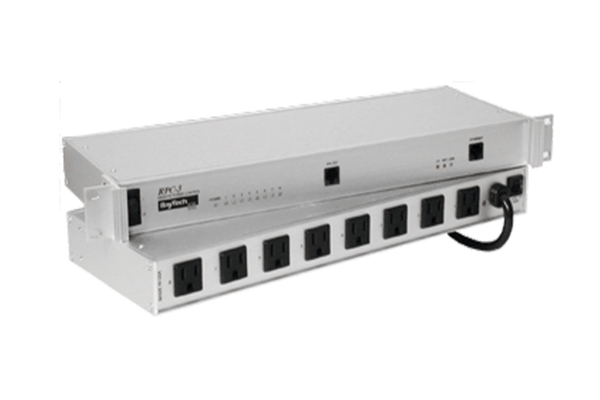
Bring one or more BayTech RPC power distribution units into Apple Home through Homebridge. Give each outlet a normal On/Off switch or a Power-aware reboot switch that uses the PDU's own power-cycle command.
Install the stable release from npm or Homebridge UI. Compatibility with every RPC model has not been verified.
Old hardware, new tricks
Your BayTech RPC may come from the era of terminal windows and blinking rack lights, but it still has plenty of switches left to flip. Retirement? Let's give it a HomeKit invitation instead.
This plugin brings that old workhorse into the Home app: tap to control an outlet, ask Siri to switch it on, or give a stubborn device a native power-cycle reboot. The PDU keeps speaking Telnet; Homebridge handles the introductions. No new smart power strip or PDU cloud account required.
Same sturdy metal box. Same satisfying relay clicks. A few decidedly modern party tricks.
Installation
Requires Homebridge 1.8+ within version 1, or Homebridge 2.x, with Node.js 22.13+ within version 22, or Node.js 24. Homebridge must be able to reach the PDU on your local network, normally TCP port 23. No Python, Pexpect, Script2, or separate Telnet program is required.
Homebridge UI
- Open Plugins and search for homebridge-rpc3control.
- Install RPC PDU Control using the default latest version. If you previously installed a beta, use the plugin menu's Manage Version option (called Install Previous Version in some older UI versions) and select latest to switch to the stable release.
- Open the plugin's Settings, configure your PDUs and outlets, and save.
- Restart Homebridge through its UI.
If the package does not appear in search yet, install it using the terminal command below, then return to the UI to configure it.
Terminal: install from npm with hb-service
For a Linux Homebridge installation managed by hb-service, run this in a terminal on the Homebridge host. It installs the package from npm into Homebridge's plugin location. You do not need an npm account to install it.
{
  echo "===== START: INSTALL RPC PDU CONTROL ====="
  if bash -c '
set -e
set -o pipefail
sudo hb-service add homebridge-rpc3control@latest
'; then
    echo "===== END: INSTALL COMMAND FINISHED; CHECK OUTPUT, THEN CONFIGURE AND RESTART IN HOMEBRIDGE UI ====="
  else
    echo "===== END: INSTALL STOPPED; SEE ERROR ABOVE; SSH SESSION REMAINS OPEN ====="
  fi
}
When using a Homebridge UI terminal that already has the required privileges, omit sudo. If your installation does not support hb-service add, use Homebridge UI's plugin installer. This command does not restart Homebridge: check the installation output, then configure and restart through the UI.
Use the same command to update to the newest stable release or switch from a beta to stable. To install a specific release, replace @latest with its full version, for example @0.1.0. Save your configuration and restart Homebridge after updating.
Configuration
Open RPC PDU Control → Settings in Homebridge UI:
- Add PDU, give it a name, and enter its IP address and total physical outlet count.
- Expand Login credentials if your PDU requires them.
- Click Add missing outlets to create entries for the configured physical numbers. Existing names, behavior, and delays are preserved. Remove entries you do not want exposed; reducing the count never silently deletes switches.
- Choose Power (On / Off) or Power-aware reboot for each outlet. Its behavior explanation and recovery check delay appear only for power-aware reboot switches.
- Optionally expand Test connection and preview outlet states. This reads current status using your unsaved settings; it sends no outlet power commands. Missing rows display Unknown.
- Use Homebridge’s Save button, then restart Homebridge to apply the configuration.
Advanced connection settings are collapsed by default. All timing controls display seconds, including fractional seconds; existing JSON still uses millisecond fields with no configuration migration. New PDUs receive a permanent ID automatically.
Connection tests run only when requested, allow one active test per settings server, enforce a five-second cooldown and a maximum ten-second session deadline, and close their sockets afterwards. The settings server is separate from the running platform and may use one additional PDU session during a test; other clients still share the device session limit. Previewing never saves configuration or changes an outlet.
Optional JSON configuration
If you prefer editing configuration directly, add this entry to the Homebridge platforms array:
{
  "platform": "Rpc3Control",
  "name": "RPC PDU Control",
  "pdus": [
    {
      "id": "rack-main",
      "name": "Main rack",
      "host": "192.0.2.10",
      "port": 23,
      "username": "admin",
      "password": "",
      "outletCount": 8,
      "outlets": [
        { "number": 2, "name": "Desk Power", "mode": "power" },
        { "number": 3, "name": "Test Device Reboot", "mode": "reboot", "resetAfterMs": 3000 }
      ]
    }
  ]
}
Replace the example address and credentials. Add one pdus entry per device. Credentials are sent only when requested, and are not stored in accessory context or logs. Telnet itself is unencrypted; use a trusted local network.
Gentle status updates for older hardware
For outlets that rarely change, these settings reduce routine traffic. Enter these values in the UI's advanced settings; all values below are seconds.
| Setting | Default | Suggested for occasional use | | --- | --- | --- | | Polling interval | 60 | 0 (disable periodic polling) | | Status cache lifetime | 15 | 60 | | Connection timeout | 3 | 3 | | Operation timeout | 8 | 8 | | Queue wait timeout | 3 | 3 | | Recovery check delay (reboot outlets) | 3 | 3 |
With polling disabled, the plugin still reads status at startup, refreshes expired cached status when HomeKit requests it, and verifies actions. Several outlets share one status refresh. Opening Home normally prompts status requests, but Apple Home controls when it asks; an external change can remain visible as the old state while the cache is valid. Choose periodic polling if you need regular updates without opening Home.
Recovery check delay controls when the plugin starts checking after a power-aware action. It does not control how long the PDU keeps power off, and no plugin timer turns the outlet back on.
PDU settings (JSON reference)
| Setting | Default | Meaning |
| --- | --- | --- |
| id | Required | Permanent unique ID: 1-64 letters, digits, _ or -. Changing it recreates accessories. |
| name | ID | Display/log name. |
| host | Required | IP address or hostname, without scheme or port. |
| port | 23 | Telnet TCP port. |
| username, password | Empty | Optional printable ASCII credentials; spaces are preserved. |
| outletCount | Required | Total physical outlets, 1-256. This is a software limit, not a compatibility claim. |
| outlets | Required list | Outlets to expose. Omitted outlets are not changed or registered. |
| pollingIntervalMs | 60000 | Recurring status interval; 0 disables it, otherwise minimum 5000 ms. |
| cacheTtlMs | 15000 | Confirmed status reuse duration; 0 requires refresh. |
| connectTimeoutMs | 3000 | Connection deadline. |
| operationTimeoutMs | 8000 | Whole login/operation session deadline. |
| queueTimeoutMs | 3000 | Maximum wait before starting. Expired queued commands are not sent. |
PDUs with either switch mode receive an initial status read even if recurring polling is disabled. Reads after cache expiry share a refresh. The polling interval applies to both modes; use 0 for on-demand status plus action recovery only. Long timeouts can exceed HomeKit's response deadline; start with defaults.
Outlet settings
| Setting | Meaning |
| --- | --- |
| number | Physical number, 1 through the PDU's outletCount. |
| name | Switch name in Home. |
| mode | power (normal On/Off) or reboot (power-aware reboot); one mode per configured outlet. |
| resetAfterMs | Legacy key for recovery check delay after an accepted/uncertain action; default 3000 ms, range 100-3600000 ms. Never changes physical reboot duration or forces displayed state. Ignored for power mode. |
Identity uses PDU ID, number, and mode. Renaming/reordering preserves identity; changing mode replaces the accessory and may require updating Home automations. Removing an outlet or PDU from valid configuration removes its accessories. Invalid configuration preserves cached accessories but makes their handlers unavailable.
What power-aware reboot does
Both switch options display the actual outlet power state. Power (On / Off) behaves like a normal power switch. Power-aware reboot has these actions:
| Confirmed outlet state | HomeKit request | PDU action |
| --- | --- | --- |
| Off | On | Native on N to power up. |
| On | Off | Native reboot N to cycle power. |
| On | On | No power command; already On. |
| Off | Off | No power command; already Off. |
The plugin checks fresh outlet status before choosing the action. Unknown status means no power action.
Turning this switch Off means reboot, including Siri requests, scenes, and “turn everything off” automations. Use the normal Power option when you need to leave an outlet switched off.
Rebooting network equipment
The plugin sends the PDU’s native reboot N command, never an off N followed by a timer-driven on N. Once the PDU has received and accepted the native command, its own controller completes the off/on cycle without needing an internet connection, an Ethernet connection to Homebridge, or a running Homebridge process. This is essential when rebooting the switch/router carrying that connection, or the host running Homebridge itself.
If the connection drops after transmission, the command may have been accepted even though its reply was lost. The plugin reports that uncertainty and does not automatically resend reboot. If the PDU never received the command, the plugin cannot guarantee that a reboot occurred.
The HomeKit switch returns to On when a subsequent status read confirms power is On. During the cycle it can show Off if that is the confirmed state, or No Response while the PDU is unreachable. It never assumes success just because a timer expired. Power On does not mean the attached router/server has finished booting.
After an accepted or uncertain action, the plugin waits for the configured Recovery check delay (default 3 seconds), then performs read-only verification. Further checks become less frequent if the device is unavailable and stop after at most ten minutes beyond the initial delay. Recovery works with regular polling disabled and stops when On is confirmed. Repeated/opposite writes are rejected while the action is pending or recovery is active, so an extra tap cannot interrupt the native cycle. After the recovery window expires, background recovery stops and a later user request checks fresh state again. Timers never send power commands.
Upgrading from beta.1
Stable releases retain the power-aware behavior introduced in beta.2. If you are upgrading directly from beta.1, the stored mode remains reboot, preserving accessory identity, but an existing reboot switch now displays power state and reboots on an Off request while the outlet is On. Update any Siri phrases, scenes, or automations that previously requested On to reboot.
The legacy JSON key resetAfterMs is retained, but now means delay before checking recovery, not a forced display reset. Its UI label is “Recovery check delay.” After restart, both modes discover real state; no saved reboot request is replayed.
Logging
Normal Homebridge logs show accepted On/Off/native Reboot commands, power-aware requests that need no change, and a single confirmation when power is observed On after a power-aware action. Messages identify the configured PDU, outlet number, and outlet name. HomeKit requests include taps, Siri, scenes, and automations; the plugin does not identify which person or Home app initiated them.
Examples:
[Main rack] Outlet 2 (Desk): HomeKit Off request: Off command accepted by PDU.
[Main rack] Outlet 3 (Router): HomeKit Off request: native Reboot command accepted by PDU; PDU controls the off/on cycle.
[Main rack] Outlet 3 (Router): Reboot request recovery: outlet power confirmed On.
Command acceptance and confirmed power are separate events. An uncertain command produces a warning, not an acceptance message. Recovery confirmation only establishes that the outlet is powered On; it does not prove that the attached device has finished booting or that an uncertain reboot definitely occurred. If recovery expires without confirming On, one warning is logged. No command is automatically retried.
Successful periodic polling, startup status discovery, ordinary state updates, and Apple Home state reads stay out of normal logs. Enable Homebridge debug logging for the instance or child bridge running this plugin, and restart it, to see:
- HomeKit read requests and returned On/Off values.
- Cache hits, shared pending refreshes, and fresh PDU status requests.
- Startup and periodic polling checks and successful refresh counts.
- Read failures and recovery reads, labelled by their source.
Debug messages do not include credentials, raw Telnet conversations, or PDU-provided outlet names. Logging does not add network requests or change cache/polling intervals. Existing warnings and errors remain visible without debug mode.
Troubleshooting and compatibility
- No Response or Unknown: check the PDU address, port, credentials, and local network path. Failed reads are not treated as proof that an outlet is Off. After connection failures, retries slow down to avoid repeatedly hitting the device.
- Too many Telnet sessions: the plugin uses at most one active control session per PDU. A manual connection preview can use one additional session. Other clients share the assumed four-session device limit; close unused Telnet sessions.
- Reboot interrupted the network: the PDU completes an accepted native reboot itself. Home may show No Response until the network returns. An uncertain command is not automatically sent again; check the equipment before manually repeating it.
- Outlets missing from Home: confirm the total physical outlet count and add the outlet entries you want exposed. Save and restart Homebridge.
- Another RPC model: devices are assumed to share the RPC menu and native commands. Other models remain unverified; support for a configurable outlet count is not a guarantee of model compatibility.
For help, open a GitHub issue with your PDU model, plugin version, Homebridge/Node versions, and relevant logs. Remove passwords and other private details before sharing.