
homebridge-viessmann-vicare
v2.0.74
Published
Complete Homebridge plugin for Viessmann ViCare heating systems with full control capabilities, advanced rate limiting protection, and intelligent cache management

Maintainers
 diegoweb100
Readme
homebridge-viessmann-vicare





A comprehensive Homebridge plugin for Viessmann heating systems with full control capabilities including boilers, domestic hot water (DHW), and heating circuits through Apple HomeKit. Features advanced rate limiting protection, intelligent cache management, automatic retry logic, and complete localization support.
🚀 Key Features
- 🔥 Complete boiler control: Temperature, operating modes, burner status, modulation
- 🚿 DHW management: Temperature control and operating modes for domestic hot water
- 🏠 Individual heating circuits: Full control of each circuit with temperature programs
- 🎛️ Advanced temperature programs: Reduced, Normal, Comfort modes with individual temperatures
- 🏖️ Holiday and quick selection modes: Holiday, Holiday at Home, Extended Heating programs
- 🌍 Complete localization: Custom names for all accessories in your preferred language
- ↔️ Bidirectional commands: Read AND write all supported parameters
- ⚡ Intelligent rate limiting: Advanced protection against API throttling with exponential backoff
- 🔄 Automatic retry logic: Smart retry mechanism with alternative API endpoints
- 🛡️ Robust error handling: Graceful degradation and recovery from API limitations
- 💾 Intelligent cache management: Advanced caching system with configurable TTL and smart refresh
- 🔐 Secure authentication: OAuth2 with automatic token refresh
- 📊 Real-time updates: Continuous monitoring with adaptive refresh intervals
- 🎯 Installation filtering: Show only specific installations or filter by name
- 🎛️ Easy configuration: Full support for Homebridge Config UI X with all parameters exposed
- 🎯 Native integration: Complete compatibility with Apple Home app and Siri controls
- 🔋 Energy system monitoring (beta): PV production, battery storage, grid feed-in/draw, wallbox — logs to CSV and MySQL
- 🌡️ TRV / Room Sensor discovery (beta): Auto-discovers ViCare Smart Climate thermostatic radiator valves and room sensors, logs temperature history
🌍 Localization & Custom Names
NEW in v2.0: Complete support for custom accessory names in any language! Perfect for Italian, German, French, Spanish users or custom naming schemes.
🇮🇹 Italian Example
{
  "customNames": {
    "installationPrefix": "Casa Mia",
    "boiler": "Caldaia",
    "dhw": "Acqua Calda",
    "heatingCircuit": "Riscaldamento",
    "reduced": "Ridotto",
    "normal": "Normale",
    "comfort": "Comfort",
    "eco": "Eco",
    "off": "Spento",
    "burner": "Bruciatore",
    "modulation": "Modulazione",
    "holiday": "Vacanza",
    "holidayAtHome": "Vacanza Casa",
    "extendedHeating": "Riscaldamento Extra"
  }
}
Resulting HomeKit names:
Casa Mia Caldaia(Main boiler control)Casa Mia Caldaia Bruciatore(Burner status)Casa Mia Caldaia Modulazione(Modulation level)Casa Mia Acqua Calda(DHW control)Casa Mia Acqua Calda Comfort(DHW comfort mode)Casa Mia Riscaldamento 1 Ridotto 18C(Reduced program)Casa Mia Riscaldamento 1 Normale 20C(Normal program)Casa Mia Riscaldamento 1 Comfort 22C(Comfort program)
🇩🇪 German Example
{
  "customNames": {
    "installationPrefix": "Mein Haus",
    "boiler": "Kessel",
    "dhw": "Warmwasser",
    "heatingCircuit": "Heizkreis",
    "reduced": "Reduziert",
    "normal": "Normal",
    "comfort": "Komfort"
  }
}
🇫🇷 French Example
{
  "customNames": {
    "installationPrefix": "Ma Maison",
    "boiler": "Chaudière",
    "dhw": "Eau Chaude",
    "heatingCircuit": "Circuit Chauffage",
    "reduced": "Réduit",
    "normal": "Normal",
    "comfort": "Confort"
  }
}
🇪🇸 Spanish Example
{
  "customNames": {
    "installationPrefix": "Mi Casa",
    "boiler": "Caldera",
    "dhw": "Agua Caliente",
    "heatingCircuit": "Circuito Calefacción",
    "reduced": "Reducido",
    "normal": "Normal",
    "comfort": "Confort"
  }
}
🏗️ Plugin Architecture (v2.0)
The plugin has been completely refactored into a modular architecture for better maintainability and debugging:
Core Modules
src/
├── 🔐 auth-manager.ts           # OAuth2 authentication & token management
├── 🛡️ rate-limit-manager.ts    # API rate limiting protection
├── 📡 api-client.ts             # HTTP client with retry logic
├── 🌐 viessmann-api-endpoints.ts # Viessmann-specific API calls
├── 🔧 network-utils.ts          # Network utilities (IP, browser)
├── 💾 api-cache.ts              # Intelligent multi-layer caching
├── 📊 api-health-monitor.ts     # Performance monitoring
└── 🎯 viessmann-api.ts          # Main API facade
Benefits
- 🐛 Better Debugging: Each module handles specific errors
- 🚀 Improved Performance: Specialized caching and retry logic
- 🛡️ Enhanced Reliability: Advanced rate limiting protection
- 🔧 Easier Maintenance: Modular, testable code structure
- 📊 Better Monitoring: Real-time performance metrics
Debugging Guide
Authentication Issues → Check auth-manager.ts logs
Rate Limiting → Monitor rate-limit-manager.ts output
Performance → Review api-client.ts and cache metrics
API Errors → Debug viessmann-api-endpoints.ts parsing
Network Issues → Examine network-utils.ts detection
For detailed architecture documentation, see the Plugin Architecture section above.
🆕 What's New in v2.0
- 🌍 Complete Localization Support: Custom names for all accessories in any language
- 🛡️ Advanced Rate Limiting Protection: Intelligent handling of Viessmann API rate limits (429 errors)
- 💾 Intelligent Cache Management: Multi-layer caching with configurable TTL for different data types
- 🔄 Smart Retry Logic: Exponential backoff with alternative API endpoints
- 📊 Adaptive Refresh Intervals: Automatic adjustment based on API availability
- 🎯 Enhanced Installation Filtering: Filter installations by name or ID to reduce API calls
- 🎛️ Individual Temperature Programs: Separate controls for Reduced/Normal/Comfort modes
- 🏖️ Enhanced Holiday Modes: Full support for Holiday and Holiday at Home programs
- ⚡ Extended Heating Mode: Quick comfort boost functionality
- 🔧 Improved Error Recovery: Better handling of temporary API issues
- 📈 Performance Monitoring: Real-time rate limit status and diagnostics
- ⚙️ Complete UI Configuration: All parameters configurable through Homebridge Config UI X
- 🎚️ Feature Toggle Controls: Enable/disable specific accessory types
- 🔧 Advanced Timeout Controls: Configurable timeouts and retry mechanisms
📊 HTML Report Preview
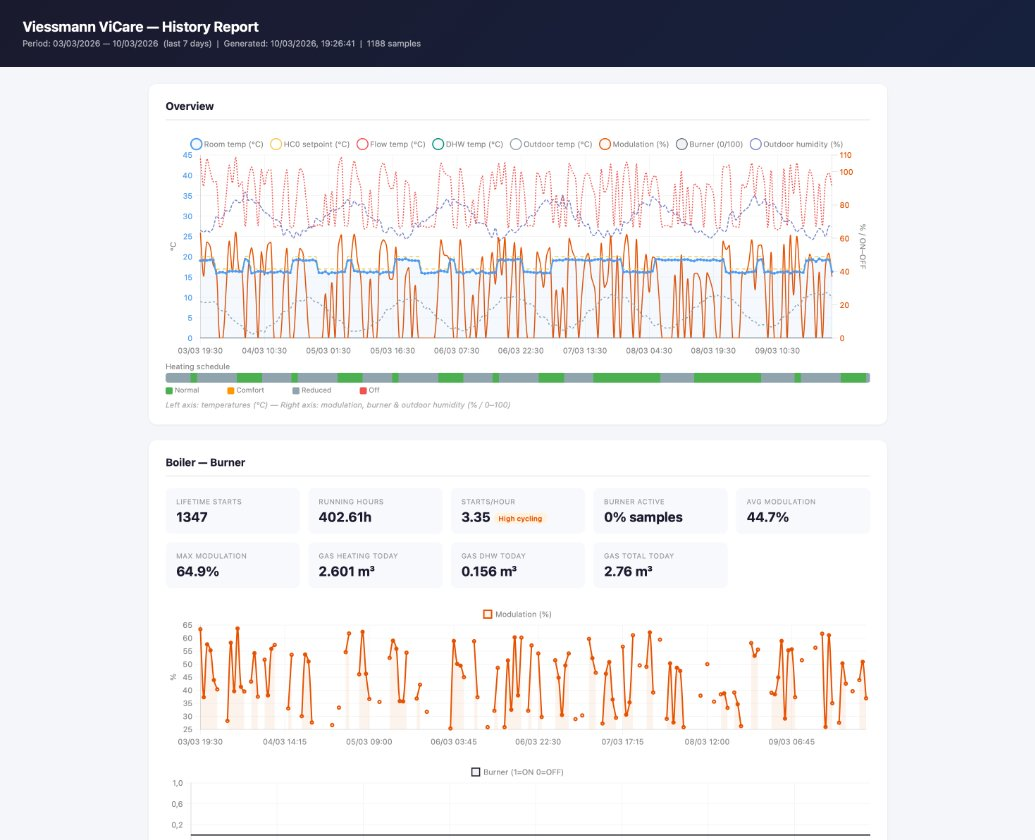
Interactive HTML report generated by the plugin — 7 days of boiler data including overview chart, heating schedule bar, stat cards, gas consumption, flow temperature and more. Full report preview ↓
🏠 Supported Devices
All Viessmann heating systems compatible with ViCare API:
- Gas and oil boilers (Vitodens, Vitoladens, Vitocrossal)
- Heat pumps (air-to-water, ground-source, hybrid systems)
- Hybrid systems (boiler + heat pump combinations)
- Pellet and biomass boilers (Vitoligno)
- Combined heating/cooling systems
- Solar thermal systems (Vitosol)
- Ventilation systems (Vitovent)
- Multi-zone systems (multiple heating circuits)
📦 Installation
Via Homebridge Config UI X (Recommended)
- Search for "homebridge-viessmann-vicare" in the Plugin tab
- Click "Install"
- Configure the plugin through the web interface using the comprehensive configuration form
Via npm
npm install -g homebridge-viessmann-vicare📊 History & Graphs
Starting from v2.0.25 the plugin automatically records historical data at every refresh cycle (~15 min).
What is recorded
| Data | Source | CSV | MySQL DB | HTML report | |---|---|---|---|---| | Burner state + modulation % | Boiler | ✅ | ✅ | ✅ | | Room temperature + setpoint | HC | ✅ | ✅ | ✅ | | DHW temperature + setpoint | ACS | ✅ | ✅ | ✅ | | Active program (normal/reduced/comfort) | HC | ✅ | ✅ | ✅ | | Burner starts + hours (lifetime + daily delta) | Boiler | ✅ | ✅ | ✅ | | Outside temperature + humidity | Boiler | ✅ | ✅ | ✅ | | Flow temperature (HC supply) | HC | ✅ | ✅ | ✅ | | Gas consumption heating + DHW (m³/day, m³/month) | Boiler | ✅ | ✅ | ✅ | | Heat production heating + DHW (kWh/day, kWh/month) | Boiler | ✅ | ✅ | ✅ | | PV production (W) + daily yield (kWh) | Energy | ✅ | ✅ | ✅ | | Battery level (%) + charge/discharge (W) | Energy | ✅ | ✅ | ✅ | | Grid feed-in / draw (W) | Energy | ✅ | ✅ | ✅ | | Wallbox charging state + power (W) | Energy | ✅ | ✅ | ✅ | | Room sensor temperature (TRV / ViCare Smart Climate) | RoomSensor (beta) | ✅ | ✅ | — | | Boiler water temperature | Boiler | — | ✅ | — | | HC operating mode + program temperatures (°C) | HC | — | ✅ | — | | Heating curve slope + shift | HC | — | ✅ | — | | Holiday mode + extended heating active | HC | — | ✅ | — | | DHW mode (comfort/eco/off) | ACS | — | ✅ | — | | DHW circulation pump state | ACS | — | ✅ | — | | Installation ID + gateway serial | All | — | ✅ | — |
📱 Eve app graphs (FakeGato)
Graphs are visible in the Eve app (free, App Store / Google Play).
Step 1 — Install fakegato-history (one time, via SSH):
sudo npm install --prefix /usr/local fakegato-historyStep 2 — Restart Homebridge from the UI.
Step 3 — Verify in Homebridge logs:
📊 Boiler: FakeGato history enabled (type: energy)
📊 ACS: FakeGato history enabled (type: thermo)
📊 HC0: FakeGato history enabled (type: thermo)
Step 4 — Open Eve app → tap the accessory → tap the graph icon. Data accumulates over time — after a few hours you will see the first trends.
Note:
fakegato-historyis anoptionalDependency. If not installed, the plugin works normally — you simply won't have Eve graphs. When you install or update the plugin via npm,fakegato-historyis installed automatically.
📁 CSV file
Every refresh appends a row to:
/var/lib/homebridge/viessmann-history-<installationId>.csv35 columns including temperatures, gas consumption, heat production, burner stats, PV/battery/wallbox. Open directly in Excel or Google Sheets for custom analysis. Use viessmann-report-server.js to generate a full HTML report.
CSV logging is enabled by default. Disable it with
logging.csv.enabled: falsein plugin config (only if using MySQL exclusively).
🗄️ MySQL / MariaDB (optional, v2.0.74+)
Write history to a local MySQL or MariaDB database for direct Grafana integration. The DB schema adds 13 extra columns not present in the CSV (boiler_water_temp, hc_slope/shift, holiday_mode_active, dhw_circulation_pump, etc.).
Step 1 — Install mysql2 (one time):
sudo npm install --prefix /usr/local mysql2Step 2 — Create DB user (example):
CREATE USER 'viessmann_rw'@'localhost' IDENTIFIED BY 'your_password';
GRANT SELECT, INSERT ON homebridge.viessmann_history TO 'viessmann_rw'@'localhost';
Step 3 — Enable in plugin config:
"logging": {
  "csv": { "enabled": true },
  "mysql": {
    "enabled": true,
    "host": "localhost",
    "port": 3306,
    "database": "homebridge",
    "user": "viessmann_rw",
    "password": "your_password",
    "table": "viessmann_history",
    "autoCreateTable": true
  }
}
Step 4 — Restart Homebridge. The table is created automatically. Existing CSV history is imported in the background on first run.
🌐 Interactive HTML report (Chart.js)
No extra dependencies — Chart.js is loaded from CDN. Open the generated file in any browser.
Generate report:
# Last 7 days — replace YOUR_INSTALLATION_ID with your actual ID (visible in Homebridge logs)
node /usr/local/lib/node_modules/homebridge-viessmann-vicare/viessmann-report.js --installation YOUR_INSTALLATION_ID

# With full system analysis (recommended — add your boiler's nominal kW from the ViCare app)
node /usr/local/lib/node_modules/homebridge-viessmann-vicare/viessmann-report.js --installation YOUR_INSTALLATION_ID --boilerKW 25 --designTemp -10

# Last 30 days
node /usr/local/lib/node_modules/homebridge-viessmann-vicare/viessmann-report.js --installation YOUR_INSTALLATION_ID --days 30 --boilerKW 25 --designTemp -10

# Custom output path
node /usr/local/lib/node_modules/homebridge-viessmann-vicare/viessmann-report.js --installation YOUR_INSTALLATION_ID --days 7 --out /tmp/report.html
| Parameter | Description | Default |
|---|---|---|
| --installation <ID> | Installation ID (required) | — |
| --days <N> | Number of days to include | 7 |
| --boilerKW <kW> | Boiler nominal power (enables kW analysis) | disabled |
| --designTemp <°C> | Design outdoor temperature for peak load calc | -7 |
| --path <dir> | Homebridge storage path | /var/lib/homebridge |
| --out <file> | Output HTML file path | auto-generated |
Copy to your Mac and open in browser:
scp user@raspberry:/tmp/report.html ~/Desktop/viessmann-report.html && open ~/Desktop/viessmann-report.htmlThe report includes:
- Overview chart: all series on a unified timeline — room temp, flow temp, setpoint, DHW temp, outside temp, modulation (%), burner ON/OFF, humidity. Linearly interpolated for continuous lines.
- Heating schedule bar: HTML/CSS bar showing the programmed weekly schedule (normal/reduced/comfort/off segments)
- Boiler stat cards: starts/hour, avg/max modulation, heat demand (kW), gas consumption, condensing badge, cycle count and durations
- Daily gas consumption chart: stacked bar (heating + DHW) with daily total line
- Cycle duration histogram: distribution across 5 buckets — highlights short-cycling at a glance
- 🔍 System Analysis section (v2.0.36+):
- Heat demand (kW), house heat loss coefficient (kW/°C), estimated peak load, house efficiency rating
- Boiler sizing check, cycling severity score, comfort stability (room temp stddev)
- Estimated system efficiency (%), heating curve behaviour (weather-compensated vs fixed flow)
- Heat Demand vs Outdoor Temperature scatter plot with regression line and balance point
- Human-readable insight cards (✅ / ⚠️ / ℹ️) with actionable diagnostics
- Heating Circuit (HC0): room temp vs setpoint chart, flow temperature chart, program distribution
- DHW chart: temperature vs setpoint over time
- Works offline once downloaded — no server required, all data is embedded
📧 Automated email report via crontab
You can schedule the report to be generated and emailed automatically using a shell script on your Raspberry Pi (or any Linux host running Homebridge).
Create the script at /home/pi/Scripts/viessmann-report.sh:
#!/bin/bash

REPORT="/tmp/report.html"
DAYS="${1:-30}"
EMAIL="$2"
INSTALLATION_ID="${3:-YOUR_INSTALLATION_ID}"
BOILER_KW="${4:-0}"       # nominal boiler power in kW (e.g. 25) — 0 = disabled
DESIGN_TEMP="${5:--7}"    # design outdoor temperature for peak load calculation
LOG="/var/log/viessmann-report.log"

if [ -z "$EMAIL" ]; then
  echo "[$(date)] ERROR: email not specified." >> "$LOG"
  exit 1
fi

echo "[$(date)] Generating report for last $DAYS days..." >> "$LOG"

EXTRA_ARGS=""
[ "$BOILER_KW" != "0" ] && EXTRA_ARGS="$EXTRA_ARGS --boilerKW $BOILER_KW"
[ -n "$DESIGN_TEMP" ]   && EXTRA_ARGS="$EXTRA_ARGS --designTemp $DESIGN_TEMP"

node /usr/local/lib/node_modules/homebridge-viessmann-vicare/viessmann-report.js \
  --installation "$INSTALLATION_ID" \
  --days "$DAYS" \
  $EXTRA_ARGS \
  --out "$REPORT" >> "$LOG" 2>&1

if [ ! -f "$REPORT" ]; then
  echo "[$(date)] ERROR: report.html not found." >> "$LOG"
  exit 1
fi

mail -s "Viessmann Monthly Report - $(date +'%B %Y')" \
  -A "$REPORT" \
  "$EMAIL" <<< "Please find attached the Viessmann ViCare report for the last $DAYS days."

rm -f "$REPORT"
echo "[$(date)] Report sent and cleaned up." >> "$LOG"
Make it executable:
chmod +x /home/pi/Scripts/viessmann-report.shSchedule with crontab — send on the 1st of every month at 08:00:
crontab -eAdd:
0 8 1 * * /home/pi/Scripts/viessmann-report.sh 30 [email protected] YOUR_INSTALLATION_ID 25 -10Or weekly every Monday at 07:00:
0 7 * * 1 /home/pi/Scripts/viessmann-report.sh 7 [email protected] YOUR_INSTALLATION_ID 25 -10Note: requires
mailutilsinstalled on the Pi (sudo apt install mailutils) and a working mail relay (e.g. Postfix with SMTP configured).
🔧 Configuration
Prerequisites
- ViCare Account: Active Viessmann ViCare account with registered devices
- API Credentials: Client ID from Viessmann Developer Portal
- System Online: Heating system must be online and accessible via ViCare
Getting API Credentials
- Visit the Viessmann Developer Portal
- Register a developer account
- Create a new application:
- Name:
homebridge-viessmann-vicare - Type: Public Client
- Redirect URI:
http://localhost:4200/ - Scope:
IoT User offline_access
- Name:
- Save the generated Client ID
Example Configuration (Complete)
{
    "platform": "ViessmannPlatform",
    "name": "Viessmann",
    "clientId": "your_client_id_here",
    "username": "[email protected]",
    "password": "your_vicare_password",
    "authMethod": "auto",
    "refreshInterval": 120000,
    "requestTimeout": 30000,
    "enableRateLimitProtection": true,
    "maxRetries": 3,
    "retryDelay": 30000,
    "rateLimitResetBuffer": 60000,
    "installationFilter": "Main House",
    "customNames": {
        "installationPrefix": "My Home",
        "boiler": "Boiler",
        "dhw": "Hot Water",
        "heatingCircuit": "Heating Circuit",
        "reduced": "Reduced",
        "normal": "Normal",
        "comfort": "Comfort",
        "eco": "Eco",
        "off": "Off",
        "burner": "Burner",
        "modulation": "Modulation",
        "holiday": "Holiday Mode",
        "holidayAtHome": "Holiday At Home",
        "extendedHeating": "Extended Heating"
    },
    "cache": {
        "enabled": true,
        "installationsTTL": 86400000,
        "featuresTTL": 120000,
        "devicesTTL": 21600000,
        "gatewaysTTL": 43200000,
        "maxEntries": 1000,
        "enableSmartRefresh": false,
        "enableConditionalRequests": false
    },
    "features": {
        "enableBoilerAccessories": true,
        "enableDHWAccessories": true,
        "enableHeatingCircuitAccessories": true,
        "enableTemperaturePrograms": true,
        "enableQuickSelections": true,
        "enableBurnerStatus": true
    },
    "advanced": {
        "baseDelay": 1000,
        "maxDelay": 300000,
        "maxConsecutiveErrors": 5,
        "deviceUpdateDelay": 1000,
        "userAgent": "homebridge-viessmann-vicare/2.0.8"
    },
    "debug": false
}
🎛️ Configuration Parameters
All parameters are now configurable through the Homebridge Config UI X interface:
Basic Configuration
platform: Must be "ViessmannPlatform"name: Platform name in HomeKitclientId: Client ID from Viessmann APIusername: Your ViCare account emailpassword: Your ViCare account password
Authentication Method
authMethod: "auto" (recommended) or "manual"hostIp: IP for OAuth redirect (auto-detected)redirectPort: Port for OAuth callback (default: 4200)accessToken: Manual access token (manual auth only)refreshToken: Manual refresh token (manual auth only)
🌍 Custom Names & Localization
customNames.installationPrefix: Custom prefix instead of full installation namecustomNames.boiler: Custom name for boiler accessoriescustomNames.dhw: Custom name for DHW accessoriescustomNames.heatingCircuit: Custom name for heating circuit accessoriescustomNames.reduced: Custom name for reduced temperature programcustomNames.normal: Custom name for normal temperature programcustomNames.comfort: Custom name for comfort temperature programcustomNames.eco: Custom name for DHW eco modecustomNames.off: Custom name for off modecustomNames.burner: Custom name for burner accessoriescustomNames.modulation: Custom name for modulation accessoriescustomNames.holiday: Custom name for holiday modecustomNames.holidayAtHome: Custom name for holiday at home modecustomNames.extendedHeating: Custom name for extended heating mode
Installation Filtering
installationFilter: Filter by name (case-insensitive)installationIds: Array of specific installation IDs
Performance & Rate Limiting
refreshInterval: Update interval in ms (default: 120000)requestTimeout: API request timeout in ms (default: 30000)enableRateLimitProtection: Enable rate limit protection (default: true)maxRetries: Maximum retry attempts (default: 3)retryDelay: Base retry delay in ms (default: 30000)rateLimitResetBuffer: Buffer after rate limit expires (default: 60000)
API Caching
cache.enabled: Enable caching (default: true)cache.installationsTTL: Installations cache TTL (default: 24h)cache.featuresTTL: Features cache TTL (default: 2min)cache.devicesTTL: Devices cache TTL (default: 6h)cache.gatewaysTTL: Gateways cache TTL (default: 12h)cache.maxEntries: Maximum cache entries (default: 1000)cache.enableSmartRefresh: Background cache warming (default: false)cache.enableConditionalRequests: Use ETags (default: false)
Feature Control
features.enableBoilerAccessories: Enable boiler controlsfeatures.enableDHWAccessories: Enable DHW controlsfeatures.enableHeatingCircuitAccessories: Enable heating circuitsfeatures.enableTemperaturePrograms: Enable temperature programsfeatures.enableQuickSelections: Enable holiday modesfeatures.enableBurnerStatus: Enable burner status accessories
Advanced Settings
advanced.baseDelay: Base exponential backoff delayadvanced.maxDelay: Maximum backoff delayadvanced.maxConsecutiveErrors: Max consecutive errorsadvanced.deviceUpdateDelay: Delay between device updatesadvanced.userAgent: Custom User-Agent string
🔧 Custom Names Setup Guide
- Configure in Homebridge Config UI X: Navigate to the "Custom Names & Localization" section
- Set your language: Use the examples above for common languages
- Enable Force Service Recreation: Set
forceServiceRecreation: truetemporarily to test changes - Restart Homebridge: Full restart required for names to take effect
- Disable Force Recreation: Set
forceServiceRecreation: falsefor production use
Important Notes:
- Custom names require a Homebridge restart to take effect
- Use
forceServiceRecreation: trueonly for testing, then disable it - Names include temperatures automatically (e.g., "Ridotto 18C")
- All names are sanitized for HomeKit compatibility
🔧 Advanced Troubleshooting (v2.0)
🔍 Modular Debugging
With the new modular architecture, you can pinpoint issues more precisely:
🔐 Authentication Issues
Module: auth-manager.ts
# Check debug logs for:
[AuthManager] 🔑 Using existing valid token
[AuthManager] ⚠️ Token refresh failed, will try to get new tokens
[AuthManager] ✅ Authentication successful! Access and refresh tokens acquired
Solutions:
- Check token storage:
~/.homebridge/viessmann-tokens.json - Verify OAuth redirect URI configuration
- Try manual authentication method
🛡️ Rate Limiting Protection
Module: rate-limit-manager.ts
# Look for these patterns:
[RateLimitManager] ⚠️ Rate limit exceeded (429). Blocked for X seconds
[RateLimitManager] 🚫 Daily API quota exceeded
[RateLimitManager] ✅ Rate limit has been reset - API calls can resume
Auto-Recovery Features:
- Automatic exponential backoff
- Cache TTL extension during rate limiting
- Daily quota detection and management
- Intelligent retry scheduling
🌍 Custom Names Issues
Module: platform.ts, accessory files
# Check for name application:
[Platform] 🏷️ DHW Setup - Installation: "Casa Mia", DHW: "Acqua Calda"
[Platform] 🏷️ Creating Comfort service: "Casa Mia Acqua Calda Comfort"
[Platform] ✅ DHW mode services setup completed
Solutions:
- Verify
customNamesconfiguration is correct - Check for typos in custom name fields
- Enable
forceServiceRecreation: truetemporarily - Restart Homebridge completely
- Check logs for service creation messages
📡 API Client Issues
Module: api-client.ts
# Monitor for:
[APIClient] 💨 Cache hit for getDeviceFeatures
[APIClient] 🔄 Retrying 'getInstallations' in X seconds
[APIClient] ✅ API call succeeded after X retries
Performance Metrics:
- Cache hit rates (target: >80%)
- Response times and retry counts
- Health scores and success rates
🌐 Network & Environment
Module: network-utils.ts
# Environment detection:
[NetworkUtils] 🖥️ Detected headless Linux environment
[NetworkUtils] 🐳 Detected container environment
[NetworkUtils] 🌐 Opening browser for authentication
📊 Real-Time Monitoring
Enable comprehensive monitoring with:
{
    "debug": true,
    "enableApiMetrics": true,
    "cache": {
        "enabled": true
    }
}
Key Metrics to Watch:
- Cache Hit Rate: Should be >70% for optimal performance
- Rate Limit Status: Should show "OK" most of the time
- API Health Score: Should be >85 for good performance
- Response Times: Should be <5 seconds typically
🔧 Module-Specific Debug Commands
Check Authentication Status:
// Available in debug logs
this.viessmannAPI.getTokenStatus()
Monitor Rate Limiting:
// Real-time rate limit status
this.viessmannAPI.getRateLimitStatus()
Cache Performance:
// Cache statistics and hit rates
this.viessmannAPI.getCacheStats()
API Health:
// Overall API performance metrics
this.viessmannAPI.getAPIMetrics()
🛡️ Rate Limiting Protection
The plugin includes advanced protection against Viessmann API rate limits:
Features
- 🔍 Rate Limit Detection: Automatic detection of 429 (Too Many Requests) errors
- ⏱️ Exponential Backoff: Intelligent retry delays that increase with each failure
- 🔄 Alternative Endpoints: Fallback to different API methods when primary endpoints fail
- 📊 Adaptive Intervals: Automatic adjustment of refresh intervals based on API availability
- 🚫 Request Blocking: Prevention of additional requests when rate limited
- 📈 Status Monitoring: Real-time monitoring of rate limit status
- 💾 Cache Integration: Automatic cache TTL extension during rate limiting
Recommended Settings by Usage
Single Installation (Low API Usage):
{
    "refreshInterval": 60000,
    "enableRateLimitProtection": true,
    "cache": {
        "enabled": true,
        "featuresTTL": 120000
    }
}
Multiple Installations (High API Usage):
{
    "refreshInterval": 300000,
    "enableRateLimitProtection": true,
    "installationFilter": "Main House",
    "cache": {
        "enabled": true,
        "featuresTTL": 300000,
        "enableSmartRefresh": true
    }
}
Recovery from Rate Limiting:
{
    "refreshInterval": 900000,
    "enableRateLimitProtection": true,
    "maxRetries": 1,
    "retryDelay": 300000,
    "cache": {
        "enabled": true,
        "featuresTTL": 1800000
    }
}
💾 Intelligent Cache Management
Multi-Layer Caching System
The plugin implements a sophisticated caching system with different TTL values for different data types:
- Installations: Cached for 24 hours (rarely change)
- Gateways: Cached for 12 hours (stable data)
- Devices: Cached for 6 hours (moderate stability)
- Features: Cached for 2 minutes (frequently changing data)
- Commands: Never cached (always fresh execution)
Cache Features
- LRU Eviction: Least Recently Used items are removed when cache is full
- Smart Refresh: Optional background warming of frequently accessed data
- Conditional Requests: ETags and Last-Modified headers support
- Memory Monitoring: Track cache size and hit rates
- Pattern Invalidation: Selective cache clearing on commands
Cache Performance Estimates
- Aggressive Caching: 70-90% API call reduction
- Conservative Caching: 40-60% API call reduction
- Minimal Caching: 20-40% API call reduction
🔐 Authentication Methods
🚀 Automatic OAuth (Recommended)
The plugin handles OAuth authentication automatically:
- First run shows an authentication URL in logs
- Browser opens automatically (on desktop systems)
- Login with ViCare credentials
- Authorize the application
- Tokens are saved automatically for future use
🔧 Manual Authentication
For server/headless environments or if automatic OAuth fails:
- Get tokens manually following instructions in logs
- Add tokens to configuration
🔄 Intelligent Fallback Logic
The plugin automatically uses the best method:
- ✅ Manual tokens in config → uses those
- ✅ Desktop environment → tries automatic OAuth
- ✅ Headless/Docker environment → uses manual authentication
- ✅ OAuth fails → falls back to manual instructions
🏠 HomeKit Accessories Created
The plugin automatically creates these accessories (configurable via feature flags):
🔥 Boiler
- Name:
[Installation] [Custom Boiler Name] - Type: HeaterCooler
- Controls: Target temperature, active state
- Sensors: Current temperature, heating state, burner status
- Additional: Modulation level (as Lightbulb brightness)
- Additional Services:
[Installation] [Custom Boiler Name] [Custom Burner Name](Switch)[Installation] [Custom Boiler Name] [Custom Modulation Name](Lightbulb)
🚿 Domestic Hot Water (DHW)
- Name:
[Installation] [Custom DHW Name] - Type: HeaterCooler
- Controls: DHW temperature (30-60°C), operating modes
- Mode Services:
[Installation] [Custom DHW Name] [Custom Comfort Name](Switch)[Installation] [Custom DHW Name] [Custom Eco Name](Switch)[Installation] [Custom DHW Name] [Custom Off Name](Switch)
- Sensors: Current DHW temperature, heating state
🏠 Heating Circuits
- Name:
[Installation] [Custom Heating Circuit Name] X - Type: HeaterCooler (main control)
- Controls: Circuit temperature, operating modes
- Temperature Programs:
[Installation] [Custom Heating Circuit Name] X [Custom Reduced Name] XXC(Switch)[Installation] [Custom Heating Circuit Name] X [Custom Normal Name] XXC(Switch)[Installation] [Custom Heating Circuit Name] X [Custom Comfort Name] XXC(Switch)
- Quick Selections:
[Installation] [Custom Heating Circuit Name] X [Custom Holiday Name](Switch)[Installation] [Custom Heating Circuit Name] X [Custom Holiday At Home Name](Switch)[Installation] [Custom Heating Circuit Name] X [Custom Extended Heating Name](Switch)
- Sensors: Room temperature, supply temperature
🎯 Advanced Features
Temperature Programs
Each heating circuit supports individual temperature programs:
- 🌙 Reduced: Low temperature for unoccupied periods
- 🏠 Normal: Standard comfort temperature
- ☀️ Comfort: Higher temperature for maximum comfort
Each program maintains its own temperature setting and can be activated independently.
Quick Selection Programs
- 🏖️ Holiday Mode: 7-day holiday schedule starting tomorrow
- 🏠 Holiday at Home: Single-day reduced heating for today
- ⚡ Extended Heating: Temporary comfort boost (activates comfort program)
Installation Filtering
Reduce API calls by filtering installations:
{
    "installationFilter": "Main House",
    "installationIds": [123456, 789012]
}
Custom Names Examples
🇮🇹 Complete Italian Setup:
{
    "customNames": {
        "installationPrefix": "Casa Principale",
        "boiler": "Caldaia Viessmann",
        "dhw": "Acqua Calda Sanitaria",
        "heatingCircuit": "Zona Riscaldamento",
        "reduced": "Temperatura Ridotta",
        "normal": "Temperatura Normale",
        "comfort": "Temperatura Comfort",
        "eco": "Modalità Eco",
        "off": "Spento",
        "burner": "Stato Bruciatore",
        "modulation": "Modulazione Fiamma",
        "holiday": "Modalità Vacanza",
        "holidayAtHome": "Vacanza in Casa",
        "extendedHeating": "Riscaldamento Potenziato"
    }
}
🔧 Troubleshooting
🌍 Custom Names Not Updating
Symptoms:
- Accessories still show English names
- New names don't appear in HomeKit
- Services have old names
Solutions:
- ✅ Verify configuration: Check
customNamesis properly configured - ✅ Restart Homebridge: Full restart required for name changes
- ✅ Enable force recreation: Set
forceServiceRecreation: truetemporarily - ✅ Check logs: Look for service creation messages
- ✅ Disable force recreation: Set to
falseafter successful update - ✅ Clear HomeKit cache: Remove and re-add accessories if needed
Rate Limiting (429 Errors)
Symptoms:
- Log messages about rate limiting
- Accessories not updating
- "Too Many Requests" errors
Solutions:
- ✅ Increase refresh interval: Set to 180000ms (3 minutes) or higher
- ✅ Enable rate limit protection: Ensure
enableRateLimitProtection: true - ✅ Use installation filtering: Filter to only needed installations
- ✅ Increase cache TTL: Set longer cache durations
- ✅ Close ViCare app: Temporarily close mobile app to reduce API usage
- ✅ Wait for reset: API limits typically reset after 24 hours
Authentication Issues
- ✅ Verify ViCare credentials are correct
- ✅ Check that devices are registered in ViCare
- ✅ Ensure Client ID is valid
- ✅ Try manual authentication method
- ✅ Check redirect URI configuration
Performance Issues
- ✅ Enable caching with appropriate TTL values
- ✅ Increase request timeout for slow connections
- ✅ Use installation filtering to reduce load
- ✅ Disable unnecessary accessory types via feature flags
- ✅ Monitor cache hit rates in debug logs
Debug Logging
Enable comprehensive debug logging:
{
    "debug": true
}
Debug logs show:
- 📊 Rate limit status and cache statistics
- 🔄 API call attempts and retries
- 🛡️ Rate limit protection actions
- 📈 Performance metrics and cache hit rates
- 🔍 Detailed error information
- 🏷️ Custom name application and service creation
📊 Performance Optimization
Performance Profiles
Real-Time Profile (High API Usage):
{
    "refreshInterval": 60000,
    "cache": {
        "featuresTTL": 60000
    }
}
Balanced Profile (Recommended):
{
    "refreshInterval": 120000,
    "cache": {
        "featuresTTL": 120000
    }
}
Conservative Profile (Low API Usage):
{
    "refreshInterval": 300000,
    "cache": {
        "featuresTTL": 300000,
        "enableSmartRefresh": true
    }
}
Monitoring Performance
Check these metrics in debug logs:
- Cache hit rates (target: >80%)
- API response times
- Rate limit status
- Memory usage
🔧 Viessmann APIs Used
- IoT Equipment API v2: Installation, gateway, and device management
- IoT Features API v2: Feature control and command execution
- IAM Authentication v3: OAuth2 authentication with PKCE
⚠️ Known Limitations
- API Rate Limits: Viessmann enforces daily request limits (varies by plan)
- Feature Availability: Not all devices support all features
- Command Latency: Commands may take several seconds to execute
- Regional Differences: Some features may vary by region/device model
- Initial Setup: First-time OAuth setup requires manual browser interaction
- Name Changes: Custom names require Homebridge restart to take effect
🤝 Contributing
Contributions are welcome! Please:
- Fork the repository
- Create a feature branch
- Test your changes thoroughly
- Submit a pull request with detailed description
📋 Compatibility
- Homebridge: >= 1.8.0 or >= 2.0.0-beta.0
- Node.js: >= 20.0.0
- Viessmann API: v1 and v2
- iOS: All HomeKit-supported devices
- Languages: All languages supported via custom names
📄 License
This project is licensed under the MIT License - see the LICENSE file for details.
🙏 Acknowledgments
- Viessmann API documentation available at Viessmann Developer Portal
- Community feedback and contributions
- International user community for localization feedback
📞 Support
For issues and questions:
- Check the 🔧 Troubleshooting section
- Search existing issues
- Create a new issue with:
- Complete configuration (without passwords)
- Full debug logs
- Device model information
- Plugin version
- Cache statistics
- Custom names configuration (if applicable)
📈 Changelog
[2.0.74] - 2026-06-23
- feat: optional MySQL/MariaDB history logging (
logging.mysql.*config section) — direct Grafana integration without import scripts - feat: 13 extra DB-only columns:
boiler_water_temp,hc_operating_mode,hc_comfort/normal/reduced_temp,hc_slope/shift,holiday_mode_active,extended_heating_active,dhw_mode,dhw_circulation_pump,installation_id,gateway_serial - feat: table auto-created on first run; existing CSV imported automatically in background
- feat:
logging.csv.enabledflag (defaulttrue) — CSV can now be disabled if using MySQL exclusively - chore:
mysql2 ^3.11.0added asoptionalDependencies
[2.0.73] - 2026-06-23
- fix: report server timeout default corrected from 300 s to 600 s; max raised from 1800 s to 3600 s
- fix:
platform.tstimeout fallback corrected from 300 s to 600 s
[2.0.72] - 2026-06-23
- fix:
readApiStatusfunction missing from report server — caused crash on everyGET /request (ReferenceError: readApiStatus is not defined) - chore: axios updated to
^1.17.0
[2.0.71] - 2026-05-30
- feat: API usage dashboard card in report server UI (daily usage bar, health score, rate limit status)
- feat:
writeApiStatusFilewritesviessmann-api-status.jsonafter each update cycle
[2.0.70] - 2026-05-29
- feat: TRV / Room Sensor discovery mode (
features.enableRoomSensorDiscovery) — scans all gateway devices, logs every API feature path+value tagged[RoomDiscovery], creates a provisional HomeKitTemperatureSensorfor each device with a temperature reading - feat: report generation timeout now configurable (
reportServerTimeout, default 300 s, range 60–1800 s) — exposed in Homebridge Config UI X - fix: report server
--timeoutarg forwarded from plugin config to child process
[2.0.68] - 2026-05-29
- fix: report server now logs actual LAN IP (
http://192.168.x.x:PORT) instead oflocalhost/0.0.0.0— URL is reachable from any device on the network - fix: report generation timeout raised from 60 s to 300 s — fixes timeout error with large CSV files (90+ days, 26 000+ rows)
- fix: error response from report server now includes full stderr so the UI displays the actual cause
- feat: comprehensive debug logging in report server (
--debugflag, forwarded automatically when plugindebug: true) - fix:
platform.tslog messages no longer have redundant[Viessmann]prefix (Homebridge already adds it)
[2.0.67] - 2026-05-29
- fix: OAuth authentication URL never shown in Docker/Umbrel/container environments — URL now printed unconditionally before any environment check (FIX#5)
- fix: improved headless detection:
DISPLAY/WAYLAND_DISPLAYcheck andDOCKER/CONTAINERenv vars — covers Docker, Umbrel, and headless Linux - fix:
tryOpenBrowserDirect()error callback now also emits the URL as fallback for undetected environments
[2.0.66] - 2026-03-19
- fix: HTTP 400 (gateway offline / boiler off) no longer causes log spam — strengthened detection via both response.status and message string fallback
[2.0.65] - 2026-03-19
- fix: HTTP 400 (gateway offline / boiler off) no longer triggers aggressive retry and error logs
- fix: api-client.ts — 400 responses skip retry loop, logged at debug level only
- fix: platform.ts — 400 during update cycle logged as debug "⏸️ gateway offline", not error
- fix: platform.ts — 400 during initial setup logged as debug, not error
[2.0.64] - 2026-03-18
- fix: CSV cleanup — 4 rows with invalid program='heating' (from first run on 10/03) corrected to empty string
- fix: version bump (v2.0.63 was already published)
[2.0.63] - 2026-03-18
- fix: ReferenceError T() in browser — chart labels now evaluated at build time via ${} wrapper
- fix: tooltip callbacks use pre-injected _tooltip object with _tt() helper
- fix: thermal efficiency note still hardcoded in Energy Summary section
[2.0.63] - 2026-03-18
- fix: SyntaxError "Unexpected identifier" in browser — chart labels T() values were emitted without quotes (label:Temp. ambiente (°C) instead of label:"Temp. ambiente (°C)")
- fix: all 40 chart label and axis T() expressions now correctly wrapped in quotes in generated HTML
[2.0.62] - 2026-03-18
- fix: report server UI — Language selector now always visible as dedicated card (was hidden inside Advanced panel)
- fix: Advanced panel — curve slope and shift now have separate labeled fields
- fix: report server UI card order: Period → Installation → Language → Advanced
[2.0.62] - 2026-03-18
- fix: all remaining hardcoded English strings in IT report (Cycle performance, Modulation & gas, Burner activity by hour, Daily gas consumption, Flow temperature note, Reset zoom, trend: label)
- fix: report server language selector moved to correct position in Advanced panel (col 1, below Boiler KW)
[2.0.62] - 2026-03-18
- feat: complete i18n — 100% of visible text translated, zero English strings in Italian report
- feat: all Chart.js dataset labels translated (Room temp, Flow temp, Heat demand, Heating curve, Condensing limit, Trend, etc.)
- feat: program schedule labels translated (Normal→Normale, Reduced→Ridotto, Heating→Riscaldamento, Off→Spento)
- feat: report header period/generated/samples line translated
- feat: heatmap legend (Low/High) translated
- fix: condensing mode/score unit shows "100% del tempo" correctly
- fix: houseEff comparison uses CSS class instead of translated label
- fix: effLabel badge uses T() for High/Severe
- fix: report server language selector in correct position
[2.0.61] - 2026-03-17
- feat: complete i18n — all report strings translated (section headers, KPI labels, badges, chart notes, boiler notes, forecast, device messages)
- fix: self-referencing T() calls inside STRINGS block
- fix: broken forecast note template literal
- fix: unescaped apostrophes in EN/IT string literals
[2.0.60] - 2026-03-17
- feat: Heat Demand scatter now includes theoretical heat loss line Q=H×(Ti-To) in green
- feat: Estimated condensing score (return temp model) added to HC0 section
- feat: Comfort vs Efficiency section — shows placeholder with data accumulation progress when < 30 days
- fix: i18n strings — escaped apostrophes in Italian strings
[2.0.59] - 2026-03-17
- feat: i18n system — English and Italian with --lang CLI param (extensible to any language)
- feat: all section titles, KPI labels and insight strings translated
- feat: actionable recommendations with concrete actions and estimated impact
- feat: --lang selector in report server web UI
[2.0.58] - 2026-03-17
- fix: TypeError "c.canvas.addEventListener is not an object" in scatter charts (zoom feature)
[2.0.57] - 2026-03-17
- feat: zoom & pan on Heat Demand and Flow Temperature scatter charts (scroll wheel, pinch, drag, double-click reset)
[2.0.56] - 2026-03-17
- feat: new chart "Flow Temperature vs Outdoor — Actual vs Heating Curve" (separate from heat demand scatter)
- fix: removed heating curve from heat demand scatter (incompatible units on same axis)
- fix: scatter chart restored to single Y axis
[2.0.56] - 2026-03-17
- fix: heating curve moved to dedicated "Flow Temperature vs Outdoor" chart (scatter chart restored to single Y axis)
- feat: flow temp chart shows actual flow temp points + theoretical heating curve + 55°C condensing limit line
[2.0.55] - 2026-03-17
- feat: heating curve overlay on Heat Demand vs Outdoor Temperature scatter chart (non-linear, fitted from ViCare app data)
- feat: heating curve slope/shift auto-read from viessmann-history-explore JSON per installation/circuit
- feat: viessmann-explore-history.js now reads heating.circuits.*.heating.curve for all circuits
- fix: curve formula uses cubic polynomial fit (±2°C accuracy) instead of linear approximation
[2.0.54] - 2026-03-17
- fix: viessmann-explore-history.js added to npm package files (was missing since initial release)
[2.0.53] - 2026-03-17
- feat: viessmann-sync-events.js — fetches burner ON/OFF events from API events-history with second-precision timestamps
- fix: Device Messages section now correctly inside max-width container
- fix: viessmann-sync-events.js added to npm package files
[2.0.52] - 2026-03-17
- feat: hourly burner heatmap in report (24-cell grid, runtime %, outdoor temp on hover)
- feat: daily thermal efficiency chart from CSV (heat_heating_day_kwh / gas × 10.55)
- feat: energy flow chart for PV/battery/grid/wallbox installations
- feat: emoji icons on all report section headers
- fix: CSV migration — hc0/dhw post-deploy rows now correctly detected (35-col format)
- fix: hc0/dhw appendCsvRow now includes event_type='snapshot' for future-proof migration
- fix: viessmann-history-YOUR_INSTALLATION_ID.csv migration script updated (re-run if needed)
[2.0.51] - 2026-03-16
- fix: viessmann-report-server.js missing from npm package (added to files field)
[2.0.50] - 2026-03-16
- feat: Report web server (viessmann-report-server.js) — configurable port, auto-detect installations, all params from UI
- feat: reportServerPort + reportServerPath in plugin config and Homebridge UI
- feat: CSV — 9 new columns: event_type, burner_starts/hours_today (delta), gas/heat monthly, heat production day/month
- fix: Burner on/off events written to CSV immediately (not only at 15-min snapshot)
- fix: Statistics read before burner state change detection — event row has accurate starts/hours
[2.0.49] - 2026-03-16
- fix: battery standby state now correctly shows 0W (not discharge)
- fix: PV daily yield unit-aware conversion (wattHour vs kilowattHour)
- fix: COP service comment corrected (×20 not ×10)
[2.0.48] - 2026-03-16
- fix: VitoCharge ESS battery/PV paths; eebus wallbox vcs.* paths
- fix: PV kilowatt→watt conversion; activePower property; daily yield from cumulated
[2.0.47] - 2026-03-15
Fixed
- Extended Heating state: HomeKit OFF while ViCare ON — confirmed via live API:
forcedLastFromSchedule.active=Trueis a schedule management artifact (always present), not an Extended Heating indicator. State now readscomfort.active OR (programs.active === comfortFeatureSuffix). Deactivation usescomfort.setTemperatureas fallback whendeactivateis not executable (Vitodens). - Extended Heating / comfort program: API-driven feature discovery — removed hardcoded candidate list
['comfort', 'comfortHeating']. Plugin now discovers the comfort program by scanning actual device features for any enabledprograms.*that has anactivatecommand, excluding known non-comfort programs. Works for Vitodens (programs.comfort), Vitocal gen3 (programs.comfortHeating), and any future device model without code changes. - HC active program normalisation: pattern-based — replaced fixed
programNormMapwithstartsWithpattern matching (comfort*→comfort,normal*→normal,reduced*→reduced). Handles any future variants from new device models automatically. - Device messages: per-device file —
writeDeviceMessagesnow writesviessmann-messages-<installationId>-<deviceId>.json(previously single file per installation, causing overwrite when multiple devices present, e.g. Vitocal + VitoCharge). Report aggregates all matching files. - Device messages written at startup —
setupDeviceAccessoriesnow callswriteDeviceMessagesso the file exists immediately on startup, not only after the first update cycle. - Compressor setpoint path: dynamic —
heating.compressors.0.speed.setpointwas hardcoded. Now derived from resolvedhpPaths.compressorModby replacing.currentwith.setpoint— correct for any device/compressor index.
[2.0.48] - 2026-03-15
(published separately)
[2.0.49] - 2026-03-16
- fix: battery standby state now correctly shows 0W (not discharge)
- fix: PV daily yield unit-aware conversion (wattHour vs kilowattHour)
- fix: COP service comment corrected (×20 not ×10)
[2.0.48] - 2026-03-16
- fix: VitoCharge ESS battery/PV paths; eebus wallbox vcs.* paths
- fix: PV kilowatt→watt conversion; activePower property; daily yield from cumulated
[2.0.47] - 2026-03-15
(published separately)
[2.0.46] - 2026-03-15
(published separately)
[2.0.45] - 2026-03-15
(published separately)
[2.0.44] - 2026-03-15
(published separately)
[2.0.43] - 2026-03-15
(published separately)
[2.0.42] - 2026-03-15
Fixed
- Extended Heating always OFF on heat pump installations — the entire Extended Heating (comfort boost) feature was conditioned on
programs.comfortexisting in the device features. Vitocal gen3 usesprograms.comfortHeatinginstead. The plugin now resolves the correct feature name once at setup (comfortFeatureSuffix), tryingcomfortfirst thencomfortHeating. All API calls — setup detection, update cycle state reading, activate/deactivate commands, temperature changes — use the resolved name. Fixes HomeKit showing OFF while ViCare app shows ON. - HC program names on heat pump installations — Vitocal 250A returns
normalHeating,reducedEnergySaving,comfortHeatingetc. instead of plainnormal/reduced/comfort. These were silently ignored, leavingcurrentProgramstale. A normalisation map now converts all HP program variants to the canonical set used by HomeKit switches. - Gas forecast annual estimate threshold — minimum 14 days of gas data required before showing annual projection. With fewer days the estimate was unreliable. Report now shows a "Need N days" badge and a clear message when threshold not met.
Added
maxCompressorRpsconfig option — configures the maximum compressor speed (rps) used to normalise heat pump modulation to 0–100% in HomeKit. Default: 50 rps (Vitocal 250A). If measured rps exceeds this value the plugin logs a warning with a suggested corrected value. Set in Homebridge config:"maxCompressorRps": 60.- Compressor setpoint logging — debug log now shows both
currentandsetpointrps alongside the normalised modulation % for calibration visibility. - Device messages JSON — plugin now writes
viessmann-messages-<installationId>.jsonto Homebridge storage on every update cycle. Contains S./F./I. codes with timestamps fromdevice.messages.status/info/service.rawfeatures. Used by theviessmann-report.jsDevice Messages section.
[2.0.41] - 2026-03-15
Fixed
- Duplicate Boiler accessory on heat pump installations —
setupBoilerAccessorywas matchingheating.boiler.serialwhich is present on VitoCharge and other gen3 devices as a system identifier. Filter now requires actual burner/boiler operation features (heating.burners.*,heating.boiler.temperature.current, etc.). Fixes "Boiler 2" / "Energy 2" confusion reported on Windows installations with Vitocal 250A.
Added — viessmann-report.js
- Gas forecast section — projects next-30-day and annual gas consumption using linear regression on historical CSV data. Shows cost estimate in € with configurable tariff via
--gasPriceEur(default: 0.90 €/m³). Includes trend indicator (rising/stable/falling). - Device messages section — reads
viessmann-messages-<ID>.json(written by plugin, future) and displays S./F./I. codes with English translations from Viessmann service documentation (80+ codes covered). --gasPriceEurCLI parameter for gas cost calculation.
[2.0.40] - 2026-03-15
Fixed
- Critical: Accessories not updating after Homebridge restart — when restoring accessories from cache,
device,installation, andgatewaywere not written toaccessory.context. The update loop silently skipped all accessories on every subsequent restart, showing0 device(s) fetched, 0/0 accessories updated. All four restore-from-cache paths (Boiler, DHW, Heating Circuit, Energy/Heat Pump) are now fixed.
Changed
- Full feature dump — moved from
INFOtoDEBUGlevel; only visible whendebug: trueis set in plugin config. - Capability detail log — resolved HP paths and capability breakdown moved to
DEBUG; single compactINFOline now summarises detected capabilities (e.g.Capabilities detected: HeatPump). updateHandler not setwarning — downgraded fromWARNtoDEBUG. Per-device spam eliminated; update cycle summary still shows the count when non-zero.
Notes
- Users upgrading from ≤ v2.0.38 with a heat pump may see ghost "Heat Pump" accessories in Homebridge cache. Remove via Homebridge UI → Settings → Remove Single Accessory.
[2.0.39] - 2026-03-11
Fixed
- Critical: Heat pump device detection —
isHeatPumpDevice()was incorrectly matching ALL Viessmann gen3 devices becausetype:E3is a gen3 architecture marker present on every device (TCU gateway, TRVs, room sensors, repeaters, VitoCharge, HEMS, wallbox, etc.). Detection now requirestype:heatpump(exact role) or modelId containingvitocal. This was causing spurious "Adding new energy accessory: … Heat Pump" log entries for every device. - Heat pump path resolution — Fixed
compressorActivepath to useheating.compressors.0(correct for Vitocal 250A gen3),compressorModto useheating.compressors.0.speed.current,returnTempto useheating.sensors.temperature.return,copto useheating.scop.heating/heating.spf.heating. - Energy device detection — PV/Battery/Wallbox capabilities now also detected from device roles (
type:photovoltaic;integrated,type:ess,type:accessory;vehicleChargingStation) in addition to feature path scanning. VitoCharge ESS+PV and wallbox now correctly identified. - Added compressor speed modulation read (
heating.compressors.0.speed.currentin rps, normalised to 0–100%).
[2.0.38] - 2026-03-11
Added
- Heat pump support (Wärmepumpe) — automatic device detection via
rolesfield (type:heatpump,type:E3, Vitocal modelId); creates a dedicated HomeKit HeaterCooler accessory (compressor state, outside temp) and a COP Lightbulb (Brightness = COP × 20%) - Energy / Heat Pump accessory fully integrated into the standard discovery flow — no separate config required
- Full feature dump — on first startup every device logs ALL feature paths (name, enabled state, property values, available commands) at INFO level; essential for reverse-engineering unknown device types
- Automatic path resolution for heat pumps — tries multiple known path variants for compressor, outside temp, supply/return temp and COP; logs which paths were found and which were not
rolesandbrandfields added toViessmannDeviceinterface and device mapping (previously discarded from API response)- PV, battery, wallbox, electric DHW accessories now properly integrated in main discovery (were previously only in beta branch)
Changed
setupDeviceAccessoriesinplatform.tsnow callssetupEnergyAccessoryas the last step — gas boiler users see zero impact (silentreturnif no energy features found)
[2.0.37] - 2026-03-10
Added
- Comfort stability — standard deviation of room temperature samples, rated Excellent (<0.2°C) / Good (<0.5°C) / Unstable
- Cycling severity score — composite score (cycles/hour × 10/avgDuration): Excellent <1, Acceptable 1–3, Severe >3
- Minimum modulation check — detects boiler operating near minimum modulation with short cycles (possible oversizing)
- Estimated system efficiency — heatProduced(kWh) ÷ gasUsed(m³ × 10.6 kWh/m³), shown as % (requires
--boilerKW+ gas data) - Heating curve behaviour — Pearson correlation between outdoor temp and flow temp: weather-compensated / fixed flow / misconfigured
- Heat Demand vs Outdoor Temperature scatter plot — each point is one burner-active sample; red regression line shows heating curve slope and estimated balance point (outdoor temp where heating demand = 0)
[2.0.36] - 2026-03-10
Added
- Heating System Assistant — new System Analysis section in the HTML report with deterministic diagnostics:
- Heat demand (kW): avg modulation × nominal power (requires
--boilerKW) - House heat loss coefficient (kW/°C): heat demand ÷ ΔT (room vs outdoor)
- Estimated peak load (kW): heat loss × (room setpoint − design temp, default −7°C)
- House efficiency rating: Excellent / Good / Average / Poor based on heat loss coefficient
- Boiler sizing check: warns if nominal power > 2× estimated peak load
- Cycling diagnostics: cycles/hour, short-cycling detection (avg < 5 min), excessive cycling (> 6/hr)
- Flow temperature heuristic: suggests lowering heating curve if flow > 55°C when outdoor > 5°C
- Human-readable insight cards: ✅ / ⚠️ / ℹ️ with actionable explanations
- Heat demand (kW): avg modulation × nominal power (requires
- New CLI parameters:
--boilerKW <kW>(nominal boiler power),--designTemp <°C>(design outdoor temp, default −7°C) - All kW-based calculations gracefully hidden if
--boilerKWis not provided — report works for all users
[2.0.35] - 2026-03-10
Added
- Multi-installation support — CSV and schedule files are now per-installation:
viessmann-history-<ID>.csvandviessmann-schedule-<ID>.json. Each installation writes its own file, no data mixing. --installation <ID>parameter for report generator — selects the correct CSV and schedule file for the specified installation ID.
Migration
Rename existing CSV and schedule files to include your installation ID:
mv /var/lib/homebridge/viessmann-history.csv /var/lib/homebridge/viessmann-history-YOUR_INSTALLATION_ID.csv
mv /var/lib/homebridge/viessmann-schedule.json /var/lib/homebridge/viessmann-schedule-YOUR_INSTALLATION_ID.json
[2.0.34] - 2026-03-10
Fixed
- Schedule bands overlay removed — Canvas-based overlay approach caused all charts to break across multiple attempts. Replaced entirely with a pure HTML/CSS horizontal bar below the overview chart.
- Schedule bands wrong position — band X positions were calculated using string comparison which matched label indices incorrectly. Replaced with numeric minutes-since-midnight comparison so bands align precisely to the actual schedule times.
Added
- Heating schedule bar — A pure HTML/CSS bar under the overview chart shows the full 24h schedule split into colored segments: 🟢 Normal, ⬜ Reduced, 🟠 Comfort, 🔴 Off. Computed server-side at report generation time, zero JavaScript, zero Chart.js interference. Tooltip on hover shows mode and duration in hours.
[2.0.33] - 2026-03-10
Fixed
- All charts broken in v2.0.32 —
Chart.register()approach caused re-render interference. Removed all canvas overlay attempts entirely, replaced with server-side HTML/CSS schedule bar (implemented in v2.0.34).
[2.0.32] - 2026-03-10
Fixed
- All charts broken in v2.0.31 — the schedule bands overlay used
plugins:[{...}]at the Chart.js root level which is invalid syntax in Chart.js 3/4 and caused all charts to fail silently. Replaced withChart.register()+Chart.getChart()approach called after chart instantiation. Also fixed band positioning to use label index lookup instead of ISO string matching.
[2.0.31] - 2026-03-10
Added
- Heating schedule awareness — the plugin now persists the weekly heating schedule to
viessmann-schedule-<ID>.jsonafter every API refresh, readingheating.circuits.0.heating.schedule(timeslots withmode,start,endper weekday). - HTML report: Today's schedule stat card — shows the active timeslots for the current day (e.g.
06:00–07:30 normal, 17:00–23:00 normal · rest: reduced) in the HC0 section. - HTML report: Schedule bands overlay — the overview chart renders subtle background bands to visually align temperature/burner data with the programmed schedule.
[2.0.30] - 2026-03-10
Fixed
- Daily gas chart not rendering — the Chart.js initializer for
cGaswas nested inside thecycleCount>=3conditional block. If fewer than 3 burner cycles were present the gas chart canvas was drawn but never initialized. Extracted as independent block, now renders whenever gas data is available (hasGasChart=true).
[2.0.29] - 2026-03-10
Fixed
- Outdoor temperature chart —
outside_tempis written by boiler accessory but was incorrectly read fromhcRowsin the report; fixed to read fromboilerRows. Outdoor temp now appears correctly in overview chart and dedicated series.
Added
- Daily gas consumption chart — stacked bar chart (heating = dark blue, DHW = teal) + red line overlay for daily total. Aggregates
max(gas_*_day_m3)per calendar day so the daily reset at midnight is handled correctly. - README: expanded HTML report section, added automated email script + crontab scheduling examples, updated "What is recorded" table.
[2.0.28] - 2026-03-10
Added
- Flow temperature logging —
heating.circuits.N.sensors.temperature.supplynow read and logged to CSV asflow_tempcolumn from HC0 accessory. - HTML report — interactive multi-chart report (
viessmann-report.js) with overview chart, burner cycles, temperature history, condensing analysis, flow temp, gas consumption, and stat cards. Run withnode viessmann-report.js --installation YOUR_INSTALLATION_ID --days 7. - Condensing badge in report: shows % time in condensing mode (flow temp ≤ 57°C).
- Cache statistics and custom names in report header.
[2.0.27] - 2026-03-10
Added
- Energy accessory (
energy-accessory.ts) — auto-detected fromheating.solar,heating.circuits.0.circulation.pump, PV/battery/grid features. Exposes ContactSensor services for each detected energy device. - Energy data columns in CSV:
pv_production_w,pv_daily_kwh,battery_level,battery_charging_w,battery_discharging_w,grid_feedin_w,grid_draw_w,wallbox_charging,wallbox_power_w.
[2.0.26] - 2026-03-10
Added
- Gas consumption logging —
gas_heating_day_m3andgas_dhw_day_m3columns added to CSV, read fromheating.gas.consumption.heatingandheating.gas.consumption.dhwfeatures.
[2.0.25] - 2026-03-10
Fixed
- DHW state update delays — DHW target temp and program now update within 2s of API confirmation instead of waiting for the next full refresh cycle.
[2.0.24] - 2026-03-10
Fixed
- HAP feedback loop on ExtendedHeating switch — incorrect initial state after restart caused HomeKit to immediately call
setExtendedHeating(false)on load, triggering an unwanted API command. Fixed with proper state initialization guard.
[2.0.23] - 2026-03-09
Fixed
- Auth token refresh race condition — concurrent requests could trigger multiple simultaneous refresh attempts. Added mutex lock around token refresh logic.
[2.0.22]
Fixed
updateAllCharacteristics()HAP feedback loop — when characteristic values were pushed to HomeKit, HAP called back the setter synchronously. Fixed with_updatingCharacteristicsguard flag cleared viasetImmediate().
[2.0.21] - 2026-03-05
Fixed
- **
ExtendedHeatingincorrect initial stat