
hotwire-native-dev-tools
v0.3.3
Published
Dev Tools for Hotwire Native


Readme
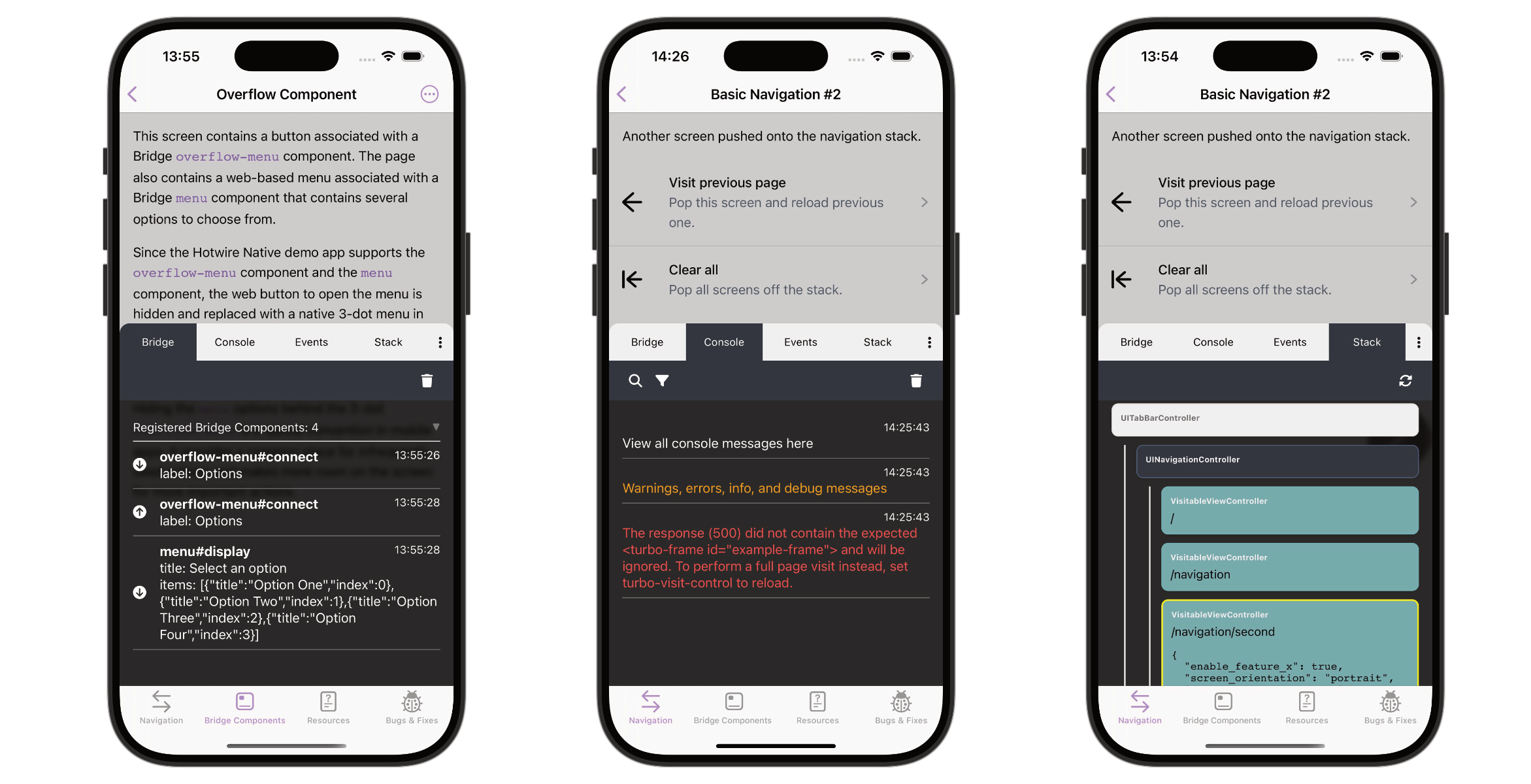
Hotwire Native Dev Tools aims to support the development process of Hotwire Native apps by providing a set of tools to inspect and debug the app.
- Inspect the bridge communication and native stack
- View console logs right in the mobile app
- Detect common Turbo issues
- Inspect cookies
- No dependencies
Installation
npm install hotwire-native-dev-toolsor
yarn add hotwire-native-dev-toolsUsage (JS)
Basic usage:
import { setupDevTools } from 'hotwire-native-dev-tools';
setupDevTools();
However, since you probably want to use the dev tools only during mobile app development, the recommended approach is to create a custom entrypoint that you load only when needed:
Example Rails + Vite:
// app/javascript/entrypoints/hotwire_native_dev_tools.js

import { setupDevTools } from 'hotwire-native-dev-tools';
setupDevTools();
// layout/application.html.erb
<head>
<%= vite_javascript_tag "hotwire_native_dev_tools" if Rails.env.development? && hotwire_native_app? %>
</head>Tip: Place the vite_javascript_tag early to capture all console logs and messages.
This way, you'll minimize the chances of missing console logs or bridge messages that are sent before the dev tools are initialized.
Example Rails + Importmap:
pin "hotwire-native-dev-tools"
pin "dev-tools", preload: false
// app/javascript/dev-tools.js
import { setupDevTools } from 'hotwire-native-dev-tools';
setupDevTools();// layout/application.html.erb
<head>
<%= javascript_importmap_tags %>
<%= javascript_import_module_tag "dev-tools" if Rails.env.development? && hotwire_native_app? %>
</head>Alternatively, if you prefer not to create a custom entrypoint, you can use a JavaScript condition to determine whether the dev tools should be loaded:
import { setupDevTools } from 'hotwire-native-dev-tools';
const isDev = process.env.NODE_ENV === 'development';
setupDevTools({
  enabled: isDev,
});
Please note that your JS condition may vary depending on your setup and needs.
The downside of this approach is that you ship the JS code of the dev tools to the client, even if the client is not in development mode.
This dev tools package is quite small (~15kb), but if you want to avoid shipping unnecessary code to the client, you should use the custom entrypoint approach.
Bubble position
The floating bubble lives by default in the bottom right corner. You can change the initial position by setting the initialBubblePosition option ("bottom-right", "bottom-left", "top-right" or "top-left"):
setupDevTools({ initialBubblePosition: "top-left" });Once you drag the bubble, its position is remembered and takes precedence over this setting.
Usage (Native)
Some features, such as the Native Stack, PathConfiguration properties and the full cookie inspector, are only available if you add the dev tool bridge components to your app.
Without them, the cookie inspector falls back to document.cookie, which can't see HttpOnly cookies (like the Rails session cookie). If you copied the components before the cookie inspector existed, update them to the latest version:
iOS
- Copy the Swift file DevToolsComponent.swift into your Xcode project
- Register the component
class AppDelegate: UIResponder, UIApplicationDelegate {
    func application(_ application: UIApplication, didFinishLaunchingWithOptions launchOptions: [UIApplication.LaunchOptionsKey: Any]?) -> Bool {
        Hotwire.registerBridgeComponents([
+            DevToolsComponent.self
        ])
        return true
    }
}
Android
- Copy the Kotlin file DevToolsComponent.kt into your Android Studio project
- Update the package names where the comments say
// Replace with your package name - Register the component
+ import replace.with.your.package.name.DevToolsComponent

class DemoApplication : Application() {
    override fun onCreate() {
        super.onCreate()

        Hotwire.registerBridgeComponents(
+            BridgeComponentFactory("dev-tools", ::DevToolsComponent),
        )
    }
}
Development
- Fork the project locally
npm installnpm run dev
Setting Up the Package Locally
One way to link the package locally is to use yarn link.
This allows you to develop the package and test it in another project.
In the root of this project run:
yarn linkIn the project you want to use the package run:
yarn link hotwire-native-dev-toolsContributing
Bug reports and pull requests are welcome on GitHub at https://github.com/leonvogt/hotwire-native-dev-tools.
Any contributions, whether it's a bug fix, a new feature, or just a suggestion for improvement, are most welcome.